

Amazon Image Requirements 2026: Size, Specs & Guidelines
July 29, 2026
Cut Out Photo Backgrounds in 2026: AI, Photoshop & GIMP
August 1, 2026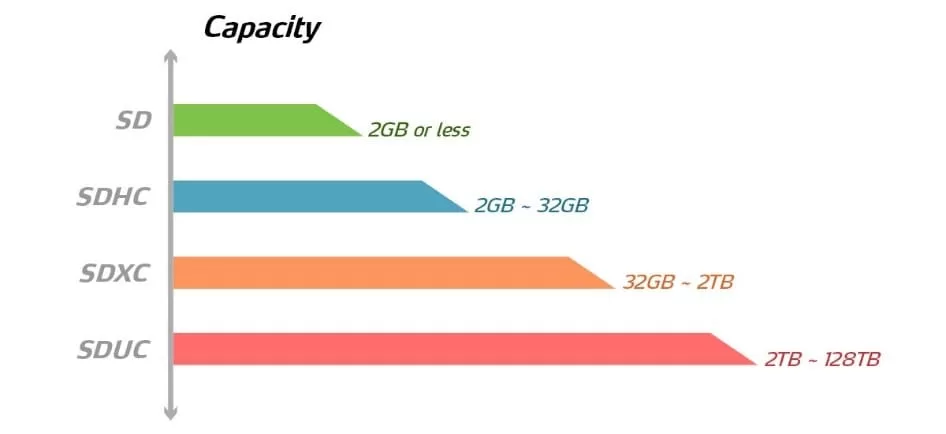
Quick Answer (TL;DR): SDHC (Secure Digital High Capacity) holds 2 GB to 32 GB of data and uses the FAT32 file system, which limits any single file to 4 GB. SDXC (Secure Digital eXtended Capacity) holds 64 GB to 2 TB and uses the exFAT file system, which effectively removes the single-file size limit. SDXC also supports faster bus interfaces such as UHS-II, UHS-III, and SD Express, making it the modern default for 4K video, RAW burst photography, and long shoots. SDHC remains cheaper and pairs well with older cameras, dashcams, and entry-level HD workflows. Physically the two cards are identical — the differences live entirely in firmware, file system, and speed class.
- Why SDHC vs SDXC Confuses So Many Buyers
- The SD Card Family: SD, SDHC, SDXC, and SDUC
- What Is an SDHC Card?
- What Is an SDXC Card?
- SDHC vs SDXC: The Master Comparison Table
- Speed Classes Decoded: The Symbols on Every SD Card
- Compatibility Rules That Actually Matter
- Real-World Use Cases: Which Card Fits Which Shooter?
- Bitrate Math: How Much Card Do You Actually Need?
- Price Reality: Does SDXC Really Cost More?
- SDUC and SD Express: The Near Future
- How to Read an SD Card Label Without Getting Lost
- SDHC vs SDXC for 4K and 8K Video
- Common Mistakes to Avoid
- SDHC vs SDXC vs microSDHC vs microSDXC
- Buying Checklist: 60 Seconds to the Right Card
- Care, Maintenance, and Longevity
- When SDHC Still Beats SDXC
- Frequently Asked Questions
- Final Verdict: SDHC or SDXC?
Why SDHC vs SDXC Confuses So Many Buyers
Walk into any camera store or scroll a marketplace, and you meet a wall of tiny cards that look identical. One reads SDHC, another SDXC, a third SDUC. They share the same shape, the same slot, and often the same brand. Yet the wrong choice can freeze a camera mid-shoot, split a 4K clip into unusable fragments, or leave a wedding photographer swapping cards during the first kiss.
The confusion is understandable. Manufacturers stamp cards with an alphabet of icons — C10, U3, V30, V90, I, II, A2, E600 — and each symbol governs a different behavior. Once you understand the logic behind those symbols, choosing between SDHC and SDXC becomes a five-second decision instead of a shopping-aisle stalemate.
This guide breaks down the entire SD family — SD, SDHC, SDXC, and SDUC — with a heavy focus on the two cards you actually see on shelves: SDHC and SDXC. You will learn the physical facts, the file-system implications, the speed-class realities, the compatibility rules, and the buying advice for every skill level. By the end, you will know exactly which card belongs in your camera, phone, drone, dashcam, or gaming console.
The SD Card Family: SD, SDHC, SDXC, and SDUC
The Secure Digital format has evolved through four capacity tiers since it launched in 1999. Each tier reflects the storage ceiling of its era and the file system built to handle those larger files. The comprehensive Wikipedia SD card entry documents the full timeline for readers who want the technical archive.
| Standard | Full Name | Capacity | File System | Year |
|---|---|---|---|---|
| SD (SDSC) | Secure Digital Standard Capacity | Up to 2 GB | FAT12 / FAT16 | 1999 |
| SDHC | Secure Digital High Capacity | Over 2 GB – 32 GB | FAT32 | 2006 |
| SDXC | Secure Digital eXtended Capacity | Over 32 GB – 2 TB | exFAT | 2009 |
| SDUC | Secure Digital Ultra Capacity | Over 2 TB – 128 TB | exFAT | 2018 |
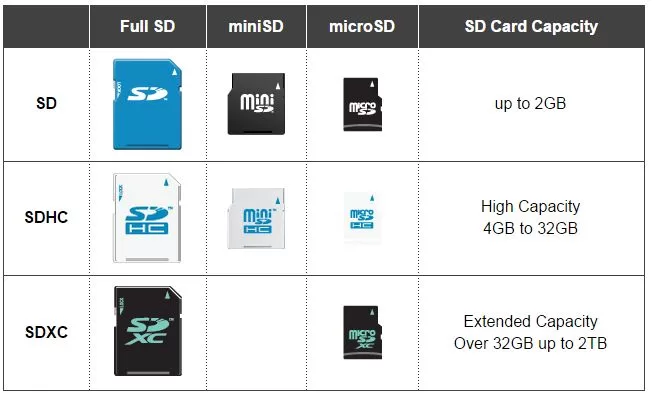
Every card in the family shares two physical form factors — full-size SD at 32 × 24 × 2.1 mm, and microSD at 15 × 11 × 1 mm. The plastic shell tells you nothing; only the printed logo and the internal firmware reveal the capacity tier.
For a wider photography-storage context, our guide to popular camera brands shows which manufacturers still ship gear tied to specific SD tiers.
What Is an SDHC Card?
SDHC (Secure Digital High Capacity) launched in 2006 to break the 2 GB ceiling of the original SD specification. It was the first SD card built around the FAT32 file system, which pushed the maximum card capacity to 32 GB while capping any single file at 4 GB.
Core specifications
- Capacity range: over 2 GB up to 32 GB
- File system: FAT32 (pre-formatted)
- Maximum file size: 4 GB per file
- Physical size: identical to SD and SDXC
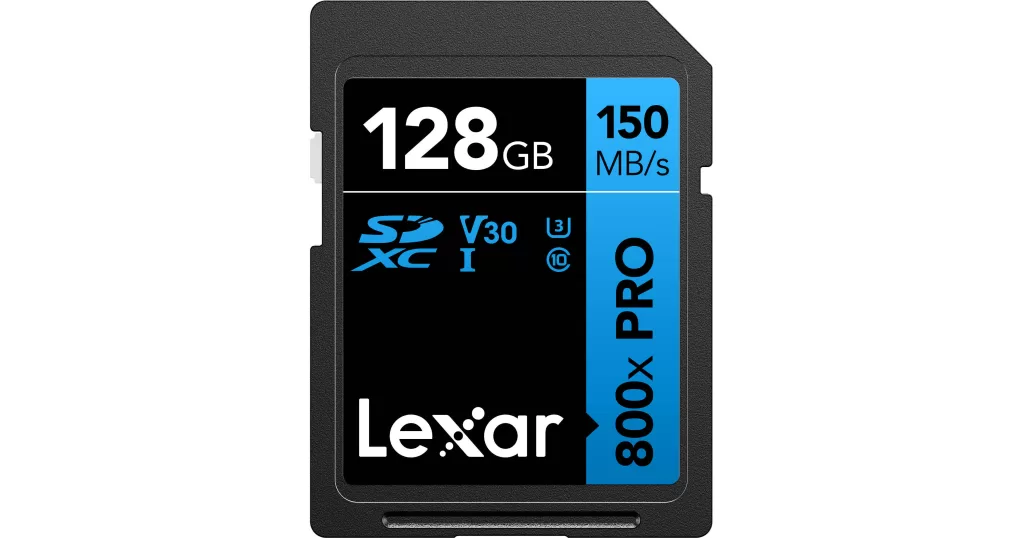
- Speed classes supported: C2, C4, C6, C10, U1, U3, V6, V10, V30
- Bus interfaces supported: Default, High-Speed, UHS-I, and technically UHS-II
- Backward compatibility: works in SDHC and SDXC hosts, not in SD-only devices
Where SDHC still shines
SDHC remains the default in dashcams, older DSLRs, budget action cameras, handheld gaming consoles, Nintendo 3DS-family devices, and countless industrial sensors. It is inexpensive, widely available, and reliable for JPEG photography and Full HD video.
Where SDHC hits a wall
The FAT32 file system enforces a hard 4 GB single-file cap. When your camera records 4K video, it must split the clip into 4 GB chunks — a workflow annoyance that ends the moment you switch to exFAT-based SDXC. If you often fill up 32 GB storage during a session, our guide on 32GB card capacity shows exactly how quickly modern RAW files consume that space.
What Is an SDXC Card?
SDXC (Secure Digital eXtended Capacity) arrived in January 2009 as part of SD specification 3.01. It pushed the maximum card capacity to 2 TB and adopted exFAT, a Microsoft-developed file system engineered for flash memory and multi-gigabyte files.
Core specifications
- Capacity range: over 32 GB up to 2 TB
- File system: exFAT (pre-formatted)
- Maximum file size: effectively unlimited for camera workloads (16 EB theoretical, 512 TB practical)
- Speed classes supported: C10, U1, U3, V6, V10, V30, V60, V90, and E150–E600
- Bus interfaces supported: UHS-I, UHS-II, UHS-III, and SD Express
- Backward direction: SDXC cards do not function in SDHC-only or SD-only hardware
Why exFAT matters
exFAT removes the 4 GB single-file cap of FAT32, streamlines cluster allocation for flash media, and improves sustained write performance at very large capacities. Every mirrorless camera capable of 4K, 6K, or 8K assumes exFAT as the default. The SanDisk knowledge base offers further reading on why manufacturers standardize on exFAT for high-capacity storage.
Want to boost your online sales with better product photography?
High-quality images increase conversions by up to 40%. Let us help you get there. See our editing services
SDHC vs SDXC: The Master Comparison Table
This is the reference table worth screenshotting.
| Feature | SDHC | SDXC |
|---|---|---|
| Full name | Secure Digital High Capacity | Secure Digital eXtended Capacity |
| Introduced | 2006 | 2009 |
| Capacity | 2 GB – 32 GB | 64 GB – 2 TB |
| File system | FAT32 | exFAT |
| Max single file | 4 GB | Effectively unlimited |
| Speed classes | C2–C10, U1, U3, V6–V30 | C10, U1, U3, V6–V90, E150–E600 |
| Max bus interface | Up to UHS-II (312 MB/s) | Up to SD Express (up to ~3,940 MB/s) |
| Typical retail price | Lower per card | Lower per gigabyte |
| Backward compatibility | Works in SDHC and SDXC hosts | SDXC hosts only |
| Ideal for | HD video, JPEG, dashcams, legacy gear | 4K/8K video, RAW bursts, drones, mirrorless |
The three practical differences that matter most
- Capacity ceiling — SDXC breaks the 32 GB wall and scales all the way to 2 TB. Explore our sizing analysis for a 64GB card to see what that extra headroom means for real photo counts.
- File system — exFAT (SDXC) removes the 4 GB per-file cap enforced by FAT32 (SDHC). Long 4K clips no longer split.
- Speed ceiling — SDXC unlocks the fastest bus interfaces (UHS-II, UHS-III, SD Express) that professional cameras require. SDHC theoretically supports UHS-II but rarely appears in production above U3.
Speed Classes Decoded: The Symbols on Every SD Card
Choosing SDHC vs SDXC solves half the problem. The other half is picking a speed class that keeps up with your camera’s data rate. There are four overlapping speed-rating systems on modern SD cards.
1. Original Speed Class ©
- C2 = 2 MB/s minimum sustained write
- C4 = 4 MB/s
- C6 = 6 MB/s
- C10 = 10 MB/s
2. UHS Speed Class (U)
- U1 = 10 MB/s minimum sustained write
- U3 = 30 MB/s minimum sustained write
3. Video Speed Class (V) — the class every video shooter should read
- V6 = 6 MB/s
- V10 = 10 MB/s
- V30 = 30 MB/s (minimum for 4K)
- V60 = 60 MB/s (high-bitrate 4K, 6K)
- V90 = 90 MB/s (8K, ProRes, cinema RAW)
4. SD Express Speed Class (E)
- E150 = 150 MB/s
- E300 = 300 MB/s
- E450 = 450 MB/s
- E600 = 600 MB/s
Bus interface speeds
The bus interface defines the maximum theoretical speed the card can reach. The speed class defines the guaranteed minimum.
- Default / High-Speed bus: up to 25 MB/s
- UHS-I: up to 104 MB/s
- UHS-II: up to 312 MB/s
- UHS-III: up to 624 MB/s (announced 2017, rarely shipped in retail products)
- SD Express (SD 7.0): up to 985 MB/s via PCIe Gen 3 x1
- SD Express (SD 8.0): up to ~3,940 MB/s via PCIe Gen 4 x2, as documented in coverage from Tom’s Hardware
Matching speed class to real workflows
- 1080p Full HD video → V10 / U1 is enough
- 4K video at 100 Mbps → V30 / U3 minimum
- 4K at 400 Mbps or 6K → V60
- 8K video, ProRes RAW, cinema log → V90
- RAW burst photography (24–61 MP) → V60 or V90 with UHS-II
For a deeper look at file sizes and data measurements, our KB vs MB explainer unpacks the math behind card capacity numbers.
Need your images to be marketplace-ready (Amazon, Shopify, etc.)?
Ensure compliance and quality with our professional Photo Retouching
Compatibility Rules That Actually Matter
Compatibility runs in one direction only. Newer hosts read older cards; older hosts refuse newer cards.
- ✅ SDXC host → accepts SDXC, SDHC, and SD cards
- ✅ SDHC host → accepts SDHC and SD cards (not SDXC)
- ❌ SD-only host → accepts SD cards only
Why SDXC does not fit backward
Older host firmware only understands FAT12, FAT16, or FAT32. exFAT is unfamiliar territory. Insert a 128 GB SDXC card into a 2005 point-and-shoot and it will either read as unformatted or refuse to mount. The physical slot accepts it; the software does not.
Real-world compatibility snapshot
- DSLRs from 2010 onward — usually SDXC-ready
- Mirrorless cameras — SDXC across the board
- Nintendo Switch (original and OLED) — SDXC via built-in exFAT patch
- Nintendo 3DS family — SDHC only, max 32 GB
- Nintendo Switch 2 — microSD Express required for full performance
- GoPro Hero 8 and later — SDXC recommended
- Older dashcams and CCTV systems — often SDHC only
- Modern smartphones with card slots — SDXC and often SDUC
Always confirm the maximum supported capacity in your device manual before buying. If you offload files to a computer often, our roundup of best card readers covers the fastest UHS-II and CFexpress options.
Real-World Use Cases: Which Card Fits Which Shooter?
Theory only goes so far. Here is a direct recommendation for the situations most creators actually face.
1. Casual photographer with a smartphone or entry-level DSLR
- Recommended card: 32 GB SDHC Class 10 or U1
- Why: cheap, plentiful, and enough for thousands of JPEG images or Full HD video
2. Enthusiast mirrorless shooter (Sony a7 IV, Canon R6 II, Nikon Z6 II)
- Recommended card: 128 GB SDXC UHS-II V60
- Why: handles 4K video, RAW+JPEG bursts, and full-day travel shoots without swapping
3. Wedding, event, or commercial professional
- Recommended card: Two 256 GB SDXC UHS-II V90 cards
- Why: dual-slot redundancy plus buffer-clearing headroom during decisive moments
Once you finish the shoot, our wedding editing workflow walks you through what happens next in Lightroom and Photoshop.
4. Drone and gimbal creator (DJI Mavic, Osmo Pocket, Ronin 4D)
- Recommended card: SDXC V30 for 4K, V60 or V90 for log/ProRes
- Why: slow cards trigger recording drops mid-flight
5. Dashcam or home security camera
- Recommended card: 32 GB SDHC or 64–128 GB SDXC with high-endurance rating
- Why: endurance matters more than raw speed for 24/7 loop recording
6. YouTuber or vlogger
- Recommended card: 128 GB SDXC V30 for everyday use, 256 GB V60 for high-bitrate 4K
- Why: modern vlogging codecs eat storage fast
If you shoot for online content, browse our roundup of the best vlogging cameras to pair the right body with the right SDXC card.
7. Retro gamer and Nintendo Switch owner
- Recommended card: 256 GB or 512 GB microSDXC U3 A2
- Why: the Switch reads exFAT natively and benefits from A2 app performance ratings
Need your images edited faster without sacrificing quality?
Our streamlined process delivers premium results in as little as 6 hours. Explore our fast-turnaround services
Bitrate Math: How Much Card Do You Actually Need?
Camera manufacturers list bitrates in Mbps (megabits per second). Card sizes come in GB (gigabytes). Here is the conversion that answers “how long can I record?”
- 1080p at 60 Mbps → ~27 GB per hour → any Class 10 card works
- 4K at 100 Mbps → ~45 GB per hour → V30 minimum required
- 4K at 400 Mbps (ProRes / BRAW) → ~180 GB per hour → V60 recommended
- 8K at 800 Mbps → ~360 GB per hour → V90 essential, plus large SDXC
Using SDHC for high-bitrate 4K means the camera splits the file every ~5 minutes because of the FAT32 4 GB cap. exFAT on SDXC removes that split entirely — recording continues until the card fills or the battery dies. The B&H Photo learning center provides additional bitrate breakdowns for professional codecs.
Price Reality: Does SDXC Really Cost More?
Yes per card, but often no per gigabyte. Approximate 2026 street prices tell the story.
| Card | Typical Price |
|---|---|
| 32 GB SDHC Class 10 UHS-I | $7 – $12 |
| 64 GB SDXC Class 10 UHS-I | $10 – $18 |
| 128 GB SDXC UHS-II V60 | $50 – $90 |
| 256 GB SDXC UHS-II V90 | $150 – $250 |
| 1 TB SDXC UHS-I | $80 – $150 |
A single 128 GB SDXC card almost always beats four 32 GB SDHC cards on price, reliability, and convenience. That said, keeping a couple of small SDHC cards on hand for legacy devices remains a smart move.
SDUC and SD Express: The Near Future
The SD roadmap does not stop at 2 TB. Two newer specifications are already reshaping professional workflows.
- SDUC (Ultra Capacity) scales from 2 TB up to 128 TB using exFAT. The first 8 TB SDUC cards from major manufacturers reached shelves in 2026.
- SD Express layers a PCIe/NVMe bus on top of any SD family (SDHC Express, SDXC Express, SDUC Express). SD 7.0 delivers up to 985 MB/s; SD 8.0 pushes that to nearly 4 GB/s — closing the gap with internal SSDs.
Most current cameras cannot use SD Express yet. Nintendo Switch 2 and a small number of flagship mirrorless bodies are among the earliest adopters. If you care about how sensor resolution keeps pushing storage demand, our list of megapixel kings makes the connection clear.
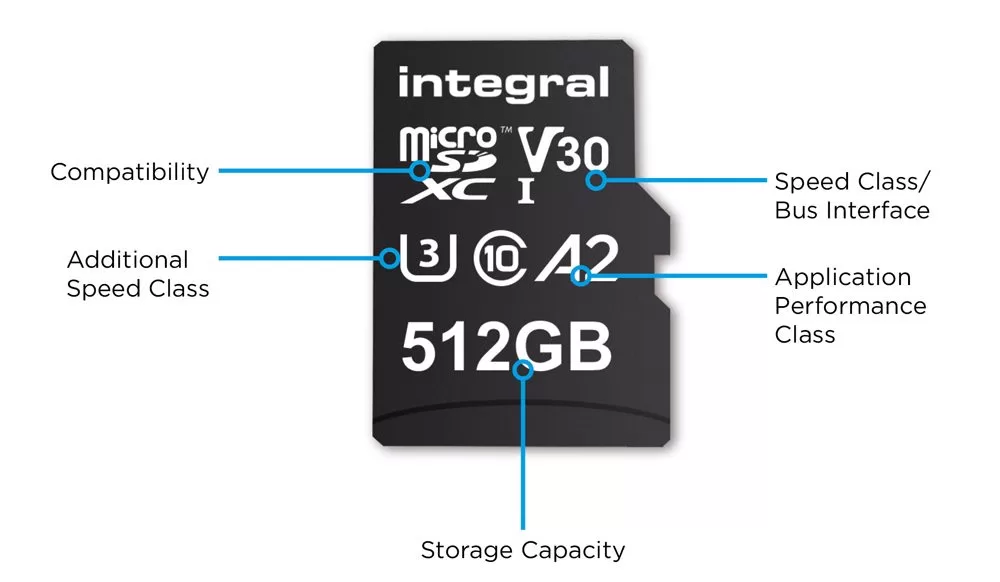
How to Read an SD Card Label Without Getting Lost
Every printed symbol has a specific meaning.
- SD, SDHC, SDXC, SDUC → capacity family
- Number in a “C” → original speed class (C10 = 10 MB/s min write)
- Number in a “U” → UHS speed class (U3 = 30 MB/s min write)
- “V” prefix → video speed class (V90 = 90 MB/s min write)
- Roman numerals I, II, III → UHS bus interface generation
- A1 or A2 → app performance class (matters for Android, not cameras)
- E ratings (E150 – E600) → SD Express speed classes
The most restrictive number wins in real-world use. A card marked “SDXC UHS-II U3 V60” delivers a guaranteed 60 MB/s sustained write, regardless of the higher UHS-II bus ceiling.
SDHC vs SDXC for 4K and 8K Video
Video creators feel the SDHC-vs-SDXC decision more sharply than any other user group. The math is unforgiving.
- FAT32 caps single files at 4 GB. At 4K/100 Mbps, that cap arrives every ~5 minutes.
- exFAT removes the file-size cap. Cameras roll continuously until the card fills.
- Sustained write speed sets the floor. A camera writing at 60 MB/s will fail on a V30 card during peak load; V60 gives headroom.
- Buffer clearing benefits from bus speed. UHS-II (312 MB/s) clears burst RAW files roughly three times faster than UHS-I (104 MB/s).
Match your codec to the class, add one tier of headroom, and you will never see a “buffer full” warning at the wrong moment. Once the shoot is done, color grading is the next skill worth mastering.
Common Mistakes to Avoid
Even experienced photographers stumble on these traps.
- Reformatting SDXC as FAT32 to “make it compatible.” This often bricks the card and voids the warranty.
- Buying suspiciously cheap high-capacity cards from unknown marketplaces. Counterfeit 1 TB cards frequently ship with 32 GB of real storage and firmware trickery.
- Assuming faster equals better. A V90 card in a UHS-I camera gains you nothing and burns cash.
- Ignoring the read vs write distinction. The headline number on the packaging is usually the read speed; write speed is what matters during capture.
- Filling cards past ~85 percent. Sustained write speed drops as the file table fragments.
- Formatting on a computer rather than in the camera. In-camera formatting produces the cleanest file table.
Need to process hundreds of images with a fast turnaround?
Our scalable Background Removal Service handles bulk orders with ease.
SDHC vs SDXC vs microSDHC vs microSDXC
The prefix “micro” describes only the physical size, not the standard. A microSDXC card carries the same 2 TB ceiling, exFAT file system, and speed-class ratings as a full-size SDXC card.
- microSDHC → 2 GB – 32 GB, FAT32
- microSDXC → 32 GB – 2 TB, exFAT
- microSDUC → 2 TB – 128 TB, exFAT
Phones, drones, action cameras, dashcams, and Nintendo Switch consoles use the micro form factor. Full-size SD dominates in DSLRs and mirrorless cameras. Every microSD card ships with an SD-sized adapter for cross-device flexibility.
Buying Checklist: 60 Seconds to the Right Card
Answer these seven questions in order.
- What maximum capacity does my device manual list? Never exceed it.
- Do I record 4K or higher video? If yes, choose SDXC with V30 minimum.
- Do I shoot RAW bursts? If yes, choose SDXC UHS-II with V60 or V90.
- Do I need dual-card redundancy? If yes, buy two identical cards.
- What is my daily fill rate? Pick a capacity that survives one full session.
- Is my card reader fast enough? A V90 card on a USB 2.0 reader offloads painfully slowly.
- Am I buying from an authorized dealer? Counterfeits dominate low-price marketplace listings.
If you photograph products for e-commerce, our Amazon product photo guide covers the editing side of the workflow.
Care, Maintenance, and Longevity
Modern SD cards outlast most cameras that hold them, provided you follow a few simple habits.
- Format inside the camera before every major shoot. This resets the file allocation table cleanly.
- Eject safely from computers to avoid mid-write corruption.
- Store cards in a hard case away from humidity, heat, and direct sunlight.
- Rotate cards at ~85 percent full to preserve sustained write speed.
- Retire cards showing errors immediately — intermittent mounting, dramatic speed drops, or file corruption are early warning signs.
- Back up before formatting, always.
- Add cloud redundancy for irreplaceable images. Our comparison of cloud photo storage breaks down the main options.
Flash cells in consumer cards are rated for roughly 10,000 write cycles, while high-endurance cards designed for dashcams and CCTV push into hundreds of thousands of hours. In practice, most photographers replace cards for capacity upgrades long before wear-out.
When SDHC Still Beats SDXC
SDXC is the smarter default in 2026, but a few situations still favor SDHC.
- Legacy hardware that predates 2010 and never received an SDXC-compatible firmware update
- Nintendo 3DS family consoles capped at 32 GB
- Older dashcams and industrial recorders locked to FAT32
- Ultra-budget setups where a spare $8 card is more useful than a $30 upgrade
- Simple JPEG or HD workflows that never approach the 4 GB single-file cap
For everyone else — mirrorless shooters, drone pilots, wedding photographers, vloggers, cinematographers — SDXC is the correct choice.
Frequently Asked Questions
1. Can I use an SDXC card in a camera that only supports SDHC?
No. SDHC-only devices cannot mount the exFAT file system that SDXC uses. Even though the card fits the slot physically, the firmware refuses to read it. Always check the manual for maximum supported capacity before upgrading.
2. Is SDXC always faster than SDHC?
Not automatically. Speed depends on the speed class and the UHS bus interface, not the capacity tier. A UHS-II SDHC V30 card can outrun a UHS-I SDXC Class 10 card. That said, manufacturers focus their premium high-speed products on SDXC, so the fastest cards you can buy are almost all SDXC.
3. What happens if I format an SDXC card as FAT32?
Some third-party tools force this. It is risky. FAT32 still caps single files at 4 GB, and improper formatting can render the card unreadable to SDXC-aware hosts. Always format inside the camera or card reader you intend to use.
4. Do SDHC and SDXC cards fit in the same slot?
Yes. Full-size SDHC and SDXC share identical dimensions of 32 × 24 × 2.1 mm, and microSDHC and microSDXC share the smaller form factor. Compatibility is decided by device firmware, not the slot.
5. Which card is better for 4K video: SDHC or SDXC?
SDXC. FAT32 splits recordings at 4 GB — an artifact that arrives every few minutes at modern 4K bitrates. exFAT on SDXC allows continuous recording. Aim for V30 minimum, and V60 or V90 for high-bitrate or log workflows.
6. Are SDXC cards more expensive than SDHC cards?
Per card, yes. Per gigabyte, SDXC is often cheaper because higher capacities enjoy better price-per-GB economics. A single 128 GB SDXC card usually beats four 32 GB SDHC cards on cost, reliability, and card-swap frustration.
7. Can I recover deleted photos from an SDHC or SDXC card?
Usually yes if you act quickly. Stop using the card immediately after deletion. Recovery tools such as PhotoRec, Recuva, or Disk Drill can rebuild the file table in most cases. Our walkthrough on deleted photo recovery explains the full workflow.
8. What is the difference between SDXC and SDUC?
SDXC caps at 2 TB using exFAT. SDUC extends from 2 TB up to 128 TB, still using exFAT, and often adds SD Express bus support. SDUC targets professional cinema, high-resolution medical imaging, and long-form archival capture.
Ready to transform your raw photos into professional assets?
Get a custom, no-obligation quote tailored to your specific volume and needs. Explore Clipping Expert Asia
Final Verdict: SDHC or SDXC?
The decision reduces to three questions.
- Do I need more than 32 GB of storage? → Choose SDXC.
- Do I record 4K or higher video? → Choose SDXC.
- Do I only shoot casual JPEGs on older gear? → SDHC is still fine.
For most creators in 2026 and beyond, SDXC is the smarter default. It costs slightly more per card, but it removes the capacity and file-size limits that will eventually frustrate you. SDHC still holds its ground for dashcams, older cameras, budget setups, and legacy handheld consoles.
Whichever tier you pick, buy from authorized dealers, match the speed class to your workflow, format inside the camera, and treat the card as the mission-critical component it truly is. Great images and buttery-smooth video begin with the storage sitting inside your camera — pick it well, and it will never be the reason a shot got away.