


Top 10 Budget Action Cameras for 2026 — 4K, Vlogging & Underwater
June 9, 2026
Best Affordable Cameras That Punch Way Above Their Price Tag
June 10, 2026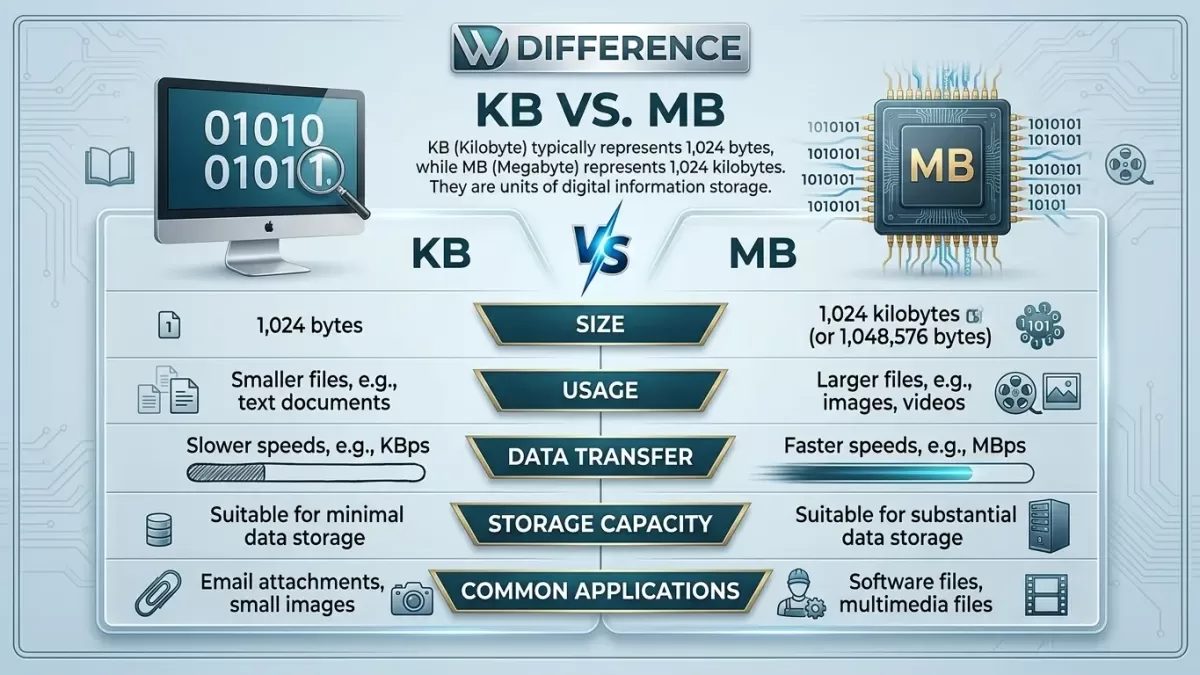
Short answer: No, a kilobyte is not bigger than a megabyte. A megabyte (MB) is roughly 1,000 times larger than a kilobyte (KB). One MB equals 1,024 KB in the binary system that computers actually use, or 1,000 KB in the simpler decimal system that storage manufacturers advertise.
If you’ve ever stared at a file labeled “2,450 KB” and wondered whether that’s the same as 2.4 MB, you’re not alone. This single confusion costs photographers blurry uploads, marketers crashed email campaigns, and store owners lost sales when product images take ages to load. So let’s settle it once and for all — clearly, accurately, and without the techno-babble.
Ready to elevate your brand’s visual presence?
Partner with Clipping Expert Asia for fast, secure, and premium image editing starting at just 25¢. Explore all our services
- What Is a Byte? Start With the Building Block
- Is KB Bigger Than MB? The Direct Answer
- The 1,000 vs 1,024 Debate (And Why It Matters)
- The Complete Data Storage Hierarchy
- Why File Size Matters in the Real World
- KB vs MB in Photography: What Photographers Need to Know
- How to Convert Between KB and MB
- How to Reduce File Size Without Losing Quality
- Real-World Examples: KB or MB?
- Bits vs Bytes: The Internet Speed Trap
- How Storage Has Grown Over Time
- Common Myths About KB and MB, Debunked
- When to Use KB vs MB in Your Workflow
- Frequently Asked Questions
- Key Takeaways
What Is a Byte? Start With the Building Block
Before we compare KB and MB, we need to meet their parent: the byte.
A byte is the basic unit computers use to store information. Each byte contains 8 bits, and each bit is either a 0 or a 1. That’s it — every photo, song, spreadsheet, and TikTok video on Earth ultimately breaks down to long chains of 0s and 1s grouped into bytes (IEC).

One byte can store a single character, like the letter “A” or the number “7.” From this tiny seed, every larger unit grows. A kilobyte is just a stack of bytes. A megabyte is a stack of kilobytes. A gigabyte is a stack of megabytes. The pattern keeps repeating all the way up to yottabytes, which we’ll cover in a moment.
Quick Vocabulary Check
- Bit (b): A single 0 or 1 — the smallest unit
- Nibble: 4 bits — half a byte (rarely used today)
- Byte (B): 8 bits — stores one character
- Kilobyte (KB): ~1,000 bytes
- Megabyte (MB): ~1,000 kilobytes
Notice the capitalization. A capital B means byte. A lowercase b means bit. Confusing them is how people end up thinking their 100 Mbps internet should download a 100 MB file in one second — it doesn’t, because megabits and megabytes are not the same thing (Diffen).
Is KB Bigger Than MB? The Direct Answer
No. MB is bigger than KB. Always.
Here’s the cleanest way to remember it:
1 Megabyte = 1,024 Kilobytes
So if someone hands you a 5 MB file and another 5 KB file, the MB file is roughly 1,000 times larger. The MB file might be a clear product photo. The KB file is probably a tiny thumbnail or a plain text document.
Why People Get Confused
The confusion usually comes from three places:
- Similar abbreviations — KB and MB look alike at a glance
- Mixed-up units — KB (kilobytes) gets confused with Kb (kilobits) used in internet speeds
- Decimal vs binary math — some systems define a kilobyte as 1,000 bytes, others as 1,024 bytes
We’ll unpack that last point next, because it’s the source of a heated debate that’s been raging in computer science classrooms for forty years.
The 1,000 vs 1,024 Debate (And Why It Matters)
Pop quiz: How many bytes are in a kilobyte?
If you answered 1,000, you’re using the decimal (SI) system — the same one used for kilograms and kilometers.
If you answered 1,024, you’re using the binary system — the one computers actually run on, because 1,024 equals 2¹⁰.
Both answers are “correct” depending on context, which is exactly why this gets confusing.
The Decimal Definition (Used by Manufacturers)
Hard drive and SSD manufacturers, internet providers, and most consumer products use the decimal system:
- 1 KB = 1,000 bytes
- 1 MB = 1,000,000 bytes
- 1 GB = 1,000,000,000 bytes
That’s why a “1 TB” hard drive shows up as roughly 931 GB once you plug it in — your computer is measuring it in binary while the box was labeled in decimal (NIST).
The Binary Definition (Used by Computers)
Operating systems, RAM, and most software use the binary system:
- 1 KB = 1,024 bytes
- 1 MB = 1,048,576 bytes (1,024 × 1,024)
- 1 GB = 1,073,741,824 bytes (1,024³)
The reason is mathematical. Computers work in powers of 2, and 1,024 (which is 2¹⁰) is the closest binary number to 1,000. Early programmers used “kilo” as shorthand for 1,024 because it was “close enough” — and the convention stuck.
The IEC Fix Almost Nobody Uses
To stop the chaos, the International Electrotechnical Commission introduced new names in 1998 — kibibyte (KiB), mebibyte (MiB), gibibyte (GiB) — for the binary versions (Wikipedia).
In theory, “kilobyte” should now mean 1,000 bytes and “kibibyte” should mean 1,024 bytes. In practice, almost nobody outside academic papers uses these terms, and “kilobyte” still gets used both ways.
Practical takeaway: Unless you’re doing exact storage calculations, just remember that 1 MB is roughly 1,000 KB. The 24-byte difference per kilobyte doesn’t matter for everyday work.
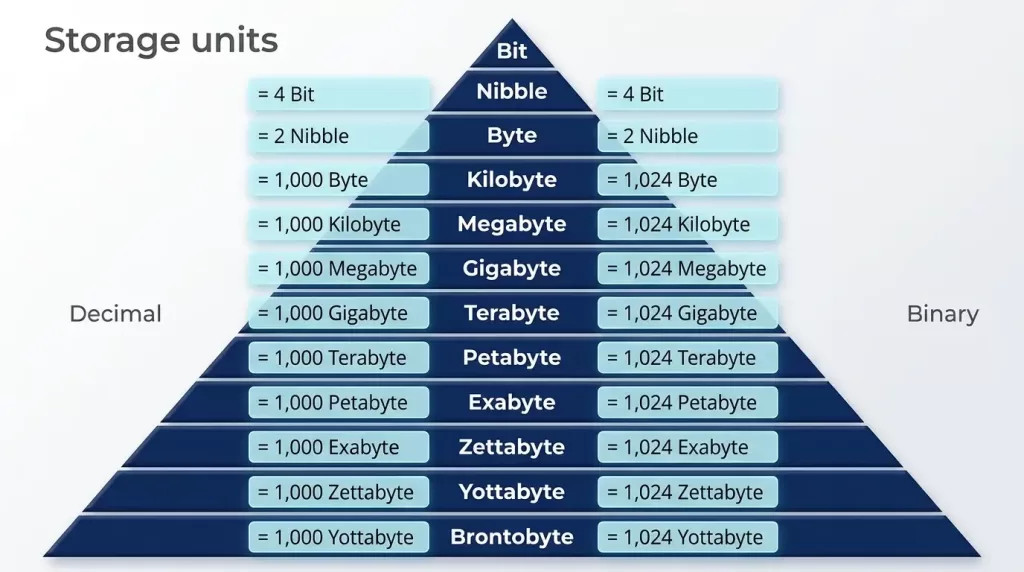
The Complete Data Storage Hierarchy
Here’s the full ladder of digital storage units, from smallest to largest. This table shows the binary values most computers and software use (GeeksforGeeks):
| Unit | Symbol | Equals | Size in Bytes |
|---|---|---|---|
| Bit | b | 1/8 of a byte | 0.125 |
| Byte | B | 8 bits | 1 |
| Kilobyte | KB | 1,024 bytes | 1,024 |
| Megabyte | MB | 1,024 KB | 1,048,576 |
| Gigabyte | GB | 1,024 MB | 1,073,741,824 |
| Terabyte | TB | 1,024 GB | ~1.1 trillion |
| Petabyte | PB | 1,024 TB | ~1.1 quadrillion |
| Exabyte | EB | 1,024 PB | ~1.1 quintillion |
| Zettabyte | ZB | 1,024 EB | ~1.1 sextillion |
| Yottabyte | YB | 1,024 ZB | ~1.1 septillion |
What Each Unit Actually Looks Like in Real Life
Numbers are abstract, so let’s anchor them to real things you handle every day.
Bytes (1 B – 1 KB)
A single character of text takes one byte. A short tweet might use a few hundred bytes. The word “Hello” is 5 bytes.
Kilobytes (1 KB – 1 MB)
- A plain-text email: 2–10 KB
- A small website logo: 5–50 KB
- A compressed thumbnail image: 20–100 KB
- A short Word document with no images: 30–80 KB
Megabytes (1 MB – 1 GB)
- A high-resolution JPEG photo: 1–5 MB
- A 3-minute MP3 song: 3–5 MB
- A 10-page PDF with images: 1–3 MB
- A short smartphone video clip: 10–50 MB
Gigabytes (1 GB – 1 TB)
- A standard DVD movie: ~4.7 GB
- An hour of 4K video: 15–20 GB
- Most mobile games: 1–10 GB
- A modern AAA video game: 50–150 GB
Terabytes and beyond
- A standard external hard drive: 1–4 TB
- A 256 GB phone holds tens of thousands of photos (see Photofixal’s full breakdown)
- Companies like Google and Facebook handle data measured in petabytes — more than 100 PB each, according to GeeksforGeeks.
Why File Size Matters in the Real World
Understanding KB vs MB isn’t just trivia. It directly affects three things you probably care about: speed, cost, and quality.
Page Load Speed and SEO
Heavy images are the #1 reason websites load slowly. Google has been clear that page speed is a ranking factor, and slow pages bleed conversions. Studies cited by performance teams show that pages taking more than 3 seconds to load lose more than half their mobile visitors before the page even renders.
For most web pages, you want individual images between 50 KB and 200 KB, not 2–5 MB. That’s a 90% reduction in size with barely any visible quality loss when done right.
Storage and Cloud Costs
If you back up uncompressed photos at 25 MB each, a single shoot of 300 frames eats 7.5 GB. Multiply that by years of work and you’re paying real money for cloud storage that smarter file sizes would cut by 70–80%.
Email and Sharing Limits
Most email providers cap attachments at 25 MB. Some intranet tools cap at 10 MB. Knowing whether your file is 800 KB (fine) or 8 MB (probably blocked) is the difference between a client getting your proposal and it bouncing back.
Need your images to be marketplace-ready (Amazon, Shopify, etc.)?
Ensure compliance and quality with our professional Photo Retouching
KB vs MB in Photography: What Photographers Need to Know
Photographers live in this conversation every day, so this section gets specific.
Image Size vs File Size — Not the Same Thing
Two concepts get mixed up constantly:
- Image size (dimensions): The width and height in pixels — like 1920 × 1080
- File size: The amount of storage the file takes up — measured in KB, MB, or GB
You can have two images at identical pixel dimensions where one is 8 MB (uncompressed RAW) and the other is 400 KB (compressed JPEG). Same picture, very different file sizes (Shotkit).
What Drives Photo File Size
Four things make a photo bigger or smaller:
- Resolution — More pixels means more data to store
- File format — RAW > TIFF > PNG > JPEG > WebP, generally
- Compression level — Higher quality settings produce larger files
- Bit depth and color profile — 16-bit files dwarf 8-bit files
A 24-megapixel RAW file from a modern mirrorless camera typically lands around 25–50 MB. The same image saved as a high-quality JPEG might be 6–10 MB. Compressed for web at 1920px wide, it can drop to 200–400 KB without obvious quality loss.
Recommended File Sizes by Platform
Different platforms want different sweet spots:
- Personal website / portfolio: 150–500 KB per image
- WordPress blog post: 100–300 KB per image
- Facebook / Instagram: Up to 200 KB recommended for fastest load
- Email newsletter: 100–500 KB total per image
- Online marketplace listings (Amazon, eBay): Usually 300 KB – 2 MB
- Print at 8×10 inches, 300 DPI: 2–10 MB or larger
- Large gallery prints (16×20+): 10 MB or more
JPEG vs PNG vs WebP: A File Size Reality Check
Choosing the right format saves enormous amounts of space:
- JPEG — Best for photos with many colors and gradients; small file sizes
- PNG — Best for graphics with transparency or sharp edges; typically 2–3× larger than JPEG for photos
- WebP — Google’s modern format; 25–35% smaller than JPEG at the same quality
- AVIF — Even smaller than WebP, but still gaining browser support
- HEIC — Apple’s mobile format; small files but limited compatibility
For most product photography and blog images, JPEG or WebP wins. Save PNG for logos, screenshots with text, and images that need transparent backgrounds.
Struggling with inconsistent cutouts from automated software?
Switch to 100% manual, expert Clipping Path for guaranteed perfection.
How to Convert Between KB and MB
The math is simple, but it depends on which system you’re using.
Binary (Computer) Conversion
- KB to MB: Divide by 1,024
- MB to KB: Multiply by 1,024
- Example: 4,096 KB ÷ 1,024 = 4 MB
Decimal (Marketing) Conversion
- KB to MB: Divide by 1,000
- MB to KB: Multiply by 1,000
- Example: 5,000 KB ÷ 1,000 = 5 MB
Quick Mental Math Trick
For everyday work, just drop three zeros when going from KB to MB, or add three zeros going the other way. A 3,500 KB file is roughly 3.5 MB. A 2 MB file is roughly 2,000 KB. The decimal vs binary difference is small enough to ignore for visual estimation.
Useful Conversion Tools
If you’d rather not do mental math, free tools handle it instantly. Search for “byte converter” and you’ll find calculators that handle KB, MB, GB, TB, and beyond in either system. For exact storage planning, stick with the binary calculation.
How to Reduce File Size Without Losing Quality
If your files are landing in megabytes when they should be in kilobytes, here’s how to fix it.
Resize Before You Compress
A photo that’s 6,000 × 4,000 pixels has 24 million pixels of data. If it’s only going to display at 1,200 pixels wide on a website, you don’t need the rest. Resize first — it does most of the heavy lifting.
Common target sizes:
- Blog post hero image: 1,200–1,920 px wide
- Product photo on a listing: 1,500–2,000 px wide
- Social media post: 1,080–1,440 px wide
- Email banner: 600–800 px wide
Compress With the Right Tool
Once resized, run images through a compressor:
- TinyPNG — Free and easy for JPEG, PNG, and WebP
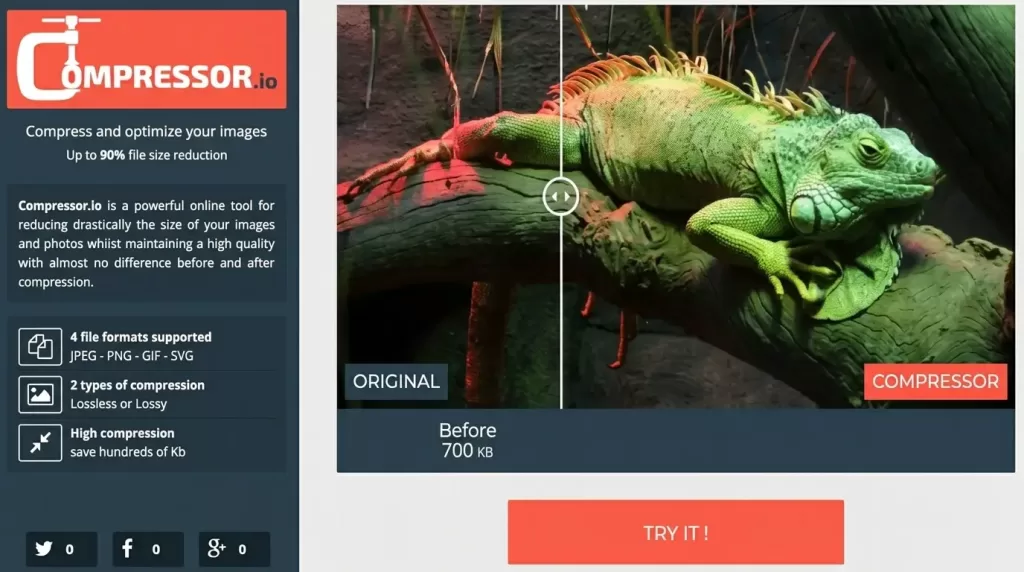
- Squoosh — Google’s free browser tool with side-by-side quality preview
- ImageOptim — Mac app with lossless and lossy options
- ShortPixel — WordPress plugin for automatic compression
A well-compressed JPEG at 80% quality typically looks identical to the original at 100% quality, while being 40–60% smaller.
Choose the Right Format
- Use JPEG for photographs with gradients and many colors
- Use PNG only when you need transparency or pixel-perfect edges
- Use WebP for maximum web performance — supported by every modern browser
Batch Processing for Big Jobs
If you have hundreds of images, manual compression doesn’t scale. Use batch tools like Adobe Bridge, Lightroom export presets, or specialized services that process volumes at once.
Need to process hundreds of images with a fast turnaround?
Our scalable Background Removal Service handles bulk orders with ease.
Real-World Examples: KB or MB?
Here’s a quick reference for what unit you should expect in common scenarios:
Files measured in KB:
- Text documents and plain emails
- Compressed icons and logos
- Web-optimized thumbnails
- Small spreadsheets without charts
- Vector graphics (SVG)
Files measured in MB:
- Full-resolution photos from a phone or camera
- Music tracks (MP3, AAC, FLAC)
- PDF documents with images
- PowerPoint and Keynote presentations
- Short videos in standard quality
Files measured in GB:
- Movies and TV episodes
- Software installers and games
- Database backups
- Folders of RAW photo shoots
- Full system images
When you see a file at “2.4 MB,” it’s the same as 2,400 KB. When you see “850 KB,” that’s 0.85 MB — less than 1 MB.
Bits vs Bytes: The Internet Speed Trap
One last source of confusion deserves attention because it costs people money.
When your ISP advertises “100 Mbps internet,” that’s 100 megabits per second, not megabytes. Since there are 8 bits in a byte, 100 Mbps translates to roughly 12.5 MB per second of actual download speed.
- Mbps (lowercase b) = megabits per second — used for internet speed
- MB/s (capital B) = megabytes per second — used for file transfer
So a 100 MB file downloaded on a 100 Mbps connection takes about 8 seconds, not 1 second. Networking equipment specs, streaming platforms, and ISPs all use bits because the numbers look bigger and sound faster (Hyperoptic).
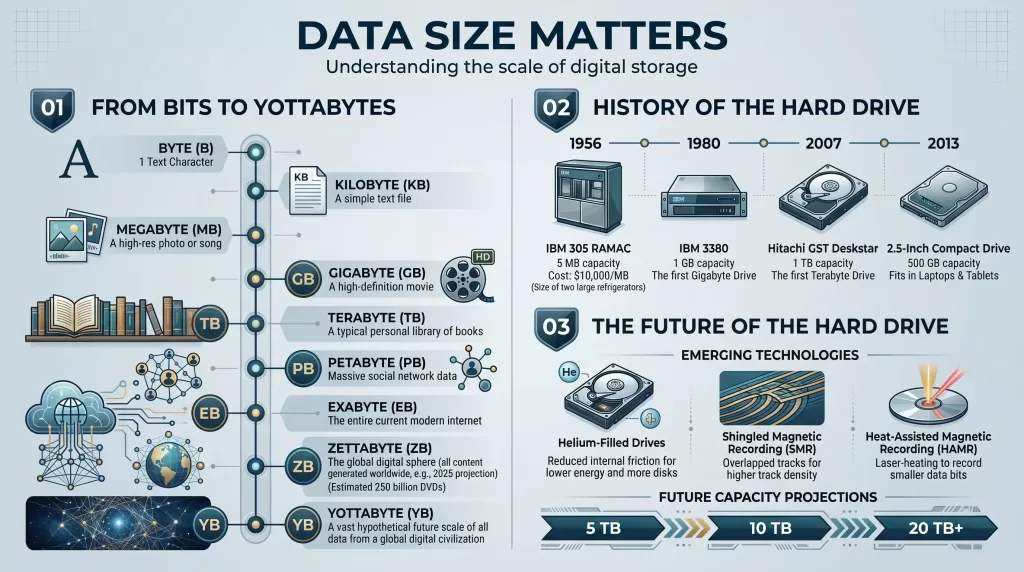
How Storage Has Grown Over Time
To appreciate how dramatically these units have scaled, look back a few decades:
- 1980s: A floppy disk held 1.44 MB
- 1990s: A CD held 700 MB
- 2000s: A DVD held 4.7 GB
- 2010s: Blu-ray discs held 25–50 GB
- 2020s: Consumer SSDs reach 4–8 TB; cloud storage is effectively unlimited
The amount of data created in a single day in 2026 dwarfs everything humanity recorded before the internet. Industry estimates put global daily data creation in the hundreds of exabytes — units we barely had names for thirty years ago.
Common Myths About KB and MB, Debunked
A few stubborn misconceptions still float around. Let’s clear them up:
Myth 1: “Higher KB always means better quality.”
Not necessarily. A poorly compressed 800 KB image can look worse than a well-optimized 400 KB version. Size is one factor; compression quality matters too.
Myth 2: “MB files are always too big for websites.”
Not always. Hero banners, product zoom images, and high-resolution portfolio pieces sometimes need to be in the low MB range. Just don’t put 5 MB thumbnails on a homepage.
Myth 3: “KB and Kb mean the same thing.”
Definitely not. KB = kilobytes (file size). Kb = kilobits (data transfer). One is 8 times larger than the other.
Myth 4: “Converting MB to KB damages the image.”
Conversion itself doesn’t damage anything. Compression and resizing might, but those are separate operations from the unit change.
When to Use KB vs MB in Your Workflow
Practical rules of thumb based on what you’re doing:
- Designing for web? Target KB for individual assets
- Sending email attachments? Stay under a few MB total
- Archiving original photos? Keep them in MB (or use lossless compression)
- Uploading to social media? Compress to KB range for fastest posts
- Printing professionally? Don’t compress — keep MB files
- Building a product catalog? Optimize each image to a few hundred KB
The goal isn’t “smallest possible” — it’s “smallest possible while still looking great.”
Need a reliable partner for high-volume color variation editing?
Our scalable Color Change Service handles bulk requests with fast turnarounds.
Frequently Asked Questions
1. Is 1 KB bigger than 1 MB?
No. One MB is approximately 1,000 times larger than one KB. A megabyte equals 1,024 kilobytes in the binary system that computers use, or 1,000 KB in the decimal system used by manufacturers.
2. How many KB are in 1 MB?
There are 1,024 KB in 1 MB when using binary math (the standard for operating systems and software). In the simpler decimal system used on storage product packaging, 1 MB equals 1,000 KB. For everyday use, either is close enough.
3. Which is better quality — KB or MB photos?
MB files usually hold more data and therefore more detail, so they often look better, especially when printed. But KB-sized files are perfect for web display where speed matters more than maximum detail. Quality depends on resolution, compression, and intended use — not just size.
4. How do I convert MB to KB quickly?
Multiply the MB value by 1,024 for exact binary math, or by 1,000 for quick decimal estimates. A 5 MB file equals roughly 5,000 KB. To go the other way, divide KB by 1,024 (or 1,000).
5. What’s the ideal image size in KB for a website?
For most web pages, 100–300 KB per image strikes the best balance between speed and quality. Hero images on landing pages can stretch to 500 KB if needed. Anything above 1 MB usually deserves further compression.
6. Why is my 1 TB hard drive showing only 931 GB?
Because the manufacturer used the decimal definition (1 TB = 1 trillion bytes) while your operating system displays the binary definition (1 TB = 1,099,511,627,776 bytes). Nothing is missing — it’s just two different counting systems showing the same storage.
7. Is KB the smallest file size unit?
No. Bytes are smaller than KB, and bits are smaller than bytes (8 bits = 1 byte). You’ll occasionally see file sizes in plain bytes for very small text files, configuration data, or metadata.
8. Are kilobits (Kb) and kilobytes (KB) the same?
No. One kilobyte (KB) equals 8 kilobits (Kb). Internet speeds are usually measured in kilobits or megabits per second, while file sizes are measured in kilobytes or megabytes. Always check whether the “b” is capitalized.
Key Takeaways
Before you go, here’s everything you need to remember about KB vs MB:
- A megabyte (MB) is bigger than a kilobyte (KB) — by about 1,000 times
- 1 MB = 1,024 KB in binary; 1 MB = 1,000 KB in decimal
- KB is good for text, logos, and web-optimized images
- MB is good for photos, music, documents, and short videos
- GB and TB are for video, software, and full-system storage
- Bits (b) and bytes (B) are different — check the capitalization
- Smart file sizing speeds up websites, cuts storage costs, and improves user experience
The next time someone asks “is KB bigger than MB?” you can answer with confidence and explain exactly why — including the binary vs decimal twist most people never learn.