

Best Adobe Photoshop Alternatives 2026: Free & Paid Tools
July 8, 2026
Why Do I Look Worse in Photos Than in Real Life? (10 Reasons + Fixes)
July 11, 2026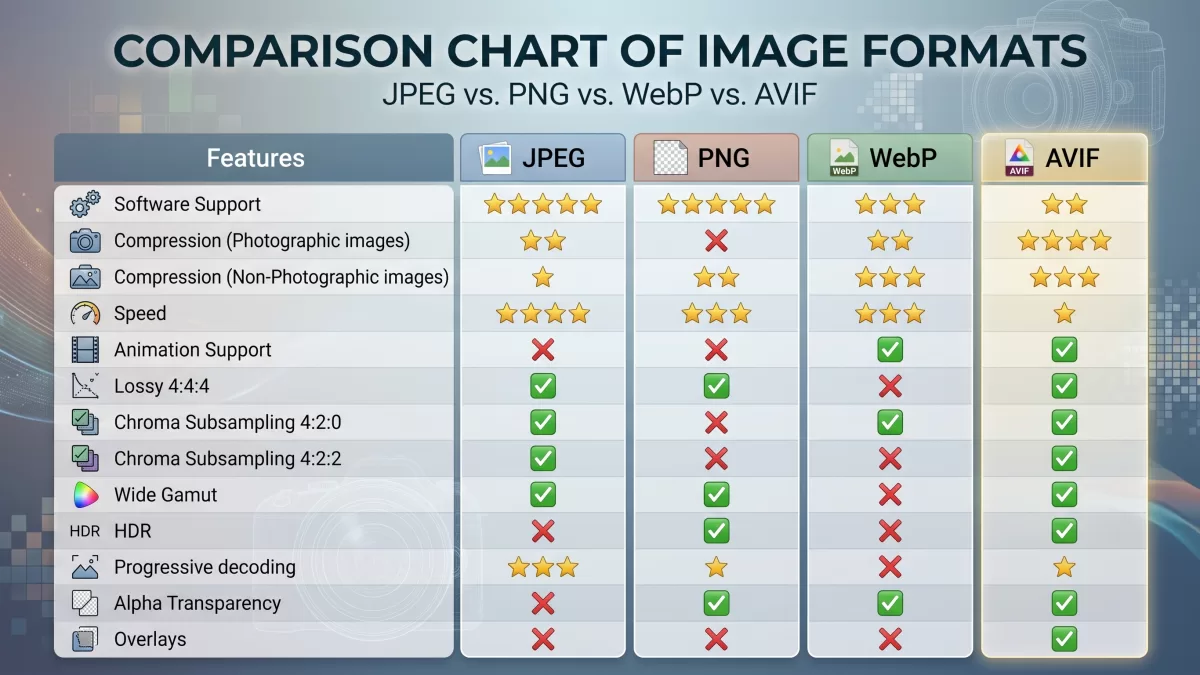
Every image on the internet carries a hidden decision baked into it — the file format. That single choice controls how sharp your photo looks, how fast your page loads, whether your logo keeps its clean edges, and whether an iPhone photo even opens on a Windows laptop. Choose well and your storefront flies; choose poorly and your Largest Contentful Paint drags, your storage bill climbs, and customers bounce before the hero image finishes painting.
This guide breaks down the five formats that matter most in 2026 — JPEG, PNG, WebP, AVIF, and HEIC — with real compression numbers, verified browser-support data, working code, and a decision framework you can use today. Whether you run an ecommerce store, manage a photography portfolio, or build the front end of a SaaS product, you will leave this page knowing exactly which format to reach for and when.
Ready to publish flawless product visuals? Let our experts handle the heavy lifting with professional background removal so your images look pixel-perfect in any format.
- TL;DR — Which image format should you use?
- Why image format choice matters more than ever
- What actually is an image format?
- JPEG — the workhorse that still won’t die
- PNG — pin-sharp edges and true transparency
- WebP — the modern all-rounder you should already be using
- AVIF — the compression king of 2026
- HEIC — brilliant on iPhone, awkward everywhere else
- Head-to-head comparison table
- How to choose the right format — a practical decision framework
- The <picture> element — the pattern that makes all this work
- Image formats and Core Web Vitals
- E-commerce photography — which format wins where
- Common conversion workflows
- Bonus: JPEG XL — the format on the horizon
- Discoverability best practices for web images
- Ten quick tips to squeeze the most from any format
- Real-world scenarios — what should you actually use?
- Common mistakes to avoid
- The future of image formats
- Final thoughts
- Frequently Asked Questions (FAQ)
TL;DR — Which image format should you use?
For readers who want the short version first:
- JPEG — The default for photographs and social uploads where universal compatibility beats file size.
- PNG — The go-to for logos, icons, screenshots, and any image needing crisp edges or a transparent background.
- WebP — The safe modern default in 2026, with ~97% browser support and files 25–35% smaller than JPEG.
- AVIF — The best compression on the open web today, roughly 50% smaller than JPEG at similar quality — use it when saving bytes matters more than legacy tooling.
- HEIC — Apple’s default camera format; brilliant on iPhone, painful outside the Apple ecosystem.
For most modern websites in 2026, the winning combination is AVIF → WebP → JPEG delivered via a <picture> element, with PNG or SVG reserved for logos, icons, and screenshots.
Now let’s unpack each format properly, because “just use WebP” isn’t always the right answer.
Why image format choice matters more than ever
Modern web performance rewards small, sharp files. Google Search indexes BMP, GIF, JPEG, PNG, WebP, SVG, and AVIF for image search results, and Core Web Vitals penalize slow-loading pages with lower rankings. Shoppers abandon pages that take more than three seconds to load, so every kilobyte you shave off translates directly into revenue.
Format choice affects five outcomes at once:
- File size — smaller files load faster and cost less to serve.
- Visual quality — some formats degrade photos, others preserve every pixel.
- Transparency support — logos and cutouts need alpha channels.
- Compatibility — not every browser, email client, or CMS reads every format.
- Search visibility — Google favors modern formats like WebP and AVIF for image search and speed.
If you have ever wondered whether a photo folder is measured in KB or MB, that same math is what your users’ browsers care about on every page load.
What actually is an image format?
An image format is a set of rules that describe how pixel data gets stored on disk and reconstructed on screen. Two levers matter most.
The first is compression type. Lossy formats discard visual information the human eye barely notices, shrinking files dramatically. Lossless formats keep every pixel intact, so files stay larger but never degrade — no matter how many times you re-save them. The second is the feature set: some formats support transparency (an alpha channel), some support animation, and some support wide color gamut, HDR, or 10-bit depth. These features determine whether a format is right for photos, graphics, UI assets, or motion.
Format also affects how much you can store. If you want to see how storage capacity plays out in real-world numbers, this breakdown of 64GB card capacity puts it in perspective — the same shot as a HEIC often uses roughly half the bytes of an equivalent JPEG.

JPEG — the workhorse that still won’t die
Overview
JPEG (or JPG) has ruled digital photography since 1992 and still handles the majority of images on the web. The format uses lossy compression based on the discrete cosine transform (DCT), which throws away frequencies your eye can’t easily distinguish. JPEG stores 24-bit color — roughly 16.7 million values, more than enough for realistic photography — but does not support transparency, animation, or layers.
Where JPEG shines
- Photographs with smooth gradients — skies, skin tones, landscapes
- Email attachments and social uploads — every platform accepts it
- Legacy compatibility — every browser, OS, camera, and printer supports it
- Small file sizes at acceptable quality — a quality-80 JPEG is typically 10× smaller than the source
Where JPEG falls apart
- No transparency — you get a solid background whether you want one or not.
- Text and sharp edges — chroma subsampling creates “ringing” artifacts around lettering.
- Repeated re-saves — every edit-and-save cycle degrades quality further (generational loss), so always archive from a lossless source.
- No animation — use WebP, AVIF, or APNG instead.
- 8-bit color depth — no HDR, no wide gamut.
A quick note on quality settings
Most tools default to JPEG quality 75–85, which hits the sweet spot for photos. Push below 60 and you’ll see blocky artifacts on flat colors. Push above 92 and you’re wasting bytes with no visible gain. If you are not sure how to resize an image before exporting, doing it before compression preserves the most detail.
PNG — pin-sharp edges and true transparency
Overview
PNG (Portable Network Graphics) arrived in 1996 as the patent-free answer to GIF, and it quickly became the format designers reach for whenever they need pixel-accurate reproduction. PNG uses lossless compression — the decoded file is a bit-for-bit copy of the original — and it supports 8-bit, 24-bit RGB, and 32-bit RGBA. Its killer feature is an 8-bit alpha channel that delivers smooth, feathered transparency far cleaner than GIF’s binary on-off mask.
Where PNG shines
- Logos and brand marks placed on any background
- Icons, UI assets, and screenshots with text or thin lines
- Illustrations with limited color palettes — PNG-8 can beat JPEG on size here
- Product cutouts used across different backgrounds
- Archival intermediates that will be re-edited multiple times
Where PNG loses
- Photographic images — PNG files balloon to 5–10× the size of an equivalent JPEG.
- Modern alternatives — WebP lossless is about 26% smaller than PNG for the same job.
- No native animation — APNG exists but has spotty support.
A common misuse to avoid
Uploading a 4000×3000 photograph as a PNG “for better quality” is one of the most common performance mistakes on ecommerce sites. The result is often a 12 MB file where a 400 KB JPEG or 250 KB WebP would look identical to the human eye. If you are new to how alpha channels behave, our guide on transparent backgrounds explains the concept from scratch.

Need clean, editable PNG cutouts for your product catalog? Our expert clipping path service delivers hand-drawn precision at scale.
WebP — the modern all-rounder you should already be using
Overview
Google released WebP in 2010, and after a slow start it has become the most practical modern format on the open web. WebP uniquely offers both lossy and lossless modes in one container, alongside transparency and animation.
What the compression numbers actually look like
- Lossy WebP is 25–35% smaller than JPEG at visually similar quality.
- Lossless WebP is roughly 26% smaller than PNG.
- WebP supports 8-bit alpha transparency — matching PNG’s core capability.
- WebP animation replaces bulky GIF with far smaller files at far higher quality.
Browser and CMS support in 2026
WebP is now safe as a default. It renders in Chrome, Edge, Firefox, Opera, and Safari (from Safari 14 on macOS Big Sur and iOS 14 onward), giving it roughly 97% global browser support. WordPress, Shopify, Squarespace, Wix, and every major CDN handle WebP natively. A <picture> fallback covers the tiny sliver of ancient browsers still lingering out there.
Where WebP still stumbles
- Older email clients — many still don’t render WebP, so ship JPEG or PNG in campaigns.
- Some print workflows — designers may still ask for TIFF or high-quality JPEG.
- 8-bit only — no HDR or 10-bit gradients, which is where AVIF pulls ahead.
- Legacy image editors — a few older versions of Microsoft Office and some archival tools still refuse WebP.
If your CMS still uploads JPEG or PNG by default, most modern hosts now offer automatic WebP conversion at the CDN edge. For manual conversion, popular options include Squoosh (from Google), ImageMagick, and export presets in Photoshop, Affinity Photo, or the growing pack of AI editing tools built for ecommerce.

Struggling with messy edges on product shots? Our precise multi-clipping path service delivers sharp, editable cutouts ready for WebP export.
AVIF — the compression king of 2026
Overview
AVIF stands for AV1 Image File Format. It encodes still frames using the royalty-free AV1 video codec inside the HEIF container, and it delivers the best lossy compression among mainstream web formats today. AVIF supports:
- Lossy and lossless compression in a single format
- 10-bit and 12-bit color depth for HDR imagery
- Alpha transparency with better efficiency than WebP
- Wide color gamut (Rec. 2020, HLG, PQ) for premium content
- Animation and film grain synthesis that preserves photographic texture at very low bitrates
How much smaller is AVIF really?
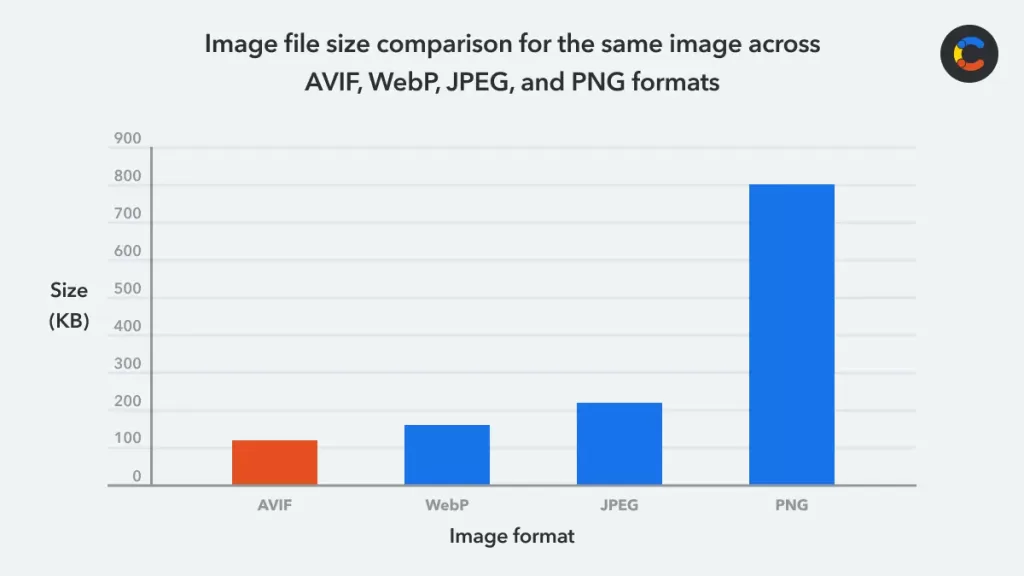
Independent benchmarks converge: AVIF is roughly 50% smaller than JPEG at visually matched quality, and about 20–30% smaller than WebP. That difference compounds fast on image-heavy pages — a 2 MB hero image can drop to 400 KB with no perceptible quality loss.
Browser and adoption reality
Every major browser now ships AVIF by default. Chrome added support in version 85 (August 2020), Firefox in 93, Safari in 16 (macOS Ventura and iOS 16, September 2022), and Microsoft Edge finally enabled it out of the box in version 121 (January 2024). Global browser coverage now sits around 96%, essentially matching WebP. Real-world adoption is climbing but still trails WebP — WebP is used on roughly 20% of all sites in 2026 while AVIF sits closer to 3–5%, though it is growing at triple-digit rates year over year.
AVIF trade-offs to know
- Slow encoding — AVIF compression is CPU-heavy and 5–10× slower to encode than WebP.
- Weaker lossless mode — it was designed for lossy work, so PNG and WebP still win pure lossless benchmarks.
- Thinner editor tooling — Adobe support arrived late, and many CMS plugins still lag.
- Legacy fallbacks still smart — a
<picture>element with WebP and JPEG fallbacks is still the safe pattern.
The practical answer: ship AVIF as the first choice in a <picture> element and fall back to WebP, then JPEG. That layered approach gives modern browsers massive savings while never breaking older ones.
HEIC — brilliant on iPhone, awkward everywhere else
Overview
HEIC (High Efficiency Image Container) is Apple’s default photo format on iPhone since iOS 11 in 2017. It is a specific flavor of the HEIF container that stores images compressed with the HEVC video codec.
What HEIC does well
- Roughly half the size of JPEG at the same visual quality
- 10-bit color depth in the files iPhones actually produce (the HEIF container spec allows up to 16-bit, but real-world HEIC captures are 10-bit)
- Multi-image containers that store bursts, Live Photos, and depth maps together
- Alpha channel and HDR metadata both supported by the container
The compatibility problem
Outside the Apple universe, HEIC has been a source of headaches for years. Windows requires paid HEVC codec extensions in some cases, Android support is uneven, and many websites, CMS platforms, and email tools still refuse the format. That is why Apple lets you switch back to JPEG under Settings → Camera → Formats → Most Compatible on any modern iPhone. The good news: Windows 11 now handles HEIC natively for many users, and macOS, iOS, and iPadOS have full read/write support built in.
HEIC vs. AVIF — an important distinction
Both share the same HEIF container but use different codecs. HEIC uses HEVC, which is patent-encumbered and expensive for browser vendors to license. AVIF uses AV1, which is royalty-free. That licensing gap is exactly why AVIF — not HEIC — became the web’s chosen successor to JPEG, despite the two formats sharing the same underlying file structure.
For anyone dealing with the iPhone-to-Windows workflow issue frequently, the “Most Compatible” setting in iOS captures JPEG directly, and Apple’s Photos app converts HEIC to JPEG on the fly when transferring to a PC. If HEIC files land on your web server, convert them to JPEG, WebP, or AVIF before publishing — no browser renders HEIC on the open web.
Head-to-head comparison table
| Feature | JPEG | PNG | WebP | AVIF | HEIC |
|---|---|---|---|---|---|
| Year introduced | 1992 | 1996 | 2010 | 2019 | 2017 (Apple) |
| Compression | Lossy | Lossless | Lossy + Lossless | Lossy + Lossless | Lossy (mostly) |
| Transparency | ✕ | ✓ 8-bit alpha | ✓ 8-bit alpha | ✓ 10-bit alpha | ✓ |
| Animation | ✕ | ▲ APNG only | ✓ | ✓ | ✓ (Live Photos) |
| HDR / wide gamut | ✕ | ✕ | Limited | ✓ 10/12-bit | ✓ 10-bit |
| Color depth (practical) | 8-bit | Up to 16-bit | 8-bit | Up to 12-bit | 10-bit |
| Typical size vs JPEG | Baseline | 5–10× larger | 25–35% smaller | ~50% smaller | ~50% smaller |
| Browser support (2026) | 100% | 100% | ~97% | ~96% | Apple only |
| Best for | Photos, social, email | Logos, UI, screenshots | Web default | Max compression + HDR | iPhone capture |
| Biggest weakness | No transparency, artifacts | Huge photo files | 8-bit only | Slow to encode | Poor cross-platform |
How to choose the right format — a practical decision framework
Rather than memorize spec sheets, follow this decision path from the top.
1. Does the image need transparency?
- Yes, and it is simple or graphic → PNG (or WebP lossless for the web)
- Yes, and it is photographic with a soft edge → WebP or AVIF
2. Is it a photograph headed to the web?
- Modern site with
<picture>fallback support → AVIF → WebP → JPEG - Simple CMS with no fallback logic → WebP (with JPEG fallback at the CDN)
- Email or legacy system → JPEG
3. Is it a logo, icon, or line graphic?
- Static and vector-friendly → SVG wherever possible, otherwise PNG
- Complex raster illustration → PNG or WebP lossless
4. Is it coming off an iPhone?
- Staying in the Apple ecosystem → HEIC
- Publishing to the web or sharing with Windows → convert to JPEG or WebP
5. Are you archiving originals?
- Master files → TIFF or PNG (lossless)
- Camera originals → RAW wherever possible
Photographing garments? Our professional ghost mannequin service turns flat lays into hollow-body 3D shots that convert.
The <picture> element — the pattern that makes all this work
The single most valuable piece of HTML in this entire guide is the <picture> element. It gives you automatic format negotiation with zero JavaScript:
<picture>
  <source srcset="hero.avif" type="image/avif">
  <source srcset="hero.webp" type="image/webp">
  <img
    src="hero.jpg"
    alt="Descriptive text about the image"
    width="1600"
    height="900"
    loading="lazy">
</picture>
The browser tries AVIF first, falls back to WebP if AVIF is unsupported, and lands on JPEG for anything older. No user-agent sniffing required. Add srcset and sizes on the <img> for responsive delivery, and preload the LCP image with <link rel="preload" as="image"> in the document head to shave further milliseconds off first paint.
Image formats and Core Web Vitals
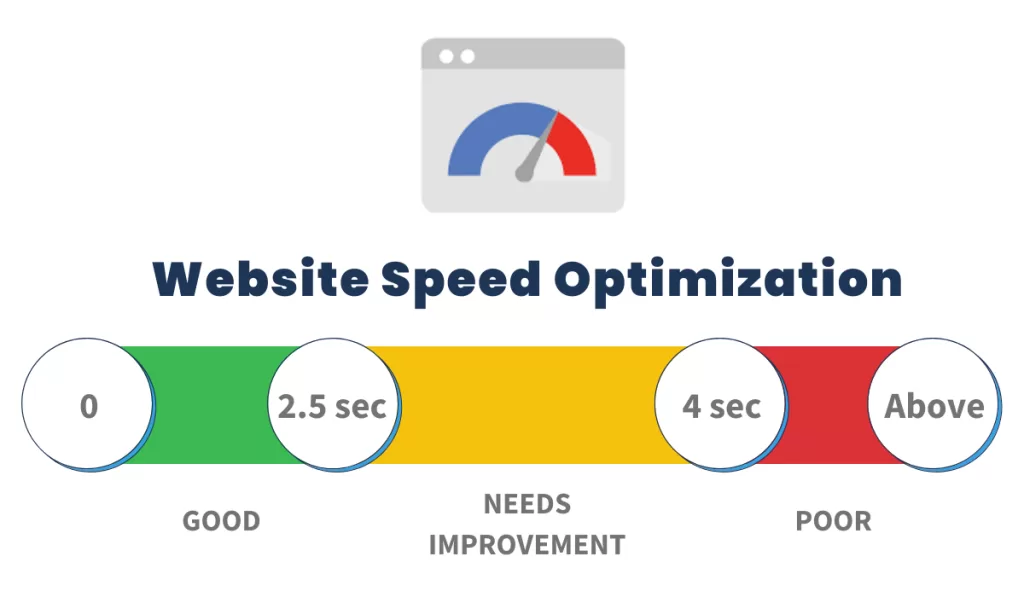
Image format choice is one of the most direct ranking factors you have, because images almost always drive Largest Contentful Paint (LCP) — Google’s headline Core Web Vitals metric. A “good” LCP is 2.5 seconds or less at the 75th percentile of visits, measured across mobile and desktop.
Here is how format decisions hit the performance scorecard:
- Smaller images = faster LCP. Swapping a 1.2 MB JPEG hero for a 400 KB AVIF often shaves 300–500 ms off LCP on a 4G mobile connection.
- Correct dimensions prevent CLS. Always set
widthandheightattributes so the browser reserves the right space before the image loads. - Responsive images beat one-size-fits-all. Use
srcsetandsizesso phones don’t download desktop-sized files. - Preload the LCP image. A
<link rel="preload" as="image">in the head shaves further milliseconds off first paint. - Serve via a CDN. Modern CDNs like Cloudflare, Fastly, Bunny, and Imgix perform format negotiation automatically, delivering AVIF to Chrome and JPEG to legacy Safari from a single source file.
Combine this pattern with a solid photo editing software export workflow and you eliminate roughly 90% of format-related performance issues in one pass.
E-commerce photography — which format wins where
E-commerce is where format choice creates the biggest real-dollar impact, because product pages live and die on load speed and image quality. A practical playbook:
- Hero product shots — AVIF or WebP with a JPEG fallback, at 1600–2000 px on the long edge
- Thumbnails and grids — WebP at 400–600 px; aggressive compression is fine
- Ghost mannequin cutouts — PNG or WebP with transparency so the composite works across themes
- Zoom and high-res detail views — WebP or high-quality JPEG at 2500–3000 px
- Lifestyle imagery — AVIF or WebP; these files tend to be large and benefit most from AV1 compression
- Ads and social exports — JPEG for maximum compatibility across ad platforms
Retouching quality matters as much as format. A brilliantly compressed image of a poorly lit product is still a poorly lit product. Sharp product photography, natural shadow creation, and clean cutouts all compound the technical gains you get from modern formats.
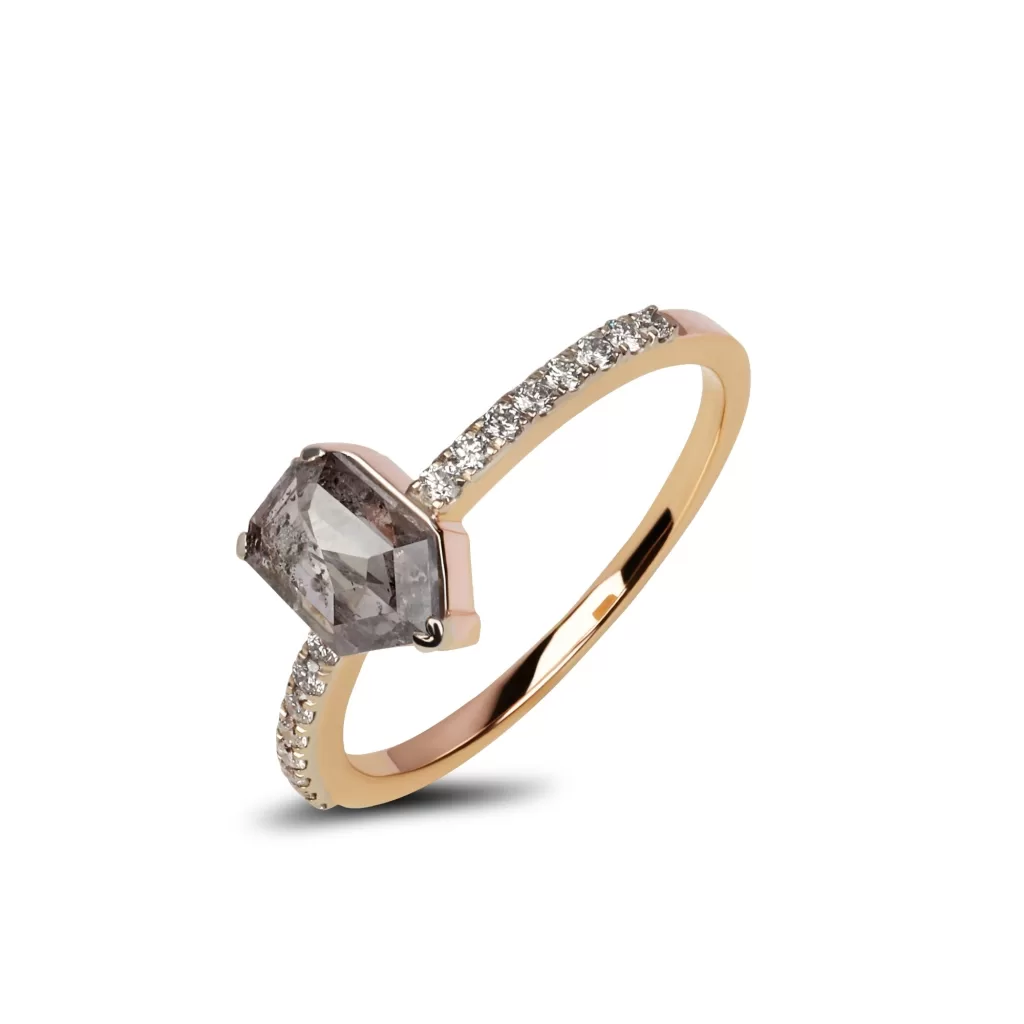
Selling jewelry online? Let our specialists bring out every sparkle and detail with expert jewelry photo editing and retouching. Perfect for high-end product shots that demand flawless presentation.
Common conversion workflows
Depending on where your images start and end up, here are the fastest paths across formats.
- iPhone HEIC → JPEG for web upload — use Preview on macOS (File → Export), the “Automatic” transfer setting in iPhone Photos, or CopyTrans HEIC on Windows.
- PNG → WebP for a lighter site — Squoosh in the browser, ImageMagick on the command line (
magick input.png output.webp), or your CMS’s built-in optimizer. - JPEG → AVIF for maximum savings — Squoosh, the
avifencCLI, or a CDN like Cloudflare Images that converts on the fly. - Batch conversion for a whole library — ImageMagick, Sharp (Node.js), Sirv, ShortPixel, TinyPNG, or Cloudinary.
A word on quality settings: for AVIF, aim for a CRF (quality) of 25–35 for lossy web use; for WebP, quality 75–82 hits a similar sweet spot; for JPEG, 78–85 is the classic default. Numbers above these ranges waste bytes; numbers below them start to produce visible artifacts.
Bonus: JPEG XL — the format on the horizon
JPEG XL (JXL) is the next-generation format designed to eventually replace JPEG itself. It offers lossless JPEG transcoding (recompressing legacy JPEGs by roughly 20% with zero quality loss), progressive decoding, wider color gamut, animation, and compression that competes closely with AVIF while encoding much faster.
After a dramatic reversal by the Chromium team in late 2025, Google Chrome 145 shipped stable JPEG XL support in February 2026, joining Safari, which has supported the format for a while. Firefox 152 added JPEG XL behind a flag, defaulting to disabled. Real-world global support still sits in the low single digits, so JXL is not a production default yet — but it is worth watching. If you already ship a <picture> element with AVIF → WebP → JPEG, layering in JPEG XL on top costs almost nothing and future-proofs your stack.
If your workflow involves converting between formats often, our tutorials on resizing images in Photoshop and cropping in Illustrator will save hours of manual work.
Discoverability best practices for web images
Web performance and search visibility now depend as much on image format as on written content. These practices keep your visuals fast, accessible, and discoverable.
- Compress before you upload. Run every photo through Squoosh, TinyPNG, or ImageOptim before publishing. Even the best format wastes bandwidth without proper compression.
- Use descriptive filenames. Save as
red-leather-sneakers-side-view.webpinstead ofIMG_2381.jpg. Search engines read filenames as ranking signals. - Write meaningful alt text. Aim for 8–15 words that describe the subject naturally, without keyword stuffing. Screen readers and search crawlers both rely on it.
- Serve responsive sizes. Use the
<picture>element or thesrcsetattribute to deliver small images to phones and larger ones to desktops. - Lazy-load below-the-fold images. Add
loading="lazy"to any<img>outside the initial viewport. That single attribute can shave seconds off initial page load. - Set explicit width and height. Reserving pixel space prevents layout shift, which Core Web Vitals measures as Cumulative Layout Shift (CLS).
- Match format to content type. Photos belong in JPEG, WebP, or AVIF; graphics and screenshots belong in PNG or lossless WebP. Serving PNG photos and JPEG logos wastes both quality and bandwidth.
- Strip EXIF and metadata. Public web images do not need camera GPS coordinates, and shedding metadata trims extra bytes.
Want to swap colors without redoing the shot? Our color changing service refreshes product variants fast — no reshoots needed.
Ten quick tips to squeeze the most from any format
- Never re-save the same JPEG repeatedly — each save discards more data
- Strip EXIF and metadata on public web images to shed extra bytes and protect privacy
- Use 4:4:4 chroma subsampling for images with fine text or brand colors; use 4:2:0 for photos to save size
- Set explicit dimensions in the
<img>tag to prevent layout shift - Lazy-load below-the-fold images with
loading="lazy" - Preload hero images so LCP hits the browser as early as possible
- Serve from a CDN with automatic format negotiation
- Test on real devices, not just desktop DevTools — Safari and Android render differently
- Keep a lossless master for every image you plan to re-export later
- Audit quarterly — a format that was the right call in 2023 may be beaten by a newer one now
Real-world scenarios — what should you actually use?
- A fashion ecommerce hero image → AVIF (with WebP and JPEG fallbacks) at 1800 px on the long edge
- A software company logo in the header → SVG, with PNG at 2× as a raster fallback
- A food blog recipe photo → WebP at quality 80, JPEG fallback
- A wedding portfolio gallery → WebP for delivery, RAW or TIFF for archive
- A screenshot for a knowledge-base article → PNG (or WebP lossless) to keep text crisp
- An iPhone snapshot bound for LinkedIn → JPEG (the share sheet handles conversion automatically)
- A transparent product cutout for multiple background themes → PNG or WebP with alpha
Common mistakes to avoid
Even seasoned designers slip up on format choices. Watch out for these traps:
- Saving logos as JPEG — you lose transparency and gain artifacts around edges
- Uploading 4000-pixel-wide photos into a 1200-pixel container — massive bandwidth waste
- Re-saving JPEGs repeatedly — every save degrades quality permanently
- Ignoring HEIC compatibility — iPhone photos may break non-Apple viewers and web forms
- Skipping alt text — hurts accessibility and image discoverability simultaneously
- Using PNG for photographs — 10× larger files with no quality benefit
- Shipping AVIF-only pages — a small percentage of visitors on legacy devices still need a fallback
- Uploading HEIC directly to a website — no browser renders it natively on the open web
Photographers building a solid setup often start with the fundamentals covered in photography tips for beginners.
The future of image formats
Three trends will shape image formats through the rest of this decade.
AVIF becomes the new default. As encoder speeds improve and CDNs automate format conversion at the edge, AVIF will steadily replace WebP as the primary format for new websites. The compression advantage is simply too large to ignore on image-heavy pages.
JPEG XL enters production. With Chrome 145 shipping stable support and Firefox 152 offering it behind a flag, publishers hunting for lossless JPEG recompression will start rolling JXL into <picture> fallback stacks. Expect broader adoption once the flag flips to on by default.
AI-powered semantic compression emerges. Formats like JPEG AI aim to compress by reconstructing perceptual content rather than pixel data, promising even smaller files at higher perceived quality. Standardization is still ongoing, but the underlying research is moving fast.
Legacy JPEG will persist as the universal fallback for another decade, but every new site launched today should serve modern formats to modern browsers.
Final thoughts
Choosing between JPEG, PNG, WebP, AVIF, and HEIC is not a nerdy technical footnote — it touches page speed, search rankings, storage bills, customer trust, and conversion rates. The good news is the decision has never been simpler.
JPEG still owns photography’s universal baseline. PNG rules the world of graphics and transparency. WebP delivers the best all-around balance for the modern web. AVIF wins on pure compression and HDR quality. HEIC dominates inside Apple’s walled garden but stumbles outside it.
For most modern websites in 2026, the winning combination is AVIF as the primary web format, WebP for progressive enhancement, PNG or SVG for logos and screenshots, and JPEG as the universal fallback — all wrapped in a single <picture> element. Add strong compression, descriptive alt text, responsive sizing, and lazy loading, and your images will load fast, rank well, and look great on every screen.
Get this right and every other image decision — retouching, cropping, background removal, shadow work — pays off in a faster, cleaner, higher-converting web experience.
Ready to make every product image conversion-ready? Explore the full Clipping Expert Asia service lineup and let our team handle clipping, retouching, and format prep at scale.
Frequently Asked Questions (FAQ)
1. Is WebP better than JPEG in 2026?
Yes, for almost every web use case. WebP files run 25–35% smaller than JPEG at visually similar quality, support transparency and animation, and now ship in every mainstream browser at around 97% global coverage. Keep JPEG as a fallback and for platforms — like most email clients — that still don’t render WebP reliably.
2. Should I use AVIF or WebP for my ecommerce site?
Use both. AVIF delivers the smallest files (roughly 50% smaller than JPEG and 20–30% smaller than WebP), while WebP has broader tooling and slightly wider browser reach. A <picture> element serves AVIF first, WebP second, and JPEG as the ultimate fallback — the best of all three worlds.
3. Why do iPhone photos save as HEIC instead of JPEG?
Apple made HEIC the default in iOS 11 because it stores images at roughly half the size of JPEG with equal or better quality, along with 10-bit color and support for Live Photos and depth maps. Switch to JPEG under Settings → Camera → Formats → Most Compatible if HEIC causes compatibility issues on the platforms you share to.
4. Does PNG still make sense in 2026?
Absolutely, for the right jobs. PNG remains the best choice for logos, icons, screenshots, illustrations with sharp edges, and any graphic that needs lossless quality plus transparency. WebP lossless is a modern alternative worth using on the web, but PNG’s universal compatibility keeps it in the toolbox for master files and non-web contexts.
5. Which image format is best for search visibility and Core Web Vitals?
The one that gives you the smallest, correctly sized file for the visual quality your users expect. In practice, that means AVIF or WebP over JPEG for photos, and PNG or SVG for graphics. Combined with proper dimensions, srcset, and lazy loading, format choice alone can shave hundreds of milliseconds off Largest Contentful Paint.
6. Can I convert HEIC to JPEG for free?
Yes. On macOS, open the HEIC in Preview and use File → Export as JPEG. On Windows 11, the Photos app handles HEIC natively with the free HEIF Image Extensions from the Microsoft Store. Free web tools like Squoosh, CloudConvert, iMazing HEIC Converter, and iLoveIMG convert HEIC batches without installing anything.
7. What’s the difference between HEIC and HEIF?
HEIF (High Efficiency Image File Format) is the container. HEIC is Apple’s specific implementation that uses the HEVC codec inside HEIF. AVIF is another HEIF-based format that uses the royalty-free AV1 codec instead, which is why the two share similar file structures but very different browser support stories — HEVC’s licensing costs kept HEIC off the open web, while AV1’s royalty-free status put AVIF into every browser.
8. Does converting JPEG to WebP lose quality?
Converting a lossy JPEG to a lossy WebP causes minor additional quality loss because you are re-compressing already-compressed data. For best results, convert from a lossless master (PNG, TIFF, or RAW) directly to WebP. If you must go JPEG → WebP, keep the WebP quality at 80 or above and export from the highest-quality JPEG you have on hand.
9. Should I stop using JPEG entirely?
No. JPEG remains the safest universal fallback because every device, browser, and app on the planet reads it. Use JPEG alongside modern formats, not instead of them — the classic <picture> stack of AVIF → WebP → JPEG gives you the compression wins of the new formats without abandoning the reach of the old one.
10. Will JPEG XL replace WebP or AVIF?
It might, eventually. JPEG XL offers strong compression, fast encoding, and lossless JPEG re-encoding, and it returned to Chrome 145 as stable support in February 2026, with Firefox 152 shipping it behind a flag. For now, real-world global support still sits in the low single digits, so treat JPEG XL as an experimental additional layer in your <picture> stack rather than a replacement for AVIF or WebP.