

Guide to Selecting Aspect Ratio for Stunning Photos
March 3, 2026
How Big Is a Wallet Photo? Printing & Size Guide
March 6, 2026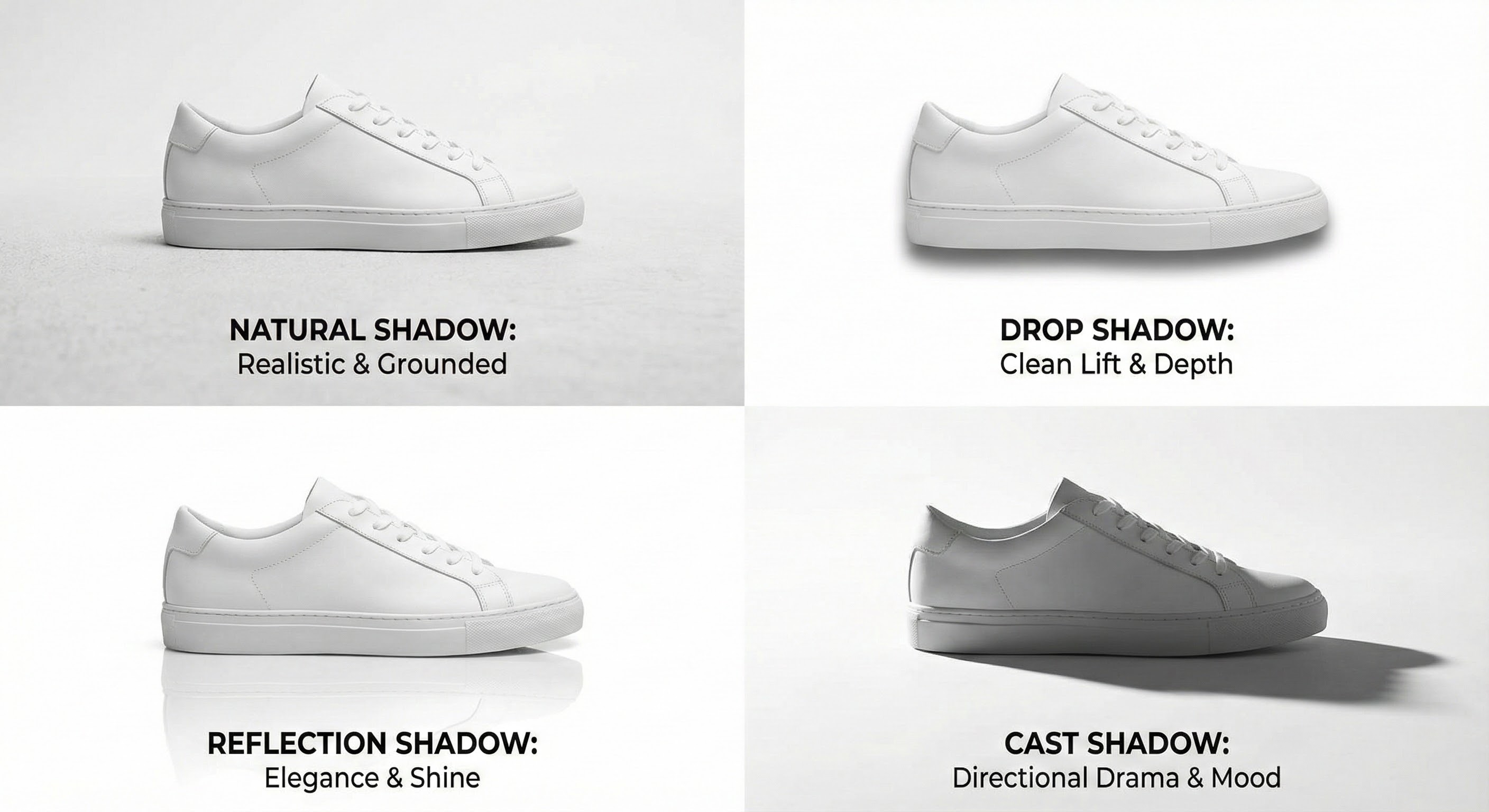
In e-commerce, your product image is your silent salesperson. It’s the first handshake, the initial pitch, and often the deciding factor for a potential customer. So what separates a good product photo from a great one? The answer lies in the subtle art of shadow creation.
Without proper shadows, product images look flat, unprofessional, and disconnected from reality — as if floating aimlessly on the page.
Shadow creation is a post-production technique that adds or enhances shadows, making products appear grounded, three-dimensional, and realistic. It’s a fundamental step in professional e-commerce image editing — transforming a simple product cutout into a compelling visual that builds trust and drives sales.
Whether you sell on Amazon or your own Shopify store, mastering high-quality shadows is a game-changer.
In this guide, you’ll learn:
- The main types of product shadows (drop, reflection, cast, natural)
- Why shadows directly impact sales and trust
- Actionable tips for realistic shadow creation
- Best tools and when to outsource
Try our professional shadow creation service free on 2 images
Exactly what you need — done for you.
- What Exactly is Shadow Creation?
- The Essential Types of Product Photography Shadows
- The Undeniable Importance of Shadows in E-commerce
- Actionable Tips for Creating Realistic Shadows
- The Best Shadow Creation Software and Tools
- GIMP (GNU Image Manipulation Program)
- Outsourcing to a Professional Service
- Conclusion: Invest in the Details That Drive Sales
- Frequently Asked Questions (FAQ)
What Exactly is Shadow Creation?
At its core, shadow creation adds realistic shadows to an image after the product is isolated from its original background.
In a studio shoot, the goal is clean lighting and sharp focus. The product is then placed on a pure white background using a clipping path — but this removes natural shadows, leaving the product looking detached and unconvincing.
A shadow creation service fixes this by digitally painting in a shadow. That shadow anchors the product to a surface, providing depth, context, and a sense of weight. It bridges the sensory gap for online shoppers who can’t physically hold the item.
This isn’t just aesthetic — it’s a psychological cue that the product is authentic and present.
The Essential Types of Product Photography Shadows
Choosing the right shadow depends on product type, surface, and brand aesthetic. A smart mix of shadow styles makes your catalog more dynamic.
1. Natural Shadow
Natural Shadow – Replicates the soft, subtle shadow of natural lighting. Editors preserve the original shadow from the photoshoot or recreate it from scratch. Soft edges, varying opacity.
- Why it matters: Highest level of realism. Tells customers the image is authentic.
- Best for: Furniture, shoes, electronics, kitchenware — anything with a flat base.
2. Drop Shadow
Drop Shadow – The most widely used e-commerce shadow. A clean shadow directly beneath the product, making it appear slightly lifted. Easy to control distance, angle, size, and opacity.
- Why it matters: Quick depth + background separation. Uniformity across hundreds of catalog images.
- Best for: Almost any product. Standard for Amazon, Shopify, and eBay listings.
3. Reflection Shadow (Mirror Effect)
Reflection Shadow (Mirror Effect) – Creates the illusion of a reflective surface (glass, marble, water). A faint vertical reflection instead of a dark shadow. Adds instant elegance.
- Why it matters: Elevates perceived value. Premium, luxurious feel.
- Best for: Luxury products — jewelry, watches, sunglasses, cosmetics.
4. Cast Shadow
Cast Shadow – Simulates a shadow “cast” by the product from a directional light source (not directly above). Stretches to one side. Adds environment and drama.
- Why it matters: Creates a dynamic, realistic 3D scene. Turns product photos into lifestyle shots.
- Best for: Creative flair. Apparel on ghost mannequins, large furniture, artistic presentations.
Why: Clearer explanation. Removed “more complex to create” (not user-focused).
The Undeniable Importance of Shadows in E-commerce
Neglecting shadows is a costly mistake. High-quality product shadows aren’t a finishing touch — they’re a core component of visual marketing that directly impacts customer behavior and your bottom line.
They Build Trust Through Realism
Builds trust through realism – Online shoppers can’t physically inspect products. Shadows make products look real and tangible. A grounded, 3D product feels authentic. A floating object feels fake. Realism gives customers confidence to buy.
They Enhance Professionalism and Brand Image
Enhances professionalism & brand image – Your product images reflect your quality standards. Crisp photos with professional shadows signal a serious, detail-oriented business. Poor or missing shadows make you look amateur. Consistency across your online store reinforces a polished, trustworthy brand.
They Improve Visual Hierarchy and Focus
Improves visual hierarchy & focus – A well-executed shadow separates product from background, drawing the eye directly to the product. A drop shadow creates just enough contrast to make the product “pop” without getting lost in white space.
They Increase Perceived Value and Justify Price
Increases perceived value & justifies price – Presentation affects perceived value. Two identical watches: one flat, one with a sleek reflection shadow on glossy surface. The second watch feels more valuable and can command a higher price. This is especially true for high-end products, where the visual story matters as much as the product itself.
Actionable Tips for Creating Realistic Shadows
Whether you’re editing yourself or guiding a professional, these fundamentals will help you produce realistic, high-converting shadows.Whether you’re editing yourself or guiding a professional, these fundamentals will help you produce realistic, high-converting shadows.
- Reflect surface texture – Matte surfaces = softer shadows. Glossy = add reflection effects.
- Observe real-world lighting – Window light = soft shadows. Direct light = sharper edges. Real shadows carry subtle tones from surroundings.
- Maintain catalog consistency – Keep light source direction, shadow softness, length, and opacity uniform across all images.
- Avoid pure black – Use dark gray. Set layer opacity to 20–50%.
- Soften edges gradually – Apply subtle blur. Shadows get softer as they extend from the product.
- Match perspective – Overhead light = short base shadows. Side light = longer cast shadows.
The Best Shadow Creation Software and Tools
Having the proper shadow editing tools is essential for professional results. While there are many options available, some are clear industry leaders.
Adobe Photoshop
Adobe Photoshop is the undisputed king of photo editing and the go-to software for professionals. Its powerful features provide complete control over every aspect of shadow creation.
- Layers and Opacity: Work on a separate layer for your shadow, allowing you to adjust its opacity, color, and position without affecting the product image.
- Brush Tool: Use a soft-edged brush to paint in natural-looking shadows manually.
- Pen Tool: Create a precise path around the product to generate a clean selection for a drop shadow or cast shadow.
- Layer Styles: The “Drop Shadow” layer style is a quick way to create a basic drop shadow with controls for angle, distance, and size.
- Blur Filters: Gaussian Blur is essential for softening shadow edges to achieve a realistic look.
- Learning shadow creation in Photoshop is a valuable skill for anyone serious about e-commerce imagery.
GIMP (GNU Image Manipulation Program)
For those on a budget, GIMP is a powerful and free open-source alternative to Photoshop. It offers a similar toolset, including layers, paths, and various brushes and filters, making it a competent tool for creating professional product photography shadows.
Outsourcing to a Professional Service
For most businesses, the most efficient and effective solution is to outsource. A dedicated shadow creation service has a team of expert editors who use professional image editing software to deliver high-quality, consistent results quickly. This saves you countless hours of tedious editing, ensures a professional finish, and allows you to focus on other aspects of your business. Services like this are experts in creating everything from clipping path shadows to complex cast shadows for large product batches.
Conclusion: Invest in the Details That Drive Sales
In e-commerce, your product images are among your most powerful tools. Shadows aren’t a minor detail — they bring products to life. They add realism, build trust, enhance professionalism, and persuade customers to buy.
From consistent catalog shadows to elegant effects for jewelry and luxury products, every decision shapes your brand’s story. You can experiment with Photoshop, but professional services deliver the best, most consistent results.
Ready to make your products stand out? Contact us for a free volume estimate
Frequently Asked Questions (FAQ)
What is shadow creation?
A digital editing technique that adds realistic shadows to product images so they look natural, grounded, and 3D — not floating.
Why is shadow creation important for e-commerce?
It increases realism, builds customer trust, enhances perceived value, and boosts sales while reducing returns.
What types of shadows are used in product photography?
Natural, drop, reflection (mirror), and cast shadows. Each creates a different mood and level of realism.
Can I create shadows without professional tools?
Yes — try GIMP, Canva, or Pixlr. But for high-quality, consistent results across large batches, use Photoshop or a professional editing service.
How do shadows impact my brand’s perception?
Realistic shadows signal professionalism, trustworthiness, and attention to detail — helping your brand stand out and command higher prices.
Is outsourcing shadow creation worth it?
For most e-commerce businesses, yes. It saves time, guarantees consistency, and lets you focus on growth.
If you have more questions or want to elevate your product images, don’t hesitate to reach out to our shadow creation experts or explore our other image editing services.