

International Dress Size Chart: US, UK, EU, FR, IT, JP & AU
September 11, 2026
International Shoe Size Conversion Chart – Women & Men
September 14, 2026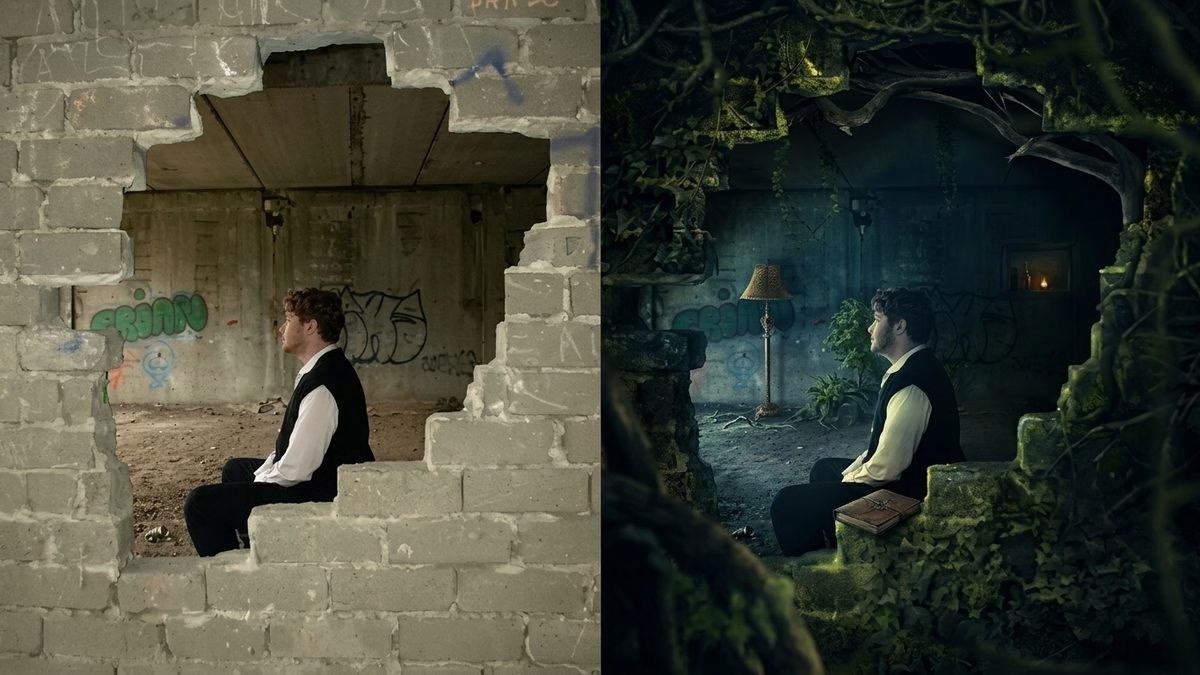
Photo manipulation is the intentional alteration of a photograph — through digital tools, AI, or traditional darkroom methods — to change what the image shows beyond simple correction. It goes further than editing brightness or fixing colors. Manipulation adds, removes, replaces, or combines visual elements to create something the camera never actually captured. Depending on the intent, it can be celebrated as art, valued as commercial polish, or condemned as deception.
If you remember only one thing from this guide, remember this: editing polishes reality; manipulation rewrites it.
- Why This Topic Matters More Than Ever
- Photo Manipulation, Defined Properly
- Photo Manipulation vs. Photo Editing: The One Distinction You Must Get Right
- A Short History of Photo Manipulation: From Glass Plates to Generative AI
- The Main Types of Photo Manipulation
- How Photo Manipulation Actually Works: The 8-Step Universal Workflow
- The Software Landscape in 2026
- Where Photo Manipulation Powers Real Industries
- How Much Does Professional Photo Manipulation Cost?
- The Ethics Question: When Does Manipulation Cross the Line?
- How to Spot a Manipulated Photo: A Practical Checklist
- Content Credentials and the Push for Provenance
- Common Beginner Mistakes (and How to Fix Them)
- The Future of Photo Manipulation: Three Trends to Watch
- Key Takeaways
- Frequently Asked Questions
Why This Topic Matters More Than Ever
You interact with photo manipulation hundreds of times a day, whether you realize it or not. Every product listing you scroll past on Amazon. Every glowing skin in a magazine campaign. Every dramatic sky in a real-estate photo. Every “candid” celebrity selfie. And now, thanks to AI, every third image you see on social media may have been partly generated by a text prompt.
In 2026 that reality has real stakes. According to research compiled by StationX, an estimated 8 million deepfakes are circulating online — a 16-fold jump from 500,000 in 2023 — and deepfake-enabled fraud already accounts for roughly 6.5% of all fraud attempts, up from just 0.1% four years ago. Learning what photo manipulation actually is — how it works, where it helps, and where it hurts — is no longer a niche skill. It is basic visual literacy.
Let’s break the whole subject down in plain English.
Photo Manipulation, Defined Properly
Photo manipulation is best understood as a spectrum, not a single act. On one end sits a wedding photographer removing an exit sign from a ceremony shot. On the other end sits a fully AI-generated scene where nothing in the frame was ever real. Everything in between — background swaps, sky replacements, body reshaping, object cloning, composite art — belongs on the same spectrum.
The Wikipedia entry on photograph manipulation defines it as “the modification of an otherwise genuine photograph,” typically for propaganda, aesthetic improvement, deception, or entertainment. Artist Jai McFerran describes it as “transforming or altering a photograph using various methods and techniques to achieve desired results” — sometimes celebrated as art, sometimes condemned as dishonesty, always defined by intent.
In short, three things need to be true for something to count as photo manipulation:
- The starting point is a real photograph, not a blank canvas.
- The image is deliberately changed, not just corrected.
- The change affects what the image shows or means, not only how it looks technically.
Photo Manipulation vs. Photo Editing: The One Distinction You Must Get Right
People throw these two terms around as if they mean the same thing. They don’t. And getting the difference right will save you a lot of confusion when you hire editors, brief clients, or write about the craft.
| Aspect | Photo Editing | Photo Manipulation |
|---|---|---|
| Goal | Enhance the image you already have | Transform the image into something new |
| Typical actions | Exposure, white balance, contrast, cropping, sharpening | Compositing, background swap, object addition/removal, body reshaping |
| Effect on reality | Preserves the original moment | May invent a moment that never happened |
| Common software | Lightroom, Capture One, mobile presets | Photoshop, Affinity Photo, GIMP, Firefly, Luminar Neo |
| Time investment | Seconds to a few minutes | Minutes to many hours |
| Skill level | Beginner-friendly | Intermediate to advanced |
| Ethical scrutiny | Usually low | Often high, especially in news and advertising |
Retouching sits awkwardly in the middle. Removing a stray hair is closer to editing. Slimming a waist crosses squarely into manipulation. If you want a deeper walkthrough of the professional workflow, our full photo retouching guide covers it stage by stage.
A Short History of Photo Manipulation: From Glass Plates to Generative AI
Photo manipulation is nearly as old as photography itself. The oldest surviving photograph — View from the Window at Le Gras — was captured by Joseph Nicéphore Niépce around 1826, and photographers began altering their prints almost immediately afterward.
The Analog Era (1830s–1980s)
Before Photoshop, manipulators worked with paint, ink, airbrushes, razor blades, glass plates, and clever exposure tricks in the darkroom.
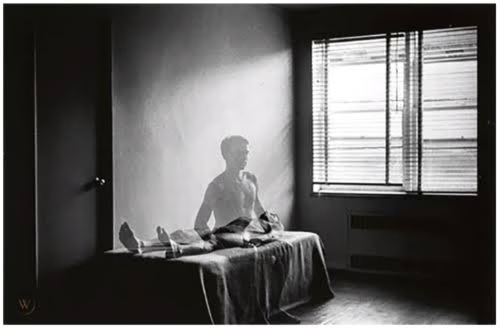
- 1863 — French illusionist Henri Robin posed with a “ghost” beside him thanks to a simple double exposure by photographer Eugène Thiébault.
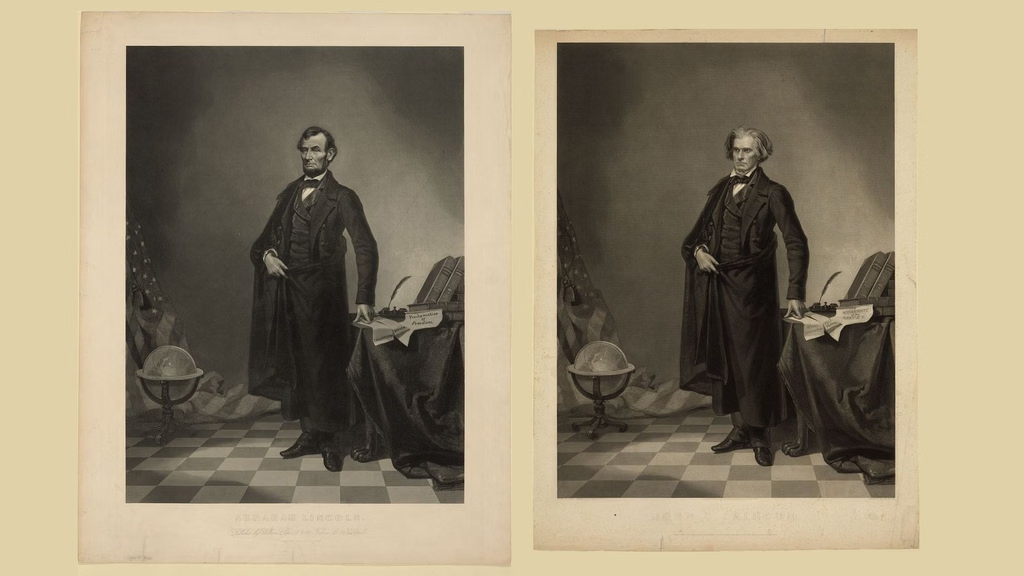
- c. 1865 — After Abraham Lincoln’s assassination, printmaker William Pate stitched a Berger portrait of Lincoln onto a Hicks painting of pro-slavery senator John C. Calhoun, and as Digital Camera World later documented, the doctored image circulated for nearly a century before the swap was widely recognized.
- 1902 — L.C. Handy’s famous “General Grant at City Point” turned out to be a composite of three separate photographs.
- 1918 — Australian photographer Frank Hurley combined multiple negatives to intensify the drama of his WWI battlefield scenes.
- 1920s–1950s — As History.com has extensively documented, Joseph Stalin’s regime became infamous for airbrushing purged officials out of state photographs, erasing them not just from politics but from history itself.
- February 1982 — National Geographic moved two Egyptian pyramids closer together on its cover to fit a vertical layout, one of the first widely condemned digital retouches in mainstream media.
The Digital Revolution (1988–2015)
Quantel’s Paintbox pioneered digital retouching in the 1980s. Then, on February 19, 1990, Adobe released Photoshop 1.0 for Macintosh, and the game changed permanently. What once demanded a wet darkroom and days of labor now happened with a mouse and a few keyboard shortcuts. By the mid-1990s, “to photoshop” had entered everyday English as a verb.
The AI Era (2022–Now)
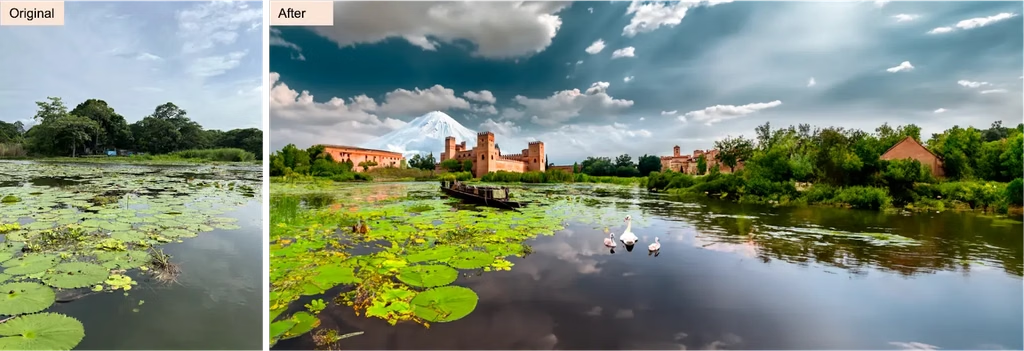
In May 2023, Adobe integrated its Firefly generative AI directly into Photoshop through Generative Fill, letting anyone add, remove, or replace parts of an image using a plain-text prompt. According to Adobe’s own 2026 update announcement, the Photoshop 2026 release added reference-image support to Generative Fill and lets users switch between Adobe’s Firefly Image Model 5 and partner models from Google and OpenAI inside the same panel. What once took ten years of Photoshop mastery now takes ten seconds of prompt writing.
The Main Types of Photo Manipulation
Photo manipulation is not one skill — it is a family of related techniques. Here is the breakdown you actually see in the wild.
1. Compositing and Photomontage
Blending elements from two or more photographs into a single seamless image. A model shot in a Manhattan studio ends up on a Kenyan savanna. A phone photographed on white paper lands on a lifestyle background. Compositing powers most modern advertising.
2. Retouching
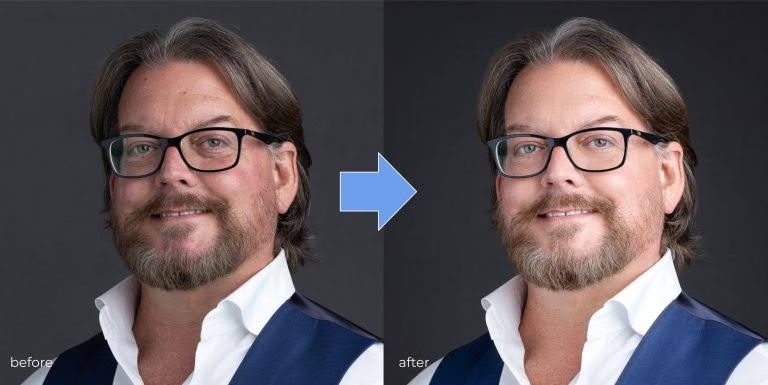
Cleaning up small imperfections without changing the story of the photo — blemishes, stray hairs, dust spots, wrinkled fabric, sensor dirt. High-end beauty work also includes frequency separation, dodge-and-burn sculpting, and skin-tone unification. See our deep dive on portrait retouching techniques for the professional workflow.
3. Background Removal and Replacement
Cutting a subject out of one environment and placing it in another — the bread and butter of e-commerce, catalog work, and marketplace listings. Many professional workflows still rely on a hand-drawn clipping path for the cleanest edges.
4. Object Addition or Removal
Erasing photobombers, dumpsters, wires, and exit signs — or adding birds, moons, snowflakes, or a wedding ring back onto a finger. The classic use case is removing a person from a photo without leaving a ghost outline behind.
5. Color Grading and Tone Manipulation
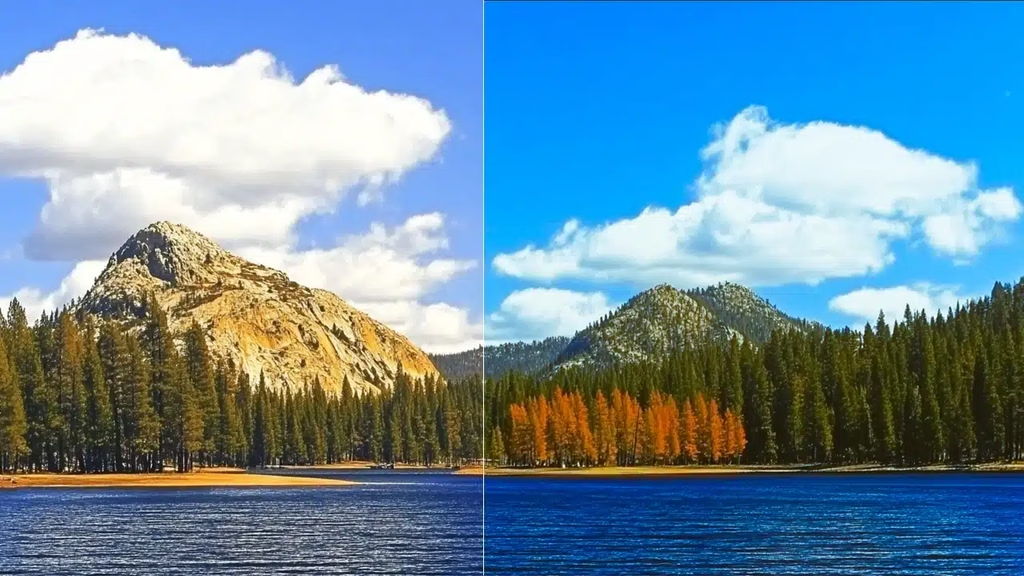
Colors carry emotion. Teal-and-orange feels cinematic. Muted earth tones feel documentary. Pastel gradients feel editorial. Grading pushes a photo beyond neutral into a mood.
6. Body and Face Reshaping
Liquify, Face-Aware tools, and AI beauty filters can slim waists, straighten teeth, enlarge eyes, and de-age skin. This is also the category driving most of today’s legal and ethical debate.
7. Photo Restoration
Old, torn, faded, or water-damaged photographs are digitally rebuilt — cracks patched, colors revived, missing corners painted back in. It is arguably the most universally loved use of manipulation because it recovers memory rather than distorting it.
8. Surreal and Conceptual Art
The purely artistic branch: talking animals, floating houses, gravity-defying oceans. The viewer is in on the illusion, and the manipulation is the whole point.
How Photo Manipulation Actually Works: The 8-Step Universal Workflow
Every serious manipulation — whether a five-minute product edit or a fifty-hour surreal composite — follows roughly the same pipeline.
- Concept and reference. Sketch the idea. Gather reference for light direction, shadow softness, and color temperature. Skipping this step is the #1 reason composites look “off.”
- Selection. Isolate the subject using pen paths, Quick Mask, Select Subject, or channel-based masking. Hair, fur, and glass usually demand a hybrid approach.
- Masking. Turn the selection into a non-destructive layer mask so original pixels stay intact and edges can be refined later.
- Placement and scale. Position each element so it obeys the vanishing points and eye-line of the base image.
- Light matching. Repaint highlights and shadows on inserted objects so they share the direction, softness, and color of the base scene’s light source.
- Color unification. Apply grading, gradient maps, or LUTs so every layer shares one color story.
- Detail refinement. Add contact shadows, atmospheric haze, dust, and film grain. Micro-details are what sell the illusion.
- Final polish and export. Dodge and burn to guide the eye, sharpen selectively, and export at the correct resolution and color profile for the destination platform.
The Software Landscape in 2026
The tool ecosystem has never been more diverse — or more automated.
- Adobe Photoshop — Industry standard, now deeply integrated with Firefly Image Model 5 and Generative Fill.
- Adobe Lightroom — Non-destructive editing, catalog management, and increasingly powerful AI masking.
- Affinity Photo 2 — A one-time-purchase Photoshop rival with strong frequency separation and HDR merging.
- GIMP — Free, open-source, cross-platform. Steeper learning curve, but genuinely capable.
- Capture One — Beloved by studio and fashion photographers for tethered shooting and rich color science.
- Luminar Neo — AI-first workflow with one-click sky replacement, portrait retouching, and relighting.
- Canva and Photopea — Browser-based, beginner-friendly, surprisingly deep for basic composites.
- Adobe Firefly — Prompt-based generation and editing trained on a commercially-safe dataset.
- Midjourney, Stable Diffusion, DALL·E — Generative platforms that increasingly blend with traditional manipulation workflows.
If you are choosing between them for a team or a starter setup, our roundup of the best photo editing software compares pricing, learning curves, and output quality for 2026.
Where Photo Manipulation Powers Real Industries
This is not a niche craft. Manipulation is the invisible engine behind entire sectors.
E-Commerce and Product Photography
Every product listing you scroll through has been manipulated — backgrounds cleaned, shadows added, colors corrected against a swatch, reflections polished. Fundamentals for online sellers live in our ecommerce product photo editing breakdown.
Fashion and Beauty
Skin retouching, hair cleanup, wardrobe repair, and body reshaping still dominate editorial work — although disclosure rules are tightening fast (more on that below).
Film, TV, and Streaming
Movie posters are almost always composites. The famous Avengers ensemble poster? Most of those actors were photographed separately, sometimes months apart, then assembled digitally. Behind-the-scenes VFX follows the same principles at a much bigger scale.
Advertising and Billboards
Manipulation places products in aspirational settings that would be prohibitively expensive — or physically impossible — to shoot for real. Water splash on a perfume bottle? Almost certainly composited from a hundred separate captures.
Real Estate
Virtual staging, sky replacement, grass greening, and lens-distortion correction turn ordinary listings into scroll-stopping visuals.
Journalism and Documentary
Here the rules flip. The World Press Photo verification process explicitly bans adding or removing elements and staging events, and even minor manipulations are subject to expert review.
Scientific and Medical Research
Image manipulation in research is treated as potential misconduct. The U.S. Office of Research Integrity found that roughly 67% of its closed research-misconduct cases between 2011 and 2015 involved image manipulation. Adjustments must be applied uniformly across the entire image and must never obscure, remove, or invent a feature.
Weddings and Portraits
Sky replacements, guest removal, dress smoothing, and skin softening are standard. Consistency across the full gallery matters more than any single hero shot.
Fine Art and Personal Expression
For artists like the late Jerry Uelsmann — a pre-digital master who built surreal composites entirely in the darkroom using multiple enlargers — and Swedish photo-manipulator Erik Johansson, manipulation is the medium. Their work is not deception. It is imagination given a photographic form.
How Much Does Professional Photo Manipulation Cost?
Prices vary wildly depending on complexity, deadline, and provider location. A rough guide:
- Basic edits (background removal, color correction, blemish clean-up): $0.25–$3 per image when outsourced in bulk.
- Standard retouching (skin work, minor liquify, small object removal): $3–$15 per image.
- Advanced compositing (multi-image composite, magazine-grade beauty retouching, surreal art): $25–$300+ per image, sometimes billed hourly at $50–$150.
- Custom commercial campaigns: usually quoted per project, often in the low thousands.
For a full breakdown by service type and market, see our transparent photo editing cost guide.
The Ethics Question: When Does Manipulation Cross the Line?
Photo manipulation itself is neutral. Intent is what makes it art, marketing, or deception.
The Three Ethical Zones
- Green zone (widely accepted): color correction, cropping, dust removal, exposure recovery, sharpening, straightening.
- Yellow zone (context-dependent): skin smoothing, sky replacement, guest removal, creative color grading, minor liquify. Fine for a fashion editorial; problematic in a news photograph.
- Red zone (widely condemned): faking evidence, planting or erasing people to change a story, non-consensual body edits, malicious deepfakes.
The Global Body-Image Backlash
Governments are legislating faster than most of the industry expected:
- Israel, 2012 — The world’s first “Photoshop Law” required models to hold a BMI of at least 18.5 and mandated disclosure when advertisements had been digitally slimmed.
- France, October 2017 — Under Article R2133-6, commercial photographs where a model’s body has been reshaped must carry a “photographie retouchée” label, with fines for non-compliance.
- Norway, June 2021 — An amendment to the 2009 Marketing Act now requires influencers and advertisers to add a standardized label to any retouched body image, with fines and even potential jail time for repeat violations.
- United Kingdom — The Advertising Standards Authority has repeatedly banned specific campaigns for misleading retouching.
The American Medical Association has publicly opposed heavy body retouching in advertising for over a decade, arguing it fuels unrealistic body standards, especially among teenagers.
The Deepfake Problem
The scariest branch of modern manipulation is the deepfake — AI-generated imagery designed to impersonate real people. The 2026 numbers pulled together in the StationX deepfake statistics report are sobering:
- 8 million deepfakes now circulate online, a 16x jump from 2023.
- Deepfake-enabled fraud reached 6.5% of all fraud attempts globally, up from 0.1% in 2022.
- Only about 0.1% of people can reliably identify a well-made deepfake in blind testing.
- Automated detection tools score ~96% accuracy in labs but drop to roughly 50% in real-world conditions.
- 47 U.S. states have enacted deepfake-related legislation since 2022, and the deepfake-detection market is projected to reach $15.7 billion by 2026.
How to Spot a Manipulated Photo: A Practical Checklist
You don’t need forensic software to catch most manipulations. Just train your eye on these signals:
- Light and shadow mismatches. Are the shadows pointing in the same direction for every subject? Is the softness consistent?
- Edge quality. Real photographs have slight edge softness, chromatic aberration, and film grain. Overly crisp cutouts scream “pasted.”
- Reflections and eyes. Missing reflections, mismatched catchlights, or blurry pupils often reveal AI-generated faces.
- Repeating patterns. Content-aware fill and clone-stamp work leaves telltale repeating textures in walls, skies, and grass.
- Warped geometry. Curved doorframes, bent tiles, and rubbery fingers usually mean liquify has been overused.
- Skin texture. Perfectly smooth, poreless skin is almost always heavily retouched or AI-generated.
- Metadata gaps. Missing EXIF data, mismatched camera profiles, or fresh Photoshop timestamps are red flags.
- Reverse image search. Google Images, TinEye, and Bing Visual Search can trace an image back to its original source.
- Forensic tools. Free services like FotoForensics analyze error levels and compression artifacts. Enterprise tools from Adobe, Truepic, and Reality Defender scan for AI signatures at scale.
Content Credentials and the Push for Provenance
The industry’s response to the deepfake crisis is a new open standard called Content Credentials, developed by the C2PA (Coalition for Content Provenance and Authenticity). Think of it as a tamper-evident nutrition label for images: creators, cameras, and editing apps cryptographically sign metadata describing when the image was captured, what tools touched it, and whether AI was involved.
By 2026, Content Credentials are baked into Photoshop, Lightroom, Firefly, Leica and Sony flagship cameras, and platforms including LinkedIn and TikTok. When credentials survive the trip from camera to platform, viewers can click a small “CR” icon and see the image’s full edit history. The system is not bulletproof — credentials can still be stripped by uncooperative platforms — but it is the most serious attempt yet to restore trust in visual media.
Common Beginner Mistakes (and How to Fix Them)
- Ignoring light direction. Match the angle, softness, and color of light across every layer.
- Perfect edges. Add a 0.3–0.8 pixel feather and a hint of grain to sell realism.
- Missing shadows. Every grounded object needs a contact shadow, no matter how small.
- Over-liquifying. If a hand looks like it belongs to a wax figure, dial it back.
- Color mismatch. Different white balances between layers scream “composite.” Unify with a global grade at the end.
- Working destructively. Always use smart objects, adjustment layers, and layer masks so you can revise later.
- Wrong resolution. A 500-pixel stock element pasted into a 4000-pixel hero image looks blurry no matter how good the mask is.
The Future of Photo Manipulation: Three Trends to Watch
- Prompt-driven editing becomes default. Typing “remove this” or “replace with sunset sky” is already faster than manual clone-stamping. This gap will keep widening.
- Provenance goes mainstream. Expect platforms, cameras, and browsers to display Content Credentials by default, and expect regulators to require them for political and commercial imagery.
- Human taste becomes the real moat. As AI closes the technical gap, the differentiator moves to concept, art direction, cultural sensitivity, and brand judgment — things machines still cannot do reliably.
Key Takeaways
- Photo manipulation alters the content of an image; photo editing enhances what is already there.
- The practice is roughly 200 years old, dating back to the earliest days of photography itself.
- Compositing, retouching, background replacement, and color grading are the four techniques you will encounter most.
- Adobe Photoshop (released February 1990) still dominates the professional market, now paired with Firefly and other generative models.
- Ethical manipulation is transparent, non-deceptive, and consent-based — especially in journalism, science, and advertising.
- France, Norway, and Israel have passed disclosure or BMI laws; more countries will follow.
- Deepfakes and Content Credentials are the two forces shaping the next decade of image trust.
Frequently Asked Questions
What is photo manipulation in simple words?
Photo manipulation is deliberately changing a photograph so it shows something different from what the camera captured — by adding, removing, replacing, or combining elements — using software like Photoshop, Affinity Photo, GIMP, or AI tools like Firefly.
Is photo manipulation the same as photo editing?
No. Photo editing enhances what is already in the frame (exposure, color, sharpness, crop). Photo manipulation alters the content itself — adding objects, changing backgrounds, blending images, or reshaping subjects. Editing polishes reality; manipulation rewrites it.
Is photo manipulation legal?
Yes, in most cases. It becomes illegal when it involves copyright violation, defamation, non-consensual intimate imagery, deceptive advertising, or fraud. Some countries — including France (2017), Norway (2021), and Israel (2012) — legally require disclosure labels on commercial images with reshaped bodies.
Is photo manipulation considered art?
Absolutely. Surreal composites, conceptual photography, book and album covers, and countless gallery-exhibited works are recognized as legitimate art forms. Pre-digital pioneers like Jerry Uelsmann and modern artists like Erik Johansson and Brooke Shaden built entire careers on it.
What is the difference between retouching and manipulation?
Light retouching (removing a blemish, brightening eyes, softening a stray hair) is usually classified as editing. Heavy retouching that reshapes bodies, alters skin color, or changes identifying features crosses into manipulation and often triggers disclosure laws in fashion and advertising.
Can AI completely replace manual photo manipulation?
Not yet. AI accelerates repetitive work — masking, background removal, sky replacement, generative fill — but complex compositing, brand-specific styling, and high-stakes retouching still need a skilled human to direct, refine, and quality-check the results.
How can I tell if a photo has been manipulated?
Watch for mismatched lighting or shadows, unnatural edges, warped straight lines, poreless skin, missing eye reflections, and repeating background patterns. Combine visual inspection with reverse image search and forensic tools like FotoForensics or Adobe’s Content Credentials viewer.
What software is best for beginners who want to learn photo manipulation?
Start with Photopea (free, browser-based, Photoshop-like), GIMP (free, powerful, cross-platform), or Photoshop Elements (paid, simplified). Move to full Adobe Photoshop once you’re comfortable with layers, masks, and selections — and then experiment with Firefly for prompt-based edits.
Is photo manipulation ethical in journalism?
Generally no. Reputable outlets and contests like World Press Photo prohibit adding, removing, or moving elements and any staging that changes the story. Basic global adjustments (exposure, contrast, color balance) are usually acceptable if applied uniformly and disclosed.
Do professional photographers manipulate their photos?
Yes — almost all of them, to some degree. Wedding, fashion, product, editorial, and real-estate photographers rely on manipulation daily. What separates professionals is knowing where to stop and being transparent when the audience deserves to know.