

How to Make a Silhouette From a Photo: 2026 Full Guide
July 13, 2026
DPI vs PPI: Master Image Resolution for Prints and Screens
July 18, 2026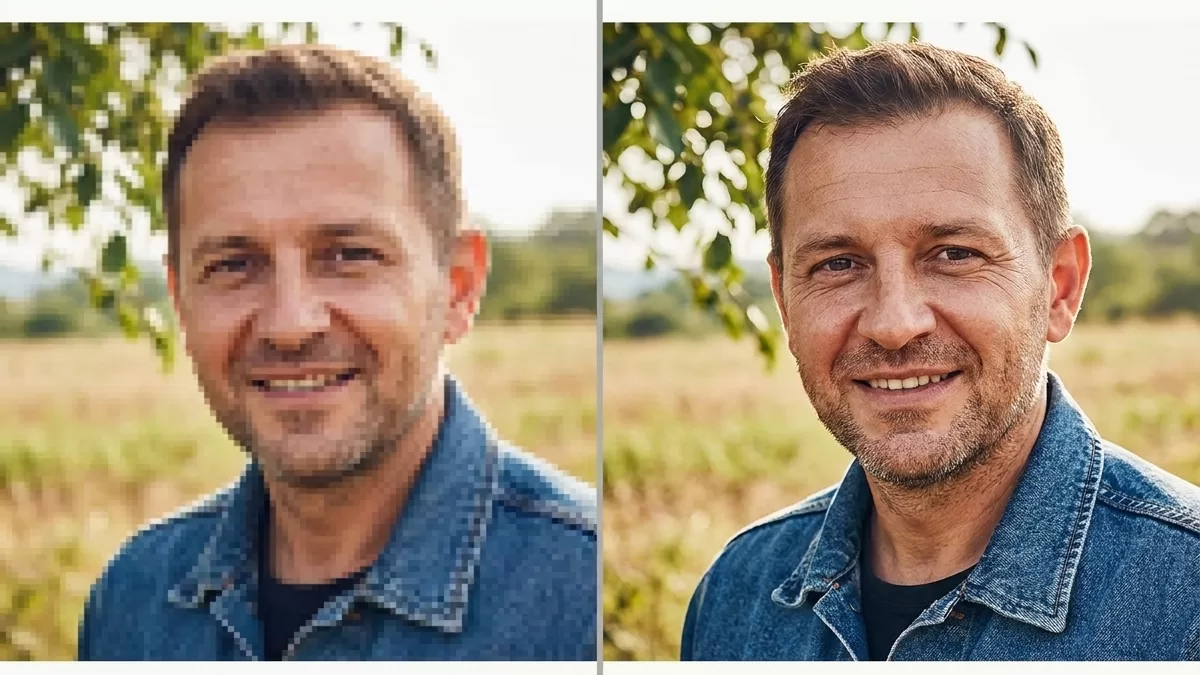
Blurry product shots kill sales. Fuzzy portraits ruin memories. Low-resolution images sink marketing campaigns before they even launch. Thankfully, artificial intelligence has finally solved a problem that plagued photographers for decades — how to enlarge an image without turning it into pixel soup. In 2026, the best AI image upscalers do far more than stretch pixels; they rebuild missing detail, restore skin texture, and rescue archival photos that once seemed beyond saving.
This guide breaks down the smartest tools, the newest upscaling techniques, and the real-world workflows that separate a professional finish from that dreaded “plastic AI look.” Whether you sell products online, shoot weddings, restore family archives, or design social content, you will find a tool matched to your budget and use case.
Struggling with soft product images even after upscaling? Our expert team can retouch, sharpen, and finish every shot — start a free trial today.
- What Is an AI Image Upscaler? A Plain-English Definition
- Best AI Image Upscalers 2026: Our Top Picks at a Glance
- 1. Magnific AI — The Creative Powerhouse
- 2. Topaz Gigapixel AI — The Photographer’s Gold Standard
- 3. Nano Banana Pro — Google’s Text-Rendering Champion
- 4. Crystal AI Upscaler — Underrated but Powerful
- 5. Let’s Enhance — The Best All-Rounder for Web and E-Commerce
- 6. Upscayl — The Best Free Open-Source AI Upscaler
- 7. Aiarty Image Enhancer — Best Value for Batch Work
- 8. Adobe Firefly & Super Resolution — Inside the Suite You Already Own
- 9. ON1 Resize AI 2026 — When Print Size Really Matters
- 10. Krea AI — Fast and Friendly for Creators
- Advanced AI Image Upscaling Techniques 2026
- AI Photo Enhancer Use Cases: Who Actually Needs This?
- Free vs. Paid AI Upscalers: Which Should You Choose?
- Common Mistakes to Avoid When Upscaling Photos
- How to Choose the Right AI Image Upscaler for You
- The Future of AI Upscaling: What to Expect in Late 2026 and Beyond
- Frequently Asked Questions (FAQ)
- Final Verdict: Which Upscaler Wins in 2026?
What Is an AI Image Upscaler? A Plain-English Definition
An AI image upscaler is a software tool that increases the resolution of a photo — typically 2x, 4x, 8x, or even 16x — by using a neural network to predict and paint in the missing pixels. Traditional resizing methods like bicubic interpolation simply spread existing pixels thinner, so edges blur and detail vanishes. Modern AI models, however, learn from millions of high-resolution and low-resolution image pairs, so they know what a sharp eyelash, a wool sweater fiber, or a brick wall texture should look like.
How AI Photo Enhancers Actually Work
Under the hood, modern AI image enhancers rely on three main architectures:
- GAN-based upscalers — Generative Adversarial Networks like Real-ESRGAN pit two neural networks against each other; one generates upscaled pixels and the other judges them. This approach produces sharp, natural-looking results and powers tools such as Upscayl and many open-source workflows.
- Diffusion-based upscalers — Diffusion models used by Magnific and Google’s Nano Banana Pro invent plausible new detail guided by the source image plus an optional text prompt. They shine on stylized art and 3D renders but can hallucinate faces if pushed too hard.
- Transformer-based upscalers — Newer Swin Transformer models (SwinIR and its successors) preserve global structure better than pure CNNs, which helps with architecture, text, and repeating patterns.
Why Resolution Matters More Than Ever in 2026
Screens keep getting sharper, print sizes keep growing, and social platforms keep compressing your uploads. If you want to understand exactly how much detail modern displays demand, this deep-dive on 4K resolution is worth a read. Meanwhile, marketplaces like Amazon and Shopify recommend at least 2000 pixels on the longest edge for zoom functionality — a threshold most smartphone photos still miss without an image resolution enhancer.
Best AI Image Upscalers 2026: Our Top Picks at a Glance
Here is our shortlist, ranked after testing dozens of tools across portraits, product shots, landscapes, AI art, and archival scans.
| Rank | Tool | Best For | Starting Price | Max Upscale |
|---|---|---|---|---|
| 1 | Magnific AI | AI art, creative reimagining | $20/mo (Premium) | 16x |
| 2 | Topaz Gigapixel AI | Photographers, RAW files, prints | $19/mo or $79/year | 6x |
| 3 | Nano Banana Pro (Google) | Text-heavy images, fidelity fixes | Included with Gemini | 2K native → 4K |
| 4 | Crystal AI Upscaler | Text rendering, affordability | Pay-per-use | 4x+ |
| 5 | Let’s Enhance | Web workflows, e-commerce | $9/mo (annual) | 16x |
| 6 | Upscayl | Free, open-source, privacy | Free | 16x |
| 7 | Aiarty Image Enhancer | Natural texture, batch jobs | $99 lifetime | 8x |
| 8 | Adobe Firefly / Super Resolution | RAW workflows in Lightroom | Creative Cloud | 4x |
| 9 | ON1 Resize AI 2026 | Large-format printing | ~$70 one-time | 10x+ |
| 10 | Krea AI | Speed, affordability, AI creators | $10/mo (Basic) | 8x |
1. Magnific AI — The Creative Powerhouse
Why It Tops Most Reviewer Lists
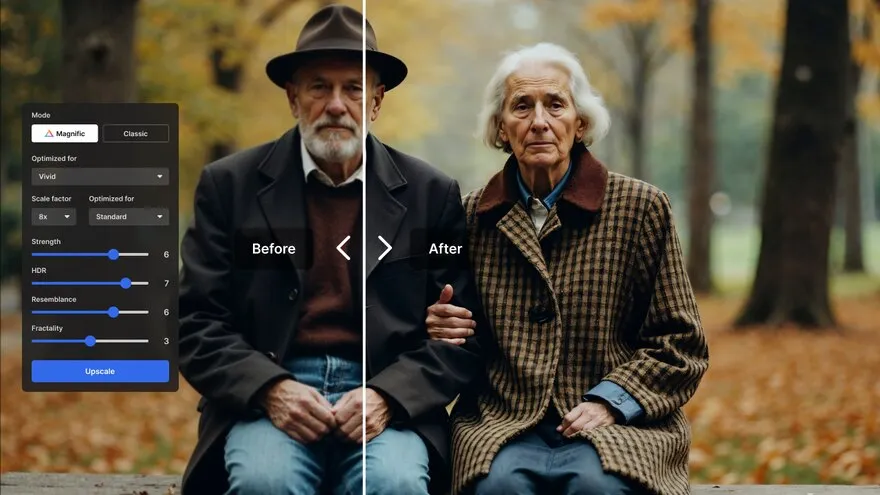
Magnific delivers what many consider the most jaw-dropping upscaling results available. It reads your source, generates fresh detail through diffusion, and lets you dial in “creativity” — the amount of new information the AI is allowed to invent. Push the slider up and dull hair becomes strand-by-strand realistic; pull it down and you get a faithful, cleaner version of the original.
Strengths
- Best-in-class detail invention for portraits, landscapes, and AI art
- Precision Upscaler mode preserves the original composition tightly
- Excellent for concept artists, marketing creatives, and 3D render finishing
Weaknesses
- Cloud-only, so batch jobs can burn credits fast
- Occasional skin-texture artifacts on close-up faces
- Premium starts at $20/month, but the popular Pro tier is $39/month
Magnific works best when you want the AI to add plausible new detail — for example, sharpening a distant background or rescuing a heavily compressed JPEG. If you need documentary accuracy instead, Gigapixel is the smarter pick.
2. Topaz Gigapixel AI — The Photographer’s Gold Standard
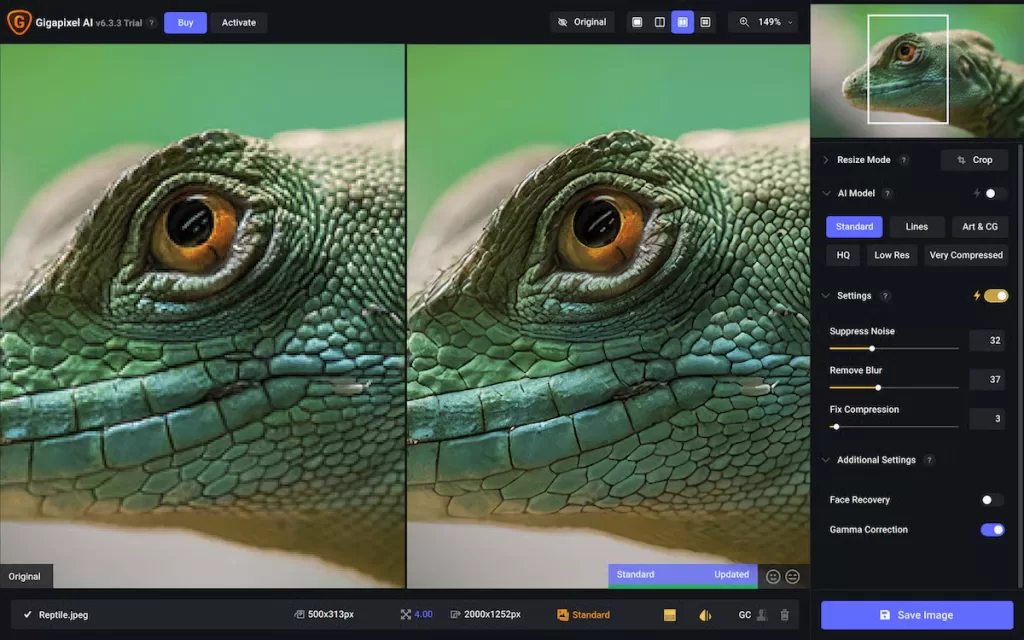
Built for RAW Files and Museum-Grade Prints
Topaz Gigapixel AI runs locally on Windows and macOS, taking full advantage of your GPU — so there are no upload limits and no privacy concerns. Its “Wonder,” “Standard V2,” and “High Fidelity V2” models let you match the algorithm to the subject, whether that is a wedding portrait, an aerial photograph, or an old family scan.
Key advantages of Gigapixel:
- Handles TIFF, DNG, and full-resolution RAW files up to 6x
- Photoshop and Lightroom plugin integration for seamless workflows
- Face Recovery module rebuilds soft eyes and skin without waxy artifacts
- Local processing keeps client work off third-party servers
One important 2026 update: Topaz retired its perpetual license in September 2025 and moved fully to a subscription model. Gigapixel now starts at roughly $19/month or $79/year, while the all-app Topaz Studio bundle costs about $399/year. If subscriptions are a deal-breaker, look toward Aiarty or ON1 for one-time pricing.
Photographers preparing large prints — for example a canvas or metal print at 16×20 dimensions — will appreciate Gigapixel’s ability to hold detail even at 4x enlargement.
Upscaled a portrait but the skin still looks off? Let our professional photo retouching team polish pores, hair, and shadows to magazine standard.
3. Nano Banana Pro — Google’s Text-Rendering Champion
Google’s Nano Banana Pro, launched inside Gemini, arrived quietly in late 2025 and quickly stunned reviewers. It fixes long-standing AI weaknesses like garbled text, incorrect anatomy, and inconsistent identities across generations. Its upscaling module renders natively at 2K resolution and intelligently upsamples to 4K using a 16-bit color pipeline, which delivers richer gradients and reduces the banding that plagues many competitors.
What Nano Banana Pro does well:
- Correctly renders legible text baked directly into the image — essential for posters, packaging, and menus
- Restores old photographs with realistic film-grain preservation
- Fixes fidelity issues left over from other AI generators
- Ships with 16-bit color for smoother sky gradients and softer skin transitions
Where it falls short:
- Not a dedicated upscaler; it is part of a broader multimodal image model
- Currently caps at 4K output
- Occasionally over-processes sources that are already sharp
4. Crystal AI Upscaler — Underrated but Powerful
Crystal is the surprise on almost every 2026 shortlist. Hosted on Replicate, it uses a diffusion-based approach fine-tuned on typographic and structural detail. Independent reviewers highlight that it is “exceptional with text” — the killer feature if you upscale movie posters, book covers, or e-commerce banners.
Highlights:
- Sharp text reconstruction without character distortion
- Preserves source composition tightly, so hallucinations stay rare
- Affordable pay-per-use pricing on Replicate
Trade-offs:
- Web UI feels clunky, especially for beginners
- Processes only a single image at a time
- Lacks a native batch pipeline for large e-commerce catalogs
5. Let’s Enhance — The Best All-Rounder for Web and E-Commerce
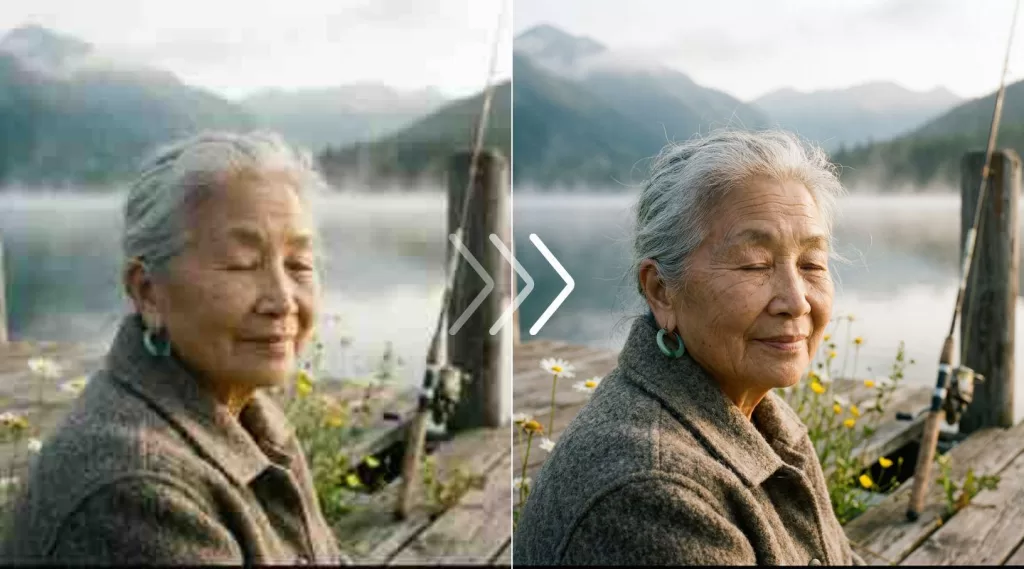
Let’s Enhance is a browser-based image resolution enhancer with dedicated models for photos, product shots, AI art, illustrations, and old scans. Because it is cloud-native, you skip the software install and skip the GPU headaches. Marketing teams love its 300+ DPI print presets and consistent output for large-format campaigns up to 512 megapixels.
Ideal for:
- Shopify, Amazon, and Etsy sellers batch-processing catalogs
- Marketing teams needing quick, consistent 4K uploads
- Restoring scanned prints and legacy photography
Pricing starts at just $9/month on the annual plan (or $12/month billed monthly), which makes it one of the most accessible paid tools on the list. If you are comparing storage needs for those upscaled batches, check the typical storage capacity of common memory cards.
6. Upscayl — The Best Free Open-Source AI Upscaler
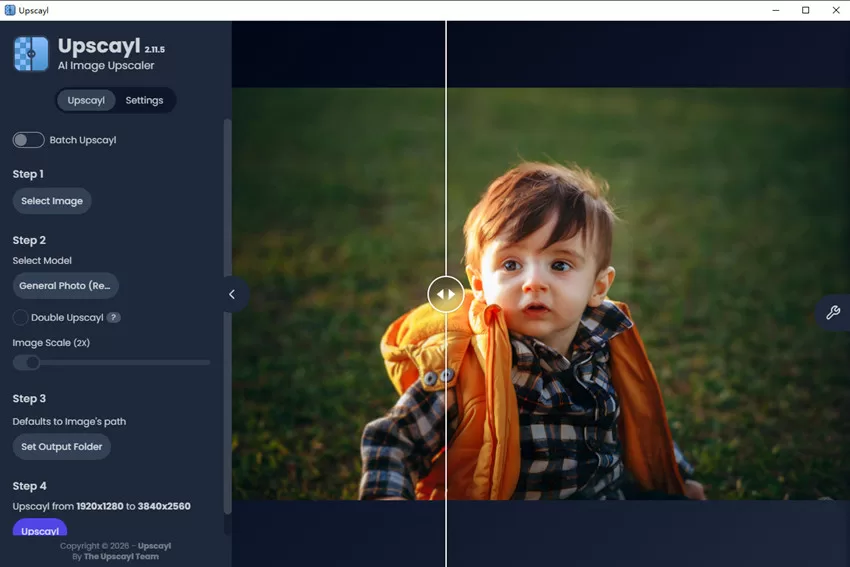
100% Free, 100% Local, Zero Privacy Concerns
Upscayl runs on Windows, macOS, and Linux, uses the Real-ESRGAN model family, and never sends your images to a server. That last point matters enormously if you handle client work, medical imagery, or NDA-protected product prototypes. You can download the desktop app straight from upscayl.org.
What Upscayl brings to the table:
- Completely free forever — no watermarks, no credits, no upsells
- Custom model support for anime, photorealism, and text
- Batch processing on the desktop
- Actively maintained on GitHub with community model additions
Trade-offs:
- Requires a decent GPU for reasonable speed
- Interface is functional rather than beautiful
- Cannot quite match Magnific or Gigapixel on the toughest sources
For hobbyists, students, and privacy-focused pros, Upscayl remains untouchable in 2026.
7. Aiarty Image Enhancer — Best Value for Batch Work
Aiarty flew under the radar until independent testers crowned it a “plastic-look-free” winner. It relies on GAN-based models tuned specifically to preserve natural skin, hair, and fabric texture, and its one-time pricing appeals to freelancers who resent subscription creep.
Perfect if you:
- Enhance mixed folders of real photos and AI art
- Want a natural, photographic look without the “waxy” over-processing
- Prefer offline processing on Windows and macOS
- Need denoising, deblurring, and colorization inside a single interface
Aiarty currently offers a lifetime license at $99 (regular price around $155), which makes it one of the most photographer-friendly tools for anyone tired of monthly bills.
Selling on Etsy, Amazon, or Shopify? Get pixel-clean cutouts with our fast, human-checked background removal service — perfect after upscaling.
8. Adobe Firefly & Super Resolution — Inside the Suite You Already Own
If you already pay for Creative Cloud, you already own two upscalers hiding inside Lightroom and Photoshop. Enhance → Super Resolution doubles linear resolution on RAW files with excellent color accuracy. The newer Firefly Upscaler layers diffusion-based creativity onto JPEGs and PNGs.
Why it still deserves a spot:
- Zero additional cost for Creative Cloud subscribers
- Non-destructive workflow inside Camera Raw and Bridge
- Integrates directly with your existing retouching pipeline
Just know that Firefly’s texture rendering still trails Magnific and Gigapixel on the hardest sources, and render times can drag on older Macs.
9. ON1 Resize AI 2026 — When Print Size Really Matters
ON1 tackles the exact problem gallery photographers face: enlarging a 24-megapixel file to a 60-inch canvas without visible artifacts. It handles paper-size presets, tiled printing, output sharpening, and margin management natively. If you sell prints, ON1 helps you deliver files a lab will not reject.
- One-time price starting around $70 (frequently discounted)
- Plugin support for Photoshop, Lightroom Classic, and Capture One
- Best-in-class geometry preservation on architectural shots
- New 2026 models rebuild noisy and cropped originals more aggressively
10. Krea AI — Fast and Friendly for Creators
Krea trades absolute maximum quality for speed and accessibility. Its generative canvas approach makes it a natural companion tool for anyone already producing AI images. Upscales that used to take minutes on other platforms finish in seconds on Krea, and pricing stays friendly to indie creators.
- Basic plan around $10/month with generous compute units
- Pro plan around $35/month unlocks higher-resolution enhancement
- Free tier lets you sample the workflow before paying
Removing complex hair, fur, or lace edges from apparel photos? Our image masking service delivers pixel-perfect cutouts every time.
Advanced AI Image Upscaling Techniques 2026
Beyond simply clicking “Enhance,” professionals coax dramatically better results by combining several advanced tactics. Here are the workflows every serious photographer, retoucher, and e-commerce team should know in 2026.
1. Tile-Based Upscaling for Massive Resolutions
When you need to enlarge beyond 4x — say, printing a mural or upscaling a group photo past 100 megapixels — modern tools split the image into overlapping tiles, upscale each tile independently, then feather them back together. This is how Magnific and Topaz handle billboard-scale output without running out of GPU memory.
2. Prompt-Guided Diffusion Upscaling
New diffusion models accept a text prompt alongside the image. Feeding a prompt like “sharp portrait, natural skin texture, film grain, studio lighting” tells the model what kind of detail to invent. This dramatically reduces hallucinated artifacts on faces and hands.
3. Multi-Pass Upscaling With Denoising
Instead of one aggressive 4x pass, savvy retouchers do 2x → denoise → 2x. This approach:
- Removes JPEG artifacts before the second enlargement
- Prevents the AI from amplifying noise into fake texture
- Produces cleaner results on old smartphone photos and social-media downloads
4. Face and Detail Recovery Modules
Tools like Gigapixel Face Recovery, GFPGAN, and CodeFormer specifically train on face datasets. Turn them on for portrait work and off for landscapes — otherwise a distant tourist may end up wearing someone else’s facial features.
5. Model Blending in Upscayl
Upscayl now supports custom .pth models. You can mix Real-ESRGAN General for photos with a specialty anime model for illustrated content, all inside one batch. Community-maintained repositories on GitHub share dozens of niche models covering everything from film scans to game textures.
6. Hybrid Retouching Workflow
The most professional workflow blends automation with human polish:
- Upscale with Gigapixel or Magnific
- Remove color casts and blemishes in Photoshop
- Hand-check hair, jewelry, and product edges
- Export at the final print or web resolution
For product photography, this last step of human refinement is exactly where outsourced retouching pays for itself — especially on jewelry, apparel, and cosmetics.
Selling fine jewelry? Even a 16K upscale cannot fix a bad edge — our jewelry photo editing & retouching team perfects every facet.
AI Photo Enhancer Use Cases: Who Actually Needs This?
E-Commerce Sellers and Amazon FBA Brands
Marketplace zoom functionality demands 2000+ pixel images. If you shoot with a mid-range mirrorless (see the best picks in this mirrorless camera guide), your files often lack the resolution for zoomed lifestyle shots. Upscalers close that gap in seconds.
Photographers Restoring Archival Work
Wedding albums from the 90s, corporate portraits from film scans, or newspaper archives all suffer from age, dust, and low-resolution originals. AI image restorers can pull startling detail out of pictures scanned at just 1500 pixels wide.
Real Estate and Architectural Marketers
Wide-angle interiors printed at billboard sizes need every extra pixel. Combining a good aspect ratio crop with a 4x upscale gives real-estate teams flyer- and hoarding-ready art without booking another shoot.
Social-Media Creators and Content Marketers
Instagram, TikTok, and Pinterest all downsize uploads aggressively. Starting from an upscaled master file survives that compression better and delivers sharper thumbnails even at small display sizes. If moving image is more your lane, this budget camcorder round-up is a helpful companion read.
Fine-Art Printers and Gallery Photographers
Large-format printing at 300 DPI on a 40-inch canvas requires roughly 12,000 pixels on the long edge — well beyond most cameras’ native resolution. AI upscaling has become the industry-standard bridge between capture and canvas.
AI Artists and Concept Designers
Nearly every diffusion model outputs at 1024×1024 or 2048×2048 as its base. Magnific, Krea, and Nano Banana Pro finish those images at print-ready sizes without losing the intended look.
Free vs. Paid AI Upscalers: Which Should You Choose?
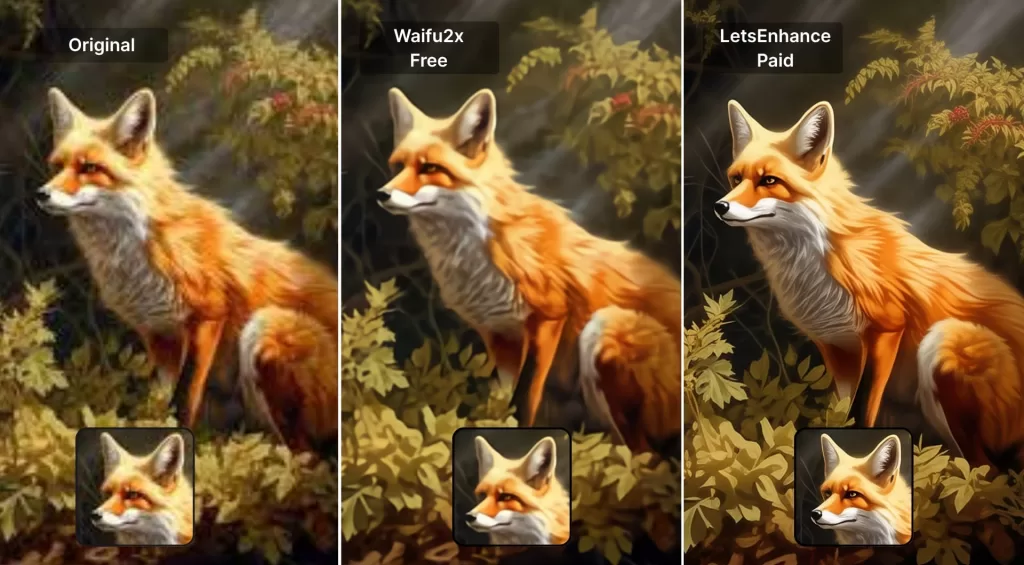
Free upscalers have improved enormously, but they still trail paid tools in three specific areas.
- Model quality — Paid tools use larger, newer architectures trained on richer datasets.
- Batch and API access — Free tools rarely support catalog-scale automation.
- Output ceilings — Most free tiers cap resolution at 4x or 4K.
When Free Is Enough
- One-off social posts
- Personal restoration of family photos
- Wallpaper or desktop image upgrades
- Anime and line-art work, where Waifu2x and Upscayl excel
When You Should Pay
- Client work with tight delivery deadlines
- Print production above A3 size
- E-commerce catalogs with hundreds of SKUs
- Portraits, jewelry, or cosmetics that will face buyer scrutiny
Common Mistakes to Avoid When Upscaling Photos
Even the smartest AI produces bad output if you feed it the wrong input. Watch for these traps:
- Feeding heavily compressed JPEGs. Compression artifacts get amplified. Always start from the highest-quality source you have.
- Ignoring model choice. Using a “photo” model on anime, or vice versa, produces obvious mismatches — match model to content type.
- Over-upscaling. 16x sounds cool, but 2x or 4x almost always looks more natural, especially for print.
- Skipping color management. Enlarge first, correct color and contrast second — some tools shift skin tones during enhancement.
- Trusting output on faces without a manual check. Zoom in to 100% on eyes, teeth, and hairlines, and fix anything that looks off in Photoshop.
- Forgetting file sizes. Upscaled files can balloon past 100 MB, so understand the basics of file sizes before uploading to slow servers.
How to Choose the Right AI Image Upscaler for You
Consider these five decisive factors:
- Volume — One image a month? A free tool wins. Hundreds a day? Invest in Let’s Enhance or Topaz.
- Content type — Photos favor Gigapixel; AI art favors Magnific; text favors Crystal or Nano Banana Pro.
- Privacy — NDA-covered work belongs in Upscayl or Gigapixel, both of which process locally.
- Output size — Billboard prints demand Topaz or ON1; social posts run fine on almost anything.
- Budget — Subscription-averse buyers pick Aiarty or ON1; SaaS-comfortable users pick Let’s Enhance or Magnific.
Need clean edges around every product image? Our clipping path specialists deliver sharp, hand-drawn paths in as little as 6 hours.
The Future of AI Upscaling: What to Expect in Late 2026 and Beyond
The pace of research is staggering. Three trends are already clear.
- Real-time video upscaling — Models like Real-ESRGAN-Video and NVIDIA’s DLSS-inspired photo tools are moving toward interactive speeds.
- Prompt-native workflows — Every major photo editor will soon accept natural-language upscaling instructions such as “keep the skin texture but sharpen the eyes.”
- On-device intelligence — Apple’s Neural Engine and Qualcomm’s Hexagon NPUs already run mid-tier upscalers directly on phones, eliminating the cloud round-trip.
Legacy interpolation methods are effectively obsolete. Microsoft, Adobe, and Google now bake super-resolution into their consumer OS-level image viewers.
Frequently Asked Questions (FAQ)
1. What is the best AI image upscaler in 2026?
For most professional photographers, Topaz Gigapixel AI remains the gold standard thanks to local processing, RAW support, and mature editing plugins. For AI art and creative reimagining, Magnific AI wins. And, for the strongest free option, Upscayl takes the crown.
2. Can AI really add detail that was not in the original photo?
Yes, but with a caveat. Diffusion-based models like Magnific invent plausible new detail based on their training data. GAN-based models like Real-ESRGAN reconstruct likely detail from patterns learned during training. Neither actually “sees” what your camera missed, so critical work such as forensic evidence should never rely on invented detail.
3. Will an AI upscaler fix a blurry, out-of-focus photo?
Partially. Modern upscalers include deblur and denoise modules that help mild blur, but they cannot recover information that was never captured. Motion blur across the whole frame is usually unrecoverable.
4. How large can I upscale an image?
Most tools cap output at 4x–16x. Beyond that, results become soft or clearly hallucinated. For extreme print work, tile-based upscaling can push resolutions past 100 megapixels while keeping detail believable.
5. Is upscaling safe for professional client work?
Yes — with disclosure where it matters. For editorial, journalistic, or forensic contexts, always disclose AI enhancement. For commercial, product, and creative work, upscaling is standard practice today.
6. Do I need a powerful computer to run AI upscalers?
Cloud tools like Magnific, Let’s Enhance, Nano Banana Pro, and Crystal run on their servers, so any laptop works. Local tools like Topaz, Upscayl, and Aiarty benefit from a dedicated GPU with at least 6–8 GB of VRAM for reasonable speed.
7. Which AI upscaler is best for e-commerce product photography?
Let’s Enhance wins for batch web catalogs, Topaz Gigapixel wins for premium print catalogs, and Aiarty wins for a balance of price and natural texture. Pair any of them with human-quality retouching to hit marketplace standards.
8. Are AI-upscaled images copyright-safe?
If you own the source image, the upscaled version inherits those rights. The AI does not create a “new” work in a copyright sense — it enhances yours. Even so, always check each tool’s terms of service, especially for cloud-based options that train on user uploads.
Final Verdict: Which Upscaler Wins in 2026?
There is no single “best AI image upscaler” for everyone — but there is one for you. Photographers who need documentary accuracy and offline privacy should stick with Topaz Gigapixel AI. Creators chasing jaw-dropping, hyper-detailed art belong with Magnific. Budget-conscious hobbyists get incredible results from Upscayl without spending a rupee, dollar, or euro. E-commerce teams and marketing agencies gain the most from Let’s Enhance and its batch-friendly cloud pipeline. Anyone allergic to subscriptions should look hard at Aiarty and ON1 Resize AI 2026 for their lifetime pricing.
Whichever tool you choose, remember that upscaling is only one step in a larger workflow. Sharp edges, clean backgrounds, natural shadows, and consistent color still separate an amateur upload from a professional listing. That is where a skilled retouching partner makes the final, revenue-shifting difference.
Ready to turn upscaled images into store-ready assets? Book a free trial of our multi clipping path service and get precise cutouts, shadows, and color work done overnight.