

Best Travel Camera 2026: Compact, Mirrorless & Zoom Picks for Every Trip
October 14, 2026
Professional Clipping Path: A Complete Guide for Clean, High-Quality Images
October 15, 2026
- TL;DR: The Short Answer
- What Is Photojournalism Editing, Exactly?
- The Three-Question Ethics Test
- What the Major News Organizations Allow (and Forbid)
- The Gray Areas: Where Good Photographers Get Caught
- The Ethical Editing Workflow, Step by Step
- Captioning and IPTC Metadata: Half the Job
- AI, Content Credentials, and the 2026 Rules
- The Famous Cases That Wrote the Rules
- 5 Mistakes That End News Careers
- Frequently Asked Questions
- Final Verdict
TL;DR: The Short Answer
Photojournalism editing is the post-processing of news and documentary photographs under a strict ethical rule: you may improve the presentation of a moment, but never change its content. The Associated Press, Reuters, AFP, and the NPPA all allow cropping, exposure and contrast correction, white balance, gentle dodging and burning, sensor-dust removal, black-and-white conversion, and light sharpening — as long as those edits stay minimal and restore the authentic scene. They forbid adding, removing, or moving any element; compositing frames; sky replacement; liquify; digitally blurring or eliminating backgrounds; heavy color grading; and any AI generative fill or synthetic content. The standard workflow is: back up RAW, cull, write IPTC captions before editing, adjust globally and non-destructively in Lightroom, keep a consistent tone across the story, export as sRGB JPEG, and preserve the original RAW as forensic evidence. World Press Photo 2026 automatically disqualifies any AI-generated or generatively filled image, and C2PA Content Credentials are becoming the industry’s proof of authenticity. This guide walks the allowed edits, the three-question ethics test, the full workflow, the AI rules, and the famous cases that wrote the rules.
What Is Photojournalism Editing, Exactly?
Photojournalism editing is not the same as commercial or Instagram retouching. A product photographer can remove a scratch, swap a background, and reshape a label — a news photographer cannot. In journalism, the photograph is evidence, and every pixel you touch is a potential lie. The NPPA Code of Ethics puts it simply: do not manipulate images in any way that can mislead viewers or misrepresent subjects. AFP goes further, calling image doctoring a firing offense rather than a guideline — its editorial standards state that photo and TV journalists “must not doctor images or videos and must not tamper with or alter subject matter.” Reuters tells its journalists not to alter still images “beyond the methods normally used to prepare content for editorial use.”
So the job of editing in news work is narrow: make a real moment look like itself, only clearer. That means correcting the technical failures of the camera — underexposure, mixed white balance, sensor dust — and never touching the content of the scene. Our what is photo manipulation guide draws the full line between enhancement and fabrication.
The Three-Question Ethics Test
Before you move any slider, ask three questions. If any answer is yes, stop.
- Does this add, remove, or move information? Cloning out a bystander removes information. Compositing two frames adds information. Moving a sign with Content-Aware Move relocates information. All three are manipulation.
- Does this change what the viewer understands happened? Heavy dodging that makes a protester look menacing, or saturation that makes a fire look bigger, changes meaning even though no pixel was added.
- Would this survive a RAW comparison? Contest juries and fact-checkers compare published JPEGs against the original RAW. If the difference is obvious, you lose the award or the job. In 2015, about 20% of World Press Photo finalists were eliminated this way.
This test is the entire discipline. Everything below — sliders, workflow, metadata — exists to help you pass it.
What the Major News Organizations Allow (and Forbid)
| Edit | AP | Reuters | NPPA | World Press Photo 2026 |
|---|---|---|---|---|
| Cropping | ✅ | ✅ | ✅ | ✅ |
| Exposure / contrast / toning | ✅ minimal | ✅ normal prep | ✅ | ✅ |
| White balance / color | ✅ normal | ✅ | ✅ | ✅ |
| Dodging & burning | ✅ | ✅ | ✅ | ✅ |
| Dust / scratch removal | ✅ | ✅ | ✅ | ✅ |
| Black & white conversion | ✅ | ✅ | ✅ | ✅ |
| Sharpening / noise reduction | ✅ light | ✅ | ✅ | ✅ AI-enhanced only if no info added/removed |
| Cloning / healing content | ❌ | ❌ | ❌ | ❌ auto-DQ |
| Compositing / multiple frames | ❌ | ❌ | ❌ | ❌ auto-DQ |
| Sky replacement / background blur | ❌ explicitly | ❌ | ❌ | ❌ |
| AI generative fill / synthetic | ❌ (22026 ban) | ❌ (2023 ban) | ❌ | ❌ auto-DQ |
| HDR / focus stacking | — | — | — | ❌ (smartphone standard mode only) |
The Associated Press spells out the allowed list in its News Values and Principles: cropping, dodging and burning, grayscale conversion, elimination of dust on the sensor and scratches on scanned negatives, and normal toning and color adjustments — limited to the minimum needed for clear and accurate reproduction. It explicitly adds that changes in density, contrast, color, and saturation that substantially alter the original scene are not acceptable, and that backgrounds must not be digitally blurred or eliminated. AP’s 2026 updated AI standards reaffirm a total ban on generative AI to create, alter, or enhance news photography. Reuters banned all AI-generated or AI-altered imagery for news reporting in 2023. World Press Photo’s 2026 verification rules state that any synthetic image or use of generative fill automatically disqualifies an entry, while AI-powered enhancement tools are allowed only if they do not introduce new information or remove captured information.
For the sharpening and noise-reduction half of the allowed list, our how to sharpen an image guide gives safe Amount/Radius settings that will never read as manipulation.
Want your images to look professionally edited, not over-processed?
Achieve natural, high-end perfection with our skilled Photo Retouching Service
The Gray Areas: Where Good Photographers Get Caught
A few edits are technically allowed but ethically dangerous. Treat them with caution.
Dodging and burning is a darkroom tradition and is allowed, but it becomes manipulation when it changes the emotional or factual reading of a scene. Darkening a subject’s face until they look threatening, or brightening a victim’s injuries until they look worse than they were, crosses the line. Keep it subtle and content-neutral.
Color is the slipperiest slope. Correcting a tungsten cast is fine. Pushing the vibrance until a protest looks apocalyptic is not. Colors are facts — a red flag, a blue helmet, a green uniform identify things. Never change a color that identifies someone or something. Our color grading guide is built for commercial work; in news, apply maybe 10% of that intensity.
Black and white is allowed, but convert the whole frame and keep every photo in the story the same treatment. Mixing color and B&W in one essay confuses readers about what is real. Never selectively desaturate.
HDR and stacking are where many smartphone shooters trip. World Press Photo 2026 permits smartphone photos only when captured in standard shooting mode — HDR, portrait mode, creative lighting, and panorama modes are not allowed. Our what is HDR guide explains why stacking merges multiple exposures and effectively adds information the camera did not capture in one moment.
Cropping is allowed, but a tight crop can remove context — a lone protester versus a protester surrounded by police are different stories. If cropping changes what the viewer understands, crop less. Our composition photography principles apply, but in news, context always wins over a prettier frame.
Want to enhance colors and contrast without losing realism?
Trust our experts to perfect your images with our Photo Retouching Service
The Ethical Editing Workflow, Step by Step
Professional news photographers follow a consistent editing workflow to prevent accidental manipulation and preserve the authenticity of every photograph.
1. Ingest and Back Up RAW Files
Copy RAW files to two separate drives immediately after transferring them from the camera. The original RAW file serves as evidence if an editor or fact-checker needs to verify the published image.
Never edit the original file. Instead, work on a copy or use a virtual copy in Lightroom to preserve the untouched original.
2. Cull and Select Photographs Before Editing
Review the photographs, flag rejects, select the strongest frames, and mark the final images before making adjustments.
Photo selection is itself an editorial decision. Choosing only the most dramatic frame when it misrepresents an event can distort the story. Select photographs that represent what happened accurately, rather than simply choosing the most visually striking images.
3. Write Accurate Captions and IPTC Metadata
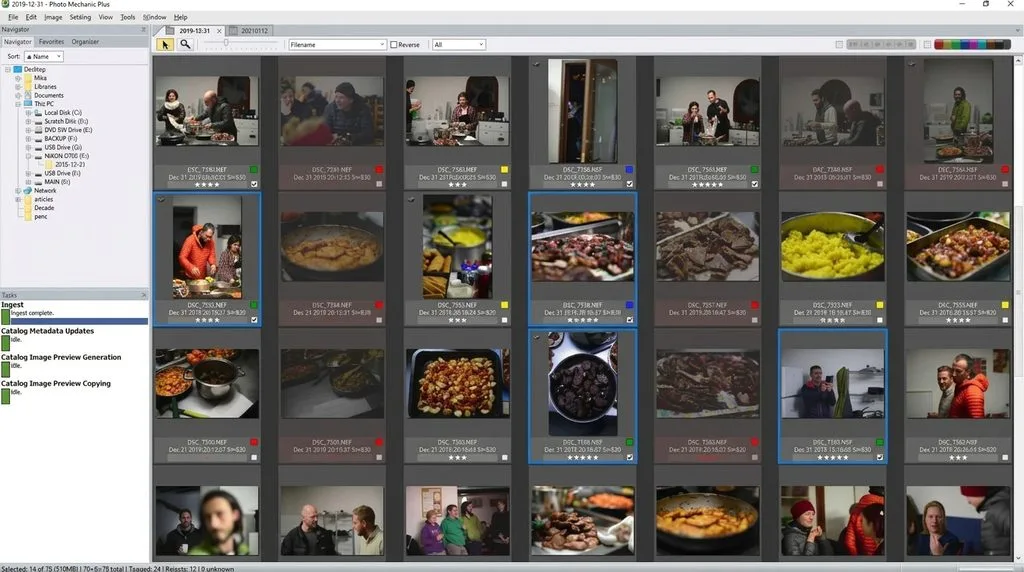
Before adjusting the image, document who, what, where, when, and why. Use Photo Mechanic’s IPTC Stationery Pad or Lightroom’s Metadata panel to enter the relevant information.
Include the following metadata:
- Caption: Who is pictured, what is happening, where and when it occurred, and why it matters.
- Credit line: The photographer’s name and agency.
- Copyright: The copyright holder’s name and year.
- Keywords: Relevant terms for searching and organizing the image archive.
Write captions using your reporting notes rather than relying on memory. Double-check names, dates, and locations because inaccurate captions can mislead readers even when the photograph itself is authentic.
4. Make Minimal, Non-Destructive Global Adjustments
Use Lightroom’s Develop module to edit the RAW file without permanently altering the original. Keep adjustments limited to what is necessary for clear and accurate reproduction.
Which adjustments are acceptable?
Depending on the publication’s editorial standards, these may include:
- Exposure and contrast correction
- White balance adjustments
- Highlight and shadow recovery
- Light sharpening and noise reduction
- Subtle, content-neutral tonal adjustments
Apply a consistent baseline across photographs from the same story. Avoid heavy presets, cinematic LUTs, or dramatic color grading that could change the viewer’s interpretation of an event.
5. Remove Sensor Dust Only
Use Lightroom’s Spot Removal tool only for legitimate technical imperfections, such as dust spots caused by the camera sensor.
Never remove people, objects, or other elements that were present in the scene. If you cannot confidently determine whether a mark is sensor dust or part of the actual scene, leave it untouched.
6. Export Photographs as sRGB JPEGs
Export the approved photographs as JPEG files using the sRGB color space, following the publication’s technical requirements.
Check the required image dimensions and compression settings. Some publications may request a long edge of around 2,000 pixels and JPEG quality between 80 and 90, but always follow the recipient’s specifications.
Use clear, descriptive filenames and retain the original RAW files. Never overwrite the originals with edited exports.
7. Archive RAW Files, Final Images, and Captions
Preserve the original RAW files, selected photographs, final exports, and accompanying captions in an organized archive.
Keeping these records allows editors and fact-checkers to review the image’s history and verify its authenticity when questions arise later.
For a broader overview of professional post-production practices, see our photo editing guide.
Captioning and IPTC Metadata: Half the Job
A news photo is half image, half caption. The IPTC standard fields are:
- Caption/Description: Who is doing what, where, when, and why. Include quotes when they matter.
- Credit Line: Photographer name and agency.
- Copyright: Your name and year.
- Keywords: Searchable archive terms.
- Date and location: Accurate to the day and place.
Apply metadata during ingest so it never gets lost. Some agencies require specific credit-line or transmission-reference fields — apply those per-destination before sending. For commercial work where metadata and consistency matter just as much, our how photographers lose clients because of inconsistent editing post explains why a uniform look protects your reputation in any genre.
AI, Content Credentials, and the 2026 Rules
AI is the biggest shift in photojournalism since Photoshop, and the rules are now explicit.
- World Press Photo 2026: No synthetic or artificially generated images, no generative fill in post-production — automatic disqualification. AI enhancement (denoise, sharpen) is allowed only if it adds no new information and removes no captured information. Smartphone photos must be shot in standard mode only.
- EU AI Act Article 50 (effective August 2, 2026) requires machine-readable transparency markers on AI-generated media, with penalties up to €15 million.
- C2PA Content Credentials, the open standard from the Coalition for Content Provenance and Authenticity, embed a cryptographically signed manifest in the file recording who created it, when, with what device, what edits were made, and whether AI was used. Photojournalists increasingly attach them to real photos to prove they are not deepfakes — the credential proves authenticity and discloses AI in the same file. The C2PA specification explainer and the Content Authenticity Initiative publish the standard.
Practical rule: if you use any AI-assisted tool — even AI denoise — tell your editor. When in doubt, do it manually. In 2026, disclosure is no longer optional; it is the cost of doing business.
The Famous Cases That Wrote the Rules
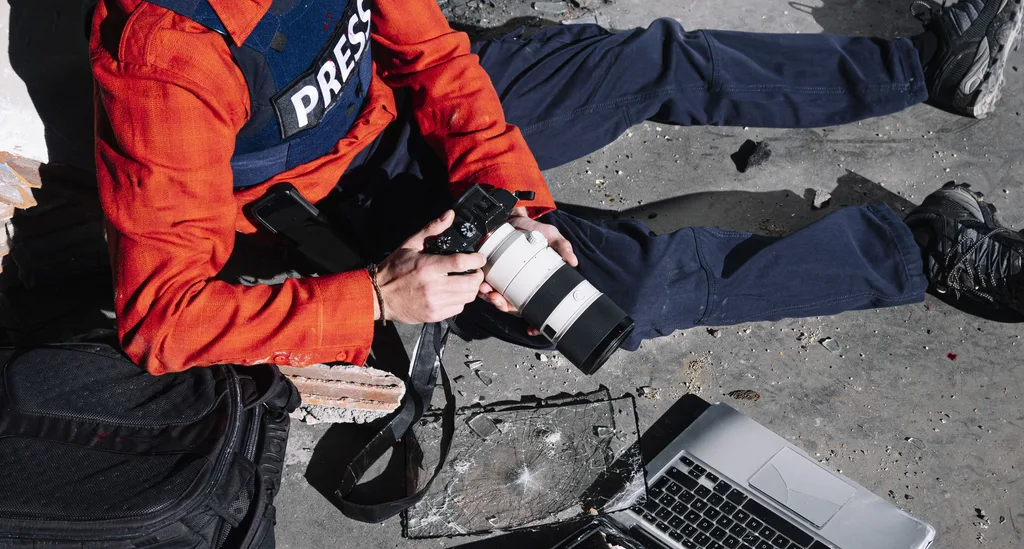
Every photo editor knows these names. Each crossed a line that felt small.
- Brian Walski (Los Angeles Times, 2003): Combined two Iraq photographs into one to improve composition. Fired immediately after editors spotted a duplicated figure.
- Adnan Hajj (Reuters, 2006): Cloned and exaggerated Beirut smoke plumes. Reuters pulled all 920 of his photos from its archive.
- Allan Detrich (Toledo Blade, 2007): Cloned out another photographer’s legs from behind a fence. Resigned; the paper re-examined two years of his work.
- Stepan Rudik (World Press Photo, 2010): Cloned out a bystander’s foot. Stripped of his prize; established that removing any element — however trivial — is falsification.
- Narciso Contreras (AP, 2014): Cloned out a video camera from a Syrian war photo corner. Fired; AP withdrew his work.
- Paul Hansen (World Press Photo 2012 Photo of the Year): Accused of over-toning a Gaza funeral image. Forensically investigated and cleared — his dodging and burning changed presentation, not content. The case marks the outer limit of acceptable toning.
Want to keep your image editing costs low without sacrificing quality?
Enjoy premium, hand-drawn Clipping Path services starting at just 30¢ per image.
5 Mistakes That End News Careers
- Cloning out a “distracting” object. In a news photo, there is no such thing as distracting content — only what was there.
- Heavy selective dodging and burning that changes a subject’s expression or the scene’s mood.
- Over-saturating or color-grading until a real event looks cinematic.
- A wrong or missing caption — misspelled names, wrong dates, missing context.
- Altering or deleting the RAW file. Without it, you you cannot prove you did not manipulate.
Frequently Asked Questions
What edits are allowed in photojournalism?
Cropping, exposure, contrast, white balance, highlight and shadow recovery, gentle dodging and burning, sensor-dust and scan-scratch removal, black-and-white conversion, light sharpening, and noise reduction — all applied minimally and globally, without changing the content or meaning of the scene.
What is forbidden in photojournalism editing?
Adding, removing, or moving any element; compositing multiple frames; sky replacement; digitally blurring or eliminating backgrounds; liquify; heavy selective color grading that misrepresents; HDR or focus stacking; and any AI generative fill or synthetic content. Any of these can get a photographer fired or disqualified.
Can you clone out a person in a news photo?
No. Even a bystander in the background counts as manipulation. Stepan Rudik lost a World Press Photo award for cloning out a single foot. If an element bothers you, crop around it or leave it.
Can photojournalists use Photoshop or Lightroom?
Yes, but only for global adjustments and cropping — never cloning, compositing, or generative fill. Most news photographers use Lightroom because its non-destructive, global-adjustment workflow makes accidental manipulation much harder. AP requires edit-logging in Lightroom for accountability.
Can you use AI to edit news photos in 2026?
AP and Reuters ban generative AI for news photography entirely. World Press Photo 2026 disqualifies any AI-generated or generatively filled image. AI enhancement tools (denoise, sharpen) are allowed only if they add or remove no information. Always disclose any AI use to your editor. The EU AI Act requires provenance labels on AI media.
Why is the RAW file important?
The unedited RAW is forensic evidence. Editors, fact-checkers, and contest juries compare published JPEGs against RAW files. In 2015, about 20% of World Press Photo finalists were eliminated this way. Never alter or delete the original RAW.
Is dodging and burning allowed?
Yes, within limits. It is a darkroom standard. It becomes manipulation when it changes the factual or emotional reading of the scene — such as darkening a face until a person looks threatening. Keep it subtle and content-neutral.
Can you convert a news photo to black and white?
Yes, as long as you convert the whole frame and keep every photo in the story on the same treatment. Never selectively desaturate parts of a color news photo.
Final Verdict
Photojournalism editing is a discipline of restraint. Touch the sliders that improve presentation — exposure, contrast, white balance, crop, gentle sharpening — and keep your hands off the tools that change content — clone, heal, composite, generative fill. Write an accurate caption before you edit. Keep the RAW. Disclose anything AI-assisted. In an era of deepfakes, that honesty is not just ethics — it is the entire value of a news photograph.