

What Is a RAW Image File Format? RAW vs JPEG, DNG, CR3, NEF & More
July 23, 2026
Clipping Path Photoshop Tutorial: Pen Tool Tips & Uses
July 27, 2026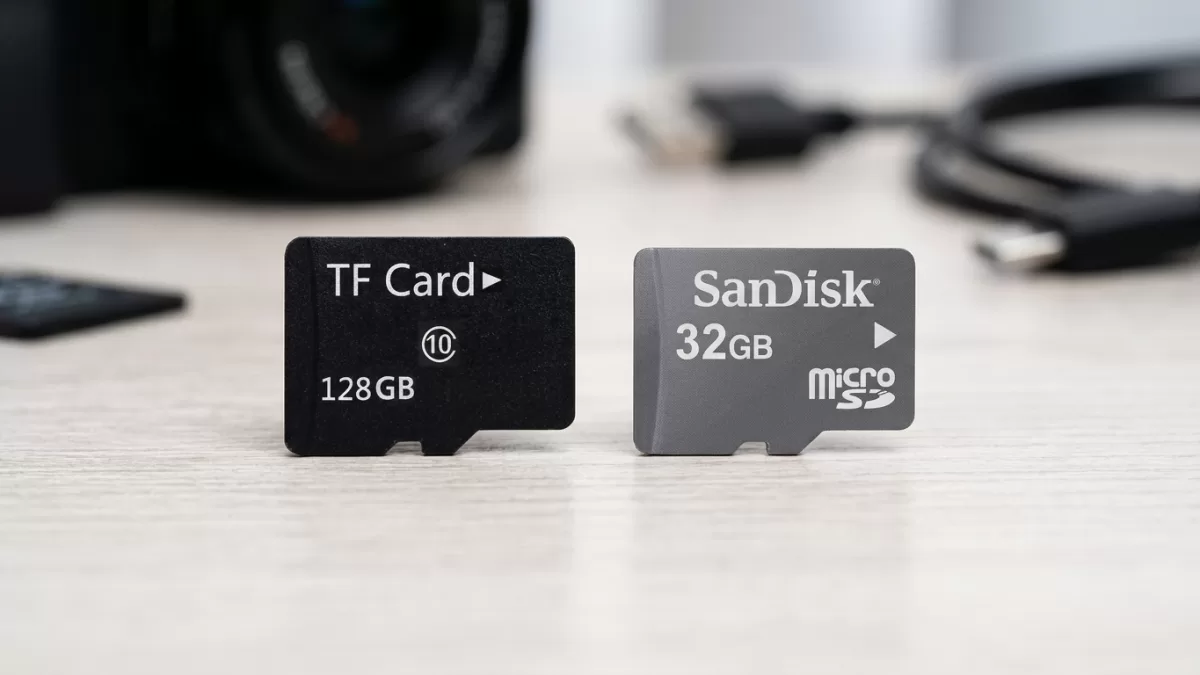
Pick up any budget action camera, dash cam, or Android phone today, and you will almost certainly find a tiny slot labelled “TF card.” Then you will read the manual — and it will suddenly call the exact same slot a “microSD” slot. Two names, one confused shopper. This guide clears the fog once and for all. You will learn what a TF card actually is, how it compares to a micro SD card, where it stands next to a full-size SD card, and how to buy the right one without wasting money on the wrong speed class or a counterfeit.
- What Does TF Card Mean?
- A Short History: From TransFlash to MicroSD
- TF Card vs Micro SD Card: Are They Really the Same?
- SD Card vs TF Card: The Real Physical & Practical Differences
- TF Memory Card vs MicroSD: Capacity Tiers Explained (SD, SDHC, SDXC, SDUC)
- Speed Classes: The Numbers That Actually Matter
- Where You Actually Use a TF Card
- How to Choose the Right TF Card for Your Device
- How to Spot a Fake TF Card Before You Get Burned
- Using Adapters: When Your Device Only Has an Full-Size SD Slot
- Formatting, Care, and Data Preservation
- The Future: microSD Express, SDUC, and What Comes Next
- TF Card vs SD Card vs MicroSD: Choosing at a Glance
- Frequently Asked Questions
- Final Word
What Does TF Card Mean?
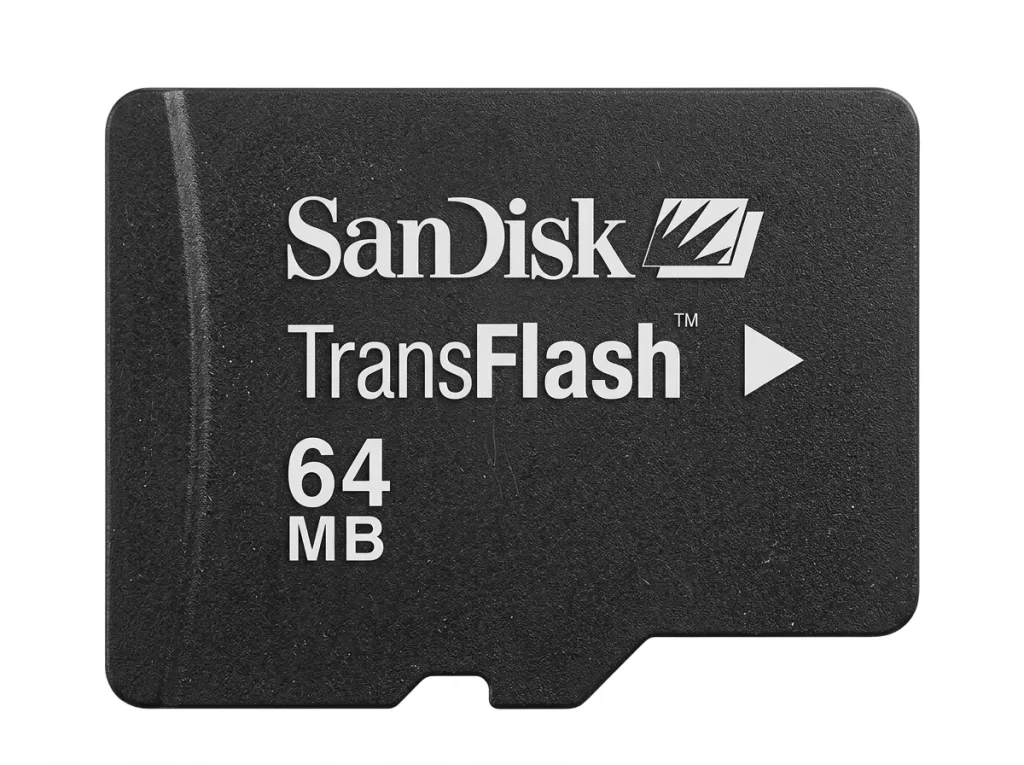
TF card stands for TransFlash card. SanDisk and Motorola co-developed it in 2004 as the world’s smallest removable flash memory format, purpose-built to squeeze extra storage into the new wave of slim mobile phones. In 2005, the SD Association adopted the format and rebranded it as microSD — but the “TF” nickname stuck, especially on packaging from Asian manufacturers, dash cam boxes, AliExpress listings, and Chinese e-commerce platforms.
When you see “TF card supported” on a spec sheet, read it as “microSD card supported.” The chip inside is the same NAND flash memory, the pin layout is identical, and the physical footprint is unchanged. Some devices even print “T-Flash” on the slot — that is yet another variant of the same original TransFlash name.
TF card meaning at a glance:
- TF = TransFlash (original SanDisk trade name from 2004)
- Physical size: 15 mm × 11 mm × 1 mm — smaller than a fingernail
- Weight: roughly 0.25–0.5 grams
- Storage type: NAND flash, non-volatile (keeps data without power)
- Operating temperature: typically -25°C to 85°C
- Modern name: microSD (used interchangeably with TF)
- Interchangeability: any TF-branded card works in any microSD slot, and vice versa
If you want a foundational refresher on how memory units themselves work, this short read on kilobytes vs megabytes pairs nicely with the technical details below.
A Short History: From TransFlash to MicroSD
SanDisk unveiled the TransFlash card at CeBIT 2004, and Motorola launched the first commercial phone to use it — the Motorola E398 music handset — the same year. Early cards held just 32 MB to 128 MB, which felt spacious at the time because feature phones stored little more than ringtones and low-resolution photos.
In July 2005, the SD Association officially absorbed the format, renamed it microSD, and added the standard SD security layer. From that moment, “TF card” and “microSD card” became two names for the same product, and manufacturers began printing whichever label fit their marketing. Two decades later, the same tiny form factor now ships in capacities up to 2 TB, with prototypes and roadmaps pushing toward 4 TB and beyond under the SDUC specification.
TF Card vs Micro SD Card: Are They Really the Same?
Here is the short answer most people are searching for: yes, a TF card and a micro SD card are the same physical product. You can slide a card labelled “microSD” into a device that says “TF card” and it will work — no adapter, no software tweak, no compatibility gymnastics.
That said, a few subtle branding and specification points are worth knowing.
Where TF and MicroSD overlap 100%
- Dimensions: both measure 15 × 11 × 1 mm
- Pin layout: identical 8-contact strip (UHS-II versions add a second row)
- File system: FAT16, FAT32, or exFAT depending on capacity tier
- Voltage and interface: identical electrical spec (3.3V nominal)
- Cross-compatibility: every TF-labelled card fits every microSD slot and vice versa
Where the two names diverge (slightly)
- Standard body: the SD Association maintains the microSD specification today; “TF” is a legacy trade name
- Security features: modern microSD cards include SD security layers (CPRM, write-protection commands) that the earliest 2004 TransFlash cards technically lacked
- Marketing usage: budget brands and dash cam boxes lean on “TF”; premium brands like SanDisk, Samsung, Lexar, and Kingston print “microSD”
- Capacity ceilings: early TF cards topped out at 2 GB; modern microSD (SDXC and SDUC) reaches 2 TB and beyond
Want to boost your online sales with better product photography?
High-quality images increase conversions by up to 40%. Let us help you get there. See our editing services
SD Card vs TF Card: The Real Physical & Practical Differences
This is where confusion is completely justified — because full-size SD and TF/microSD are not the same thing. They share a family, a logo, and a file system, but they are physically different cards.
| Feature | SD Card (Standard) | TF Card / MicroSD |
|---|---|---|
| Dimensions | 32 × 24 × 2.1 mm | 15 × 11 × 1 mm |
| Weight | ~2 g | ~0.25–0.5 g |
| UHS-I pins | 9 | 8 |
| UHS-II pins | 17 (two rows) | 16 (two rows) |
| Write-protect switch | Yes (physical slider) | No (only on adapters) |
| Typical devices | DSLRs, mirrorless, camcorders, laptops | Phones, dashcams, drones, GoPros |
| Max capacity (2026) | Up to 128 TB (SDUC spec) | Up to 2 TB retail, 128 TB roadmap |
| Adapter needed? | Fits SD slots natively | Requires adapter for SD slots |
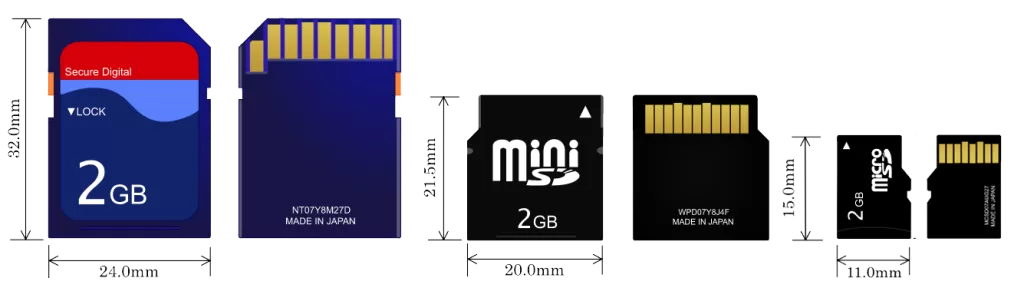
Beyond the ruler, the practical picture matters more. Full-size SD cards suit devices with roomy bodies — mirrorless cameras, camcorders, and card readers — where the physical write-protect switch also helps professional photographers lock finished shoots. TF/microSD cards, on the other hand, dominate portable electronics where every cubic millimetre counts, from Android smartphones to compact vlogging cameras. For a hands-on look at how memory choice affects a working shooter, this walkthrough of the best vlogging cameras shows exactly which slot type each model uses.
In one sentence: every TF card is a microSD card, but not every SD card is a TF card.
TF Memory Card vs MicroSD: Capacity Tiers Explained (SD, SDHC, SDXC, SDUC)
Whether the label says TF or microSD, the capacity tier follows the same SD Association standard. Knowing the tier prevents the classic mistake of buying a 512 GB card for a device that maxes out at 32 GB.
- SD (SDSC): up to 2 GB, uses FAT12/FAT16. Nearly extinct today, but some very old digital cameras and gaming handhelds only accept these.
- SDHC (High Capacity): more than 2 GB up to 32 GB, uses FAT32 with a 4 GB single-file limit. Still widely supported, but the file size cap breaks long 4K video recordings.
- SDXC (eXtended Capacity): more than 32 GB up to 2 TB, uses exFAT — the sweet spot for most 2026 buyers. This is what you will find on store shelves from 64 GB to 1 TB and beyond.
- SDUC (Ultra Capacity): more than 2 TB up to 128 TB, ratified by the SD Association for future rollout. Practical 4 TB cards began surfacing during 2025–2026.
Older cameras and gaming handhelds often accept only SDHC, so a shiny new 256 GB SDXC card may simply refuse to mount. Always check your device manual before spending. If a card and device speak different capacity tiers, the device is the bottleneck — no firmware trick fixes it.
To picture what these capacities mean for real shooting sessions, our reference on how many photos a 32 GB card holds gives concrete numbers based on image size and format.
Speed Classes: The Numbers That Actually Matter
Capacity gets the marketing, but speed decides whether your 4K clip drops frames. Every genuine TF/microSD card carries printed symbols describing its minimum sustained write speed — the value that keeps video recording smooth. Read speed sells cards, but write speed is what actually protects your footage.
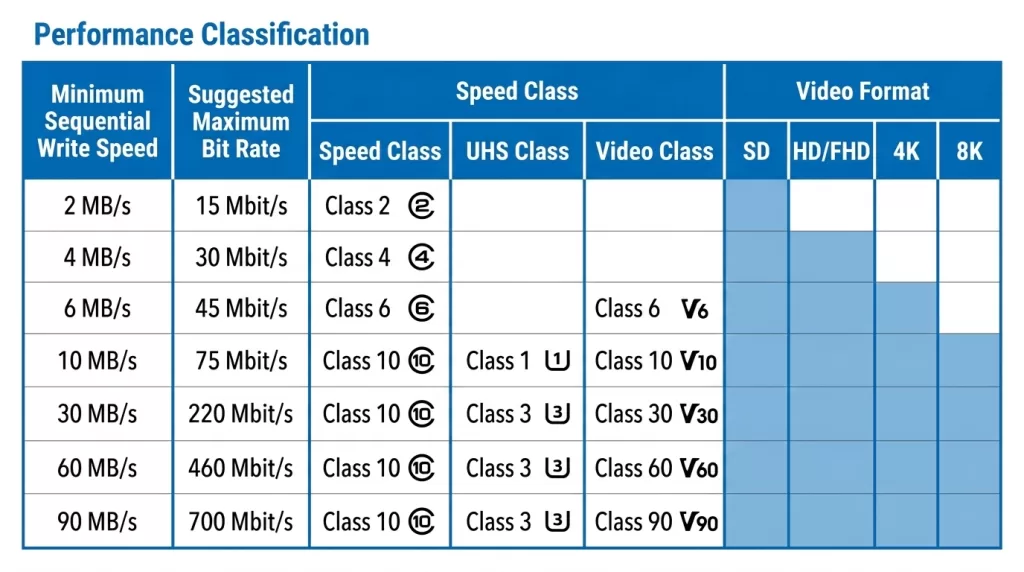
Here are the labels you will actually see on a TF card and what they promise:
- Speed Class (C2 / C4 / C6 / C10): the number inside the “C” indicates minimum MB/s write speed. Class 10 (10 MB/s) is the modern baseline. Older classes below C10 are effectively obsolete for new purchases.
- UHS Speed Class (U1 / U3): U1 guarantees 10 MB/s, U3 guarantees 30 MB/s — printed inside a small “U” symbol. U3 is the minimum for stable 4K video.
- Video Speed Class (V6 / V10 / V30 / V60 / V90): the number equals minimum MB/s sustained write. V30 handles standard 4K, V60/V90 handle 8K, ProRes, and cinematic bitrates. These ratings are more reliable than the older “C” classes because they measure sustained (not burst) speed.
- UHS Bus Interface (I / II / III): the Roman numeral describes the physical bus. UHS-I peaks at ~104 MB/s, UHS-II jumps to 312 MB/s via a second row of pins, and UHS-III reaches 624 MB/s (ratified but rarely implemented — most premium cards now leapfrog to SD Express).
- Application Performance Class (A1 / A2): for smartphones and single-board computers. A1 guarantees 1,500 read IOPS + 500 write IOPS; A2 guarantees 4,000 read IOPS + 2,000 write IOPS. Both add a 10 MB/s minimum sequential floor. A2 matters when the card runs apps directly or hosts a Raspberry Pi OS.
Quick buying rule of thumb:
- 1080p video or general phone storage: Class 10 / U1 / A1
- 4K video, drones, GoPro, dashcams: U3 / V30 / A2
- 8K, ProRes, high-bitrate cinema, professional burst photography: UHS-II with V60 or V90
- Gaming handhelds (Steam Deck, ROG Ally, retro emulators): A2 for faster game loading
- Nintendo Switch 2: microSD Express only — regular microSD cards will not work for storage expansion
For an in-depth speed-class breakdown from the standard body itself, the SD Association’s own Speed Class page is the definitive reference.
Want to enhance colors and contrast without losing realism?
Trust our experts to perfect your images with our Photo Retouching Service
Where You Actually Use a TF Card
The TF card powers a surprising slice of modern gadgets. Its featherweight footprint fits places a standard SD would never squeeze into.
- Smartphones and tablets: expand internal storage on Android and many rugged phones (some 2024–2026 flagships have dropped the slot in favour of soldered UFS storage)
- Action cameras and vlogging cameras: GoPro Hero series, DJI Osmo Action, and Insta360 X-series all specify V30 microSD/TF cards
- Dashcams: high-endurance TF cards handle the constant overwrite cycles of loop recording
- Home and outdoor security cameras: most modern outdoor security cameras record locally to a TF/microSD slot
- Drones: DJI Mini, Air, and Mavic series save 4K/6K video directly to microSD
- Handheld gaming consoles: Nintendo Switch (original), Steam Deck, ROG Ally, and retro emulators all use standard microSD
- Nintendo Switch 2: requires microSD Express cards (a newer, PCIe-based variant)
- Bluetooth speakers, MP3 players, and audio recorders: budget audio devices often list “TF card slot” for offline playback
- IoT devices and single-board computers: the Raspberry Pi boots entirely from a microSD
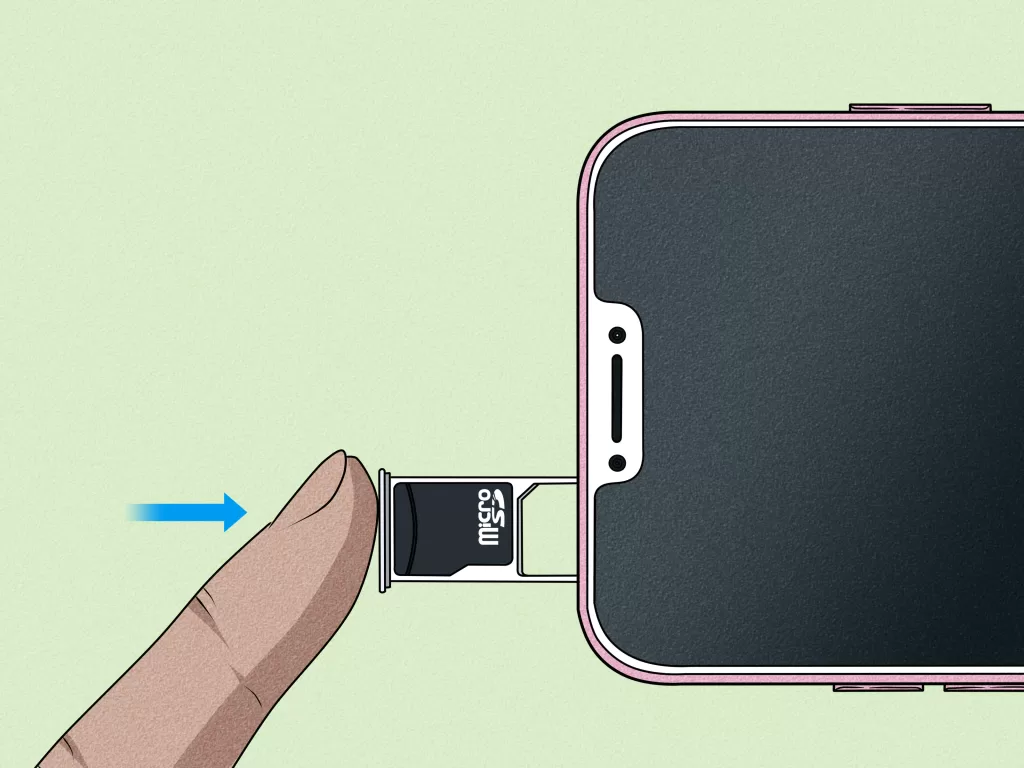
If you shoot heavily with action gear, our roundup of the best budget action cameras lists exactly which TF card class each one recommends out of the box.
How to Choose the Right TF Card for Your Device
Choosing a memory card is less about grabbing the biggest number and more about matching four variables: capacity, speed class, endurance, and brand trust. Follow this order and you will not misfire.
Step 1 — Check the maximum capacity your device supports.
Older Nintendo 3DS units cap at 32 GB (SDHC), some GoPro Hero cameras cap at 512 GB, and only newer devices officially certify 1 TB or 2 TB SDXC. The manual or manufacturer’s website always lists the ceiling.
Step 2 — Match the minimum speed class to your workload.
A dash cam or 4K camera needs at least V30; a phone benefits from A2 for smoother app performance. Undersizing speed causes dropped frames, crashed recordings, and “card too slow” warnings on your device.
Step 3 — Pick high-endurance NAND for continuous recording.
Dash cams, security cameras, and doorbells overwrite footage constantly. Standard consumer cards may wear out within months of 24/7 duty. Look for “High Endurance,” “Max Endurance,” or “PRO Endurance” labels — these use more write-tolerant NAND. Here is the endurance hierarchy in plain terms:
- SLC (Single-Level Cell): 1 bit per cell, ~100,000 write cycles, most durable — but expensive and rare in consumer cards
- MLC (Multi-Level Cell): 2 bits per cell, ~10,000 write cycles, industrial-grade
- pSLC (pseudo-SLC): MLC or TLC cells operated in SLC mode, ~30,000 write cycles, the go-to for premium dash cam cards
- TLC (Triple-Level Cell): 3 bits per cell, ~3,000 write cycles, standard for consumer microSD
- QLC (Quad-Level Cell): 4 bits per cell, ~1,000 write cycles, cheapest but least durable
Step 4 — Stick to reputable brands.
SanDisk, Samsung, Lexar, Kingston, and ProGrade Digital dominate independent lab tests. Wirecutter’s most recent testing calls out the Samsung Pro Plus and SanDisk cards as the best all-round options for 2026 buyers.
Even legitimate marketplaces host counterfeits. Verify the seller badge, holograms, and packaging labels before checkout.
If your workflow ends in printed photos, sizing the file to the paper matters just as much as sizing the card — this standard photo sizes resource is a handy sidekick.
How to Spot a Fake TF Card Before You Get Burned
Counterfeit microSD cards are one of the biggest scams in consumer electronics. They advertise 512 GB or 1 TB, feel real in the hand, and initially appear to work — until the day they silently overwrite your data because the actual capacity is only 8 GB or 16 GB. Here is how to filter them out before you lose a wedding shoot.
- Inspect the printing: genuine cards display crisp, evenly aligned text. Blurry logos, faded colours, off-centre labels, or ink that smudges under a fingernail are red flags.
- Check the packaging: legitimate SanDisk, Samsung, and Lexar packs include serial numbers, UPC barcodes, and holographic seals. Missing warranty info almost always signals a fake.
- Verify the price: a 1 TB microSD card selling for under 20 USD is not a bargain — it is a scam. Real 1 TB cards from major brands sit around 90–150 USD as of 2026.
- Run a capacity test: free tools like H2testw (Windows) and F3 (Mac/Linux) write and verify data across the entire card, exposing the real usable size within an hour.
- Benchmark the speed: apps like CrystalDiskMark, AJA System Test, or BlackMagic Disk Speed Test confirm whether the card meets its advertised class.
- Verify serial numbers: SanDisk, Samsung, and Kingston offer online authentication tools where you enter the serial from the back of the card.
- Buy from authorised retailers: brand websites, official Amazon storefronts, or verified electronics chains cut counterfeit risk sharply.
If a “too good to be true” listing tempts you, remember: recovering data from a failed fake is often impossible, no matter how much you spend on recovery software or services. Save the money — spend it on a real card.
Using Adapters: When Your Device Only Has an Full-Size SD Slot
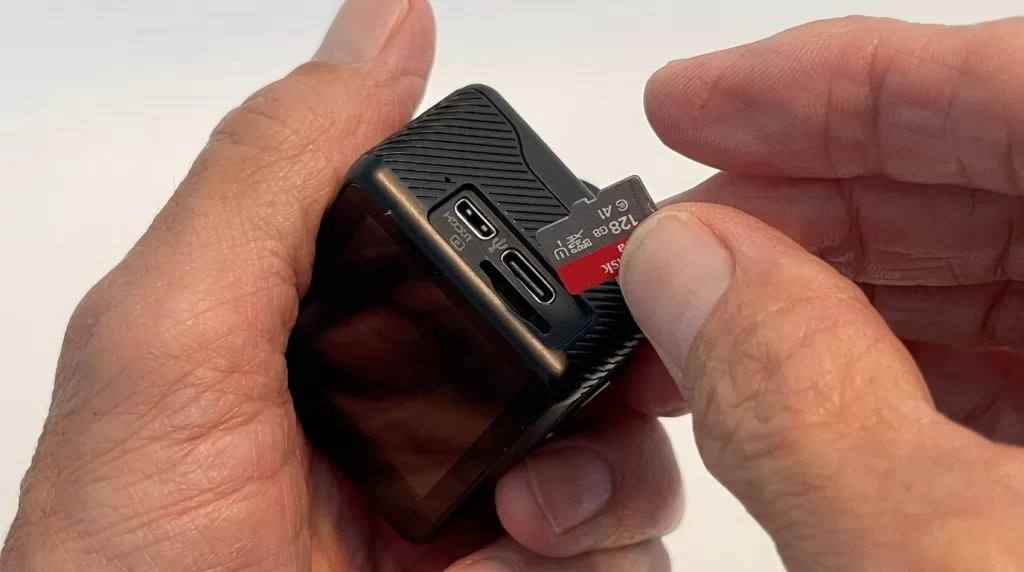
Many laptops, card readers, and older cameras accept only full-size SD cards. Since your TF/microSD card is physically smaller, you will need an SD adapter — a passive plastic shell that lets the smaller card slide into a standard SD slot.
- Most retail microSD cards include a free adapter in the blister pack. Keep it — you will need it eventually.
- The adapter is passive: it simply reroutes the electrical contacts. It does not affect speed, capacity, or wear.
- UHS-II adapters exist and matter: if you own a UHS-II microSD card, make sure the adapter also has the second row of pins. A standard UHS-I adapter will bottleneck a UHS-II card down to UHS-I speeds.
- Write-protect switch on the adapter: the adapter shell has a physical lock slider that the microSD card itself lacks. Slide it down to protect finished shoots from accidental deletion.
- Adapter reliability: cheap third-party adapters are a common source of intermittent read errors. Stick with the adapter shipped by the card brand.
Formatting, Care, and Data Preservation
A TF card is a physical device with real limits. Treating it well keeps your photos and video safe for years.
- Format inside the target device. A camera formats the card with the exact allocation table it prefers, which improves write consistency. Formatting on Windows and then moving the card to a camera often causes subtle compatibility issues, especially on high-bitrate video recorders.
- Use exFAT above 32 GB. FAT32 caps single files at 4 GB — a 20-minute 4K clip will fail mid-record and split into fragments.
- Eject safely before removing the card from a computer. Yanking it during a write can corrupt the file allocation table and lock you out of every file.
- Avoid extreme temperatures. Leaving a card in a hot dashboard for months degrades NAND retention. Cards are rated for -25°C to 85°C, but sustained heat accelerates wear.
- Keep a backup. Flash memory can fail without warning — often with zero symptoms until the moment of failure. Cloud storage plus a local drive is the belt-and-braces approach — our guide to the best cloud storage for photos walks through affordable options.
- Retire old cards on schedule. Every card has a finite number of program/erase cycles. After heavy loop recording (dashcam, security), replace the card annually even if it still appears functional.
- Never store a card long-term without power. Flash cells slowly leak charge over years. Cards left unpowered for 5+ years can lose data silently — use SSDs or optical media for long archival.
Want to replace messy backgrounds with pure white or custom colors?
Our expert Background Removal Service makes it quick and effortless.
The Future: microSD Express, SDUC, and What Comes Next
Even the humble TF card is getting a major upgrade. The SD Association has ratified microSD Express, which piggybacks on the PCIe 3.1 and NVMe interfaces to hit sequential read speeds of nearly 985 MB/s theoretical maximum — roughly ten times faster than UHS-I. Current retail microSD Express cards from SanDisk deliver about 880 MB/s read and 650 MB/s write in real-world tests.
The Nintendo Switch 2 is the first major consumer device to mandate microSD Express for storage expansion — standard microSD cards are recognised only for photo/video transfer, not game storage. Expect professional video recorders and next-generation handhelds to adopt microSD Express as a standard feature through 2026–2028.
Meanwhile, the SDUC ceiling of 128 TB is written into the standard, with manufacturers racing toward practical 4 TB microSD cards during 2025–2026. The gap between microSD and full internal SSDs continues to shrink.
In parallel, some flagship smartphones have quietly dropped the TF slot in favour of soldered UFS storage. Whether the microSD survives in phones remains an open debate, but its dominance in cameras, drones, dashcams, IoT devices, and handheld consoles looks safe well past 2030.
TF Card vs SD Card vs MicroSD: Choosing at a Glance
If you are still weighing which family fits your workflow, use this quick decision tree:
- Shooting on a DSLR or full-frame mirrorless → full-size SD, ideally UHS-II V60 or V90
- Shooting on a mirrorless with dual slots → one SD + one microSD via adapter, or dual SD depending on the body
- Recording with a phone, action cam, or drone → TF card / microSD, V30 A2 minimum
- Running a dash cam or security camera → high-endurance TF card (pSLC or MLC), 128–256 GB
- Booting a Raspberry Pi or a handheld console → A2 microSD, 128–256 GB is the sweet spot for the Switch and Steam Deck
- Buying for the Nintendo Switch 2 → microSD Express only (regular microSD will not work for game storage)
- Archiving master photo files → neither — use SSD, HDD, or cloud, and treat flash cards as transfer media only
For photographers who care about card-to-computer transfer speed, pairing the right card with the right reader unlocks the promised throughput. This best memory card readers guide is worth a bookmark.
Frequently Asked Questions
Is a TF card the same as a micro SD card?
Yes. TF (TransFlash) is the original 2004 name; the SD Association renamed the format microSD in 2005. Both terms describe the identical physical card with the same dimensions, pins, voltage, and interface.
Can I use a TF card in a full-size SD card slot?
Yes — but you need a passive microSD-to-SD adapter. Most retail TF cards ship with the adapter in the box. Slide the TF card into the adapter, then insert the adapter into any SD slot.
What is the maximum capacity of a TF card in 2026?
Consumer microSDXC cards currently reach 2 TB. Under the newer SDUC specification, the ceiling extends to 128 TB, though such capacities are not yet on shelves. First practical 4 TB microSD cards began appearing during 2025–2026.
Why does my new TF card show less storage than advertised?
Two reasons. First, manufacturers use decimal GB (1 GB = 1,000,000,000 bytes) while operating systems display binary GiB, so a “128 GB” card reads as roughly 119 GiB. Second, if the difference is huge — a “512 GB” card showing 32 GB — you almost certainly have a counterfeit.
What speed class do I need for 4K video?
At minimum, UHS Speed Class 3 (U3) or Video Speed Class 30 (V30), which guarantees 30 MB/s sustained write. For 4K at high bitrates, ProRes, or 8K, jump to V60 or V90 with a UHS-II bus.
TF card vs SD card — which is better?
Neither is universally better. A full-size SD card suits cameras and laptops with room to house it and typically hits higher bus speeds (UHS-II or UHS-III). A TF/microSD card wins in portable devices where size and weight matter. Pick the one your device slot accepts — the “better” card is simply the one that fits.
How long does a TF card last?
Typical consumer cards handle 3–5 years of light use. High-endurance TF cards in a 24/7 dash cam or security camera last 1–3 years depending on record settings and NAND type. Flash memory has finite write cycles, so backups are essential — never treat a card as a long-term archive.
Do I need to format a new TF card before using it?
Yes. Format the card inside the target device (camera, dashcam, phone) rather than on a computer. The device applies the optimal file system and cluster size, which improves write performance and stability.
Can I use a standard microSD card in a Nintendo Switch 2?
Only for photo and video transfer. The Nintendo Switch 2 requires microSD Express cards for game storage expansion. Regular microSD cards — even fast UHS-I or UHS-II versions — are not compatible for installing games.
Why do some devices label the slot “TF” while others say “microSD”?
“TF card” is the original 2004 trade name that persists in Asian manufacturing, especially on AliExpress listings, dash cam packaging, and budget electronics. “MicroSD” is the standardised name adopted by the SD Association in 2005. Both work identically — it is purely a labelling choice.
Final Word
A TF card is simply the original name for a microSD card — the tiny NAND flash memory format that SanDisk and Motorola unleashed in 2004 and the SD Association renamed a year later. It differs from a full-size SD card only in physical dimensions and use cases, while sharing the same capacity tiers (SDHC/SDXC/SDUC), speed classes (C10/U3/V30/V60/V90), and bus interfaces (UHS-I/II/III/Express). Buy the capacity and speed class that match your device, avoid suspiciously cheap listings, stick to trusted brands, and back up your files often. Do that, and this fingernail-sized sliver of silicon will quietly do its job for years.
Ready to transform your raw photos into professional assets?
Get a custom, no-obligation quote tailored to your specific volume and needs. Explore Clipping Expert Asia