


Professional Clipping Path: A Complete Guide for Clean, High-Quality Images
October 15, 2026
LinkedIn Image Sizes 2026: Banner, Post, Profile & Ad Dimensions (Updated)
October 17, 2026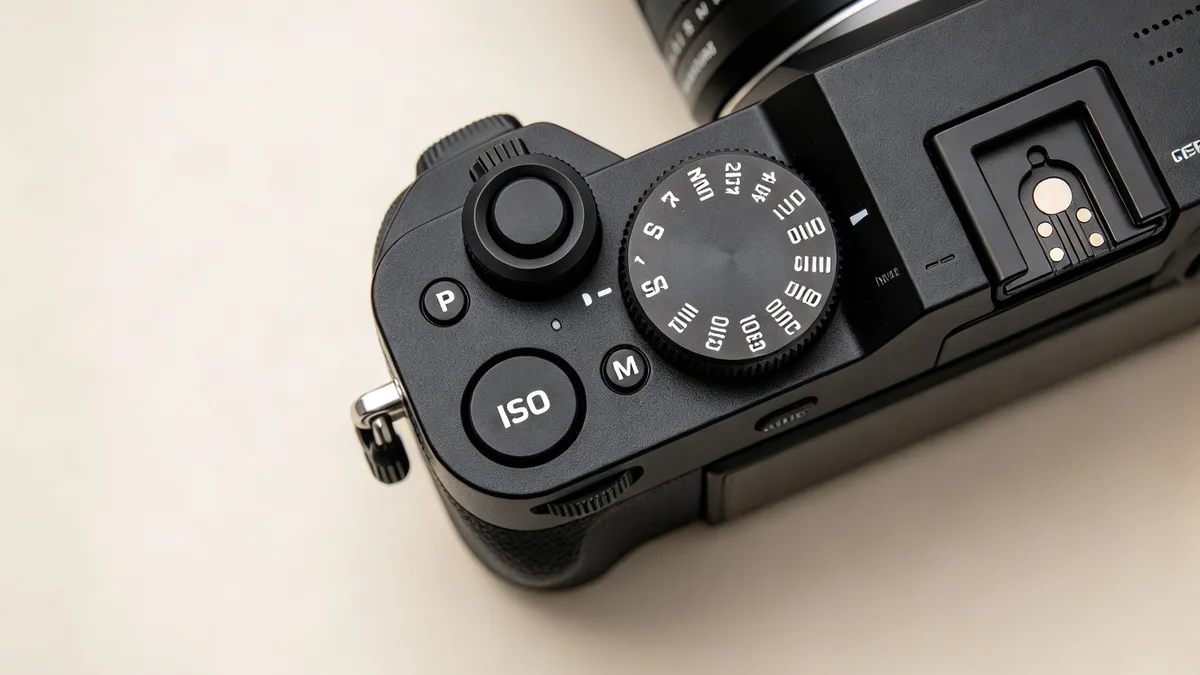
- TL;DR: The Short Answer
- What ISO Actually Means (and the Myth It Doesn't)
- ISO and the Exposure Triangle
- Base ISO, Dual Native ISO, and ISO Invariance
- The Science of Noise: Why High ISO Looks Grainy
- Practical ISO Cheat Sheet: What to Set When
- Auto ISO: The Setting Most Beginners Ignore
- Expose to the Right (ETTR): The Pro Trick for Clean Images
- Noise Reduction in Post: When You Did Push ISO
- 5 Common ISO Myths, Busted
- Frequently Asked Questions
- Final Verdict
TL;DR: The Short Answer
ISO is the camera setting that brightens your image by amplifying the signal captured by the sensor — and it is one leg of the exposure triangle, alongside aperture and shutter speed. Low ISO (100–200) gives clean, detailed images but needs more light. High ISO (3200–12800+) brightens dark scenes but adds visible noise (grain). The biggest myth in photography is that high ISO causes noise — it doesn’t. Underexposure causes noise; high ISO just reveals it. That single idea changes everything: you should raise ISO whenever it keeps your shutter speed fast enough for a sharp photo, because a slightly noisy sharp photo always beats a clean blurry one.
Modern cameras are ISO-invariant above a threshold (Sony A7 IV ~ISO 400, Canon R5 ~ISO 800, Fujifilm X-H2 ~ISO 1250), many have dual native ISO with a second clean high-ISO point, and AI noise reduction makes ISO 6400 usable on full-frame bodies. This guide covers what ISO actually does, the exposure triangle, base and dual native ISO, ISO invariance, noise science, practical settings for every scene, auto ISO, expose-to-the-right, noise reduction, and the common myths. Nikon’s what is ISO guide and SLR Lounge’s ISO definition confirm the fundamentals.
What ISO Actually Means (and the Myth It Doesn’t)
ISO stands for the International Organization for Standardization, the body that standardized film sensitivity ratings in the 1970s (replacing the older ASA and DIN systems). On a digital camera, the ISO number tells you how much the camera amplifies the signal coming off the sensor. ISO 100 = no amplification (cleanest). ISO 200 = one stop brighter. ISO 400 = two stops. Every doubling of the number = one stop brighter.
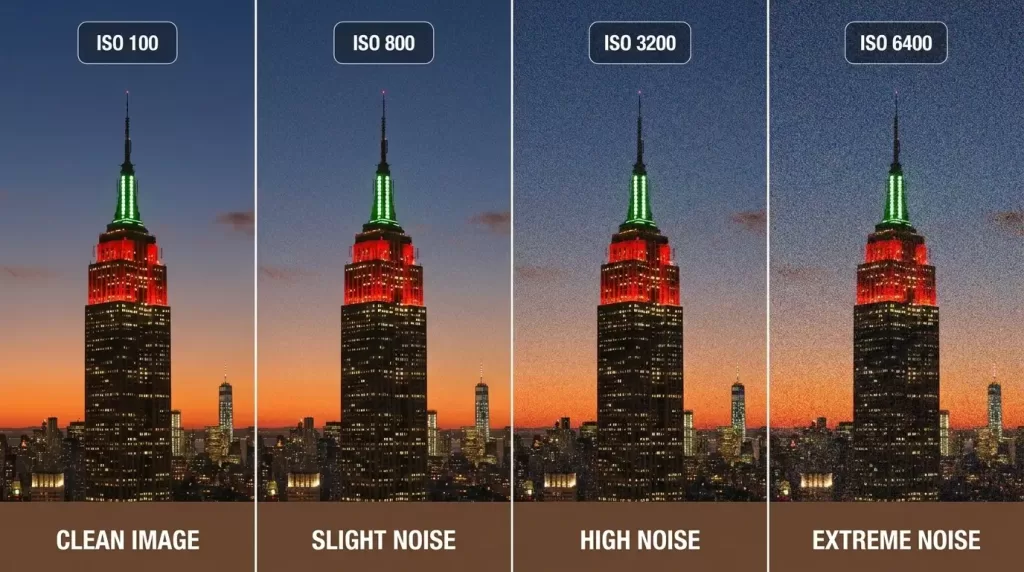
Here is the part most beginners get wrong: raising ISO does not make the sensor more sensitive, and it does not add light to the scene. The sensor captures exactly the same number of photons at ISO 100 and ISO 6400 with the same aperture and shutter speed. What changes is how much the camera amplifies that captured signal before turning it into an image. Because the signal is weak in dark conditions, amplification brightens both the real image and the random noise in the electronics — so the noise becomes visible. The noise was always there; high ISO just makes it visible. That is why a well-exposed ISO 3200 photo can look cleaner than an underexposed ISO 800 photo that you brighten in post.
ISO and the Exposure Triangle
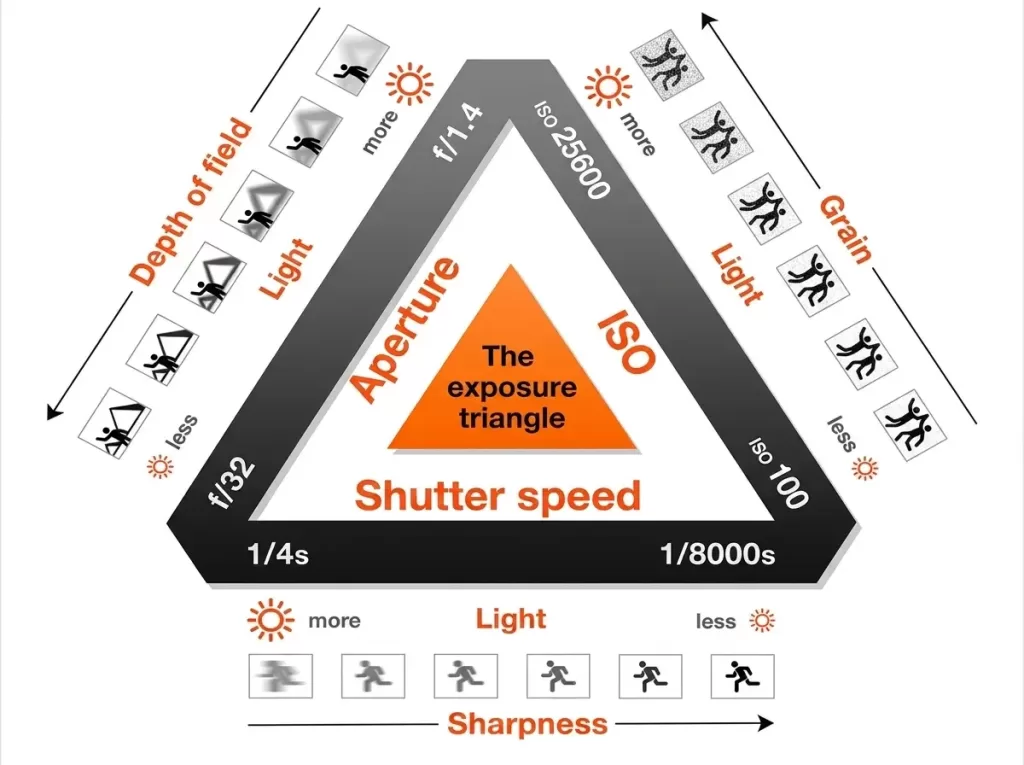
ISO works with two other settings to determine how bright your photo is. Together they are the exposure triangle.
- Aperture (f-stop): how wide the lens opens. Wider (f/1.8) = more light + blurrier background. Narrower (f/11) = less light + more in focus.
- Shutter speed: how long the sensor is exposed. Faster (1/1000s) = freezes motion but less light. Slower (1/30s) = more light but motion blur or camera shake.
- ISO: amplification of the captured signal. Higher = brighter image but more noise.
If you raise ISO by one stop (e.g., 200 → 400), you can either close the aperture by one stop (f/4 → f/5.6) for more depth of field, or use a shutter speed one stop faster (1/60 → 1/125) to freeze motion. That trade-off is the whole game. In low light, the usual order is: open aperture as wide as your creative needs allow, lower shutter speed to the slowest you can hand-hold (roughly 1/focal length, or slower with stabilization), and only then raise ISO. For our composition photography principles, exposure is the technical foundation that makes composition visible.
Base ISO, Dual Native ISO, and ISO Invariance
These three concepts separate beginners from advanced shooters, and they are where the “always use the lowest ISO” advice breaks down.
Base (native) ISO is the setting where the sensor applies no amplification — usually ISO 100, sometimes 64 or 200. At base ISO you get the cleanest signal, the widest dynamic range, and the most detail. It is always the best choice when you have enough light.
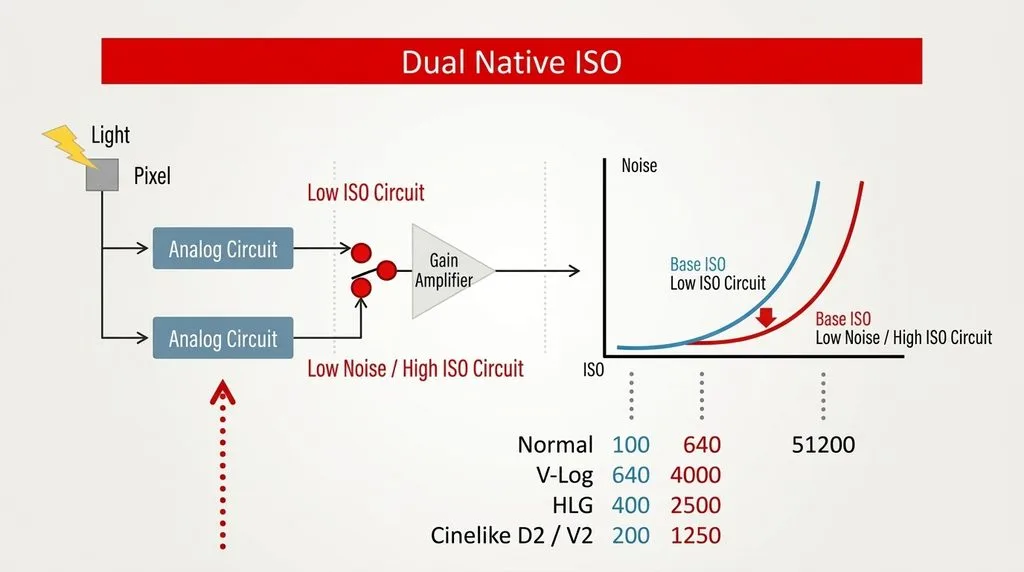
Dual native ISO is a feature on many modern cameras (Sony A7S III/FX3, Canon R5 C, Panasonic S5 II/GH6, Nikon Z8/Z9, and increasingly mid-range bodies) where the sensor has two separate amplifier circuits, each optimized for a different gain level. There is a second clean ISO point — often ISO 640, 800, 1250, or even 2500/4000 — where read noise actually drops. Measurements put the Nikon Z9’s stills switch at ISO 500, meaning an ISO 500 frame can carry less read noise than ISO 400. So on these cameras, jumping to the second native ISO can give a cleaner image than a mid-range ISO — counterintuitive but true. PhotographyTalk’s high-ISO noise reduction guide covers these switch points.
ISO invariance means that above a certain ISO, it no longer matters whether you raise ISO in-camera or underexpose and brighten in post — the noise is the same. Testing puts the threshold around ISO 400 on the Sony A7 IV, ISO 800 on the Canon R5, and ISO 1250 on the Fujifilm X-H2. This matters in high-contrast scenes: you can shoot at base ISO to preserve highlights and lift shadows in Lightroom with no noise penalty, instead of blowing out the sky with high ISO. Frame & Focal’s noise in photography deep-dive quantifies these thresholds.
The Science of Noise: Why High ISO Looks Grainy
Noise comes from three sources, and understanding them tells you how to fight it.
- Shot noise (photon noise): the randomness of light itself. Dominant in most photos. You reduce it by capturing more light — wider aperture, slower shutter, or moving closer to light. It is the reason “expose to the right” works.
- Read noise: electronics noise from the sensor and amplifier. Very low on modern sensors, and lowest at base (and second native) ISO.
- Fixed pattern / banding noise: a relic of older sensors; rare on 2020s cameras.
Because shot noise dominates, the single biggest factor in clean images is how much light you captured, not what ISO you set. A photo taken at f/1.4, 1/60s, ISO 3200 captured far more light than one at f/5.6, 1/60s, ISO 800 — and will look cleaner, even though the ISO number is higher. That is the whole “high ISO doesn’t cause noise” idea in practice.
Sensor size matters too. A full-frame sensor captures roughly double the light of an APS-C sensor at the same exposure settings (one stop cleaner), and four times the light of a Micro Four Thirds sensor (two stops cleaner). That is why full-frame bodies dominate low-light and event work. Modern phones compensate with computational multi-frame stacking, which is why a phone night mode can rival a camera — but only for static scenes.
Practical ISO Cheat Sheet: What to Set When
| Scene | ISO range | Notes |
|---|---|---|
| Bright daylight | 100–200 | Base ISO, maximum quality |
| Overcast / shade | 200–400 | Still essentially clean |
| Indoor, well-lit | 400–800 | Noise barely visible at web size |
| Indoor event / wedding reception | 1600–3200 | Expect some grain; acceptable |
| Dark restaurant / concert | 3200–6400 | Use widest aperture; AI denoise in post |
| Night / astrophotography | 3200–12800 | Tripod or wide lens; expose to the right |
| Sports indoor arena | 3200–6400 | Prioritize fast shutter (1/500s+) over low ISO |
The rule of thumb: use the lowest ISO that still gives you a shutter speed fast enough to avoid blur. If that means ISO 6400, so be it — noise is fixable in editing; blur is not. Our how to fix grainy photos guide walks the noise-reduction workflow.
Auto ISO: The Setting Most Beginners Ignore
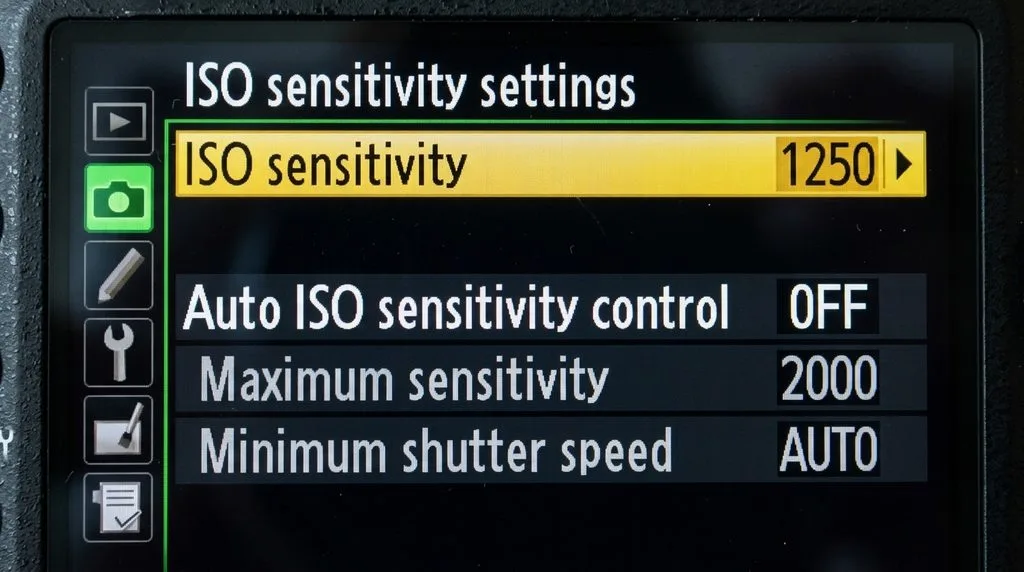
For events, street, travel, and anything fast-moving, Auto ISO is the professional’s secret weapon. You set two limits and let the camera handle the rest:
- Base ISO: 100 (or 64/200, your camera’s native).
- Maximum ISO: the highest you accept — 3200 for APS-C, 6400–12800 for full-frame.
- Minimum shutter speed: roughly 1/(focal length × crop factor), or half that if you have in-body stabilization.
With Auto ISO on, you set aperture (for depth of field) and the camera raises ISO only as far as it must to keep your shutter speed above your minimum. You never get a blurry shot from too-slow shutter again, and you never use more ISO than necessary. For static work on a tripod, turn it off and lock ISO at base.
Expose to the Right (ETTR): The Pro Trick for Clean Images
Because shot noise dominates, the cleanest image is the one that captures the most light without clipping highlights. “Expose to the right” means you deliberately expose as brightly as you can while keeping the histogram away from the right edge (blown highlights), then darken in post. A brighter RAW capture contains more photon data and less visible noise when you bring the exposure down. This works best on ISO-invariant cameras — shoot at base ISO, push exposure until the histogram nearly touches the right edge, then correct in Lightroom. Just never clip skin highlights or the sky; blown highlights cannot be recovered.
For high-contrast scenes where you cannot hold both highlights and shadows in one frame, bracketing and merging to HDR is the answer — our what is HDR guide covers when to blend exposures instead of raising ISO.
Ready to transform your raw photos into professional assets?
Get a custom, no-obligation quote tailored to your specific volume and needs. Explore Clipping Expert Asia
Noise Reduction in Post: When You Did Push ISO
Even at ISO 6400, modern tools rescue detail:
- Lightroom AI Denoise / Adobe Enhance: trained on millions of images, the best all-rounder, works on RAW.
- Topaz Photo AI / Denoise AI: strongest for extreme ISO (12800+), run as a standalone or plugin.
- Capture One / DxO PureRAW: excellent for specific camera/lens profiles.
- Luminance vs color noise: reduce color noise aggressively (it looks like speckles), reduce luminance noise gently (it smears detail).
Rule: apply noise reduction before sharpening, and never sharpen first — sharpening amplifies noise. Keep a little grain; over-smoothed skin and plastic-looking textures look worse than honest noise. Our photo editing guide covers the full order of operations.
5 Common ISO Myths, Busted
- “High ISO causes noise.” No — underexposure causes noise. High ISO amplifies a weak signal, revealing noise that was already there.
- “Always use the lowest ISO.” No — use the lowest ISO that keeps your shutter speed fast enough. A sharp ISO 3200 photo beats a blurry ISO 100 one.
- “ISO 100 is always the cleanest.” Usually yes, but dual-native-ISO cameras have a second clean point (often ISO 640–1250) that can be cleaner than mid ISOs.
- “Raising ISO in-camera is better than brightening in post.” Only below your camera’s ISO-invariant point. Above that threshold (ISO 400–1250 on most modern bodies), they are equivalent.
- “Extended low ISO (L0.5 / ISO 50) is better.” No — extended low ISO just pulls exposure down, reducing dynamic range. It does not give you a cleaner file.
Frequently Asked Questions
What is ISO in photography?
ISO is the camera setting that brightens an image by amplifying the sensor’s captured signal. It is one leg of the exposure triangle with aperture and shutter speed. Low ISO (100) is clean; high ISO (6400+) is bright but noisy.
What does ISO stand for?
International Organization for Standardization — the body that standardized film sensitivity ratings (formerly ASA and DIN). In digital, the number measures signal amplification, not true sensor sensitivity.
Is higher or lower ISO better?
Lower ISO gives cleaner images and more dynamic range, but needs more light. Higher ISO lets you shoot in darker conditions with faster shutter speeds. Use the lowest ISO that still gives a sharp, well-exposed photo — never so low that your shutter speed becomes too slow.
What ISO should I use?
Daylight: 100–200. Overcast/shade: 400. Indoor: 800–1600. Events/concerts: 3200–6400. Night/astro: 6400–12800. Prioritize a fast enough shutter speed over low ISO.
Does high ISO cause noise?
Not directly. Underexposure (capturing too little light) causes noise. High ISO amplifies the weak signal, making the noise visible. A well-exposed ISO 3200 photo can be cleaner than an underexposed ISO 800 photo brightened in post.
What is base ISO?
The ISO with no amplification applied — usually 100 (sometimes 64 or 200). It gives the cleanest signal, widest dynamic range, and most detail. Always use it when you have enough light.
What is dual native ISO?
A sensor design with two amplifier circuits, giving a second clean ISO point (often 640–1250, sometimes higher). At that second native ISO, read noise drops, so high-ISO images can be cleaner than mid-ISOs. Common on video-focused and modern full-frame bodies.
What is ISO invariance?
A sensor property where, above a threshold ISO (ISO 400–1250 on most modern cameras), raising ISO in-camera and brightening in post produce identical noise. It lets you shoot at base ISO to preserve highlights and lift shadows in editing with no noise penalty.
Final Verdict
ISO is not a quality dial to keep as low as possible — it is a brightness trade-off. Set it as low as you can while keeping your shutter speed fast enough for a sharp shot, and accept the noise when the light demands it. Understand base ISO, check whether your camera has dual native ISO and an ISO-invariant threshold, use Auto ISO for fast-moving work, expose to the right when you can, and let AI noise reduction handle the rest. Get those right, and the ISO setting becomes the easiest decision on the camera.