

What Is ISO in Photography? Camera Sensitivity, Noise & Settings Explained
October 16, 2026
Twitter Image Sizes 2026: Header, Post, Profile & Ad Dimensions (X)
October 20, 2026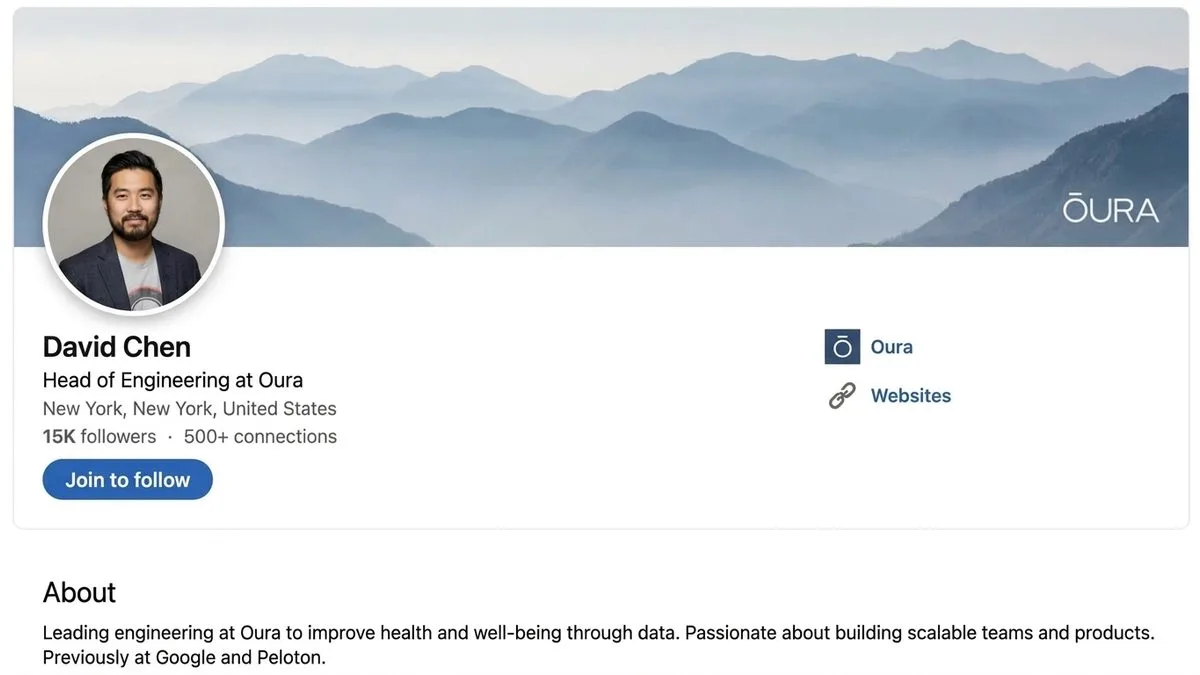
- TL;DR: The Short Answer
- The 2026 LinkedIn Image Size Cheat Sheet
- Personal Profile: Banner and Photo
- Company Page: The 2026 Cover Change You Must Know
- Feed Posts: Landscape, Square, or Portrait?
- Carousels and Documents: The Highest-Engagement Format
- LinkedIn Ads: Sizes That Convert
- Video and Events
- Safe Zones and Crop Traps: What Gets Hidden
- Export Settings for Sharp, Fast-Loading LinkedIn Graphics
- 5 Common LinkedIn Image Mistakes
- Frequently Asked Questions
- Final Verdict
TL;DR: The Short Answer
Here is the one thing most guides get wrong in 2026: the LinkedIn company page cover photo is no longer 1128×191 or 4200×700 — LinkedIn’s official Help Center now lists 1512×256 pixels. If you designed your banner to the old numbers, it is getting cropped.
Beyond that, the core sizes are stable: personal profile banner 1584×396 (4:1), profile photo 400×400 (circle crop), feed post images 1200×627 landscape / 1080×1080 square / 1080×1350 portrait, carousel slides 1080×1080, and single-image ads 1200×627 or 720×900 (4:5, mobile-only). Export as sRGB JPG (PNG for text-heavy graphics) under 8 MB, keep all important text and logos centered because the profile photo overlaps the bottom-left of your banner and mobile crops the edges. This guide covers every surface — personal profile, company page, Life tab, feed posts, carousels, ads, video, and events — with safe zones, export settings, and the mistakes that get your graphics cropped.
The 2026 LinkedIn Image Size Cheat Sheet
| Surface | Recommended size | Aspect ratio | Max file | Notes |
|---|---|---|---|---|
| Personal profile banner | 1584 × 396 px | 4:1 | 8 MB | Profile photo overlaps bottom-left |
| Profile photo | 400 × 400 px (upload larger) | 1:1 | 8 MB | Displayed as circle ~200 px |
| Company page cover | 1512 × 256 px | ~6:1 | 3–8 MB | Updated 2026 — not 1128×191 |
| Company page logo | 400 × 400 px (min 268×268) | 1:1 | — | Square, shown small |
| Life tab main image | 1128 × 376 px | 3:1 | — | Mobile-only tab |
| Life tab company photos | 900 × 600 px | 3:2 | — | Gallery |
| Feed post — landscape | 1200 × 627 px | 1.91:1 | 8 MB | Best for link previews |
| Feed post — square | 1080 × 1080 px | 1:1 | 8 MB | Largest feed footprint |
| Feed post — portrait | 1080 × 1350 px | 4:5 | 8 MB | Tallest, mobile-first |
| Carousel / document slide | 1080 × 1080 px (or 1080×1350) | 1:1 or 4:5 | 10 MB/slide | PDF/PPT upload |
| Single-image ad | 1200 × 627 px (or 1080×1080) | 1.91:1 / 1:1 | 5 MB | JPG/PNG/GIF |
| Vertical ad (mobile only) | 720 × 900 px | 4:5 | 5 MB | Serves on mobile only |
| Carousel ad | 1080 × 1080 px per card | 1:1 | 5 MB/card | 2–10 cards |
| Event cover photo | 1776 × 528 px | ~3.4:1 | — | Title/date overlay |
| Video (organic) | 1920 × 1080 (16:9) or 1080×1080 | 16:9 / 1:1 / 9:16 | 200 MB | 3 s – 10 min |
Personal Profile: Banner and Photo
Your personal profile has two images, and both get cropped — so design for the crop, not the canvas.
Profile banner (background photo): upload at 1584 × 396 pixels (4:1), JPG or PNG, up to 8 MB. The trap is that your circular profile photo overlaps the bottom-left of the banner, and mobile crops roughly 15–20% off both edges. Keep all text, logos, and faces in the center two-thirds of the canvas, and away from the bottom-left corner. Check the result in both light and dark mode — LinkedIn applies a subtle overlay that can darken bright backgrounds. A solid brand-color banner (like Zapier’s orange) always works and never crops badly.
Profile photo: upload at 400 × 400 minimum (a larger square, e.g. 800×800, is fine — LinkedIn downscales). It displays as a circle around 200 px, so keep your face centered and away from the corners. Use a real headshot with a plain or blurred background — LinkedIn is a professional network, and a clear face builds trust. For a clean background on a headshot, our background removal methods work, or our ecommerce product photo editing team handles it at scale.
Company Page: The 2026 Cover Change You Must Know
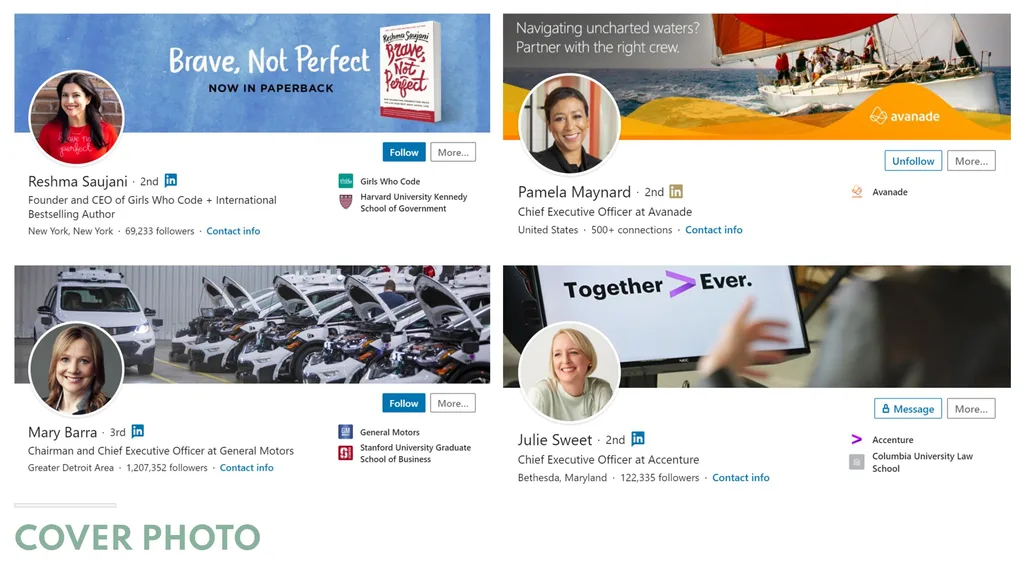
This is the update most guides have missed. LinkedIn’s official Help Center now specifies a company page cover of 1512 × 256 pixels. The old 1128 × 191 and the very old 4200 × 700 are outdated — upload at either and your cover will be stretched or cropped. Design at 1512 × 256, keep your logo and tagline centered, and check it on mobile, where the crop is tighter. Because the canvas is only 256 px tall, use large, bold text and a simple background — fine detail will vanish.
Company logo: upload at 400 × 400 (minimum 268 × 268), square. It displays small in feeds, so use a simplified mark, not your full horizontal logo with tiny taglines.
Life tab (mobile only): main image 1128 × 376, gallery company photos 900 × 600, custom modules 502 × 282. This tab only appears in the mobile app, but it is where candidates look at your culture — don’t leave it blank.
Want to boost your online sales with better product photography?
High-quality images increase conversions by up to 40%. Let us help you get there. See our editing services
Feed Posts: Landscape, Square, or Portrait?
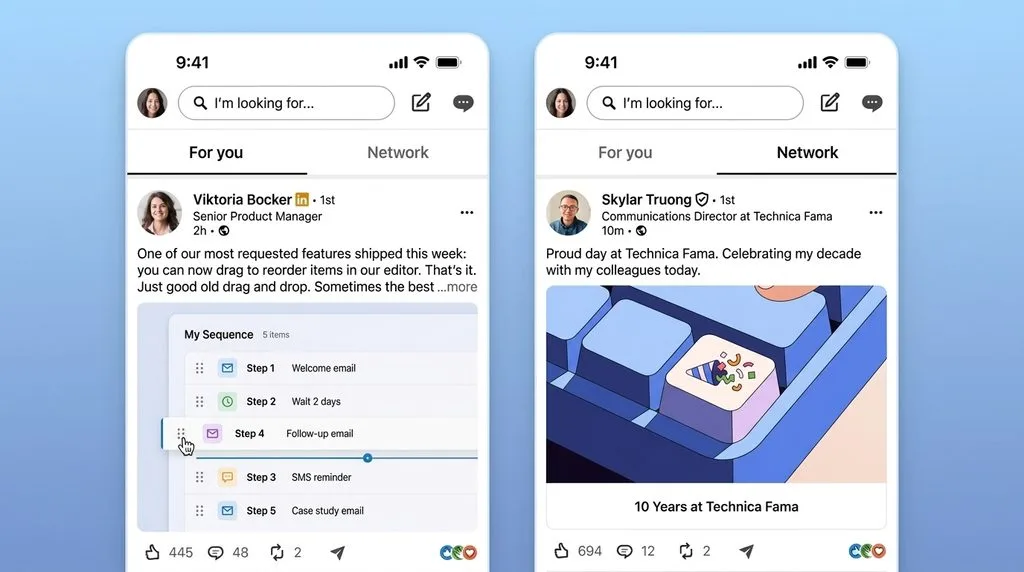
LinkedIn accepts three feed ratios, and each behaves differently — choose based on your content.
- Landscape 1200 × 627 (1.91:1): the classic, best for link-preview-style posts and infographics with horizontal layouts. It occupies the least vertical space in the feed. Minimum accepted is 552 × 289, but anything under 1200 px wide looks soft on retina displays.
- Square 1080 × 1080 (1:1): takes the most real estate in the feed and works equally well on desktop and mobile. Best for quotes, single stats, and product shots.
- Portrait 1080 × 1350 (4:5): the tallest option, dominates the mobile feed. Great for carousels-as-single-post and vertical infographics. Avoid anything taller — LinkedIn will crop.
All three accept JPG, PNG, or GIF, up to 8 MB (some paths cap at 5 MB for ads). LinkedIn supports images up to 36 megapixels, but uploading a 50 MB RAW export is pointless — it will just compress harder. Export at exactly the target pixel size, sRGB, JPG quality 80–90%. After resizing, a light sharpening pass keeps text and edges crisp through LinkedIn’s compression. For consistent brand look across posts, our how photographers lose clients because of inconsistent editing post explains why a uniform template matters.
Carousels and Documents: The Highest-Engagement Format
LinkedIn carousels (documents) consistently outperform single images because swipeable content keeps people on your post longer. Upload as a PDF or PowerPoint, and design each slide at 1080 × 1080 (1:1) or 1080 × 1350 (4:5). Each slide can be up to 10 MB, and documents can run 2–300 pages (though 5–10 slides is the sweet spot). Keep text large — slides render small in the feed preview. Use the first slide as a hook (big question or stat), middle slides for content, last slide for a call to action. Export slides as PNG for sharp text, then assemble into a PDF.
LinkedIn Ads: Sizes That Convert
Sponsored content has tighter limits than organic posts.
- Single image ad: 1200 × 627 landscape or 1080 × 1080 square, JPG/PNG/GIF, max 5 MB. Intro text up to 600 characters, headline up to 70.
- Vertical ad (4:5): 720 × 900 px. Note: vertical ads serve on mobile only — if you run them, exclude desktop or accept zero desktop delivery.
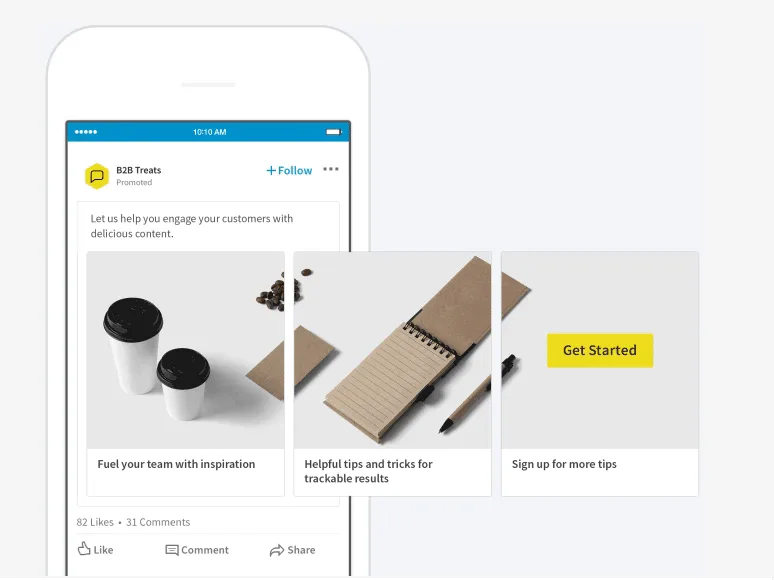
- Carousel ad: 2–10 cards, each 1080 × 1080, max 5 MB per card. Headline up to 45 characters per card.
- Video ad: MP4 or MOV, max 500 MB, 3 seconds to 30 minutes (15–30 seconds recommended), aspect ratios 16:9, 1:1, or 9:16. Upload SRT captions as plain text — 80% of LinkedIn video is watched without sound.
Need your images to be marketplace-ready (Amazon, Shopify, etc.)?
Ensure compliance and quality with our professional Photo Retouching
Video and Events
Organic video: 3 seconds to 10 minutes, file under 200 MB, resolution from 256 × 144 up to 4096 × 2304. Stick to 1920 × 1080 (16:9) for horizontal, 1080 × 1080 square, or 1080 × 1920 (9:16) vertical. Add captions — most viewers watch on mute.
Event cover photo: 1776 × 528 px. The event title, date, and location overlay the bottom of the image, so keep that area clean or use a gradient fade. Showcase pages use the same cover spec as the parent company page (1512 × 256).
Safe Zones and Crop Traps: What Gets Hidden
Three crops ruin LinkedIn graphics — design around them.
- Banner bottom-left overlap: your profile photo covers the bottom-left of your personal banner. Never put a logo or text there.
- Mobile edge crop: phones crop roughly 15–20% off the left and right of banners and covers. Keep important content in the center 70%.
- Feed image crop in previews: when your post is shared or shown in a small preview, LinkedIn crops to a square or 1.91:1 center. Put your subject in the middle.
Always preview your final graphic on both desktop and mobile before publishing — a 30-second check saves a re-upload.
Export Settings for Sharp, Fast-Loading LinkedIn Graphics
- Color space: sRGB. Adobe RGB or ProPhoto will look dull or shifted on LinkedIn.
- Format: JPG quality 80–90% for photos; PNG-24 for text-heavy graphics, logos, and anything with flat colors or transparency.
- File size: under 8 MB (organic), under 5 MB (ads). Aim for 200–500 KB for feed images.
- Pixel dimensions: export at exactly the recommended size. Do not upscale a smaller image — it will blur.
- Sharpen after resize: a light unsharp mask (Amount 80–120%, Radius 0.5–1 px) compensates for LinkedIn’s compression. Our photo editing guide covers the full export workflow.
- Text: keep it large and high-contrast. Fine text under 14 px will be unreadable in a 1584×396 banner.
Ready to elevate your brand’s visual presence?
Partner with Clipping Expert Asia for fast, secure, and premium image editing starting at just 25¢. Explore all our services
5 Common LinkedIn Image Mistakes
- Using the old company cover size (1128×191 or 4200×700). It is now 1512×256 — update your page.
- Putting text in the bottom-left of a personal banner. Your profile photo covers it.
- Uploading oversized files. A 15 MB photo gets compressed harder and looks worse than a properly exported 500 KB one.
- Ignoring mobile. 60%+ of LinkedIn traffic is mobile — if your banner text is in the cropped edges, most viewers never see it.
- Forgetting captions on video. 80% of LinkedIn video is watched muted.
Frequently Asked Questions
For a personal profile, 1584 × 396 pixels (4:1). For a company page, the updated official size is 1512 × 256 pixels — the old 1128×191 and 4200×700 are outdated. Both accept JPG or PNG up to 8 MB.
What size is a LinkedIn profile picture?
Upload at 400 × 400 pixels minimum (a larger square is fine). It displays as a circle around 200 px, so center your face and keep it away from the corners.
What is the best LinkedIn post image size?
Landscape 1200 × 627 (1.91:1) for link-style posts, square 1080 × 1080 for maximum feed space, or portrait 1080 × 1350 (4:5) for mobile dominance. Minimum accepted is 552 × 289, but 1200 px wide is recommended for sharpness.
What size are LinkedIn carousel slides?
1080 × 1080 (1:1) or 1080 × 1350 (4:5), up to 10 MB per slide. Upload as a PDF or PowerPoint. 5–10 slides is the engagement sweet spot.
What is the LinkedIn company page cover photo size?
1512 × 256 pixels, per LinkedIn’s updated Help Center. Many older guides still list 1128 × 191 — uploading at the old size causes cropping or stretching.
What is the LinkedIn square post size?
1080 × 1080 pixels (1:1). Square posts take the most space in the feed and work equally well on desktop and mobile.
What is the LinkedIn ad image size?
Single-image ads: 1200 × 627 landscape or 1080 × 1080 square, max 5 MB. Vertical ads: 720 × 900 (4:5), mobile-only. Carousel ads: 1080 × 1080 per card, 2–10 cards.
What file size and format should I upload to LinkedIn?
JPG (quality 80–90%) for photos, PNG for text/logos, sRGB color space, under 8 MB for organic and 5 MB for ads. Export at the exact pixel dimensions, then lightly sharpen.
Final Verdict
LinkedIn’s sizes are stable except for one important 2026 change: the company page cover moved to 1512 × 256. Personal banners stay at 1584 × 396, profile photos at 400 × 400, feed posts at 1200 × 627 / 1080 × 1080 / 1080 × 1350, and carousels at 1080 × 1080. Design for the three crop traps — profile-photo overlap, mobile edge crop, and feed preview — export in sRGB under 8 MB, and always preview on mobile. Get those right and your graphics will look sharp on every device.