

Clipping Path Photoshop Tutorial: Pen Tool Tips & Uses
July 27, 2026
SDHC vs SDXC: Which SD Card Is Right for Your Camera?
July 30, 2026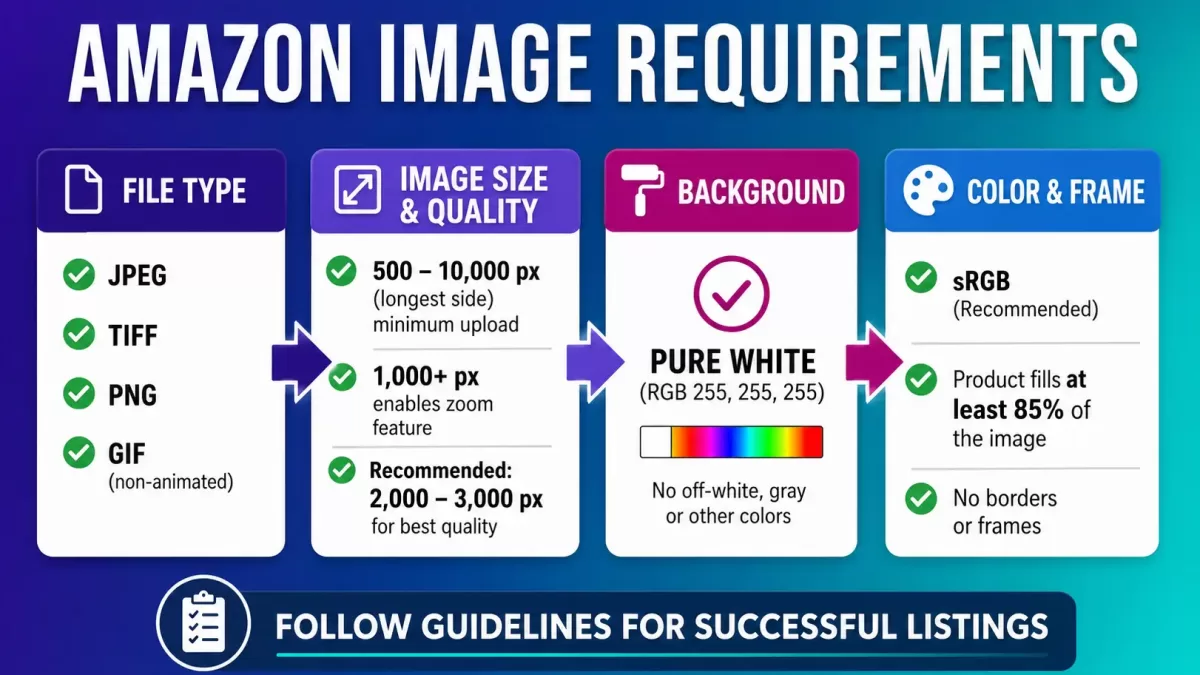
Amazon shoppers scroll fast, tap faster, and forgive nothing. In a marketplace holding more than 350 million active listings, the single main image on your product page decides whether a customer clicks or keeps swiping. That is exactly why Amazon enforces one of the strictest image policies in e-commerce, and why sellers who nail the specs quietly outperform everyone else in their category.
This guide walks you through every rule that matters in 2026 — pixel dimensions, color space, the 85% frame-fill law, category-specific quirks, A+ Content specs, and the small mistakes that trigger silent listing suppression. You will finish with a printable compliance checklist and a clearer sense of how to turn compliant images into a real conversion engine.
- Why Amazon Image Requirements Matter More Than Ever in 2026
- Amazon Product Image Requirements 2026 at a Glance
- Amazon Main Image Requirements (The Non-Negotiables)
- Amazon Image Size Requirements: Pixels, Formats, and Color Explained
- Amazon Secondary Image Requirements (Where Creativity Lives)
- Category-Specific Amazon Image Rules
- The 85% Frame-Fill Rule Explained
- Amazon A+ Content Image Specs (Bonus for Brand Owners)
- Common Reasons Amazon Suppresses Product Images
- Best Practices to Turn Compliant Images Into Conversions
- Workflow: How Pro Sellers Prep Amazon-Ready Images
- A Note on Amazon Video and the Seventh Slot
- Amazon Image Compliance Checklist (Save This)
- Tools and Services That Simplify Amazon Image Prep
- Frequently Asked Questions
- Final Word
Why Amazon Image Requirements Matter More Than Ever in 2026
Amazon treats every image as a ranking signal, an indexing signal, and a trust signal — not just decoration. Strong images push click-through rate up, drop return rate down, and improve your Buy Box odds. Weak or non-compliant images do the exact opposite. When Amazon suppresses a listing for a policy break, that listing effectively disappears from search until you fix the offending file.
A few forces have raised the stakes over the past year:
- Amazon’s automated image checks now flag colored, textured, or dirty “white” backgrounds within minutes of upload.
- Mobile devices drive most Amazon traffic, so images must stay crisp on a 6-inch screen and hold up under desktop zoom on the same asset.
- The zoom feature — the single biggest conversion lever in a listing — only activates when your longest side hits 1,000 pixels or more, per the official Amazon product image guide inside Seller Central.
- A+ Content, Brand Stores, and Sponsored Brand ads all pull from the same asset library, so weak images drag down every marketing surface at once.
If you sell in a competitive category — apparel, jewelry, electronics, kitchen, beauty — a single non-compliant main image can freeze a top-performing ASIN for days. That is real revenue lost to a rule you could have fixed in five minutes.
Amazon Product Image Requirements 2026 at a Glance
Before we go deep, here is the compliance snapshot every seller should memorize:
| Specification | Requirement (2026) |
|---|---|
| Minimum longest side | 500 px (accepted) / 1,000 px (zoom-eligible) |
| Recommended longest side | 2,000–3,000 px |
| Maximum longest side | 10,000 px |
| Maximum file size | 10 MB per image |
| Accepted formats | JPEG (preferred), PNG, TIFF, GIF (non-animated) |
| Color profile | sRGB preferred (CMYK accepted) |
| Main image background | Pure white (RGB 255, 255, 255) |
| Product frame fill (main image) | 85% or more |
| Aspect ratio | 1:1 square strongly recommended; up to 5:1 accepted |
| Images per listing | Up to 9 uploaded; 7 shown (6 if a video is present) |
Amazon Main Image Requirements (The Non-Negotiables)
Your main image is the hero of your listing. It shows up in search results, category grids, Sponsored Products ads, the shopping cart, wish lists, and the mobile app. Break its rules and the listing quietly drops off the map.
The main image must:
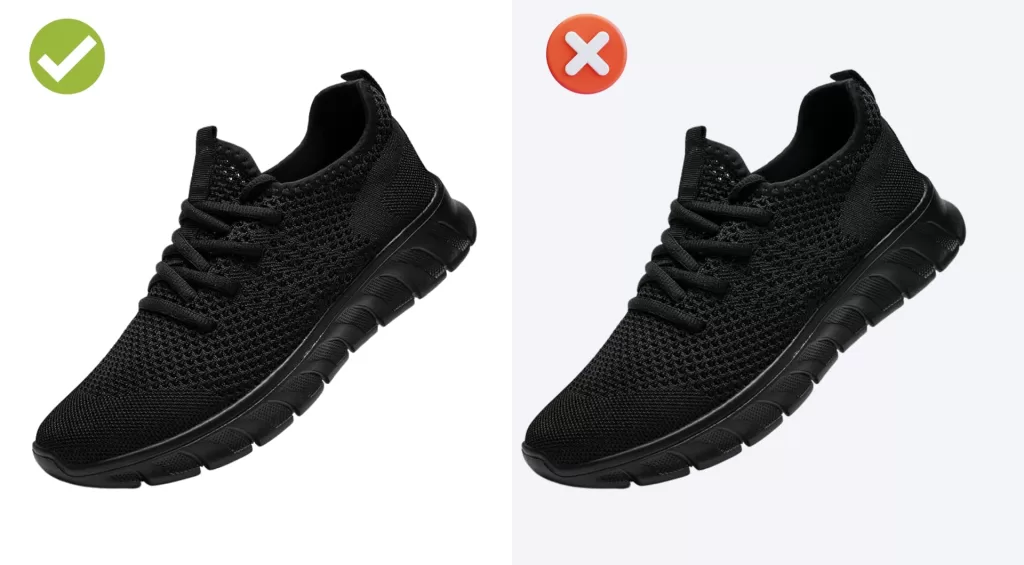
- Sit on a pure white background with the exact RGB value 255, 255, 255. Off-white, cream, or subtle-gradient backgrounds get flagged.
- Show the actual product only — no illustrations, renderings, mockups, or placeholders, unless the category (like books) allows a rendered cover.
- Fill 85% or more of the frame. No tiny products drifting inside a sea of white.
- Show the entire product outside of its packaging, unless the packaging itself is part of what you are selling (DVDs, board games, small consumables).
- Contain no text, logos, watermarks, borders, color blocks, or promotional badges such as “Best Seller” or “50% Off.”
- Avoid inset images, split screens, or multiple angles in a single frame.
- Exclude any accessories or props not included in the sale.
- Follow the correct model pose rules (more on that in the clothing section).
Amazon’s guidelines also state that the product must not touch or be cut off by the frame edge, with necklaces the only meaningful exception. If borderline shadows or gray halos keep haunting your “white” backgrounds, a proper background removal workflow removes the guesswork.
Want to replace messy backgrounds with pure white or custom colors?
Our expert Background Removal Service makes it quick and effortless.
Amazon Image Size Requirements: Pixels, Formats, and Color Explained
Amazon’s technical specs sound dry until you realize they quietly control what your customer actually sees. Here is what each one means in practice.
Image dimensions and resolution
- Absolute minimum: 500 pixels on the longest side. Anything smaller is rejected at upload.
- Zoom threshold: 1,000 pixels. Below this, the magnifying-glass zoom on the detail page stays inactive, which measurably suppresses conversion.
- Recommended sweet spot: 2,000–3,000 pixels on the longest side. This range keeps zoom crisp without bloating file size.
- Maximum: 10,000 pixels on the longest side. Larger files fail the upload check.
- Resolution: 72 DPI is the technical minimum; 300 DPI is the professional norm for anyone planning to retouch or reuse files across advertising channels.
Accepted file formats
- JPEG (.jpg / .jpeg): Amazon’s preferred format, and the best compression-to-quality ratio for photographic content.
- PNG (.png): Fully accepted, though any transparent background converts to white on the main image.
- TIFF (.tif): Accepted, but the file sizes balloon quickly and rarely justify the quality gain.
- GIF (.gif): Accepted only as static. Animated GIFs are prohibited across the platform.
If you are still weighing which format to use for which channel, our image format guide explains JPEG, PNG, WebP, AVIF, and HEIC in plain English.
File size
- Maximum: 10 MB per image on standard listings.
- Practical target: 500 KB to 3 MB for a 2,000-pixel JPEG exported at 85–95% quality. That range preserves detail without slowing the page.
Color space
- sRGB is Amazon’s preferred profile because that is how browsers, phones, and the Amazon app render color.
- CMYK files are accepted at upload, but expect colors to shift on screen — buyers see brands, not print proofs.
- Always embed the color profile on export so previews across devices stay consistent.
Uploading files larger than needed hurts page speed and mobile experience. A quick pass in Photoshop can rescale without softening the image — here is a walk-through on how to resize safely.
Amazon Secondary Image Requirements (Where Creativity Lives)
Once the main image passes compliance, the remaining six or seven slots become your storytelling playground. Amazon relaxes the rules here so you can sell the story around the product, not just the product itself.
Secondary images allow:
- Lifestyle shots with real environments and human models in any pose
- Infographics with text callouts, dimensions, feature icons, and comparison charts
- Coloured or gradient backgrounds
- Close-ups on textures, stitching, and materials
- Before-and-after transformations
- Packaging and “what’s in the box” layouts
- Size charts, ingredient panels, and instructional visuals
Secondary images still cannot contain:
- Nudity or sexually suggestive content
- Amazon logos, trademarked marks, or unearned badges such as “Amazon’s Choice”
- Fake reviews, invented star ratings, or bogus awards
- Contact information, external URLs, or QR codes
- Competitor product logos
Most winning listings follow a proven layout across their seven visible slots:
- Slot 1 — Main image on pure white, product filling 85%
- Slot 2 — Hero infographic showcasing the top three to five benefits
- Slot 3 — Lifestyle image of the product in real use
- Slot 4 — Feature callouts, dimensions, and material spotlights
- Slot 5 — Comparison chart against competitors or older versions
- Slot 6 — Packaging shot or “what’s included” breakdown
- Slot 7 — Brand story, sustainability proof, or a social-proof visual
The Jungle Scout image requirements guide notes that sellers who fill all seven slots typically outperform sellers using only three or four by a wide margin.
Need your images to be marketplace-ready (Amazon, Shopify, etc.)?
Ensure compliance and quality with our professional Photo Retouching
Category-Specific Amazon Image Rules
Amazon overlays extra image rules on top of the general policy for certain categories. Miss one of these and even a technically clean shot can trigger suppression.
Clothing and apparel
The official Amazon clothing image guidelines set the standard here:
- Men’s and Women’s clothing main images must show the garment on a live human model.
- Kids’ and Baby clothing main images must be photographed flat, off-model, for safety and consistency.
- Multi-pack apparel main images must be flat (off-model).
- Clothing accessories main images must not include any part of a mannequin, with stockings and socks the usual exceptions.
- Models must stand upright — no sitting, kneeling, leaning, or lying down.
- Legs cannot be spread wide, eyes must be open, and mouth expressions should stay neutral.
If your workflow does not use live models, the ghost mannequin technique creates the hollow, dimensional look Amazon shoppers expect on jackets, tops, and dresses.
Footwear
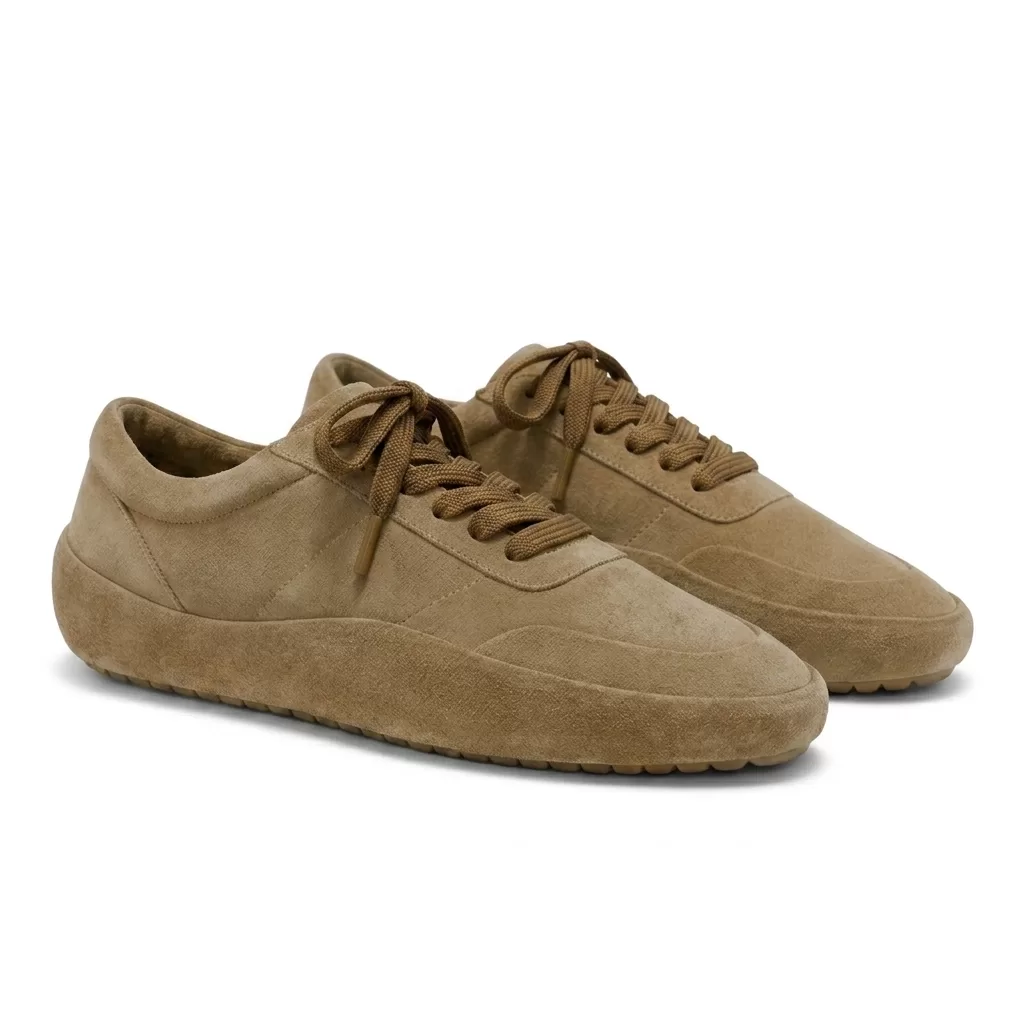
- The main image must show a single shoe, facing left, at a 45-degree angle.
- The full pair belongs in a secondary image, never the main.
- No boxes, tissue paper, or lifestyle props in the main frame.
Jewelry
- Necklaces are the only category allowed to have the product cut off by the frame edge on the main image, which lets sellers highlight a pendant and part of the chain.
- Rings look best photographed at a slight angle rather than flat top-down.
- Reflections and hairline scratches are the top rejection reasons — precision retouching is non-negotiable for luxury shots.
Do your product images fail to show off intricate details?
Highlight every facet and texture with our precise Jewelry Photo Editing Service
Books, media, and software
- Front cover only in the main image.
- No shrink-wrap glare, price stickers, or retailer tags.
- Back cover, spine, and interior spreads belong in secondary slots.
Grocery and consumables
- The main image should display the exact packaging the buyer will receive.
- Nutritional and ingredient panels belong in secondary slots.
The 85% Frame-Fill Rule Explained
Amazon repeatedly stresses that the product must fill 85% or more of the main image frame. This one rule causes more silent listing suppressions than any other technical spec.
The reasoning is simple:
- Small thumbnails must read at a glance on mobile search.
- Buyers should recognize the product instantly, not squint at it.
- Empty white space signals amateur photography and erodes CTR.
To hit the rule cleanly:
- Compose the shot so the product occupies most of the frame during capture, rather than relying on aggressive cropping later.
- Leave a small margin — roughly 5 to 10% — between the product and the frame edge to avoid the cut-off penalty.
- For unusually tall or wide products, rotate the item slightly or shoot from a diagonal angle so it hits 85% without touching the sides.
- Use a 1:1 square canvas so both portrait and landscape products land at 85% consistently across your catalog.
If your catalog runs into the hundreds of SKUs, outsourcing batch Amazon clipping path work is the fastest way to enforce uniform 85% framing across every image.
Amazon A+ Content Image Specs (Bonus for Brand Owners)
If your account is enrolled in Amazon Brand Registry, A+ Content lets you add rich modules below the standard listing. Its image rules differ from the standard listing image rules, and it is worth learning them before designing.
Key A+ image specs, per the official Amazon A+ Content guide:
- Standard module widths: 300 × 300, 600 × 450, 970 × 300, and 970 × 600 pixels depending on module type
- Premium full-width modules: 1,464 × 600 pixels (desktop), with a mobile counterpart typically at 600 × 450 pixels
- Maximum file size: 2 MB per A+ image (some modules cap at 3 MB)
- Accepted formats: JPG, PNG, BMP
- Color space: RGB only — never CMYK for A+
- Minimum resolution: 72 DPI
Sellers who deploy A+ Content routinely report conversion lifts in the 3–10% range, in line with Amazon’s own internal reporting. Treat these modules as brand storytelling real estate, not just extra thumbnails.
Common Reasons Amazon Suppresses Product Images
When a listing goes dark overnight, images are almost always the culprit. The most frequent triggers include:
- Off-white or gradient backgrounds — even RGB (254, 254, 254) can fail the automated check
- Visible shadows or reflections spilling to the frame edge
- Text overlays or promotional badges on the main image
- Multiple products shown when only one is listed for sale
- Watermarks or brand logos on the main image
- Illustrations, renders, or CGI passed off as the main product
- Human models in prohibited poses for the category
- Product occupying less than 85% of the main frame
- Missing accessories that appear in the image but not in the actual bundle
- Files below 500 pixels or above 10,000 pixels, or files larger than 10 MB
The good news: most of these issues do not require a reshoot. A skilled editor can rescue roughly eight out of ten borderline images in minutes, and our breakdown on why Amazon sellers invest in professional photo editing explains why manual work still beats one-click AI tools in high-stakes retail.
Best Practices to Turn Compliant Images Into Conversions
Meeting the rules is table stakes. Winning the click requires deliberate craft.
Composition and framing
- Center the product for symmetrical shapes; use the rule of thirds for asymmetric silhouettes.
- Shoot at eye level for most products, and slightly above for food, cosmetics, and top-load items.
- Keep framing consistent across every SKU so your catalog reads as one curated brand in search results.
Lighting and shadow
- Use soft, diffused lighting to eliminate harsh, distracting shadows.
- Add a subtle natural or reflection shadow to lifestyle-adjacent secondary images for realism, but keep the main image shadow-free or very soft against pure white.
- Our full breakdown on shadow techniques covers when to use drop, natural, and reflection shadows for each product type.
Need to choose between drop, natural, or reflection shadows?
Our versatile Drop Shadow service delivers the exact effect your brand needs.
Color accuracy
- Calibrate your monitor to sRGB before editing anything you plan to publish.
- Match on-screen color to a physical sample under 5,500K daylight.
- Never oversaturate. Buyers who receive a duller product return it and leave 1-star reviews, which hurts long-term ranking.
Storytelling through images
- Show scale — a hand holding the product, or a familiar object next to it.
- Show emotion — a person visibly enjoying the outcome.
- Show results — before-and-after visuals or clear numeric benefits.
Mobile-first thinking
- Preview every image at 300 × 300 pixels, roughly the size it appears in mobile search.
- Text on infographics must remain readable at that size — treat 24-pixel font as the practical minimum.
- Place your strongest benefit in the top-left corner, where the eye naturally lands first.
Workflow: How Pro Sellers Prep Amazon-Ready Images
High-performing Amazon brands run a repeatable pipeline rather than one-off Photoshop sessions. A typical workflow looks like this:
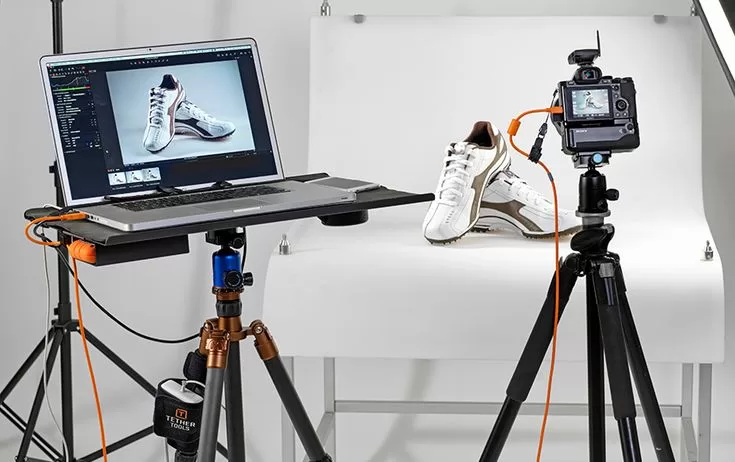
- Shoot RAW at 300 DPI on a proper white sweep or lightbox.
- Cull and select the sharpest angle for each of the seven slots.
- Cut out the product with a clean clipping path — this outperforms one-click AI selection on hair, fur, and metallic edges.
- Place the subject on a pure white canvas (RGB 255, 255, 255) at the correct 85% fill.
- Add a natural shadow for lifestyle-lite variants — but never for the main.
- Color-correct against a physical sample under daylight.
- Export as sRGB JPEG at 2,000–3,000 pixels, 85–95% quality, under 3 MB.
- Rename files using SKU plus slot number (for example, ABC123-MAIN.jpg, ABC123-02.jpg) so Seller Central uploads stay organized.
- QA every image on a real mobile device before publishing.
Automation helps at volume, but the trickiest edges — jewelry, translucent bottles, faux fur, plush toys — still need human hands. Reading up on how AI background remover tools decide edges versus how a human clipping path handles them will save you a lot of re-work.
Struggling with inconsistent cutouts from automated software?
Switch to 100% manual, expert Clipping Path for guaranteed perfection.
A Note on Amazon Video and the Seventh Slot
Video is optional, but it moves the needle. Adding a video reduces one visible image slot — so seven becomes six — yet the conversion lift generally justifies the trade. In practice, Amazon accepts standard e-commerce video formats (MP4 and MOV are the safest), recommends Full HD 1080p as a baseline, and prefers content that shows the actual product in action without external URLs or competitor mentions. Because Amazon updates video specs by category and program more often than image specs, always confirm the current requirement inside Seller Central before final export.
Amazon Image Compliance Checklist (Save This)
Before every upload, run through this quick audit:
- ✅ Longest side between 1,000 and 10,000 pixels (2,000+ ideal)
- ✅ File under 10 MB, saved as JPEG in sRGB
- ✅ Pure white background (RGB 255, 255, 255) on the main image
- ✅ Product fills 85% or more of the frame
- ✅ No text, logos, watermarks, borders, or badges on the main
- ✅ Actual product photography — not renders or mockups
- ✅ Correct category pose (live model, flat, or left-facing 45° for shoes)
- ✅ Every accessory shown is included in the sale
- ✅ Colors match the physical product under daylight
- ✅ Mobile preview at 300 × 300 pixels still reads clearly
Print this list, tape it above your monitor, and you will dodge roughly 95% of Amazon image rejections before they happen.
Tools and Services That Simplify Amazon Image Prep
You do not need a Hollywood budget to hit Amazon’s specs, but you do need the right stack.
Reliable tools most Amazon sellers rely on:
- Adobe Photoshop — still the gold standard for retouching, precision clipping paths, and micro-edits
- Adobe Lightroom — batch color correction and export presets across large catalogs
- GIMP or Photopea — capable free alternatives for smaller inventories
- Amazon’s built-in image editor inside Seller Central — useful for last-minute crops
- Automated background removers — fine for volume, but weak on tricky edges
For sellers shipping hundreds of SKUs a week, blending automation with human quality control gives the best of both worlds. If your catalog includes glossy items like jewelry, learning how to prep transparent backgrounds properly means one master file can flip between Amazon-white and lifestyle contexts without a reshoot.
Frequently Asked Questions
What is the minimum image size for Amazon product listings in 2026?
Amazon requires a minimum of 500 pixels on the longest side to accept an upload, but the practical minimum is 1,000 pixels because that is when the zoom feature activates. The recommended size for both quality and mobile performance is 2,000–3,000 pixels on the longest side.
Can I use a light-gray background instead of pure white?
No. Amazon’s main image rule requires pure white with the exact RGB value 255, 255, 255. Even slightly off-white values such as 253, 253, 253 can trigger automated flagging, especially in competitive categories where the image AI runs more aggressively.
How many images can I upload to an Amazon listing?
You can upload up to nine images per ASIN. Only the first seven appear on the listing by default. If you upload a video, one image slot is replaced, so you effectively show six images plus a video.
What file format does Amazon prefer for product images?
Amazon prefers JPEG because it delivers the best balance of quality and file size. PNG, TIFF, and static GIF files are also accepted. Animated GIFs are prohibited anywhere on your listing.
Do I need to add a shadow to my Amazon main image?
No. A shadow-free main image is safest, and any shadow that reaches or crosses the frame edge fails compliance. Natural and reflection shadows are welcome — and often desirable — on secondary images and lifestyle shots.
What exactly is the 85% frame-fill rule?
Amazon requires the product to occupy at least 85% of the main image frame so it reads clearly in thumbnails, mobile search, and Sponsored ad placements. Products that fill less than 85% risk suppression.
Do the same image rules apply to Amazon A+ Content?
No. A+ Content follows separate module-based dimensions (300×300, 600×450, 970×300, 970×600, or 1,464×600 for premium), a lower file-size cap of about 2 MB, and accepts JPG, PNG, and BMP. Backgrounds, text overlays, and creative layouts are all permitted inside A+ modules.
How can I test if my image passes Amazon’s requirements before going live?
Preview it against the compliance checklist above, then upload it as a draft ASIN inside Seller Central. If the listing goes live and stays live for 24 hours without image-related notifications in your dashboard, your image is compliant.
Final Word
Amazon’s image rules feel strict because they are — but every requirement exists to protect the buyer’s trust, which is the same trust that protects your sales. Nail the technical specs (pixels, format, color, file size), respect the main-image commandments (pure white, 85% fill, actual product only), and treat your remaining slots as premium storytelling real estate. Do that consistently across every SKU and the compound effect shows up in the metrics that matter: better click-through, stronger conversion, fewer returns, and a listing that survives every Amazon policy sweep.
Whether you shoot in-house or outsource, the goal is the same — images so clean, so clear, and so category-correct that shoppers stop scrolling and start buying.