


The 10 Best Memory Card Readers of 2026: SD, CFexpress & USB4 Picks
June 22, 2026
What Does DSLR Stand For? Meaning, History & How It Works
June 24, 2026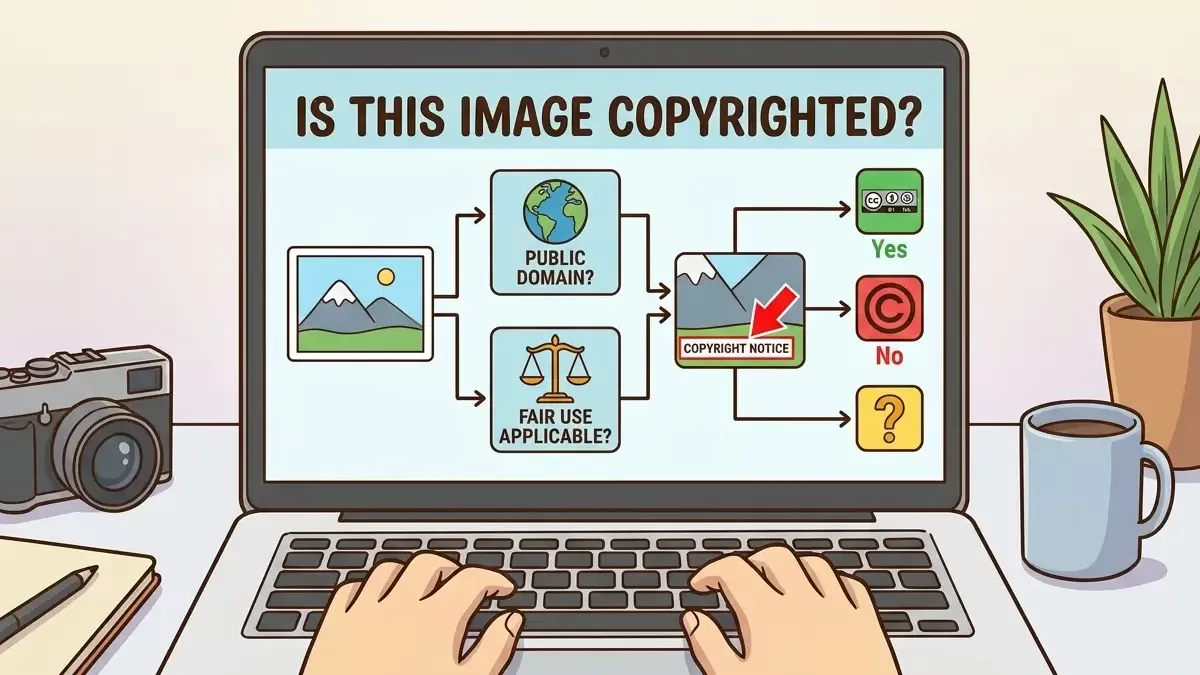
You stumble across the perfect photo for your blog, product page, or social ad. The lighting is right. The mood matches your brand. Then a small, uncomfortable voice whispers in the back of your head: “Wait — am I actually allowed to use this?”
That instinct deserves a closer look. In the United States, every original photograph gains copyright protection the very second the shutter clicks — no registration, no symbol, no paperwork required, per the U.S. Copyright Office. That single legal reality changes everything about how brands, bloggers, students, marketers, and small businesses should treat “free-looking” pictures on the internet.
This guide walks you through every reliable method to verify whether an image is copyrighted in 2026, the exact tools that work today, and the smart workflows that keep you out of court while still letting you publish beautiful content.
Quick answer: Assume every image online is copyrighted unless the license clearly says otherwise. Verify ownership using five layers — visible credit lines and watermarks, EXIF/IPTC metadata, reverse image search, the U.S. Copyright Public Records System, and (when in doubt) a direct email to the creator. When uncertainty remains, do not publish.
Need clean, properly licensed product photos for your store? Skip the legal headaches — get fast, pixel-perfect cutouts with our professional clipping path service and publish with confidence.
- Why Image Copyright Matters More Than Ever in 2026
- What “Copyrighted” Actually Means (Plain English)
- 8 Reliable Methods to Check If an Image Is Copyrighted
- Image License Types Decoded
- How Long Does Image Copyright Actually Last?
- The Fair Use Doctrine: What You Can (and Can’t) Do
- What to Do When You Cannot Verify Copyright
- Special Cases You’ll Bump Into
- How to Send a DMCA Takedown If Someone Steals Your Image
- Best Tools to Check Image Copyright in 2026
- Common Image Copyright Myths — Busted
- A Practical Pre-Publish Checklist (Copy & Save This)
- Building a Long-Term Image Workflow That Stays Legal
- Final Takeaway
- Frequently Asked Questions (FAQs)
Why Image Copyright Matters More Than Ever in 2026
Image theft used to feel like a low-risk shortcut. That era is over. AI scrapers, automated infringement scanners, and reverse-image platforms now help photographers spot stolen pictures within hours, and U.S. courts continue to award statutory damages of $750 to $30,000 per infringed work, with willful infringement reaching up to $150,000 per image, under 17 U.S. Code § 504 and as explained by the Copyright Alliance.
A single unlicensed photo can quietly trigger:
- A DMCA takedown that pulls your page off Google
- A demand letter from agencies like Getty Images, Pixsy, or Copytrack
- Permanent removal of your social media account
- Statutory damages even when the image earned no revenue
- Ad-account bans on Meta, TikTok, or Google Ads
The pressure intensified in 2025 when Getty Images and Shutterstock announced a $3.7 billion merger, creating what will soon be the largest licensable photo library in the world. That consolidation gives enforcement teams more reach, more data, and stronger legal muscle to pursue infringement.
The same year delivered a landmark AI ruling. In Thomson Reuters v. Ross Intelligence, a Delaware federal court issued the first federal decision rejecting a fair-use defense for AI training data, signalling that copyright applies even when machines do the copying, as documented by Reed Smith and Goodwin Law.
In short: knowing how to check copyright is no longer optional. It is a core publishing skill — right next to writing headlines and choosing the right 4:3 aspect ratio for your visuals.
What “Copyrighted” Actually Means (Plain English)
Copyright is automatic. The moment a photographer presses the shutter, the law treats that image as their property. They do not need to register it, place a © symbol on it, or even publish it to own it.
Owning the copyright gives the creator exclusive rights to:
- Reproduce the photo (print or digital)
- Distribute it across any platform
- Display it publicly
- License or sell usage rights
- Create derivative works (edits, crops, remixes)
- Sue anyone who does any of the above without permission
Registration with the U.S. Copyright Office is optional, but it unlocks the right to claim statutory damages and attorney’s fees — a major advantage in court. Internationally, the Berne Convention, administered by WIPO, extends similar automatic protection across more than 180 member countries.
The Golden Rule: Every image is copyrighted until you prove otherwise. Permission is the exception. Verify before you publish.
That single sentence will save you from 90% of risky decisions. If you cannot confirm an image’s license, treat it as off-limits — then run through the eight verification methods below.
8 Reliable Methods to Check If an Image Is Copyrighted
Use these in order. Each method narrows the uncertainty until you can publish confidently — or walk away with a clear conscience.
Method 1: Look for Visible Clues First
Before launching any tool, scan the image and the page where you found it. The owner has often already told you everything you need to know.
Scan for:
- Copyright notice (©, “All Rights Reserved”) — usually in a corner or caption
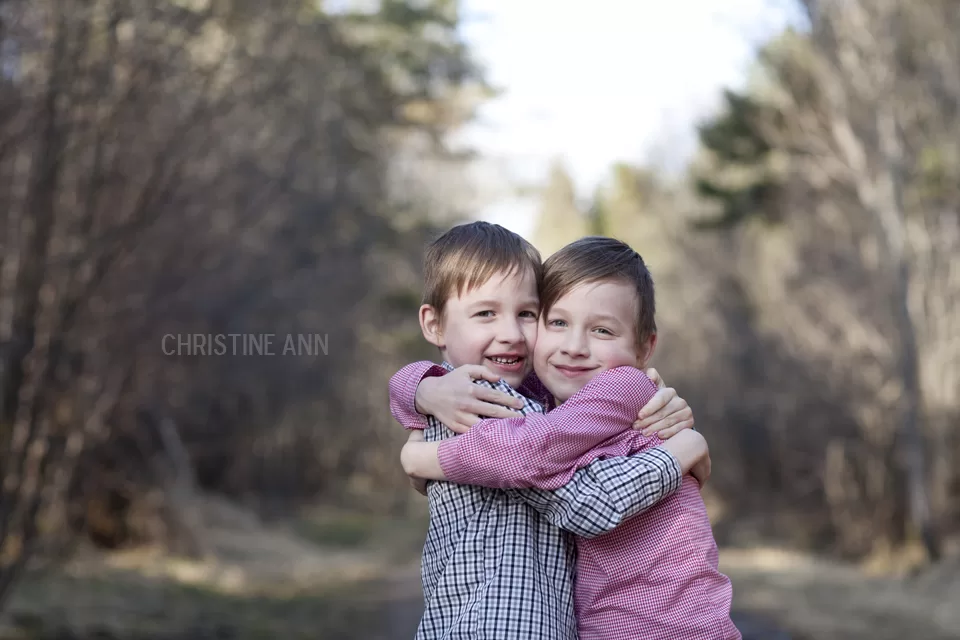
- Watermark or signature — translucent logos, photographer names, or studio marks
- Photo credit lines — small text near the image (“Photo by Jane Doe / Unsplash”)
- Image captions — academic, editorial, and news sites credit owners here
- Website footer notices — “© 2026 Acme Studios. All rights reserved.”
- Dedicated Terms of Use, Press, or Image Use pages
- The image filename itself (e.g.,
john-doe-photography-2025.jpg)
A watermark does not, by itself, create copyright — the copyright already exists. But it signals that the creator actively monitors and protects their work. Treat any watermark — visible or semi-transparent — as a firm “do not use without permission” sign.
Important: Never crop, blur, or clone-stamp a watermark away. Doing so is treated as willful infringement under U.S. law, which dramatically increases potential damages under 17 U.S.C. § 504.
If you find a credit, search that photographer’s name. Their portfolio site usually lists usage terms or a contact form. A short, polite, specific email works surprisingly well — many independent creators license images for far less than stock-photo agencies if you simply ask.
Method 2: Run a Reverse Image Search
A reverse image search uploads the picture (or its URL) to a search engine, which then finds visually similar matches across the web. The earliest published copy usually points to the rights holder.
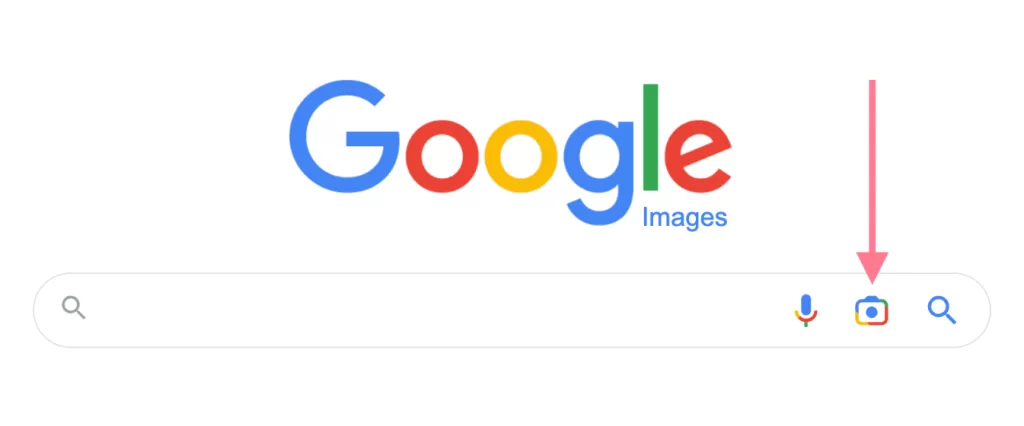
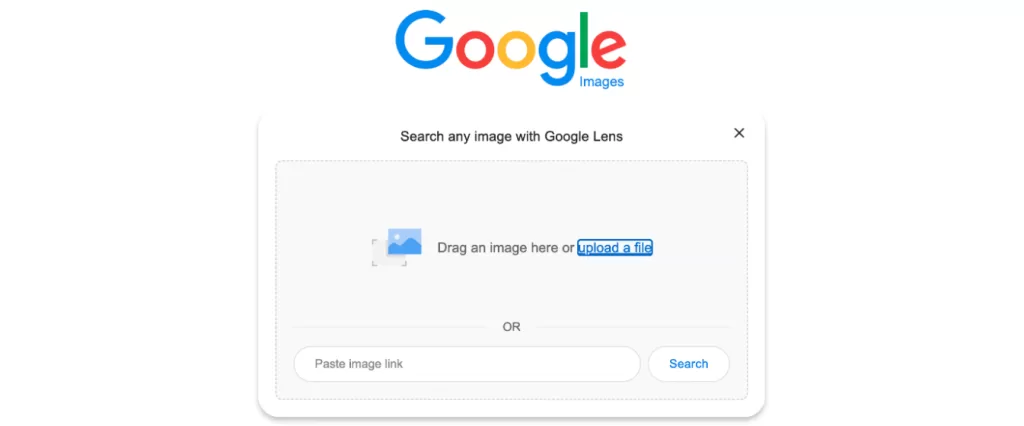
Best reverse-image tools in 2026:
- Google Images / Google Lens — broadest crawl; works inside the Chrome address bar and on mobile
- TinEye — searches 84+ billion images and excels at finding the original upload, even after cropping or recoloring
- Bing Visual Search — strong on e-commerce and product photography
- Yandex Images — historically the best at finding faces and obscure sources
- Pixsy / Berify — paid, AI-powered services used by professional photographers
How to read your results:
- Sort by date (TinEye’s “Oldest” filter is excellent) and find the earliest appearance — usually the creator or licensor.
- Look for stock-agency hits on Getty, Shutterstock, Adobe Stock, or Alamy — a strong copyright signal.
- Find the photographer’s portfolio site or social account.
- Identify any licensing page (“License this image” links).
- Spot news-agency credits (AP, Reuters, AFP) — almost always rights-managed.
Pro tip: Run the same image through at least two engines. TinEye often catches what Google misses, and vice versa. If multiple credible sources host the photo, you are almost certainly looking at a copyrighted work.
Found a licensed photo but the background looks messy? Get studio-clean visuals with our precision background removal service — delivered in as little as 6 hours.
Method 3: Inspect the Image’s EXIF and IPTC Metadata
Every digital image carries embedded metadata — invisible fields written by the camera or editing software. EXIF covers technical details (camera model, exposure, GPS), while IPTC carries the editorial fields you actually care about: creator name, copyright notice, contact info, and usage terms.
How to view image metadata:
- Windows: Right-click → Properties → Details tab
- macOS: Open in Preview → Tools → Show Inspector → click the ⓘ → EXIF / IPTC tabs
- Adobe Photoshop / Lightroom: File → File Info
- Free online viewers: Metadata2Go.com, Jeffrey’s Image Metadata Viewer
- Pro command-line tool: ExifTool by Phil Harvey — most thorough EXIF reader available
- iPhone: Photos app → tap the ⓘ icon; Android: apps like Photo Exif Editor
What to look for inside IPTC:
- Creator / Author — the person who took the photo
- Copyright Notice — e.g., “© 2025 Jane Doe Photography”
- Rights Usage Terms — sometimes lists licensing conditions
- Credit Line / Source — the agency or publication holding rights
- Contact / URL — email or website for licensing
Critical caveat: Most social platforms — Instagram, Facebook, X, Reddit, WhatsApp, TikTok, and Snapchat — strip EXIF data from public uploads to protect user privacy. Missing metadata is not proof of public-domain status. The original creator’s rights remain intact even when the IPTC fields are blank.
Method 4: Search Official Copyright Records
Registration is optional, but many photographers and agencies register their work specifically to unlock statutory damages and attorney’s fees. You can search those records directly.
On June 24, 2025, the U.S. Copyright Office officially replaced the legacy Public Catalog with the new Copyright Public Records System (CPRS) — offering faster searches, better filters, and modern interfaces, as confirmed by the Library of Congress newsroom.
Where to search:
- U.S. Copyright Public Records System (CPRS) — official records, 1978 to today
- U.S. Copyright Office Virtual Card Catalog — pre-1978 registrations
- WIPO Global Brand and IP search — international filings
- National copyright offices — UK’s IPO, Canada’s CIPO, Australia’s IP Australia
- Library of Congress online catalog — supplements Copyright Office data
Search by:
- Photographer’s name (most common)
- Image title or series name
- Registration number (if listed on the photo)
- Date range
A formal registration confirms the image is copyrighted. But no record found does not mean the photo is free — registration is optional, while copyright itself is automatic. Most photographs are never registered yet remain fully protected.
Method 5: Identify Creative Commons and Public Domain Images
Not every image online is locked down. Two major categories of “free” images exist, each with rules you must follow.
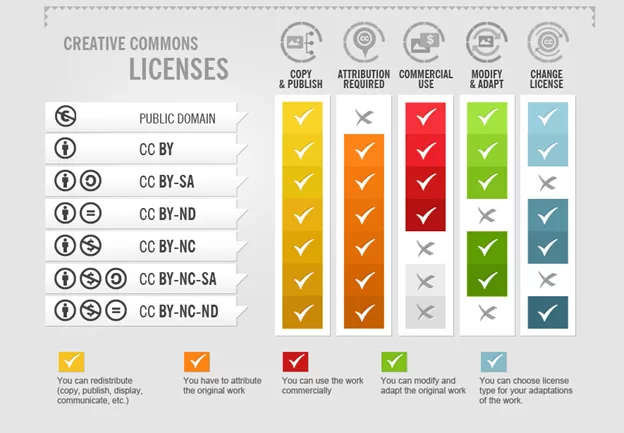
The six standard Creative Commons licenses — plus CC0:
- CC BY — Use freely; credit the creator.
- CC BY-SA — Use freely with credit; share derivatives under the same license.
- CC BY-ND — Use freely with credit; no modifications allowed.
- CC BY-NC — Free with credit, non-commercial use only.
- CC BY-NC-SA — Non-commercial + share-alike + credit.
- CC BY-NC-ND — Non-commercial, no derivatives, credit required (most restrictive CC).
- CC0 — Creator waives all rights; truly free for any use.
Always read the specific CC version under the photo. A CC BY-NC image cannot legally appear in a sponsored Instagram post, even with credit.
Public Domain sources you can trust:
- Works by U.S. federal employees made in official duties (NASA, NOAA, U.S. military, federal agencies)
- Works published in the U.S. before 1930 (this cutoff advances each year — 1930 is correct as of January 1, 2026)
- Works dedicated to the public via CC0
- Government archives: Library of Congress, National Archives, Smithsonian Open Access
- PICRYL, Openverse, Wikimedia Commons (verify per-photo license)
Use the Google Images “Usage Rights” filter:
- Open Google Images and run your search.
- Click Tools in the toolbar.
- Open the Usage Rights dropdown.
- Choose Creative Commons licenses or Commercial & other licenses.
- Click through to the source page and verify the license — users sometimes mis-tag their uploads.
Method 6: Identify Stock Photos and Rights-Managed Imagery
Stock photography agencies hold copyrights for millions of images. If you suspect a picture is stock-licensed, your verification path is straightforward.
Run the image through:
- Google Images — agency thumbnails typically dominate top results
- TinEye — often surfaces the licensing page directly
- The agency’s own search — Getty, Shutterstock, Adobe Stock, Alamy, iStock, Depositphotos, Dreamstime
- Reuters Pictures / AP Images — for editorial and news photography
Quick stock-photo red flags:
- A smiling, diverse business team in a sunlit office
- Studio-perfect lighting with zero candid moment
- Negative space conveniently positioned for text overlays
- The same model appearing in many unrelated photos
- File dimensions of exactly 1920×1280, 1500×1000, or other agency-standard sizes
When you spot these, treat the image as licensed until proven otherwise. The same caution applies to “free” images embedded inside design tools — many bundle stock libraries with their own license rules.
Selling apparel online? Convert flat lays into lifelike, copyright-safe product visuals with our ghost mannequin service — built for Shopify, Amazon, and Etsy.
Method 7: Use Dedicated Copyright Checker Tools
Beyond general reverse search, several specialized platforms focus specifically on copyright verification and enforcement:
- Pixsy — image monitoring and infringement detection used by professional photographers; runs continuous AI scans and has an in-house legal team for enforcement
- ImageRights — automated tracking and enforcement
- Copytrack — finds unlicensed uses worldwide and pursues claims on a contingency basis
- PicDefense — compliance vault for site owners to audit their image library and store proof-of-license
- Berify — AI-driven matching across deep web sources
- SmallSEOTools Reverse Image Search — quick, free, no signup
For an enterprise audit, run every image on your domain through Pixsy or PicDefense to build a proof-of-license vault before any legal challenge arrives.
Method 8: Contact the Source Directly
When the previous seven methods leave any uncertainty, just ask. A polite email or DM to the photographer or website usually resolves the question within 48 hours — and creates a written license record you can save forever.
Use this template:
Subject: Permission to use your photo “[title or URL]”
Hi [Name],
I came across your image at [URL] and would love to use it on [where, e.g., my blog post about X].
Could you let me know whether the photo is available for licensing, and if so, your terms and any credit line you require?
Thanks for your time,
[Your name + website]
Include:
- Where you found the image
- How you plan to use it (blog, ad, social, print)
- Whether you need exclusive or non-exclusive rights
- Your budget or willingness to credit + link
Many photographers — especially those building a portfolio — happily license a single image for a modest fee or a backlink. The Copyright Alliance recommends saving every licensing email, invoice, or signed agreement for at least the lifetime of your project.
Image License Types Decoded
Mastering these license types saves hours of guesswork.
| License Type | What It Means | Cost | Attribution? |
|---|---|---|---|
| All Rights Reserved | Default. No use without explicit permission. | Permission/fee required | Yes, plus permission |
| Royalty-Free (RF) | Pay once, use many times within license limits. | One-time fee | Usually not |
| Rights-Managed (RM) | Pay per specific use (region, duration, medium). | Per-use fee | Yes |
| Creative Commons (CC) | Free reuse under specific conditions. | Free | Depends on license |
| Public Domain (CC0) | No restrictions. Use freely, even commercially. | Free | Not required |
| Editorial Use Only | News and commentary only — no advertising or product promotion. | Varies | Yes |
How Long Does Image Copyright Actually Last?
In the United States:
- Photos taken today by an individual: Protected for life of the photographer + 70 years
- Work-for-hire / corporate / anonymous photos: 95 years from publication or 120 years from creation — whichever ends first
- Published 1930–1963: Protected only if the copyright was renewed
- Published 1964–1977: Protected for 95 years from publication
- Published before 1930: Public domain in the U.S. (as of January 1, 2026, per the Cornell Public Domain chart)
- NASA, U.S. military, and federal-agency photos: Public domain from creation
Most countries follow the Berne Convention, which sets a global minimum of life + 50 years. The European Union, UK, Australia, and — since December 30, 2022 — Canada all use life + 70 years.
Canada’s extension is not retroactive: works whose copyright expired on or before December 31, 2021, remain in the public domain.
If you are scanning vintage family pictures or working through old prints stored on cloud storage, the copyright still belongs to whoever pressed the shutter — usually a family member, even decades later.
The Fair Use Doctrine: What You Can (and Can’t) Do
Section 107 of U.S. copyright law allows limited use of protected images without permission for purposes such as:
- Criticism and commentary
- News reporting
- Teaching, scholarship, and research
- Parody and satire
- Transformative works that add new meaning or message
Courts weigh four factors:
- Purpose and character of the use — commercial vs. educational, transformative or not.
- Nature of the copyrighted work — factual vs. highly creative.
- Amount and substantiality used relative to the whole.
- Effect on the market for the original work.
Critical limits:
- Fair use is decided case by case in court — there is no “25% rule” or “if I credit them, it’s fine” shortcut.
- Outside the U.S., equivalent doctrines (like “fair dealing” in the UK and Canada) are narrower.
- Fair use is a defense raised at trial, not a label you can self-apply.
- Photographs are generally treated as creative works, which makes fair use harder to claim than for factual content.
Educational blogging, museum websites, and journalism enjoy stronger fair-use claims than e-commerce, advertising, or social-media marketing. When in doubt, license or replace the image — especially if you are experimenting with AI editing tools that train on or remix copyrighted material.
What to Do When You Cannot Verify Copyright
Sometimes every method comes up empty. The photographer is unknown, the metadata is stripped, and reverse search finds nothing. Here’s the safest path forward:
Option A — License It Properly
Reach out to the photographer or the agency listed in your reverse-image search. Many will license a single web-resolution image for $10–$50. For commercial campaigns, agencies like Shutterstock, Adobe Stock, Alamy, and Getty offer instant downloads with clear license terms.
Option B — Replace It With a Safer Source
Reliable, free, commercial-friendly libraries include:
- Unsplash — proprietary Unsplash License; free for most commercial uses (attribution appreciated but not required)
- Pexels — permissive CC0-style terms; free commercial use
- Pixabay — Pixabay Content License; free commercial use
- Wikimedia Commons — verify the license per photo
- Library of Congress free-to-use sets
- Smithsonian Open Access
- NASA Image and Video Library
- CC Search / Openverse — aggregates 800M+ openly licensed works
Option C — Create Your Own
The safest images are the ones you shoot. A modern smartphone, a small lightbox, and a photo printing software workflow can produce publication-quality results — and you own every pixel.
Special Cases You’ll Bump Into
AI-Generated Images
The U.S. Copyright Office’s January 2025 Part 2 Report confirmed that purely AI-generated images without significant human authorship are not eligible for copyright in the U.S. The Thaler v. Perlmutter decision, affirmed by the D.C. Circuit in March 2025, reinforced this rule.
But that doesn’t mean every AI image is “free.” Key caveats:
- The training data may include copyrighted works — currently the focus of multiple active lawsuits.
- Some platforms grant commercial rights only to paid subscribers.
- Many platforms forbid using outputs to recreate trademarked characters.
- Edited AI images with substantial human creativity may be partially copyrightable.
Always review the AI platform’s terms of service (Midjourney, OpenAI/DALL·E, Stable Diffusion, Adobe Firefly all differ) before commercial use.
Screenshots of Other People’s Photos
A screenshot is a copy. Taking a screenshot of an Instagram photo and republishing it does not change ownership. The original photographer still holds copyright.
Social Media Embeds
Embedding a public Instagram or X post used to be considered safer than downloading. The 2018 ruling in Goldman v. Breitbart weakened that defense by holding that embedding a tweet containing a copyrighted photo can constitute “display” under the Copyright Act. Federal courts remain split on the so-called “server test.” When in doubt, link out instead of embedding.
Photos of Public Figures or Public Places
Copyright protects the photograph, not the subject. You can shoot your own photo of the Eiffel Tower — but you cannot freely reuse someone else’s. One curious wrinkle: the Eiffel Tower’s nighttime lighting display is itself a copyrighted artistic work owned by SETE (the tower’s operator). Personal night shots are fine; commercial publication of Eiffel Tower night photos requires SETE’s permission, per the official Tour Eiffel guidance.
Family Photos and Old Prints
Even decades-old prints in a shoebox are copyrighted by whoever shot them. Scanning preserves the image; it doesn’t transfer ownership. Some users wonder whether memory card capacity can hold a lifetime of digitized memories — capacity has nothing to do with rights.
Product Photography You Commissioned
When you hire a photographer for product shots, the U.S. default rule is that the photographer owns the copyright — even though you paid them, per Copyright Alliance. Always get a written work-for-hire agreement or assignment of rights to be safe. The same logic applies if you later need to remove color or otherwise edit those shots.
Stop worrying about copyright headaches and start publishing with confidence. Outsource your image editing to the trusted experts at Clipping Expert Asia for studio-quality results, delivered around the clock.
How to Send a DMCA Takedown If Someone Steals Your Image
If you discover your image stolen, the Digital Millennium Copyright Act (DMCA) gives you a fast, free remedy. Per Section 512 of the U.S. Copyright Act, the notice-and-takedown system requires U.S. hosting platforms to remove infringing content promptly — and you do not need a registered copyright (or an attorney) to file.
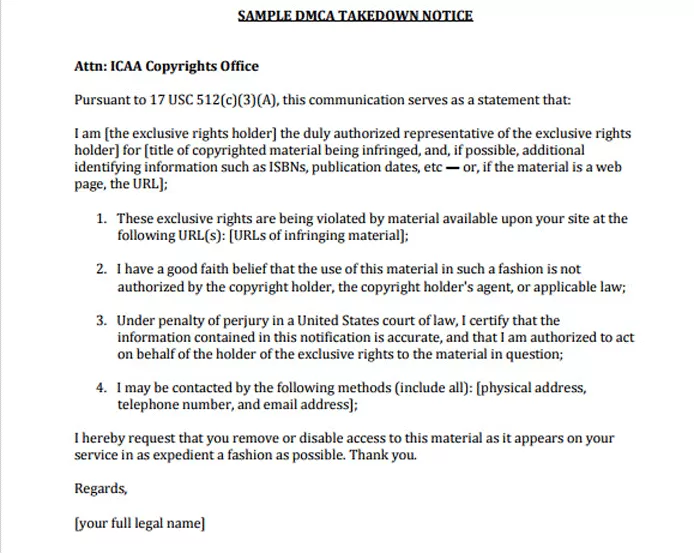
A valid DMCA takedown notice must include:
- Your contact information (name, email, phone, address).
- Identification of the copyrighted work.
- The exact URL(s) where infringement appears.
- A statement of good-faith belief that the use is unauthorized.
- A signed statement (electronic is fine) under penalty of perjury that you are the owner or an authorized agent.
Send the notice to the hosting platform’s designated DMCA agent — most platforms list one on their legal page. Google, YouTube, Meta, X, Shopify, and major CDNs typically respond within days.
Escalation tips:
- Use WHOIS lookup to identify the website host if no DMCA agent is listed.
- Submit a Google search-removal request to delist the infringing URL.
- For repeat infringers, consider services like Pixsy or ImageRights that handle enforcement on commission.
Best Tools to Check Image Copyright in 2026
| Tool | Best For | Free Tier | Standout Feature |
|---|---|---|---|
| Google Lens / Images | Quick checks, broad coverage | Yes | Crops, recolors, similar-image matching |
| TinEye | Finding the original upload | Yes (usage limits) | Searches 84B+ images; tracks edits |
| Yandex Images | Faces and obscure sources | Yes | Strong AI matching |
| Bing Visual Search | E-commerce and products | Yes | Shopping integration |
| Pixsy | Photographers monitoring theft | Limited free | AI scanning + in-house legal team |
| ExifTool | Deep metadata inspection | Free | Most complete EXIF/IPTC reader |
| Metadata2Go | One-off metadata check | Free | No install required |
| U.S. Copyright Office CPRS | Registration verification | Free | Official records 1978–today |
| Openverse | Discovering CC-licensed images | Free | Aggregates 800M+ CC works |
Common Image Copyright Myths — Busted
| Myth | Reality |
|---|---|
| “If it’s on Google, it’s free.” | Google indexes images; it doesn’t license them. |
| “No © symbol means no copyright.” | Copyright is automatic. The symbol is optional. |
| “Credit = permission.” | Attribution is not a license. |
| “Non-commercial use is always fair use.” | Non-commercial use can still infringe. |
| “I modified it, so it’s mine now.” | Derivative works still infringe the original. |
| “Screenshots aren’t copyrighted.” | They include the copyrighted underlying content. |
| “I removed the watermark, so no one will know.” | Watermark removal = willful infringement; damages skyrocket. |
| “Pinterest, Tumblr, and Reddit images are free game.” | Reposted images keep their original copyright. |
| “Old photos are public domain.” | Only if copyright has actually expired in your country. |
| “AI-generated images have no copyright.” | True for purely AI works in the U.S., but training-data origin still matters. |
The American Bar Association’s IP section regularly debunks these myths in greater depth.
A Practical Pre-Publish Checklist (Copy & Save This)
Before you hit publish on any photo, ask:
- Did I take this photo myself?
- Do I have written permission or a paid license?
- Is the image clearly marked Creative Commons, public domain, or CC0?
- Did I check EXIF/IPTC metadata for ownership data?
- Did I run reverse image search on at least two platforms?
- Did I confirm the license on the host website (not just Google)?
- Will I credit the creator according to the license terms?
- Have I documented the source URL and license in my records?
- Do I have screenshots of the license terms saved as evidence?
- If I commissioned this shot, do I have a written assignment of rights?
If any box stays unchecked, replace the image or seek permission. A 5-minute check beats a $30,000 lawsuit every single time.
Building a Long-Term Image Workflow That Stays Legal
A repeatable workflow protects you long after this article fades from memory.
- Maintain a license library. Save every receipt, license file, and CC link in a shared folder or DAM system. A simple Google Sheet works.
- Standardize file naming. Use
source_creator_license_date.jpgso anyone on your team can trace rights at a glance. - Use approved-source whitelists. Limit your team to vetted libraries (Unsplash, Pexels, paid stock you own, your own shoots).
- Embed your IPTC data. Write your copyright notice into every file before sharing — it travels with the image.
- Watermark your own work. Add visible and invisible (digital) watermarks to deter theft.
- Schedule quarterly audits. Rerun reverse image searches on legacy images to confirm they’re still legitimate.
- Train collaborators. Brief writers, designers, and VAs about copyright basics during onboarding.
- Use modern editing apps. Tools featured in roundups of the best photo editing apps make it easier to track image versions and source files.
- Back up evidence. If you license a photo, screenshot the license terms. Companies change websites; you need the proof you bought rights.
Final Takeaway
If you did not take the photo, and you cannot prove permission or a license, do not use it. That single sentence has saved more bloggers, marketers, and small businesses from lawsuits than any other piece of advice in this guide.
The internet looks like a free buffet of images. Legally, it is a museum: every picture has an owner, every owner has rights, and every wall has a label — even if you can’t see it. The eight methods above turn those invisible labels visible. Use them, build a clean workflow, and you’ll publish stunning visuals without ever worrying about a takedown notice or a five-figure demand letter.
Ready to scale your visual content the right way? Explore the full suite of image editing services at Clipping Expert Asia — clipping path, background removal, retouching, ghost mannequin, and shadow creation — and publish with total confidence today.
Frequently Asked Questions (FAQs)
Q1. How can I tell if an image is copyrighted for free?
Run a reverse image search on Google Images, TinEye, and Yandex. Inspect the image’s EXIF/IPTC metadata with Metadata2Go or ExifTool, look for credits or watermarks on the host page, and search the U.S. Copyright Public Records System (CPRS). All five steps are free.
Q2. Are all images on Google copyrighted?
Yes, by default. Google indexes the open web, and most images you see in search results are protected by their creators. Use the Google Images “Usage Rights” filter under Tools, then verify the license directly on the host website before publishing.
Q3. Can I use a copyrighted image if I give credit to the photographer?
No. Credit is not the same as permission. You still need written permission, a paid license, or a Creative Commons license that allows your specific use case. Attribution is a requirement of many licenses — not a substitute for one.
Q4. How can I tell if an image is in the public domain?
Check the original publication date, the creator’s death date, and the country of origin. Use the Cornell Public Domain chart, the Library of Congress catalog, and PICRYL. As of January 1, 2026, U.S. works published before 1930 are generally in the public domain. Works by U.S. federal employees in official duties (NASA, NOAA) are public domain from creation.
Q5. What happens if I accidentally use a copyrighted image?
You may receive a DMCA takedown notice, a demand letter, or a lawsuit. Statutory damages range from $750 to $30,000 per image, with willful infringement reaching $150,000. Removing the image quickly and apologizing can reduce — but not eliminate — liability.
Q6. Does adding a watermark protect my copyright?
A watermark does not create copyright — protection already exists automatically. But a watermark signals ownership, deters casual theft, and is treated as evidence of intent to enforce rights. Pair it with metadata embedding, U.S. Copyright Office registration, and reverse-image monitoring for stronger protection.
Q7. How long does copyright last on a photograph?
In the U.S., EU, UK, Australia, and Canada (since December 30, 2022), copyright generally lasts for the life of the photographer + 70 years. Works made for hire are protected for 95 years from publication or 120 years from creation, whichever ends first. Always verify based on country and year of creation.
Q8. Are AI-generated images copyright-free?
Purely AI-generated images cannot currently be copyrighted in the U.S. because they lack human authorship — confirmed by the U.S. Copyright Office’s January 2025 Part 2 Report and the Thaler v. Perlmutter ruling. However, the AI platform’s terms of service may still restrict commercial use, and underlying training data may include copyrighted works. Always read the platform’s license carefully.