


What Is 4K Resolution? Complete Guide to Pixels, Screen Size & Meaning
March 2, 2026
Shadow Creation in Product Photography: The Key to Realistic Product Images
March 4, 2026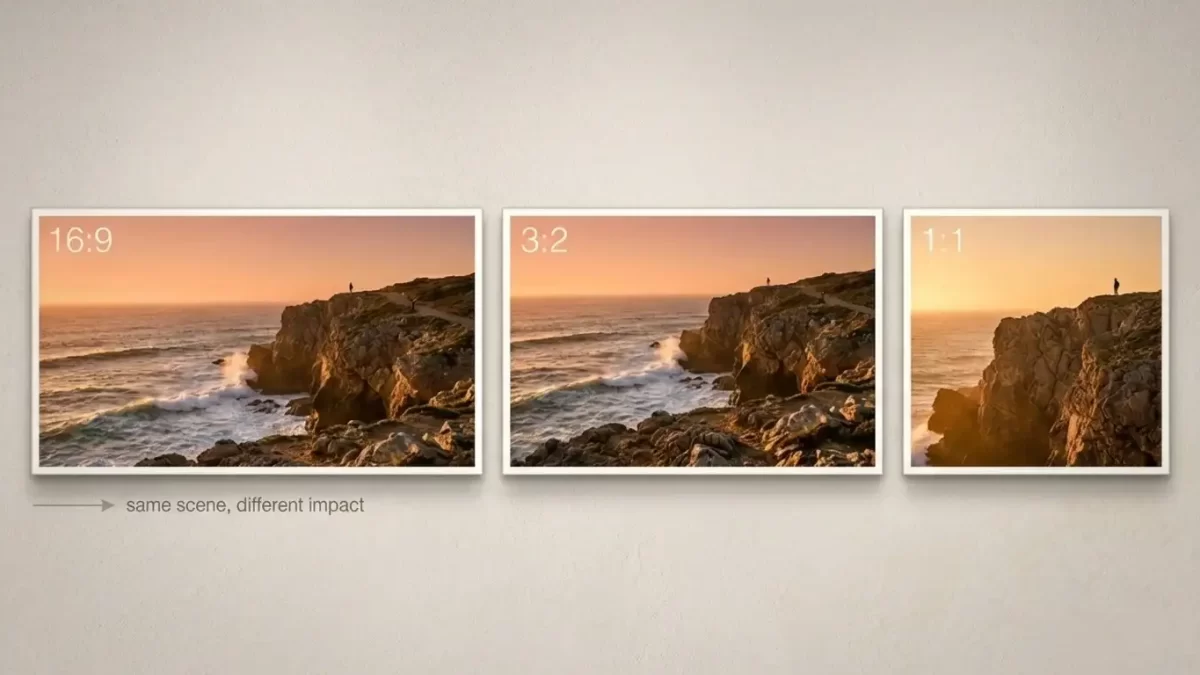
You select the ideal aspect ratio by aligning the frame’s proportions with your subject, intended message, and display medium. Professional photographers treat aspect ratio as a foundational creative decision that directs viewer attention, establishes visual balance, and eliminates the need for destructive cropping during post-production. This proportion directly influences composition strength, emotional impact, and technical quality across prints, websites, and social platforms. When you master aspect ratio choices, you transform ordinary captures into compelling visual stories that resonate deeply with audiences.
The decision extends far beyond simple numbers. It shapes how eyes travel across the image, how much context you include, and how the final piece performs in its environment. Experienced creators switch ratios intentionally to enhance impact, while beginners often overlook this powerful tool. You gain complete control over framing when you understand the relationship between width and height and apply it deliberately in every shoot.
Understanding aspect ratio empowers you to compose with intention rather than accept default settings. Many photographers begin with their camera’s native ratio and never explore alternatives, yet switching ratios on purpose often transforms an ordinary frame into a compelling image. This comprehensive guide explains the reasoning process, common formats, critical decision factors, and practical applications across genres, equipping you with the knowledge and practical skills needed for consistent success.
- Understanding Aspect Ratio Fundamentals
- Popular Aspect Ratios and Their Characteristics
- The Historical Evolution of Aspect Ratios in Photography
- Why Aspect Ratio Matters in Professional Photography
- Key Factors Influencing Aspect Ratio Selection
- In-Camera Aspect Ratio Settings Explained
- Effective Cropping Strategies in Post-Production
- Genre-Specific Aspect Ratio Recommendations
- Frequent Pitfalls and How to Avoid Them
- Advanced Techniques to Elevate Your Ratio Decisions
- Optimizing Aspect Ratio for Modern Digital Platforms
- FAQs
Understanding Aspect Ratio Fundamentals
Aspect ratio defines the proportional relationship between an image’s width and height. A 3:2 ratio, for example, maintains three units of width for every two units of height regardless of physical size or pixel count. This proportion remains constant regardless of the actual pixel dimensions or physical print size you ultimately choose.
Distinguish aspect ratio from resolution clearly. Resolution measures total pixels, whereas aspect ratio governs the shape of the canvas. You preserve maximum detail by choosing the correct ratio during capture or early editing instead of forcing drastic crops later. When you change the ratio during shooting or editing, you effectively crop the captured scene while preserving pixel quality if you prepare correctly from the start.
Photographers leverage these proportions to control narrative flow. Wide formats emphasize expanse and context, while taller frames concentrate focus on vertical subjects. Square formats simplify complex scenes and deliver symmetrical balance. You establish the emotional tone and narrative focus before you even begin post-processing.
You visualize ratios through real-world examples. A 16:9 frame stretches horizontally to embrace sweeping horizons, creating a sense of grandeur and immersion. A 4:3 frame offers balanced proportions that feel familiar and comfortable for everyday subjects. When you internalize these relationships, you compose scenes more effectively and anticipate how images will appear in final presentations.
Explore practical aspect ratio examples and tools in this clear overview from Adobe.
Popular Aspect Ratios and Their Characteristics
The photography world favors a select group of ratios because hardware, print standards, and digital platforms support them consistently. Several established ratios continue to dominate photography because camera sensors, printing standards, and digital displays naturally support them.
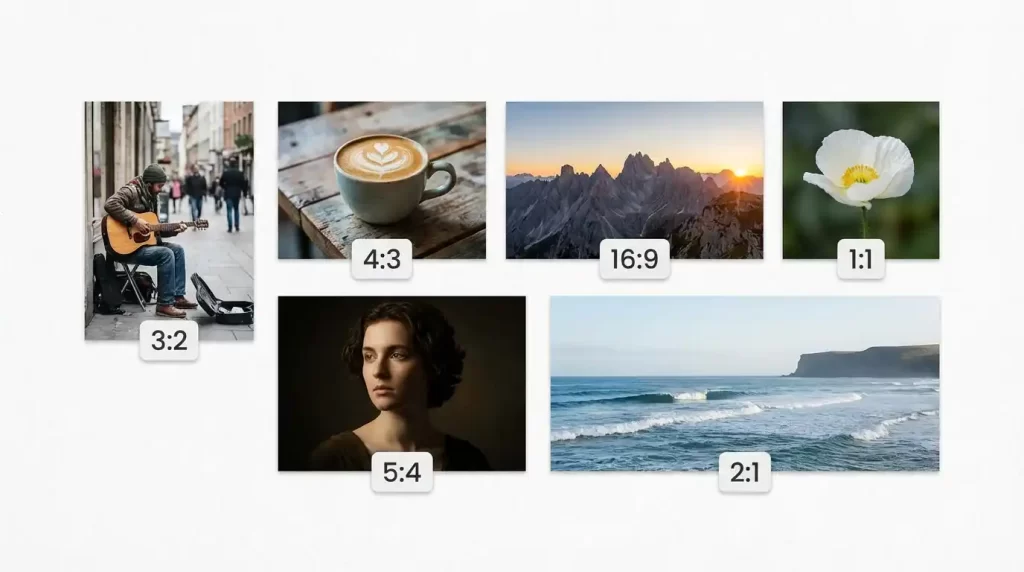
- 3:2 – Classic full-frame DSLR and mirrorless format; delivers balanced, film-like proportions ideal for general use.
- 4:3 – Traditional compact camera and many smartphone defaults; provides slightly more vertical real estate for portraits and product shots.
- 16:9 – Widescreen cinematic look; excels at panoramic landscapes, architectural interiors, and video-still hybrids.
- 1:1 – Perfect square; creates minimalist impact and performs exceptionally well on profile-based social platforms.
- 5:4 – Subtle classic proportion; frequently chosen for fine-art prints and medium-format aesthetics.
- 2:1 and wider – Panoramic options; used sparingly for dramatic environmental storytelling.
Each ratio carries distinct visual personality. Experimenting with them reveals how small changes dramatically shift mood and emphasis.
Aspect Ratio Quick Reference Table
| Aspect Ratio | Typical Use Cases | Strengths | Common Output Formats |
|---|---|---|---|
| 3:2 | General, portraits, street | Balanced, classic feel | 4×6, 8×12 prints, full-frame |
| 4:3 | Portraits, product, phone default | Slightly taller, natural headroom | Micro 4/3 sensors, many compacts |
| 16:9 | Landscape, cinematic, video stills | Expansive, immersive | Widescreen monitors, panoramic |
| 1:1 | Social media, minimalist, square | Symmetrical, focused | Instagram grid, profile pictures |
| 5:4 | Fine art, studio, medium format | Elegant, subtle vintage aesthetic | 8×10, 16×20 prints |
Popular Aspect Ratios – Quick Comparison
| Aspect Ratio | Example Pixel Dimensions (Full Frame) | Key Strengths | Best Suited For | Common Print Compatibility |
|---|---|---|---|---|
| 3:2 | 6000 × 4000 | Natural balance, versatile | Portraits, landscapes, street | 4×6, 8×12, 16×24 |
| 4:3 | 6000 × 4500 | Slightly taller, intimate | Everyday, product, some portraits | 8×10, 11×14 |
| 16:9 | 6000 × 3375 | Cinematic, expansive | Horizons, architecture, video | Panoramic, wide prints |
| 1:1 | 4000 × 4000 | Balanced, minimalist | Social media, abstracts | Square frames, albums |
| 5:4 | 5000 × 4000 | Elegant, traditional | Studio, fine art | 8×10, 11×14, 16×20 |
Learn the history and technical foundations of image ratios here.
The Historical Evolution of Aspect Ratios in Photography
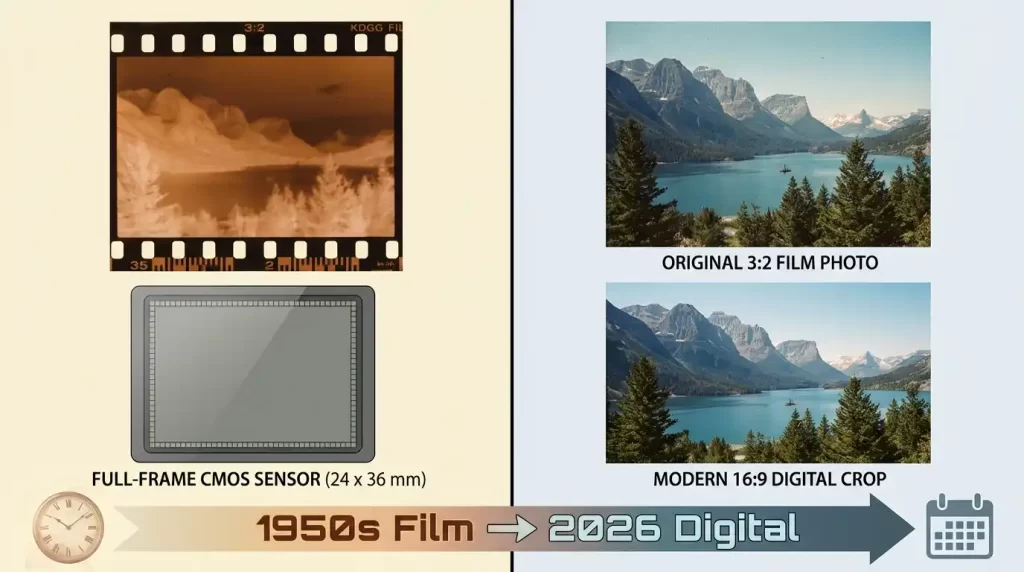
Aspect ratios evolved alongside photographic technology from early film formats to modern digital sensors. You appreciate current options more deeply when you understand their origins. Film cameras established 3:2 as a standard because it mirrored the golden rectangle proportions favored by classical artists. Digital sensors later adopted similar ratios for compatibility with existing workflows.
You see how manufacturers refined these proportions over decades to balance technical capabilities with creative demands. Today’s cameras offer multiple in-camera choices precisely because photographers demanded flexibility. This evolution empowers you to select ratios that honor tradition while embracing contemporary display needs.
Why Aspect Ratio Matters in Professional Photography
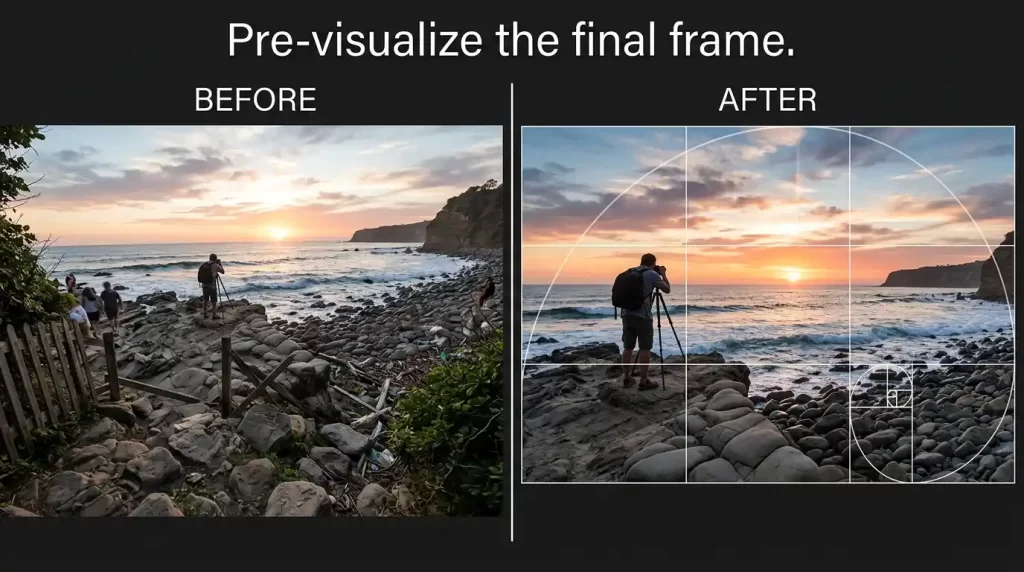
Aspect ratio actively shapes viewer perception before any editing begins. Wide frames invite exploration across the scene, while narrow frames pull attention inward. You strengthen composition when you decide proportions early. Pre-visualizing the final frame helps place key elements more deliberately along leading lines, thirds, or golden spirals.
Professionals view aspect ratio as an active creative decision rather than a passive technical setting. They match frame shape to emotional intent and viewing context from the moment they raise the camera. Aspect ratio exerts influence on every decision you make behind the lens. You shape viewer attention and emotional response when you establish proportions early in the creative process.
Read a thoughtful exploration of aspect ratio decisions in this detailed Phlearn feature.
Key Factors Influencing Aspect Ratio Selection
Multiple variables guide your choice in the field. Evaluate them systematically for consistent, purposeful results. You evaluate multiple considerations before committing to a specific ratio. Subject characteristics, compositional elements, background details, and final output requirements all contribute to the optimal choice.
Subject Matter and Visual Flow
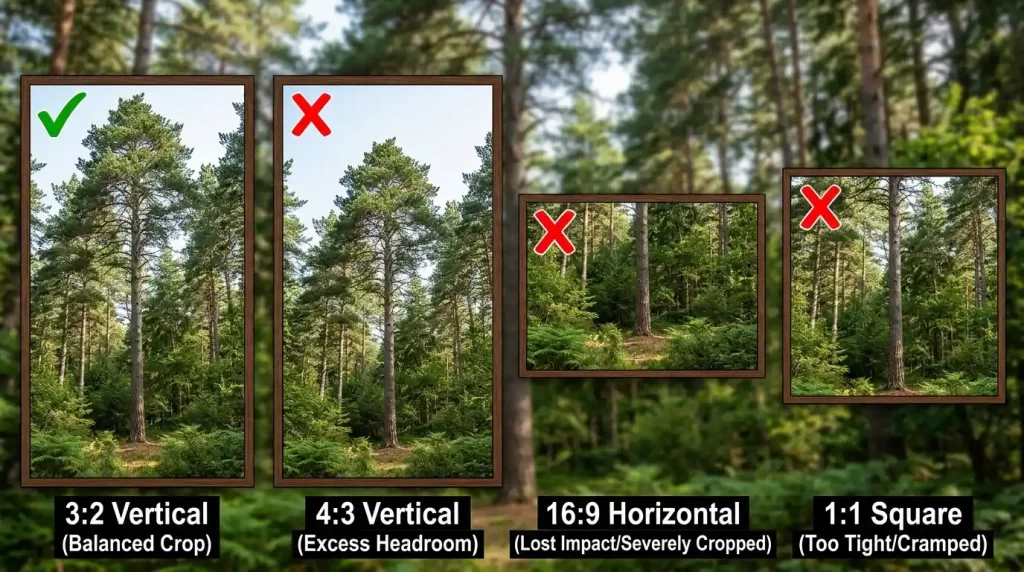
Vertical subjects—standing figures, architecture, tall trees—benefit from taller ratios that preserve full height without forced cropping. Horizontal compositions—expansive vistas, group portraits, coastal horizons—gain strength from wider proportions that include essential context.
Deliberate use of negative space alters emotional tone. Generous margins around a solitary subject convey isolation or tranquility; tighter framing heightens intensity.
Final Display Requirements
Print dimensions lock in specific ratios. Standard 4×6, 8×12, and 16×24 prints align perfectly with 3:2 aspect ratio, eliminating unwanted trimming. Digital platforms impose their own preferences. Vertical 4:5 or 9:16 formats dominate mobile-first feeds, while square 1:1 remains king for grid consistency.
Commercial clients often supply exact layout specifications. Matching ratio at capture saves revision time and maintains highest quality. Website layouts load efficiently when images match container dimensions. You eliminate distortion and improve user experience by preparing files according to exact display requirements.
Camera Sensor and File Flexibility
Native sensor ratios set the starting point. Full-frame 3:2 sensors offer generous cropping latitude, while smaller 4:3 sensors limit extreme adjustments. RAW capture preserves maximum flexibility. You adjust ratio non-destructively during editing without sacrificing detail. JPEG shooters commit earlier, so previewing crop overlays in-camera becomes essential.
Discover practical Canon guidance on selecting aspect ratios for different creative needs.
In-Camera Aspect Ratio Settings Explained
Contemporary cameras provide built-in ratio selection for accurate live-view composition. Mirrorless and DSLR models typically offer 3:2, 4:3, 16:9, 1:1, and occasionally 5:4 or custom options. Activating the setting displays darkened guide areas outside the chosen frame.
Smartphone interfaces simplify the toggle. Tap the ratio icon to cycle through presets and compose precisely on the screen. Always verify menu settings before important shoots. An unnoticed change can force heavy cropping later. You preview the exact composition in live view mode and adjust framing with complete confidence.
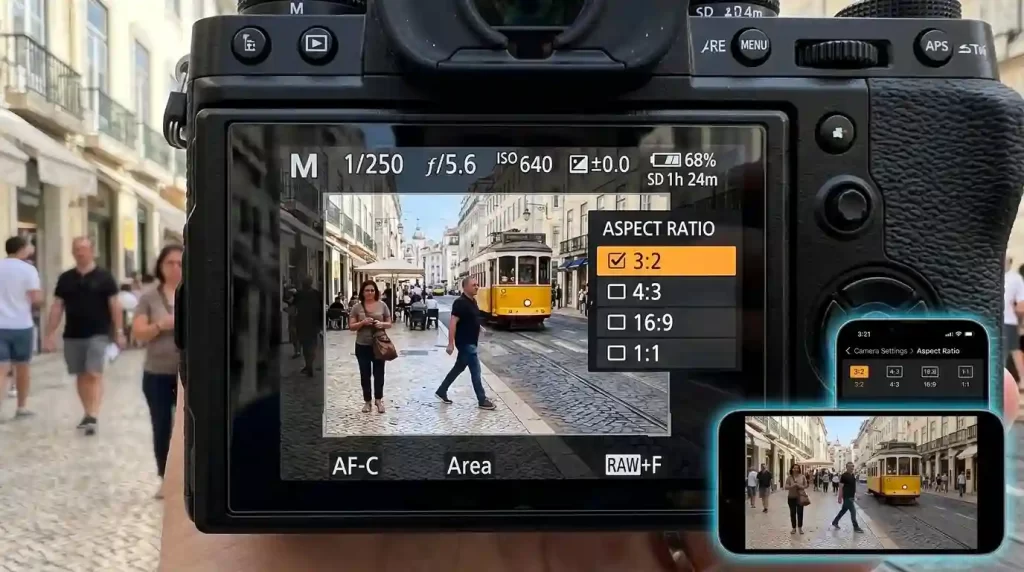
You capture in RAW format whenever possible to retain maximum data flexibility for future adjustments without any quality compromise.
Effective Cropping Strategies in Post-Production
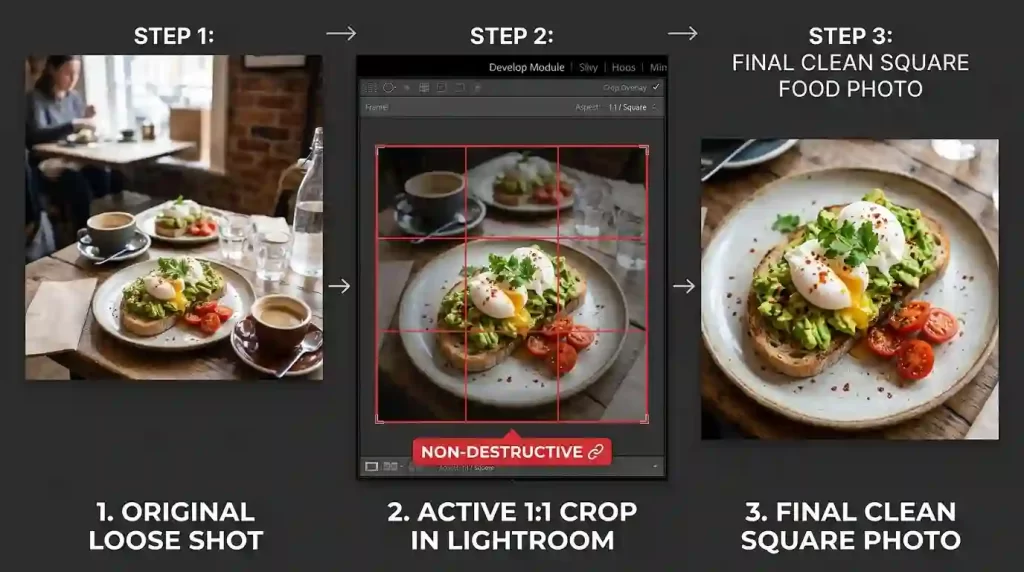
When in-camera selection isn’t possible, precise cropping tools restore control. Most editing programs feature locked-ratio crop modes. Enter desired proportions, drag corners, and reposition to protect vital elements.
Batch cropping maintains uniformity across portfolios. Apply the same ratio to an entire project for cohesive presentation. Non-destructive editing layers allow multiple ratio versions from one file. Compare options side by side before committing. You activate the crop tool, enter your target numbers, and watch the selection frame conform automatically while you reposition to preserve essential elements. Many applications remember your most recent ratio setting, enabling consistent application across complete photo series.
Reference this detailed magazine resource from Phlearn for advanced post-production cropping strategies.
Genre-Specific Aspect Ratio Recommendations
Different photography styles naturally favor certain proportions. Tailor your approach for maximum impact. You customize ratios according to each photographic style to achieve maximum visual strength and coherence.
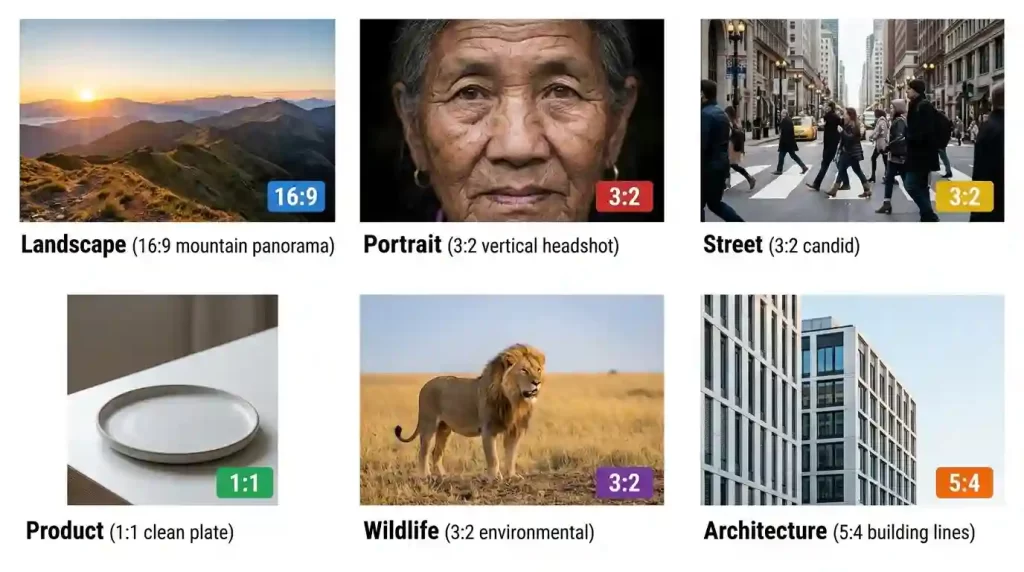
- Landscape – 16:9 or 3:2 horizontal; emphasizes breadth and horizon lines. Landscape photographers frequently employ 16:9 or panoramic crops to capture vast skies and rolling terrain that convey endless scale and serenity.
- Portrait – 4:3 or 3:2 vertical; positions faces comfortably with balanced headroom. Portrait specialists prefer 4:3 or vertical 3:2 formats that position faces naturally and minimize distracting peripheral space.
- Street & Documentary – 3:2 classic; captures candid moments with contextual surroundings. Street photographers alternate between 3:2 and 1:1 depending on whether they wish to include environmental context or isolate distinctive moments.
- Product & Food – 1:1 square; delivers clean, centered compositions perfect for e-commerce. Product and culinary creators rely heavily on 1:1 squares that deliver clean, professional appearances suitable for online catalogs and social sharing.
- Architectural – 3:2 or 5:4; preserves straight lines and proportional accuracy.
- Wildlife – Flexible switching; wide for environmental context, tighter for intimate behavior. Wildlife photographers adapt ratios dynamically based on subject behavior, utilizing wider frames for group scenes and tighter proportions for intimate behavioral details.
Recommended Aspect Ratios by Photography Genre
| Genre | Primary Ratio | Alternative Options | Rationale |
|---|---|---|---|
| Landscape | 16:9 | 3:2, panoramic | Emphasizes horizon and scale |
| Portrait | 3:2 vertical | 4:3, 4:5 | Flatters subject proportions |
| Street | 3:2 | 1:1 | Balances context and moment |
| Product/Food | 1:1 | 4:3 | Clean presentation for e-commerce |
| Wildlife | 3:2 | 16:9, 4:3 | Adapts to animal movement and habitat |
| Architecture | 16:9 | 5:4 | Highlights lines and structures |
Frequent Pitfalls and How to Avoid Them
Aggressive post-capture cropping often discards critical details. Frame slightly looser during shooting to retain options. Ignoring output specifications leads to distorted or truncated final images. Confirm requirements before pressing the shutter.
Over-reliance on a single ratio restricts creative growth. Regularly challenge yourself to shoot intentional alternatives. Neglecting sensor limitations reduces quality during heavy crops. Larger sensors forgive more aggressive adjustments. You lose critical subject details when you apply aggressive cropping after capture without adequate buffer space. Always incorporate generous margins around important elements during initial framing.
Disregarding final output specifications generates unnecessary rework. You prevent wasted effort by verifying print sizes or platform requirements before shooting. Remaining loyal to a single ratio indefinitely restricts creative growth. You discover fresh perspectives and stronger compositions when you experiment systematically across multiple options.
Advanced Techniques to Elevate Your Ratio Decisions
Overlay composition grids within your chosen ratio. Rule-of-thirds, golden ratio, and diagonal guides help place focal points precisely. Golden ratio spirals offer sophisticated placement assistance. You position focal points along these natural curves to create harmonious visual flow.
Capture bracketed ratio versions of promising scenes. Review them later on a large monitor to select the strongest framing. Maintain consistent ratios within themed series. Uniform proportions unify disparate images into intentional collections.
Study master photographers’ work through exhibition catalogs or online archives. Notice how ratio choices support their visual language. Batch processing enables efficient application of consistent ratios across similar images, saving considerable time while maintaining portfolio cohesion.
Consult this beginner-friendly aspect ratio tutorial from Picfair for additional creative inspiration.
Optimizing Aspect Ratio for Modern Digital Platforms
You align ratios with current platform requirements to ensure images display beautifully without automatic cropping or distortion. Updated 2026 guidelines favor vertical formats for maximum engagement on mobile-first networks.
Recommended Aspect Ratios for Popular Platforms (2026)
| Platform | Feed/Grid Ratio | Stories/Reels Ratio | Optimal Pixel Dimensions |
|---|---|---|---|
| 4:5 or 1:1 | 9:16 | 1080 × 1350 | |
| 4:5 or 1:1 | 9:16 | 1080 × 1350 | |
| X (Twitter) | 16:9 or 1:1 | N/A | 1200 × 675 |
| 1.91:1 | N/A | 1200 × 627 | |
| 2:3 vertical | N/A | 1000 × 1500 |
For the latest specifications, check resources like Hootsuite’s guide.
Mastering aspect ratio transforms routine captures into deliberate, powerful photographs. You frame with greater purpose, match proportions to intent, and deliver images that resonate across every platform and print size. Keep experimenting—the right aspect ratio choice becomes second nature with practice, and your photography gains professional polish as a result. You preserve original files securely and celebrate the expanded creative freedom that informed ratio decisions provide. Your entire body of photographic work reaches new levels of professionalism and impact when you fully master this essential skill.
FAQs
Which aspect ratio appears most frequently in professional photography?
The 3:2 ratio remains the most common due to its alignment with full-frame sensors and traditional print dimensions.
Is it possible to adjust aspect ratio after capturing the image?
Yes. Use non-destructive crop tools in editing software to apply precise ratios while preserving original file quality.
What aspect ratio performs best on Instagram and similar platforms?
Square 1:1 suits grid views perfectly, while 4:5 vertical maximizes screen real estate for portrait-oriented posts.
Does camera sensor size restrict my aspect ratio flexibility?
Native sensor proportions set the baseline, but larger sensors provide more room for clean cropping to alternative ratios.
How can I tell if I’ve chosen an unsuitable aspect ratio?
Key elements appear cut off, balance feels off, or the image requires heavy distortion to fit its intended display format.
Should I always shoot in my camera’s native aspect ratio?
No. Select the ratio that best serves your composition and output needs, even if it differs from the sensor default. Many professionals recommend capturing at the native ratio to maximize data retention, then cropping during editing when needed.
Can aspect ratio affect image quality during editing?
Heavy cropping from an incorrect initial ratio reduces pixel count and detail. Matching early preserves maximum sharpness.
How do I develop intuition for selecting aspect ratios quickly in the field?
Consistent practice combined with regular review of your work builds rapid decision-making ability. You eventually recognize ideal proportions instinctively based on subject, light, and intended use.