

Clipping Path vs Image Masking: When to Use Which
August 15, 2026
Ghost Mannequin vs Flat Lay vs On-Model Photography: Which Sells More in 2026?
August 18, 2026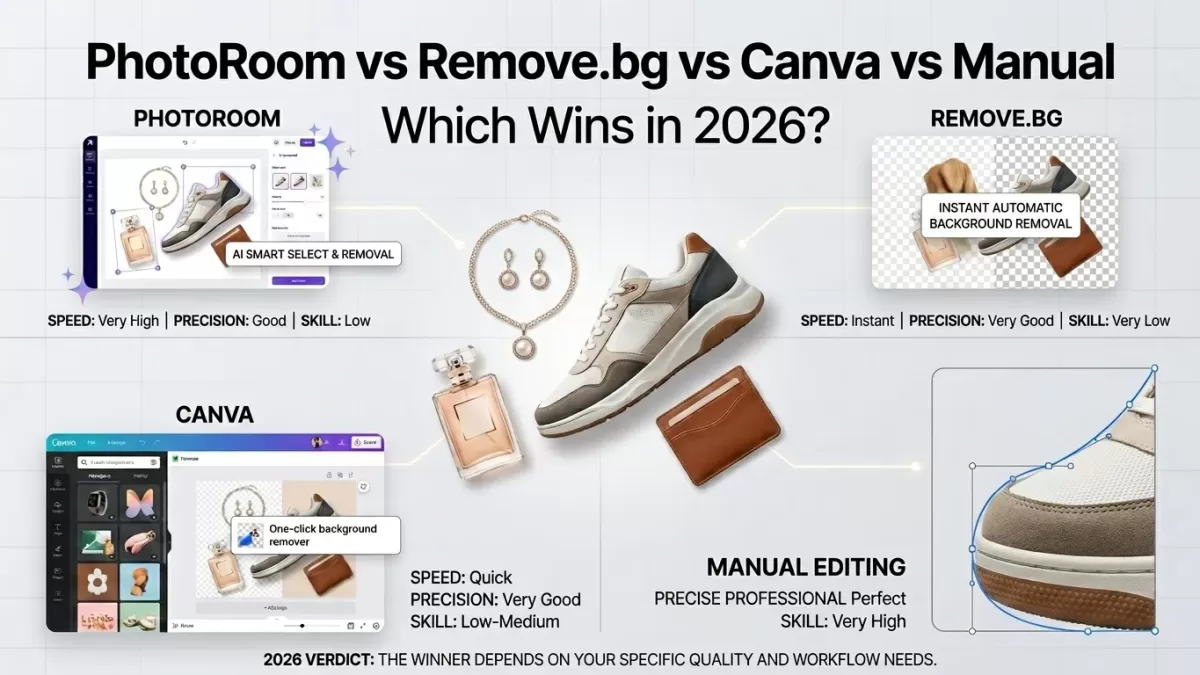
- TL;DR — The Verdict Up Top
- Who This Guide Is For
- Background Removal in 2026: Why the Tool Choice Actually Matters
- How We Evaluated Each Tool
- Remove.bg — The AI Cutout Purist
- PhotoRoom — The E-Commerce Studio in an App
- Canva Pro — The Design Generalist
- Manual Editing — The Human Precision Play
- Head-to-Head Comparison Table
- Rating Scorecard (1–10)
- Real-World Scenarios: Which Tool Wins Where?
- Where AI Still Loses in 2026
- Amazon Marketplace Safety in 2026 — Read This Before You Ship
- The Hybrid Workflow Winning in 2026
- Real Cost of 1,000 Product Cutouts in 2026
- How to Test Any Background Remover Yourself — A 5-Step Checklist
- 2026 Trends Shaping Background Removal
- Alternatives Worth Knowing
- Real Example — Editing 500 SKUs for a Jewelry Brand
- The Decision Framework — Which Should You Actually Use?
- FAQs
- Final Thoughts
TL;DR — The Verdict Up Top
- Remove.bg — best pure-cutout accuracy on hair, fur, and single-image precision. Pricing starts at $8.10/month billed annually for 40 credits; API from about $0.20 per image.
- PhotoRoom — best all-in-one for e-commerce sellers who want cutouts plus shadows, staging, and marketplace exports. Pro starts near $7.50/month billed annually.
- Canva Pro — best if you already live inside Canva for design and marketing work. Unlimited background removal is bundled from about $12.99/month billed annually.
- Manual editing — best for jewelry, glassware, reflective metals, hero shots, and anything where a fringe pixel costs a sale. Rates land between $0.25 and $5.00 per image with 6–24 hour turnaround.
- The honest 2026 verdict — no single tool wins every scenario. The professional default is a hybrid pipeline: AI for volume, humans for hero shots, disciplined QA in between.
Who This Guide Is For
This comparison serves anyone whose revenue depends on clean product cutouts:
- Amazon, Shopify, Etsy, Walmart, and TikTok Shop sellers pushing new SKUs weekly.
- DTC brands and marketing teams producing ads, social posts, and email creatives.
- Product photographers and studios delivering ready-to-list assets.
- Marketplace agencies handling thousands of images per client per month.
By the end you will know exactly which tool to reach for on each product type, what each option actually costs in 2026, and how to test any background remover yourself before signing up.
Background Removal in 2026: Why the Tool Choice Actually Matters
Background removal separates a product from its original scene so you can drop it onto a pure white, transparent, or lifestyle backdrop. Clean cutouts build trust; ragged ones get listings suppressed on Amazon or quietly lose conversions on Shopify.
Fringing halos, chopped hair, missing negative spaces, and lost transparency add up fast. Independent Baymard research shows that 25% of e-commerce sites still fail to provide product images with sufficient resolution or zoom — editing quality directly feeds that gap.
Four routes now dominate the market in 2026:
- Remove.bg — the AI cutout purist.
- PhotoRoom — the AI-plus-studio all-rounder built for sellers.
- Canva Pro — the design-first generalist.
- Manual editing — hand-drawn Photoshop paths and masks by human editors.
Each option shines in a specific scenario. Choosing wrong burns money and rankings; choosing right compounds into faster catalogs and higher conversion.
How We Evaluated Each Tool
Everything below is grounded in five evaluation criteria used by professional retouching teams:
- Edge accuracy on hair, fur, glass, jewelry, and reflective surfaces.
- Speed per image in both single-file and batch workflows.
- True cost at real volume — with the fine print (credit ceilings, session caps, watermarks) included.
- Marketplace safety — does the output pass Amazon’s pure-white RGB rule and the new AI-disclosure requirements?
- Extras beyond cutouts — shadows, staging, ghost mannequin, PSD delivery, revision policy.
The verdicts blend published 2026 pricing, third-party benchmarks (Velebit AI 2023, Photoroom’s 45-image test, multiple 2026 independent tests), and daily production experience from studios that process thousands of e-commerce images.
Remove.bg — The AI Cutout Purist
Remove.bg launched in 2018 and set the modern standard for one-click background removal. The tool does one thing extremely well and refuses to bloat itself with unrelated design features.

Strengths:
- Top-tier edge detection on hair and fine detail — multiple 2026 independent tests (Sparkpix, Morphed) place Remove.bg at 9.0–9.2 out of 10 on edge accuracy.
- Fast processing — a cutout finishes in about five seconds.
- Bulk uploads up to 50 files at once through the web app, unlimited via API.
- Robust developer API with predictable rate limits.
Weaknesses:
- Credit-based pricing scales poorly for high-volume sellers.
- Entry-level Lite plan runs $8.10/month billed annually for 40 credits; the 500-credit tier costs $80.10/month billed annually.
- No editing extras — cutouts only. No shadows, no staging, no templates.
- API cost of roughly $0.20 per image is affordable at low volume but stacks up quickly at catalog scale.
Best for: developers integrating cutouts into custom pipelines, single high-quality portrait or headshot work, and anyone needing the sharpest single-image cutout without paying for design bloat.
When it fails: on reflective jewelry, transparent glassware, and complex layered products where AI selection cannot tell foreground metal from background reflection.
PhotoRoom — The E-Commerce Studio in an App
PhotoRoom positions itself as an end-to-end visual production tool for online sellers. It removes backgrounds, adds AI-generated shadows, drops products into styled scenes, and handles batch exports for marketplace uploads.

Strengths:
- Strong across e-commerce workflows — PhotoRoom’s own 2024 45-image benchmark scored 42/45. A 2023 Velebit AI evaluation (commissioned by PhotoRoom) placed it at 70.8% vs Remove.bg’s 41.7%, though both engines have improved dramatically since.
- Batch export ceilings are transparent: Pro handles 500 exports/month, Max lifts that to 1,500, and Ultra scales up to 5,000+ per month.
- Bundles Product Staging, Virtual Model, and Ghost Mannequin AI tools that would otherwise require separate services.
- Pro subscription starts at $7.50/month billed annually (or $12.99 month-to-month).
Weaknesses:
- Hair edges can look softer than Remove.bg on some file types in independent 2026 tests.
- Free tier watermarks exports and downscales resolution.
- Pro tier caps sessions at 50 images and applies a monthly ceiling that surprises new subscribers scaling up.
- Reflective surfaces and delicate transparency still misfire, especially on studio glassware.
Best for: Amazon, Shopify, and Etsy sellers with 100–1,000 SKUs per month who want cutouts, shadows, staging, and marketplace-ready exports inside a single paid subscription.
When it fails: on hero images for premium jewelry, watches, or bespoke fashion where the final 5% of edge precision decides whether the listing feels “$50” or “$500”.
Canva Pro — The Design Generalist
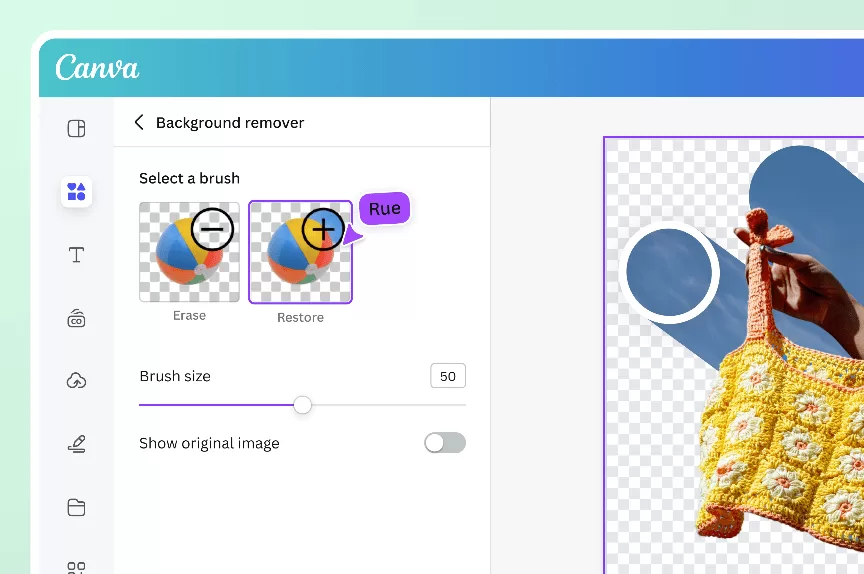
Canva Pro treats background removal as one feature inside a wider creative platform. Millions already subscribe to Canva for social graphics, decks, and ad creatives, and the background remover sits inside that same interface.
Strengths:
- Unlimited background removal on Canva Pro — no per-image credits or session caps.
- Cutouts live inside the same document as full designs, so exports skip a step.
- Canva Pro pricing sits around $12.99/month billed annually (or $15–$18 monthly, depending on region) and covers templates, brand kits, and video editing.
- Ideal for teams already inside Canva for marketing collateral.
Weaknesses:
- Cutout accuracy trails Remove.bg and PhotoRoom on complex edges — hair, fur, and translucent objects show visible softness.
- Struggles on low-resolution source photos and can drop fine detail without warning.
- No dedicated e-commerce features like ghost mannequin or product staging.
- Background remover only unlocks on paid tiers, so free users are locked out.
Best for: solopreneurs, small business owners, and social media teams who already live in Canva and need “good enough” cutouts alongside broader design work.
When it fails: on marketplace hero images where cutout precision drives revenue. Amazon suppresses fringed cutouts, and a soft Canva mask can push a listing straight into that trap.
Manual Editing — The Human Precision Play
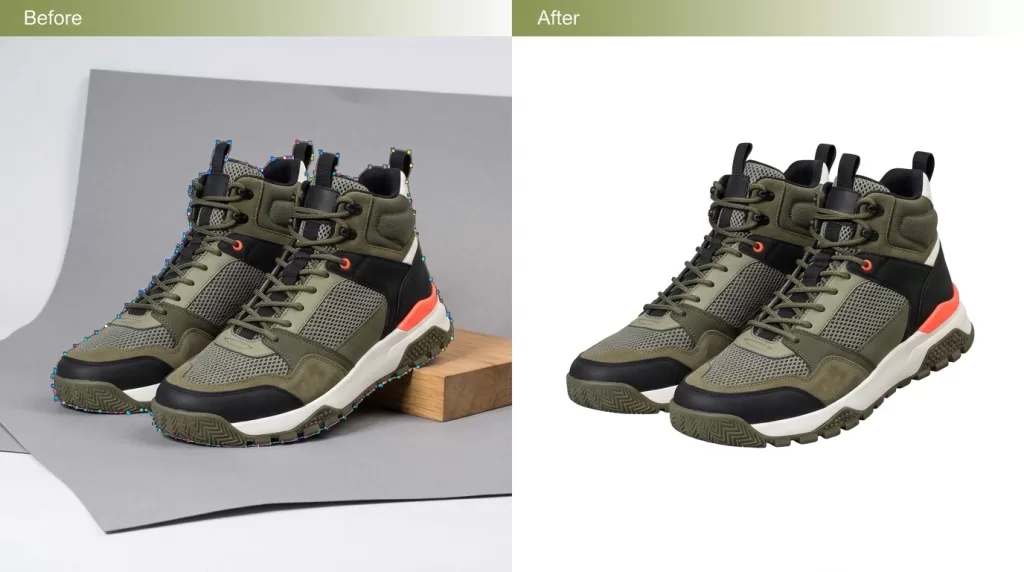
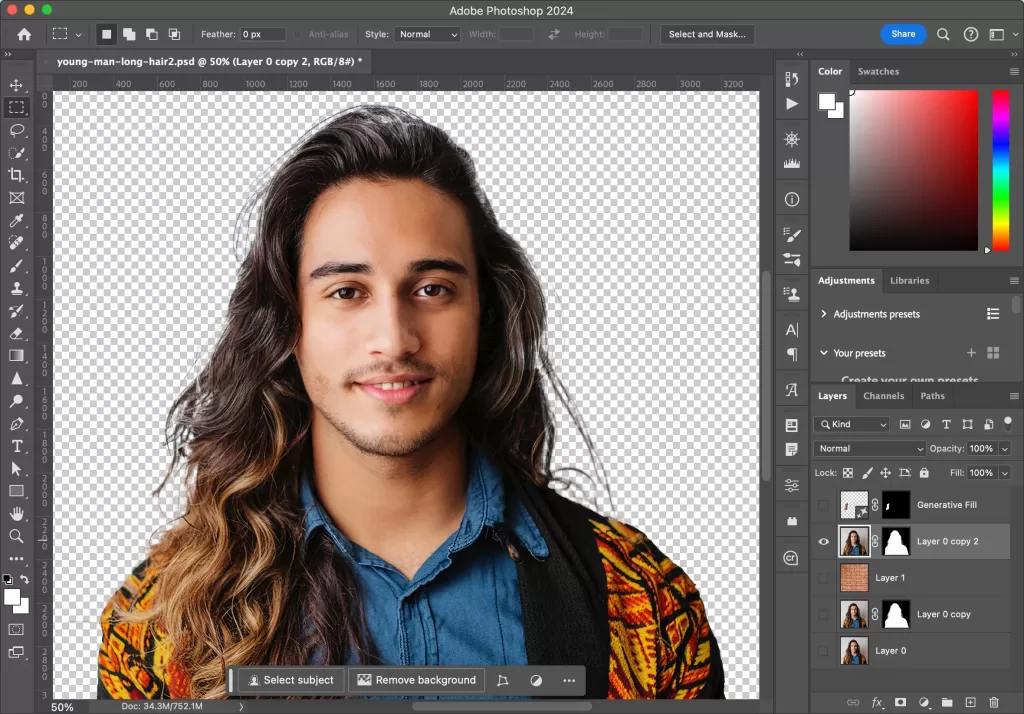
Manual editing means a trained editor draws a clipping path with the Photoshop Pen Tool or builds an alpha-channel mask by hand. It is slower per image than AI. It is also the only method that consistently delivers pixel-perfect edges on the hardest product categories.
Strengths:
- Resolution-independent vector paths that scale from thumbnail to billboard without pixelation.
- Handles reflective jewelry, glassware, tinted bottles, fur, veils, and negative-space silhouettes AI still fumbles.
- Unlimited revisions on most professional services.
- Rates land between $0.25 and $5.00 per image with volume discounts of 10%–40% typically kicking in at 50, 100, 500, and 1,000+ images.
- 6–24 hour turnaround is the 2026 industry standard, with rush options as fast as 1–6 hours.
Weaknesses:
- Slower than AI on simple products — a manual cutout takes minutes, not seconds.
- Requires a clear style guide up front, otherwise revision cycles erode the cost advantage.
- Not cost-effective for hundreds of throwaway social ads or one-off marketing tests.
Best for: revenue-critical hero images, jewelry, glassware, high-end apparel, catalog studios producing 500+ SKUs monthly, and any brand that treats visual consistency as competitive infrastructure. Our own analysis of best clipping path providers breaks down how the leading services compare on turnaround, revisions, and volume pricing.
When it fails: almost never on quality — only on speed, when a marketing team needs 200 rough cutouts for a social test in 15 minutes.
Struggling with inconsistent cutouts from automated software?
Switch to 100% manual, expert Clipping Path for guaranteed perfection.
Head-to-Head Comparison Table
| Criteria | Remove.bg | PhotoRoom | Canva Pro | Manual Editing |
|---|---|---|---|---|
| Cutout accuracy — simple products | Excellent | Excellent | Very good | Excellent |
| Cutout accuracy — hair / fur | Best in class | Very good | Fair | Excellent |
| Cutout accuracy — glass / jewelry | Fair | Fair | Poor | Best in class |
| Speed per image | ~5 seconds | ~5 seconds | ~5 seconds | Minutes to hours |
| Batch capacity | 50 web / unlimited API | 500–5,000+ / mo | Unlimited | Unlimited (scales with team) |
| Extras beyond cutouts | None | Shadows, staging, ghost mannequin, templates | Full design suite, video, brand kit | Retouching, color, shadows, PSD delivery |
| Entry pricing 2026 | $8.10/mo (annual) | $7.50/mo (annual) | $12.99/mo (annual) | From $0.25/image |
| API access | Yes — ~$0.20/image | Yes — quote-based | No public API | Not applicable |
| Marketplace-safe output | Usually | Usually | Sometimes | Always |
| Revision policy | Rerun only | Rerun only | Rerun only | Unlimited human revisions |
| Best use case | Devs, high-quality single cutouts | E-commerce sellers | Social media teams | Hero shots, hard products |
Rating Scorecard (1–10)
| Criteria | Remove.bg | PhotoRoom | Canva Pro | Manual Editing |
|---|---|---|---|---|
| Edge accuracy (average) | 9 | 8 | 6 | 10 |
| Speed | 10 | 10 | 10 | 5 |
| Cost efficiency at scale | 6 | 8 | 7 | 9 |
| Marketplace safety | 7 | 7 | 6 | 10 |
| Feature breadth | 4 | 9 | 9 | 8 |
| Overall (unweighted average) | 7.2 | 8.4 | 7.6 | 8.4 |
Scores blend published 2026 pricing, benchmark data from Sparkpix, Morphed, Velebit AI, and PhotoRoom’s own 45-image test, and studio production experience. Manual editing and PhotoRoom tie for the highest overall score — for very different reasons.
Real-World Scenarios: Which Tool Wins Where?
Abstract feature lists lie. Concrete scenarios tell the truth.
- A shoe photographed on a solid backdrop. All four tools produce clean cutouts. Pick whichever fits your existing workflow. AI wins on speed.
- A model with flying hair against a busy background. Remove.bg and PhotoRoom trade blows on hair. Canva blurs. Manual editing wins whenever the shot lands on a paid ad or a website hero.
- A diamond ring on velvet with soft lighting. Every AI tool produces halos or misses inner negative space. A hand-drawn multi-clipping path is the only reliable answer. A color grading pass afterward completes the polish for gemstone accuracy.
- A transparent perfume bottle on white. AI reads highlights as background and eats the glass shoulder. Alpha-channel image masking done manually preserves transparency without ghosting.
- 300 social ad creatives for a Meta campaign next week. AI wins outright. Human editing is overkill when the creative rotates out in 14 days.
- 1,200 Amazon product photos for a new apparel drop. Hybrid workflow wins. AI handles cutouts; humans polish hero shots; a ghost mannequin pass ties the fashion set together.
Struggling with complex hair or fur edges?
Let our experts deliver flawless, natural cutouts with our advanced Image Masking Service
Where AI Still Loses in 2026
AI improved dramatically over the last three years. It still fails predictably in six scenarios that recur across every catalog:
- Flyaway hair on dark backgrounds — AI cannot separate thin strands from noise.
- Transparent glass, bottles, and perfume packaging — models read highlights as background and eat the glass shoulder.
- Fine jewelry chains — the tight negative spaces between links confuse most matting models.
- Reflective metals and mirror finishes — AI mistakes studio reflections for the actual product boundary.
- Overlapping product groupings — cutouts merge or drop edges where products touch.
- Products against similarly colored backgrounds — a white shoe on a white sweep loses detail on the sole entirely.
For any of these, a manual editor still outperforms even the best AI matting model. Even Photoroom’s public benchmarks acknowledge that some categories remain out of reach for pure AI in 2026.
Amazon Marketplace Safety in 2026 — Read This Before You Ship
Amazon updated its AI-image policy in 2026. The rules are subtler than most sellers realize, so understanding them protects your revenue.
- AI-generated product images are officially allowed — with conditions.
- Photorealistic AI-generated people (full bodies, faces, hands) must be disclosed in the listing.
- AI generation that misrepresents the product’s physical characteristics is prohibited — colors, sizes, or features that do not match reality trigger suppression.
- The Amazon Seller Central image guide still requires a pure white background (RGB 255,255,255) on main images, with the product filling at least 85% of the frame.
Practical fallout: fringed AI cutouts often break the pure-white rule when a halo pixel drops the RGB below 255, and Amazon’s automated pre-publish checks flag those halos before a human ever sees them. Sellers report a rising trend of automated image suppressions in 2026 driven by:
- Off-white halos around AI-removed cutouts.
- Compression artifacts from re-exports that no longer read as pure white.
- Synthetic backgrounds flagged as AI-generated without required disclosure.
The safest workflow for revenue-critical listings pairs an AI first pass with a manual final touchup on hero images.
Need your images to be marketplace-ready (Amazon, Shopify, etc.)?
Ensure compliance and quality with our professional Photo Retouching
The Hybrid Workflow Winning in 2026
Professional e-commerce studios stopped picking one tool years ago. The 2026 default combines two or three of these options into a single pipeline:
- Shoot in-studio with consistent lighting and a neutral backdrop.
- Run AI background removal (Remove.bg or PhotoRoom) as a first pass on all files.
- Route hero images, complex products, and marketplace main photos to a manual editor for touchup or full re-clipping.
- Add shadows through PhotoRoom AI or manually depending on category — our take on shadow creation walks through which shadow type suits each product.
- Convert everything to sRGB with the right dimensions for Amazon, Shopify, Etsy, Walmart, and Google Merchant Center.
- Quality-check every hero image at 100% zoom before publishing.
This pipeline captures AI’s speed on the 80% of easy files and preserves human precision on the 20% that drives revenue.
Want to replace messy backgrounds with pure white or custom colors?
Our expert Background Removal Service makes it quick and effortless.
Real Cost of 1,000 Product Cutouts in 2026
Cost feels abstract until you multiply by real volume. Here is what 1,000 product image cutouts actually cost across the four workflows in 2026:
- Remove.bg — Volume+ subscription ($80.10/month for 500 credits, or ~$160/mo for 1,000): ≈ $160 for pure cutouts, no extras.
- PhotoRoom Pro ($7.50/month billed annually, 500 batch exports) or Max ($20.99/month, 1,500 batch exports): ≈ $21 to fit 1,000 exports inside Max, with shadows and staging bundled.
- Canva Pro — bundled unlimited use inside your $12.99/month plan: ≈ $13 for cutouts alongside all other design work, but with quality trade-offs on complex products.
- Manual editing at $0.30–$0.79 per image with a 30% volume discount: ≈ $210–$553 with hand-drawn precision, unlimited revisions, and PSD delivery.
The apparent price winner hides the biggest quality risk. The apparent premium option delivers the outcomes that pass Amazon compliance, reduce returns, and hold up at 400% zoom. Match the tool to the stakes.
How to Test Any Background Remover Yourself — A 5-Step Checklist
Before signing up for any paid plan, run the same five product photos through the free tier of each candidate and evaluate against these five criteria:
- Hair test — Upload a portrait or model shot with flyaway strands against a dark backdrop. Zoom to 300% and inspect edges for chopped hair, blurred strands, or color halos.
- Glass test — Try a transparent bottle on white. Move the cutout onto a solid black background afterward — any AI mask that “eats” the glass shoulder will reveal itself instantly.
- Jewelry test — Feed the tool a fine chain necklace with tight negative spaces. Look for filled-in gaps between links.
- Marketplace-safe test — Place the cutout on a pure white background, sample the edge with the Photoshop eyedropper, and confirm RGB reads exactly 255,255,255 without halo pixels.
- Batch test — Upload 10–20 files at once and check whether the tool preserves consistent edge quality across the whole set, or whether accuracy drops on some files.
If a tool fails two or more tests, it is not the right pick for revenue-critical listings — regardless of how attractive the pricing looks.
2026 Trends Shaping Background Removal
- AI matting models keep improving — PhotoRoom, Remove.bg, and newcomers like Nano Banana Pro and Qwen have all pushed benchmark accuracy up meaningfully year-over-year.
- Amazon’s AI-image disclosure rules changed the calculus — sellers now need to think about metadata, not just pixels.
- Hybrid workflows are the professional default — pure AI-only pipelines are shrinking to low-stakes marketing use cases.
- API-first pricing is standardizing — bulk operators can now build custom pipelines at $0.001–$0.20 per image depending on the provider.
- WebP-first exports are replacing JPEG defaults — Google’s compression study shows WebP files run 25–34% smaller than JPEG at equivalent quality, a direct Core Web Vitals win.
The overall direction is clear: AI is the default first pass, manual editing is the final polish for anything that matters, and studios blending both are outpacing pure-AI competitors on quality and pure-manual competitors on speed.
Alternatives Worth Knowing
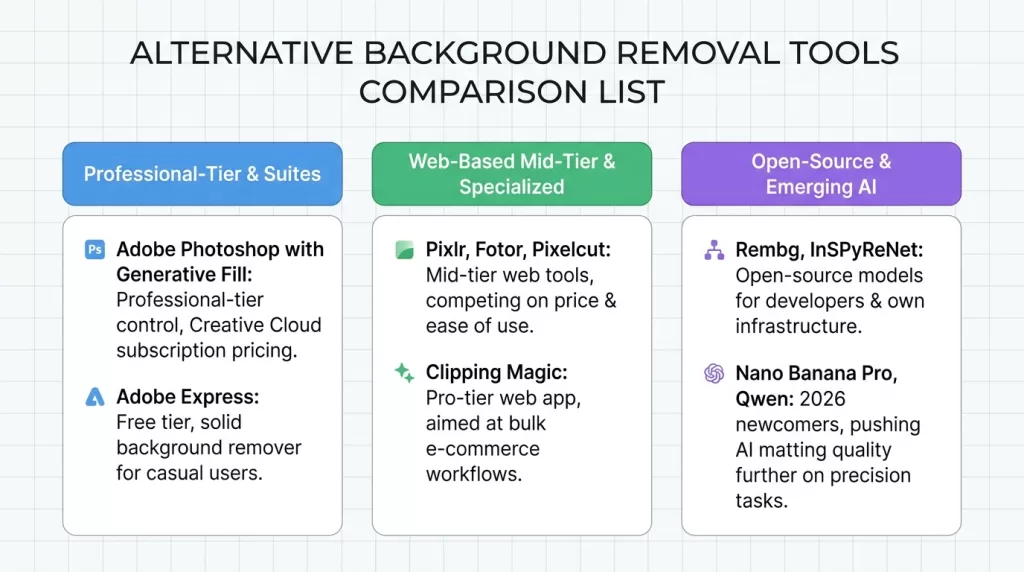
Remove.bg, PhotoRoom, Canva, and manual editing are not the only options in 2026:
- Adobe Photoshop with Generative Fill — professional-tier control at Creative Cloud subscription prices.
- Adobe Express — free tier with a solid background remover for casual users.
- Pixlr, Fotor, Pixelcut — mid-tier web tools competing on price and ease of use.
- Clipping Magic — pro-tier web app aimed at bulk e-commerce workflows.
- Rembg, InSPyReNet — open-source models for developers running their own infrastructure.
- Nano Banana Pro, Qwen — 2026 newcomers pushing AI matting quality further on precision tasks.
None of these change the four-way conclusion, but they matter if you outgrow the main options or need cheaper API access at scale.
Real Example — Editing 500 SKUs for a Jewelry Brand
Here is exactly how a professional studio would process a 500-piece jewelry collection using a hybrid pipeline in 2026:
- Shoot all 500 pieces in-studio at 300–400% zoom on identical lighting rigs.
- AI pass — run the entire batch through Remove.bg or PhotoRoom for a quick preview cut. Cost: about $100 for the full set.
- Route every image to a manual editor for hand-drawn multi-clipping paths on gemstones, prongs, chains, and negative spaces.
- Color-correct metals so gold reads gold and silver reads silver — not orange or blue-grey.
- Add reflection shadows beneath every ring to lift perceived value.
- QA at 400% zoom on hero pieces and top-selling SKUs.
- Export as marketplace-compliant JPEG (sRGB) and archive layered PSD files for future edits.
Running this through AI alone produces fringing halos, mis-colored metal, and returns from confused shoppers. Running the hybrid workflow means every listing hits the marketplace standard on the first upload. Our post on affordable jewelry retouch walks through how volume pricing changes this math.
Do your product images fail to show off intricate details?
Highlight every facet and texture with our precise Jewelry Photo Editing Service
The Decision Framework — Which Should You Actually Use?
Answer five questions honestly and the right choice becomes obvious:
- How many images per month? Under 40: any tool works. 40–500: PhotoRoom or Canva. 500+: manual editing or hybrid pipeline.
- Do your products include hair, glass, jewelry, or reflections? Yes: manual editing on hero shots is non-negotiable. No: AI handles it well.
- Are these images landing on Amazon or Walmart main slots? Yes: a manual final pass protects against suppression. No: AI is likely enough.
- Do you also need shadows, staging, or ghost mannequin? Yes: PhotoRoom or a manual service. No: Remove.bg or Canva.
- Do you already subscribe to Canva for design work? Yes: try Canva Pro first, upgrade later if quality fails. No: skip it.
The best editing decision in 2026 is rarely one tool. It is a workflow.
FAQs
Which is more accurate — Remove.bg or PhotoRoom?
Both are excellent, and the winner depends on the test set. PhotoRoom scored higher in a 2023 Velebit AI benchmark (70.8% vs Remove.bg’s 41.7%), but multiple independent 2026 tests place Remove.bg at 9.0–9.2 out of 10 on hair-edge accuracy — ahead of PhotoRoom on that specific criterion. For pure single-image cutouts, Remove.bg often wins hair; for e-commerce output including shadows and staging, PhotoRoom is the more complete tool.
Is Canva Pro’s background remover good enough for Amazon listings?
Canva Pro delivers acceptable cutouts on simple products with solid backgrounds. For Amazon main images, a manual touchup usually protects you from halo-triggered suppressions and edge-fringing rejections that Canva’s softer masks can produce.
When is manual clipping path worth the extra cost?
Manual editing pays off on jewelry, glassware, hair, fur, complex apparel, and any hero image where a fringe pixel visibly affects perceived value. Rates run $0.25–$5.00 per image with volume discounts of 10%–40% at 50, 100, 500, and 1,000+ files.
Can AI background removers handle bulk product catalogs?
Yes for simple products. Remove.bg supports up to 50 files at once through the web app and unlimited through its API. PhotoRoom Pro handles 500 batch exports monthly, Max lifts that to 1,500, and Ultra scales to 5,000+. Bulk workflows still benefit from a manual QA pass on hero SKUs.
What is the biggest weakness of AI background removers in 2026?
Fringing halos on transparent objects, chopped hair against dark backgrounds, and lost negative space on jewelry chains. AI improved on all three since 2023 but still fails often enough to matter on high-value listings.
How do I know if my cutout is Amazon-compliant?
Zoom to 400%, sample background pixels with the Photoshop eyedropper, confirm RGB reads exactly 255,255,255, and check that the product fills at least 85% of the frame. Anything short of that risks suppression.
Does Amazon actually allow AI-generated product images in 2026?
Yes, with conditions. Amazon officially allows AI product imagery but requires sellers to disclose photorealistic AI-generated people (faces, hands, full bodies), and prohibits any AI generation that misrepresents the product’s physical characteristics. Synthetic backgrounds on main images remain risky when they trip automated pre-publish checks.
Can I mix AI and manual editing in one workflow?
Absolutely. The 2026 professional default runs AI first for speed on the bulk of files, then routes hero and complex images to manual editors for the final polish. Hybrid pipelines outperform both extremes on cost, speed, and quality combined.
Final Thoughts
The four options in this comparison do not compete on the same axis. Remove.bg is an AI specialist. PhotoRoom is an e-commerce studio in an app. Canva is a design generalist. Manual editing is a human precision service. Picking the “best” one in isolation is the wrong question to ask in 2026.
The right question is which combination fits your product catalog, your marketplace mix, your revenue per SKU, and the specific images at stake this week. For most serious sellers this year, the answer looks like AI for volume, humans for hero shots, and disciplined QA in between. That workflow scales, holds up on Amazon compliance checks, and still lets you launch new campaigns in hours instead of weeks.
Ready to transform your raw photos into professional assets?
Get a custom, no-obligation quote tailored to your specific volume and needs. Explore Clipping Expert Asia