


Best Free Photo Editing Apps Without Watermark (2026 Tested Guide)
October 22, 2026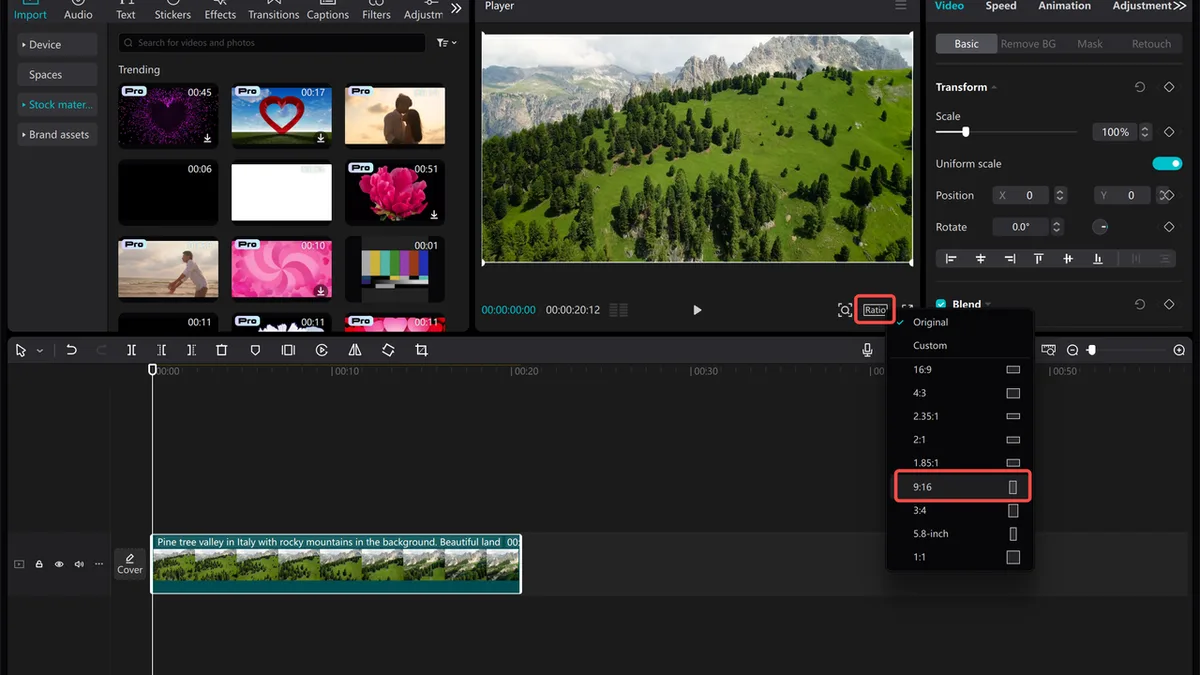
Looking for the best video editing software in 2026? The right choice depends on whether you edit YouTube videos, short-form social content, or professional projects. We’ve compared popular free and paid editors by features, platform compatibility, system requirements, and long-term pricing to help you choose.
| You make… | Best pick | Price | Why |
|---|---|---|---|
| YouTube / long-form, Windows or Mac | DaVinci Resolve (free) → Studio $295 once | $0 or $295 one-time | Hollywood-grade editing, color, and audio — free version exports 4K with no watermark |
| Social shorts / TikTok / Reels | CapCut | Free (Pro optional) | Fastest from phone to post, AI captions, templates |
| Mac only, fast turnarounds | Final Cut Pro | $299.99 one-time | Magnetic timeline, blazing on Apple Silicon, no subscription |
| Adobe team / After Effects workflow | Adobe Premiere Pro | $22.99/mo (annual) | Industry standard, deep Creative Cloud integration |
| Total beginner, zero budget | CapCut or iMovie (Mac) | Free | No learning curve, no watermark |
| Windows, fast rendering, budget | CyberLink PowerDirector 365 | ~$4.58/mo or ~$70/yr | Fastest renders, lots of effects |
Adobe’s Premiere Pro page, Apple’s Final Cut Pro page, and Blackmagic’s DaVinci Resolve page are the official sources for the numbers below.
- The 5-Year Cost Reality Check (Most Guides Hide This)
- Pick Yours in Three Questions
- The Big Four, Deep Dive
- The Rest, in One Comparison Table
- Free Video Editors With No Watermark (Ranked)
- System Requirements Cheat Sheet (Don't Buy an Editor Your Laptop Can't Run)
- The Six Features That Actually Matter (Ignore the Rest)
- The Five Mistakes People Make When Choosing
- Frequently Asked Questions
- Final Verdict
The 5-Year Cost Reality Check (Most Guides Hide This)
Here’s the number that should change how you shop. A $22.99/month subscription feels cheap — until you multiply it.
| Editor | Pricing model | Cost over 5 years | Notes |
|---|---|---|---|
| Adobe Premiere Pro | $22.99/mo (annual plan) | ~$1,379 | Teams plan $33.99/mo = ~$2,039 |
| Final Cut Pro | $299.99 one-time | $299.99 | Free updates; Mac only |
| DaVinci Resolve Studio | $295 one-time | $295 | Free version covers most people |
| DaVinci Resolve (free) | Free | $0 | 4K UHD export, no watermark |
| CapCut | Free (Pro ~$7.99/mo optional) | $0–$480 | Pro only if you need premium assets |
| CyberLink PowerDirector 365 | ~$70/yr | ~$350 | Fast rendering, effects library |
| Wondershare Filmora | ~$80 one-time / ~$50/yr | $80–$250 | Beginner-friendly |
The takeaway is uncomfortable for the subscription-first guides: if you’re not collaborating with an Adobe team or using After Effects every day, DaVinci Resolve (free) or Final Cut Pro ($299 once) will save you over $1,000 in five years — and for most creators, the editing quality is identical. Our own video editing tips guide covers the craft side; this one covers the buying side.
Pick Yours in Three Questions
Before reading a single review, answer these. They’ll eliminate 80% of the options.
- Mac or PC? If you’re on Mac and never switching, Final Cut Pro is on the table. If you’re on Windows or switch machines, it’s not — cross that off.
- Short-form social or long-form video? Shorts (TikTok, Reels, Shorts) → CapCut is genuinely the fastest. Long-form YouTube, weddings, films → you want a real timeline editor (DaVinci, Premiere, Final Cut).
- What’s your budget, honestly? $0 → DaVinci Resolve or CapCut. Under $300 once → Final Cut or DaVinci Studio. Subscription is fine only if you need the Adobe ecosystem.
The Big Four, Deep Dive
These four handle 95% of all video editing in 2026. Everything else is a niche player.
1. DaVinci Resolve — The Best Value (and the Best Free Editor, Period)
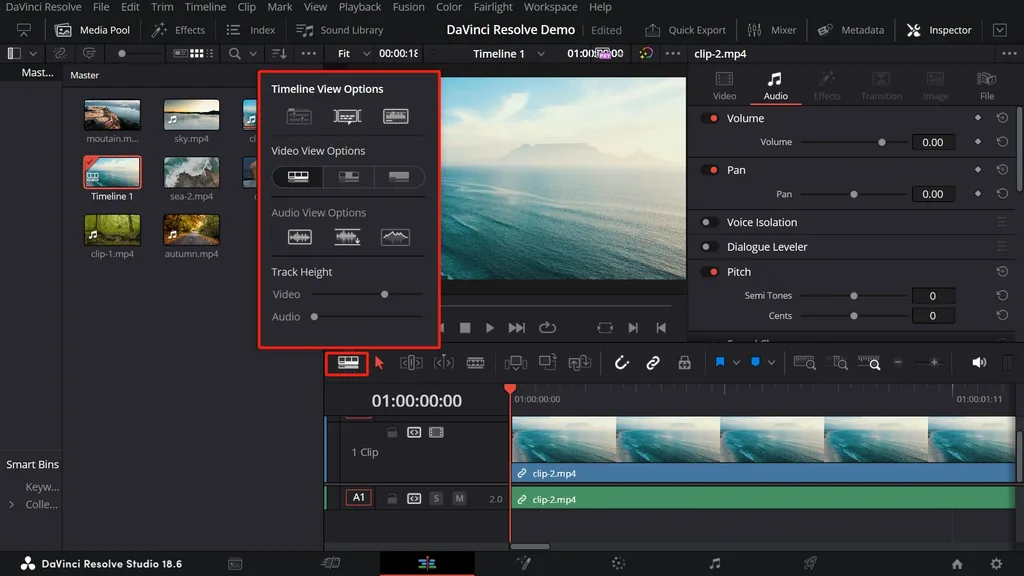
Blackmagic’s DaVinci Resolve is the story of the last five years. The free version gives you a full professional editor, the industry’s best color grading tool, a full audio post-production suite (Fairlight), and Fusion for visual effects — all for $0, exporting up to 4K UHD at 60fps with no watermark. The $295 Studio one-time purchase unlocks 8K+, 120fps, noise reduction, and a few pro features — but most creators never need it.
- Who it’s for: Anyone serious about editing who doesn’t want a subscription. Beginners to pros.
- Pros: Unbeatable value, best-in-class color, cross-platform (Windows/Mac/Linux), one-time Studio fee.
- Cons: Steepest learning curve of the four, heavy on system resources (16GB RAM minimum for 4K, dedicated GPU strongly recommended).
- 5-year cost: $0 or $295.
2. Adobe Premiere Pro — The Industry Standard (If You’re in the Adobe Ecosystem)
Premiere Pro is what most professional studios and YouTube networks use, because it plays perfectly with After Effects, Photoshop, Audition, and team collaboration workflows. If you already pay for Creative Cloud, it’s effectively already yours. If you don’t, it’s the most expensive option on this list by a wide margin.
- Who it’s for: Professional editors, Adobe Creative Cloud subscribers, teams that collaborate.
- Pros: Industry standard, unlimited multicam, best plugin ecosystem, seamless After Effects/Audition integration, works on Mac and PC.
- Cons: Subscription only (~$1,379 over 5 years), steep learning curve, needs a powerful computer.
- 5-year cost: ~$1,379 (standalone) or included in Creative Cloud.
3. Final Cut Pro — The Fastest Editor on Mac (One-Time Price)
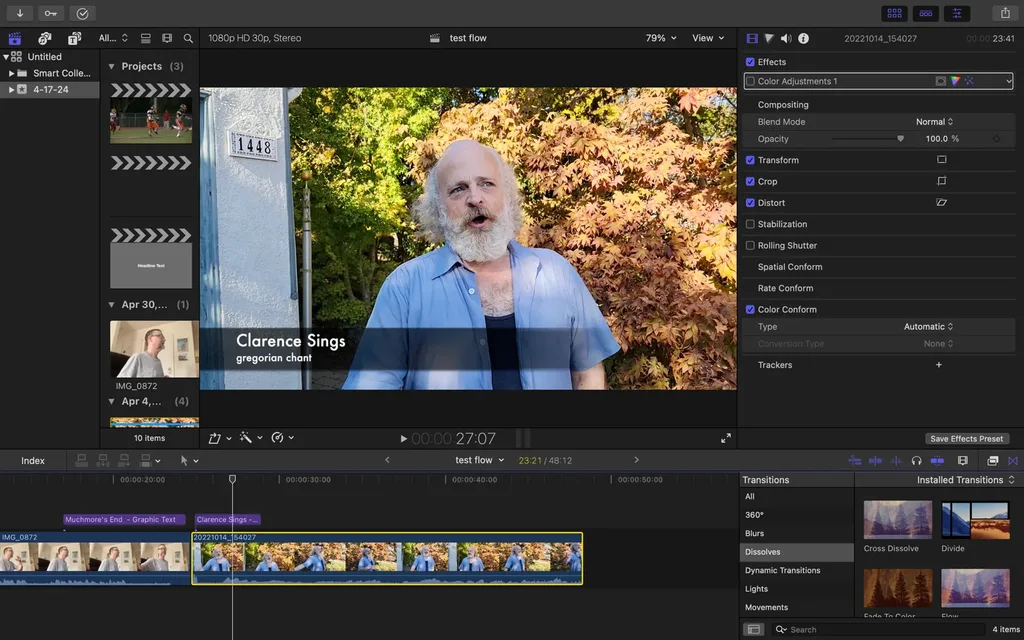
Apple’s Final Cut Pro costs $299.99 once and never asks you for money again. Its Magnetic Timeline is polarizing — people love it or hate it — but on Apple Silicon it renders faster than anything else, and the one-time price crushes Premiere on cost. The catch: Mac only, and no Windows version ever.
- Who it’s for: Mac-only creators who want speed and no subscription.
- Pros: Blazing performance on M-series Macs, one-time payment, magnetic timeline (once you learn it), multicam, 8K ProRes.
- Cons: Mac only, magnetic timeline frustrates switchers from Premiere, weaker plugin ecosystem.
- 5-year cost: $299.99.
4. CapCut — The Free Social-Shorts Juggernaut
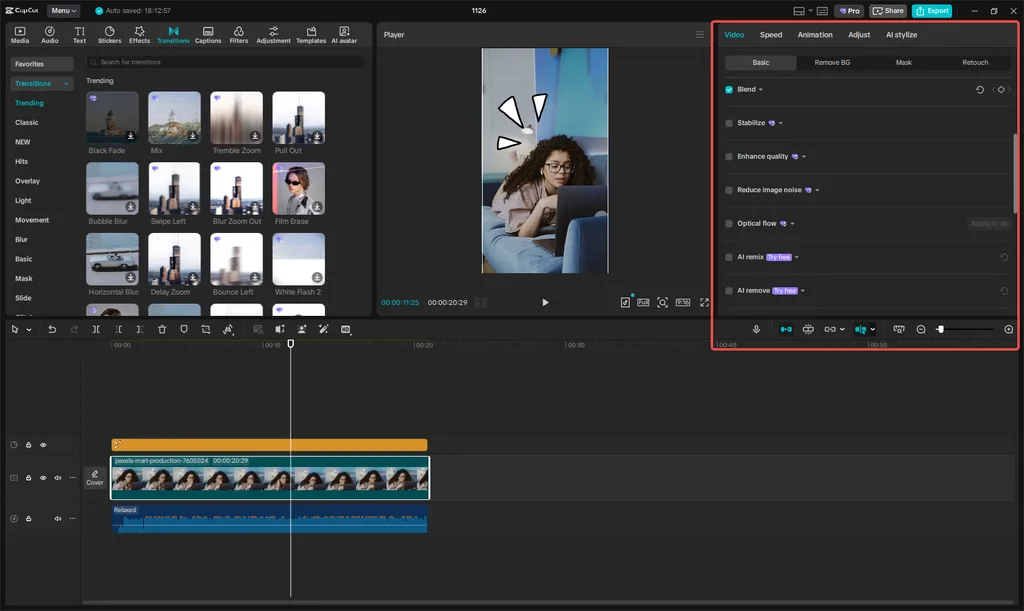
CapCut (by ByteDance, the same company as TikTok) is free, runs on phone, desktop, and web, and exports without a watermark. It dominates short-form because of its AI captions (auto-generated in dozens of languages), templates, transitions, and speed — you can go from clip to posted Reel in minutes. It is not built for long-form, complex timelines, or serious color work.
- Who it’s for: Social media creators, TikTok/Reels/Shorts, beginners.
- Pros: Free, no watermark, AI captions, templates, works on any device, easiest learning curve.
- Cons: Not for long-form or professional color/audio, cloud-based workflow, Pro tier for premium assets.
- 5-year cost: $0 (or ~$480 if you go Pro).
The Rest, in One Comparison Table
These are solid, but they don’t crack the Big Four for most people. Use this table to skip the long reviews.
| Editor | Price | Platform | Best for |
|---|---|---|---|
| CyberLink PowerDirector 365 | ~$70/yr | Win/Mac | Fastest rendering, effects-heavy edits |
| Wondershare Filmora | ~$80 once / ~$50/yr | Win/Mac | Beginners who want more than CapCut |
| iMovie | Free (Mac/iOS) | Apple only | Total beginners on Mac |
| Clipchamp | Free (basic) / $11.99/mo | Win/web | Windows built-in, simple cuts |
| HitFilm (Free) | Free (with watermark on some exports) | Win/Mac | VFX-focused hobbyists |
| Kdenlive / Shotcut / OpenShot | Free, open source | Win/Mac/Linux | Tinkerers, no-budget, Linux |
| Adobe Premiere Elements | ~$99 once | Win/Mac | Beginners who want Adobe without subscription |
| Movavi Video Editor | ~$55–$80 once | Win/Mac | Simple, one-time-purchase editing |
| Corel VideoStudio Ultimate | ~$80 once | Windows only | Windows users on older hardware |
Free Video Editors With No Watermark (Ranked)
If budget is $0, download in this order:
- DaVinci Resolve — best overall, 4K export, no watermark, pro-grade.
- CapCut — best for social shorts and phone-first creators.
- iMovie — best free for Mac/iOS beginners.
- Kdenlive / Shotcut — open source, cross-platform, no watermark, but rougher interface.
- Clipchamp — built into Windows, fine for simple cuts (some premium features paywalled).
Avoid any “free” editor that puts a watermark on your exports or limits you to 720p — in 2026 that’s unnecessary, and the five above don’t do it.
System Requirements Cheat Sheet (Don’t Buy an Editor Your Laptop Can’t Run)
The #1 reason people hate their video editor is that their computer can’t run it smoothly. Match your hardware to your footage.
| Your footage | RAM minimum | GPU | Storage | Editors that run well |
|---|---|---|---|---|
| 1080p | 8GB | Integrated OK | HDD OK | CapCut, iMovie, Filmora, Premiere Elements |
| 4K | 16GB | Dedicated 4GB+ VRAM | SSD strongly recommended | DaVinci Resolve, Premiere Pro, Final Cut, PowerDirector |
| 4K + heavy effects / 8K | 32GB+ | Dedicated 8GB+ VRAM | NVMe SSD | Premiere Pro, Final Cut on M-series, DaVinci Studio |
Rule of thumb: if you’re editing 4K and your machine has less than 16GB RAM and no dedicated GPU, CapCut or Premiere Elements will feel much better than DaVinci Resolve or Premiere Pro — the pro editors will lag, and you’ll blame the software instead of the hardware. Our best photo editing software and best graphic design software guides apply the same hardware logic to stills.
Ready to transform your raw photos into professional assets?
Get a custom, no-obligation quote tailored to your specific volume and needs. Explore Clipping Expert Asia
The Six Features That Actually Matter (Ignore the Rest)
Every editor advertises 500 features. These six are the ones that will make or break your workflow:
- Multicam editing — if you shoot with two+ cameras (weddings, podcasts, interviews), this is non-negotiable. CapCut and iMovie don’t do it well.
- Motion tracking — for blurring faces, pinning text to moving objects, or stabilizing. Standard on all the Big Four.
- Color grading tools — DaVinci is the gold standard; Premiere is strong; CapCut is basic.
- Audio tools — noise reduction, auto-ducking, and a decent audio mixer matter more than video effects. Fairlight (in DaVinci) and Audition (Adobe) are the best.
- AI captions / speech-to-text — CapCut leads here; Premiere and DaVinci now have it too. Huge time-saver for social video.
- Hardware acceleration / proxy workflow — determines whether 4K edits smoothly on your machine. PowerDirector and Final Cut lead on speed.
The Five Mistakes People Make When Choosing
- Buying Premiere by default. Most creators don’t need the Adobe ecosystem. DaVinci Resolve free will do the same job for $0.
- Ignoring the 5-year cost. $22.99/month sounds small; $1,379 over five years is not.
- Buying a pro editor their laptop can’t run. Match software to your hardware, not the other way around.
- Using CapCut for long-form. It’s built for shorts; a 30-minute podcast in CapCut is a miserable experience.
- Paying for “Pro” features you’ll never use. 90% of creators need trim, transitions, captions, color, and export — that’s it.
Frequently Asked Questions
What is the best video editing software in 2026?
For most people, DaVinci Resolve (free) is the best value — pro-grade editing, color, and audio at $0 with no watermark. For social shorts, CapCut. For Mac-only creators, Final Cut Pro ($299 once). For Adobe teams, Premiere Pro.
What do most YouTubers use to edit?
Premiere Pro and Final Cut Pro dominate among full-time YouTubers, but DaVinci Resolve is the fastest-growing because it’s free and powerful. Many short-form creators use CapCut exclusively.
Is DaVinci Resolve really free?
Yes. The free version exports up to 4K UHD at 60fps with no watermark and includes editing, color grading, audio (Fairlight), and VFX (Fusion). The $295 Studio version adds 8K, 120fps, noise reduction, and a few pro features.
Is Adobe Premiere Pro free?
No — there’s a 7-day free trial, then $22.99/month on an annual plan. That’s about $1,379 over five years.
What’s the best free video editor with no watermark?
DaVinci Resolve (desktop, pro-grade) and CapCut (social, any device) are both free with no watermark. iMovie is free on Mac. Open-source options like Kdenlive and Shotcut also have no watermark.
Premiere Pro vs Final Cut Pro: which is better?
Premiere Pro works on Windows and Mac, integrates with After Effects, and is the industry standard for teams. Final Cut Pro is Mac-only, faster on Apple Silicon, and costs $299 once vs. Premiere’s ~$1,379 over five years. Pick by platform and budget.
How much RAM do I need for 4K video editing?
16GB minimum, 32GB recommended, plus a dedicated GPU with 4GB+ VRAM and an SSD. 1080p editing runs fine on 8GB and integrated graphics.
Is CapCut good enough for professional editing?
For short-form social video, yes — it’s the fastest tool available. For long-form YouTube, weddings, films, or serious color/audio work, no — use DaVinci Resolve, Premiere Pro, or Final Cut Pro.
Final Verdict
Don’t shop by “best editor” lists — shop by what you make, what machine you own, and what you’ll actually pay over five years. Start free with DaVinci Resolve (long-form) or CapCut (shorts). If you’re on Mac and outgrow free, buy Final Cut Pro once. Only subscribe to Premiere Pro if you live in the Adobe ecosystem. Get those four decisions right and you’ll save over a thousand dollars while editing exactly the same videos.
Ready to elevate your brand’s visual presence?
Partner with Clipping Expert Asia for fast, secure, and premium image editing starting at just 25¢. Explore all our services