


Shutter Speed in Photography: The Complete Guide to Mastering Motion, Light & Creative Exposure
May 26, 2026
Best Photo Editing Software 2026: Top 10 Tools Ranked
June 3, 2026
Online shoppers form an opinion about your product in roughly 50 milliseconds — barely longer than a blink — according to behavioral research summarized by the Nielsen Norman Group. In that micro‑moment, blurry edges, mismatched backgrounds, or uneven shadows quietly cost you the sale. So when your catalog jumps from 50 SKUs to 5,000, “editing on the side” stops working. You need a system. You need scale. And most growing brands eventually outsource bulk image editing services to keep up.
This guide walks you through what bulk image editing actually covers, when outsourcing pays off, what fair pricing looks like in 2026, how to vet a provider without getting burned, and how to set up a workflow that ships consistent photos week after week. It’s written for ecommerce founders, marketplace sellers, photographers, and marketing managers who feel the squeeze every time a new shoot lands in the inbox.
Drowning in unedited product shots this week? Get a free trial of our bulk clipping path service and see catalog‑ready images delivered within 24 hours.
- What “Bulk Image Editing” Actually Means
- Why Brands Outsource Bulk Photo Editing Instead of Hiring In‑House
- When Outsourcing Bulk Editing Makes Sense (and When It Doesn’t)
- The Bulk Image Editing Services Most Brands Actually Need
- What Outsourced Bulk Image Editing Actually Costs in 2026
- How to Choose the Right Bulk Image Editing Partner
- A Battle‑Tested Bulk Editing Workflow (Use It This Week)
- In‑House vs Freelance vs Outsourced Studio: Quick Comparison
- Real‑World Example: Cutting a 14‑Day Launch to 3 Days
- AI vs. Human Editors: The Right Mix in 2026
- Industries That Rely Most on Bulk Image Editing
- Red Flags to Avoid When Outsourcing
- How Outsourcing Bulk Editing Affects Conversions
- What to Look for in Your Service Agreement
- Frequently Asked Questions
- Final Take: Outsourcing Is About Buying Back Time, Not Just Saving Money
What “Bulk Image Editing” Actually Means
Bulk image editing is the structured, repeatable post‑production of large image batches — usually hundreds or thousands at a time — using consistent settings, style guides, and quality benchmarks. It’s the opposite of treating every photo as a one‑off art project, and it’s very different from clicking “batch preset” inside Lightroom. Real bulk editing combines smart automation with skilled human hands, so that image #1 and image #4,832 still look like siblings.
In practice, a bulk job blends several services into a single workflow:
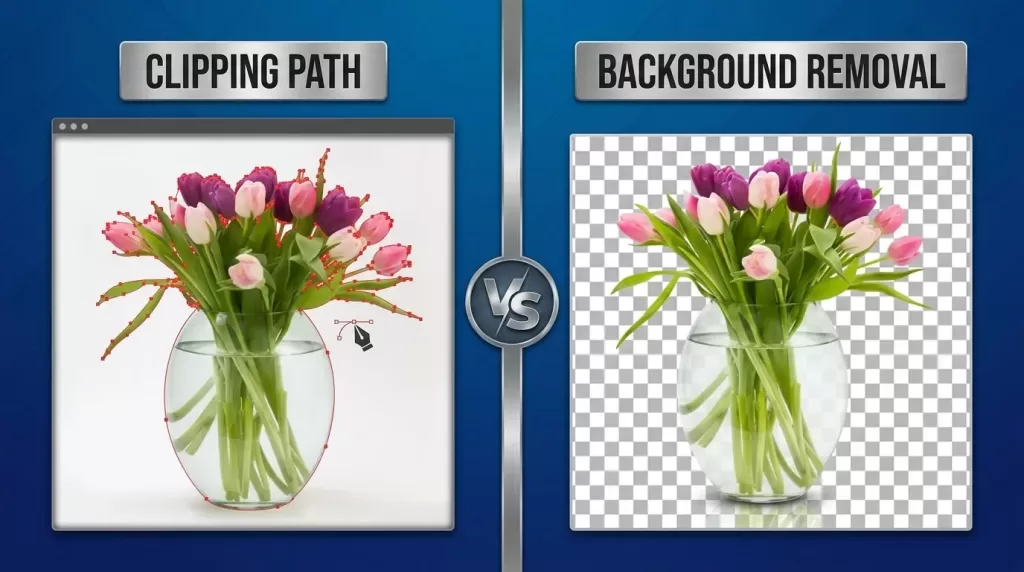
- Clipping path — hand‑drawn pen‑tool selections that isolate subjects from backgrounds
- Background removal or replacement — pure white, transparent PNG, or branded backdrops
- Image masking — for soft edges like hair, fur, smoke, fabric, and glass
- Multi‑clipping path — multiple paths inside one image, so each region can be edited independently
- Ghost mannequin (neck joint) — the invisible mannequin effect for apparel
- Photo retouching — skin smoothing, dust spot removal, wrinkle fixes, dent repair
- Color correction — white balance, saturation, and exposure standardization
- Shadow creation — natural, drop, or reflection shadows for depth
- Resizing, cropping, and file‑format conversion — to match marketplace specs
A single Amazon‑ready listing photo often passes through five or six of those steps before going live. Multiply that by a 1,200‑SKU launch, and the limits of doing it internally become obvious fast.
Why Brands Outsource Bulk Photo Editing Instead of Hiring In‑House
Most founders try to build an in‑house editing team first. It rarely survives the second peak season. Here’s why outsourcing wins on most fronts.
1. You pay only for what you ship.
An in‑house editor in North America runs $45,000–$70,000 a year, plus benefits, Adobe licenses, calibrated monitors, and storage — fixed costs whether you process 50 images that week or 5,000. Outsourcing flips that math into a variable cost. Industry research consistently shows businesses saving 10–30% on production costs by outsourcing repeatable creative tasks, with some ecommerce operations reporting savings of up to 60% on per‑image costs.
2. Turnaround times shrink dramatically.
A solid bulk‑editing studio runs 24/7 in shifts across time zones. You upload at 6 p.m.; polished files come back by 9 a.m. That’s not magic — it’s a properly staffed production line. Brands using professional editing pipelines push products live 30–50% faster than those relying on internal generalists, which is the difference between a sold‑out launch and a markdown clearance during seasonal windows.
3. Quality stays consistent across thousands of SKUs.
Trained editing teams follow your style guide for every batch, so image #12 looks identical in tone, crop, and background to image #1,200. That visual consistency directly shapes how shoppers perceive your brand on Amazon, Shopify, and Etsy.
4. Your team gets its creative hours back.
Your photographer should be shooting. And your designer should be designing campaigns. Neither should spend six hours pen‑tooling earring chains.
5. You access specialist skills on demand.
Need jewelry retouching one week and ghost mannequin apparel work the next? An outsourced studio already has the right specialists on staff — you don’t need to recruit them.
For a broader take on how product imagery affects sales, Shopify’s product photography guide is an excellent third‑party resource that backs up these points with conversion data.
Ready to free up your in‑house designers? Outsource your background removal in bulk and get pixel‑perfect PNGs back the same day.
When Outsourcing Bulk Editing Makes Sense (and When It Doesn’t)
Outsourcing is a tool, not a religion. Be honest about both sides before you commit.
Outsource when:
- You process more than 200 images per week, and editing eats into other work
- You run frequent product launches and need predictable turnaround
- Your in‑house team is creative but not technically Photoshop‑fluent
- You sell on multiple marketplaces with different image specs
- You’re scaling and don’t want to hire, train, and manage editors yet
Keep editing in‑house when:
- You shoot fewer than 50 images per month, and quality varies intentionally (a fine‑art studio, for example)
- Your brand identity demands one specific retoucher’s signature style
- Confidentiality requirements rule out third‑party access (rare, but real)
Most ecommerce and catalog businesses sit firmly in the “outsource” column. Boutique creative studios sit closer to the middle.
The Bulk Image Editing Services Most Brands Actually Need
Not every shoot needs every service. Use this as a menu to match what you order with what your photos truly require.
Clipping path
- Best for: hard‑edged products — boxes, bottles, electronics, books, furniture
- What it does: isolates the subject with a vector pen‑tool path so the background can be swapped, removed, or replaced
- Output: transparent PNG, white‑background JPG, or PSD with paths
Background removal
- Best for: large catalog jobs where the subject sits on a clean studio background
- What it does: faster and slightly cheaper than a full clipping path — ideal when you don’t need complex edge work
Image masking
- Best for: soft edges — hair, fur, lace, sheer fabric, smoke, motion blur, semi‑transparent glass
- What it does: uses channel masks and layer masks where the pen tool would lose detail
- Output: preserves wisps, fly‑aways, and translucency a hard clipping path would chop off
For soft‑edge subjects, a professional image masking service usually beats any AI cutout tool by a wide margin, especially for hair, fur, and chiffon.
Multi‑clipping path
- Best for: images that need separate color or property changes on individual parts — a shoe where the laces, sole, and upper need different adjustments
- What it does: creates several paths within one image so each region can be edited independently
If you sell apparel, jewelry, or accessories with multiple colorways, multi‑clipping path work saves you from reshooting every variant from scratch.
Ghost mannequin / neck joint
- Best for: apparel — t‑shirts, dresses, jackets, shirts
- What it does: removes the mannequin while preserving the 3D shape of the garment, with the inside neck label composited in
- Why it matters: it’s the standard for fashion catalogs and every major marketplace
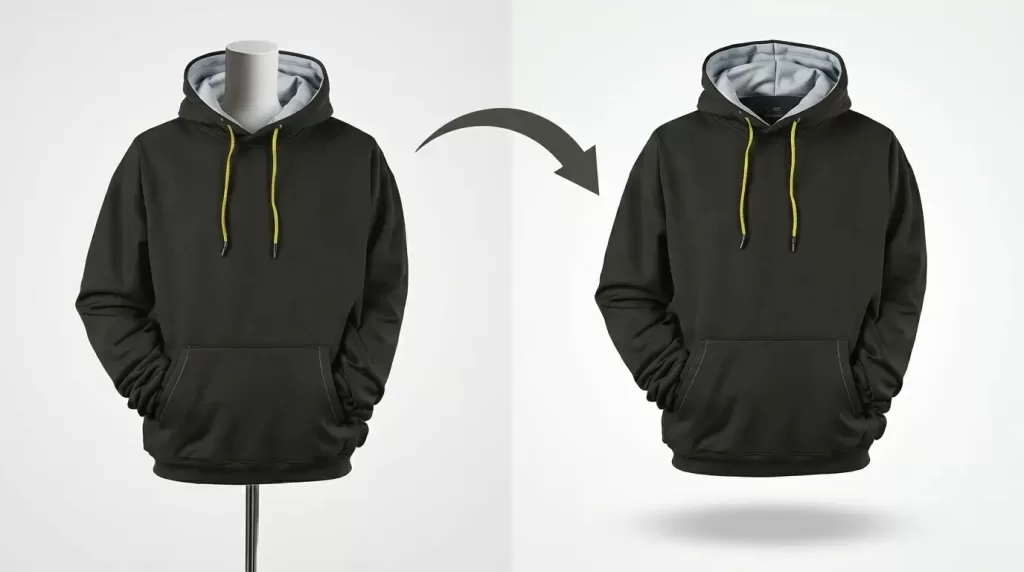
Photo retouching
- Best for: model shots, jewelry, cosmetics, luxury goods
- What it does: removes blemishes, dust, scratches; smooths skin; evens tones; rebuilds damaged areas
Shadow creation
- Best for: floating products that need to feel grounded
- What it does: adds drop shadows, natural shadows, or reflection shadows so items don’t look pasted onto the background. Marketplaces like Amazon allow only specific shadow types — your editor should know which.
Color correction & resizing
- Best for: mixed‑lighting shoots and multi‑channel catalogs
- What it does: normalizes white balance, contrast, and saturation so a navy sweater looks the same shade in every photo, and exports the file in the exact size each channel needs
Selling apparel and tired of awkward mannequins in your final shots? Try our ghost mannequin editing service and turn flat clothing into 3D, sale‑ready visuals.
What Outsourced Bulk Image Editing Actually Costs in 2026
Pricing varies by complexity, but the market has settled into recognizable bands. Most providers price per image and offer further discounts on monthly retainers.
| Service Type | Typical Cost Per Image (USD) | Turnaround |
|---|---|---|
| Basic background removal | $0.25 – $0.50 | 6–12 hrs |
| Simple clipping path | $0.39 – $1.00 | 6–24 hrs |
| Complex / multi‑path clipping | $1.50 – $8.00 | 12–48 hrs |
| Image masking (hair/fur) | $1.50 – $6.00 | 12–48 hrs |
| Ghost mannequin | $0.49 – $3.50 | 12–24 hrs |
| Light retouching | $0.50 – $2.00 | 12–24 hrs |
| Advanced model / beauty retouching | $3.00 – $25.00+ | 24–72 hrs |
| Shadow creation | $0.30 – $1.50 | 6–24 hrs |
A few realities most providers won’t print on their homepage:
- Rush jobs under 6 hours carry a 25–50% surcharge
- Volume discounts typically kick in at roughly 500+ images per month
- Truly complex retouching (jewelry, luxury skincare, dented furniture) is priced individually, not by a flat rate
- PSD layered files cost more than flattened JPGs
- Free trials of 2–3 images are industry standard — always use one before committing
A useful rule of thumb: a healthy ecommerce brand budgets $0.75–$1.50 per finished image across a mixed catalog. That’s roughly the cost of one paid Google Ads click — except the photo keeps working for you forever.
How to Choose the Right Bulk Image Editing Partner
A checklist that filters out 80% of underperformers
Most teams pick a vendor on price alone and regret it within two batches. Use this checklist instead.
Capacity and turnaround
- Can they handle your peak volume — say, 3,000 images in 24 hours — without dropping quality?
- Do they operate across multiple shifts and time zones?
- Is there a guaranteed delivery window in writing?
Quality assurance process
- Is there a dedicated QA layer reviewing every file before delivery?
- Do they confirm style‑guide acceptance for each new client?
- Will they redo work for free if a file misses spec?
Security and confidentiality
- Is an NDA available before you send sample files?
- Are images transferred through secure FTP, encrypted cloud links, or a private portal — not WhatsApp?
- How long are your files retained after delivery, and on whose servers?
Service range
- Can the same provider handle clipping, masking, ghost mannequin, retouching, and shadow creation? Switching vendors mid‑project kills consistency.
Pricing transparency
- Are quotes per‑image, with no hidden “complexity surcharges” after delivery?
- Are revisions free, capped, or billed?
Communication
- Do they assign a dedicated account manager?
- What’s the response time for urgent batches — minutes, hours, or “next business day”?
Trial output
- Always request 2–5 free trial images that match the complexity of your real catalog. The trial tells you more than any sales call.
For studios handling sensitive imagery, file safety matters as much as price. If you’ve ever worried about accidentally losing original RAW files during back‑and‑forth transfers, this practical guide on how to find recently deleted photos is worth bookmarking — it covers recovery across phones, cameras, and cloud drives.
Need spotless model and product shots that hold up under zoom? Try our high‑end photo retouching service for natural skin, sharp details, and zero blemishes.
A Battle‑Tested Bulk Editing Workflow (Use It This Week)
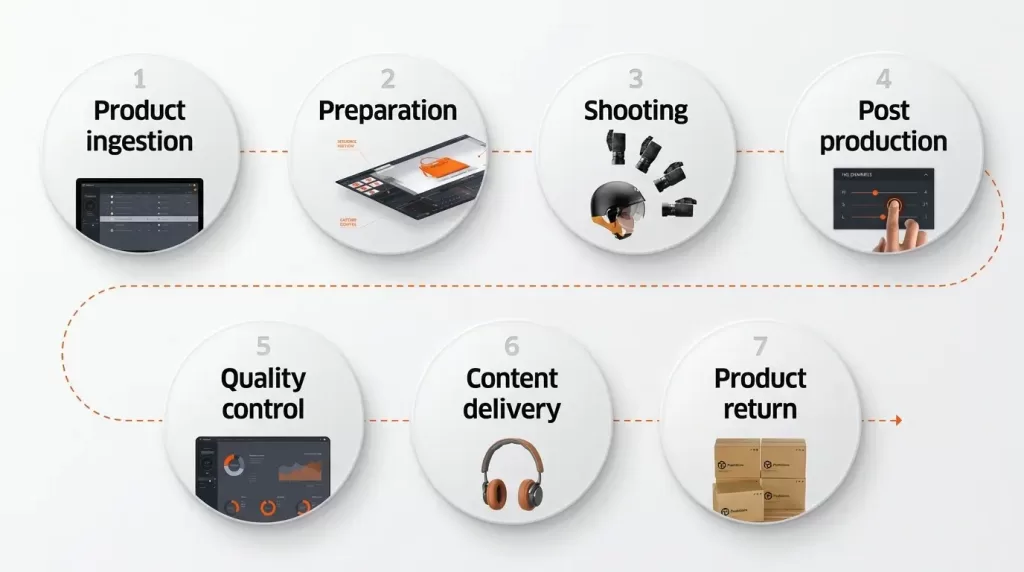
This is the workflow most outsourced teams already follow behind the scenes. Adopting the same structure on your end makes handoffs smoother and revisions rarer.
Step 1 — Standardize at the shoot.
Lock your camera settings, lighting, and background before the first click. Drop a color reference card into the first frame of every set. Editing problems start at the camera, and editors can’t undo a shoot where every photo’s exposure jumped half a stop.
Step 2 — Write a one‑page style guide.
Don’t send a 40‑page brand bible. Send a one‑pager that answers: target background hex code, output sizes per channel, shadow style (drop, natural, reflection, none), acceptable retouching level, plus three “yes” and three “no” examples. Focused guides beat exhaustive ones because editors actually read them.
Step 3 — Batch and label files before uploading.
Group images by SKU and by editing type. Name folders like batch‑2026‑W23_apparel_v01 or SKU‑1023_clippingpath_white‑bg. Predictable filenames let the studio process the batch 10x faster.
Step 4 — Send a trial batch first.
Even with a vetted partner, send 10–20 representative files first. Approve the look, then release the full job.
Step 5 — Use a single feedback loop.
Mark up revisions in one centralized file or annotated PDF. Scattered Slack messages, emails, and DMs are where consistency dies. Sample 5–10% per batch and track first‑pass acceptance rate (target >90%) and revision turnaround (target <12 hours).
Step 6 — Maintain a version archive.
Keep the layered PSDs, not just the flat JPGs. Six months from now, when you need to swap a background color across 800 product photos, your future self will thank you.
Photos look flat or floating on the page? Add realistic shadows with our shadow creation service and ground every product in natural depth.
In‑House vs Freelance vs Outsourced Studio: Quick Comparison
| Factor | In‑House Editor | Freelance Editor | Outsourced Studio |
|---|---|---|---|
| Cost per image (1,000+/mo) | $$$$ | $$ | $ |
| Scalability under spikes | Low | Medium | High |
| Speed for 1,000+ images | 1–2 weeks | 3–7 days | 24–48 hrs |
| Quality consistency | High (if trained) | Variable | High (with QA) |
| Specialist coverage | Narrow | Narrow | Broad |
| Sick days / holiday risk | High | Medium | Very low |
| Setup time | 4–8 weeks (hiring) | 1 week | 1–3 days |
For volumes under ~200 images a month, a strong freelancer is fine. Beyond that, an outsourced studio almost always wins on cost, speed, and consistency.
Real‑World Example: Cutting a 14‑Day Launch to 3 Days
Picture a mid‑sized swimwear brand prepping 320 new SKUs for a May launch. Their old workflow looked like this:
- Day 1–3: Shoot
- Day 4–10: One in‑house designer edits in batches between other tasks
- Day 11–13: Revisions and ghost mannequin work
- Day 14: Upload begins
Total launch lag: 14 days from shoot to live.
After moving to an outsourced bulk pipeline, the same team rebuilt the timeline:
- Day 1–2: Shoot
- Day 2 evening: Upload RAW files to vendor
- Day 3 morning: 320 retouched, ghost‑mannequinned, marketplace‑ready images delivered
Total launch lag: 3 days. That’s 11 extra days of sell‑through during peak season — and zero added headcount. This isn’t a unicorn case. It’s typical of what happens when standardized shoots meet a specialized editing team.
AI vs. Human Editors: The Right Mix in 2026
AI background removers like Remove.bg, Photoroom, and Adobe Sensei have leaped forward. For simple, high‑contrast subjects on plain backgrounds, they deliver in seconds at near‑zero cost. So why pay humans at all?
Because AI still struggles with:
- Wispy edges — hair, fur, smoke, lace
- Reflective surfaces — glass, jewelry, polished metal
- Brand‑critical color matching — that specific shade of teal your customer expects
- Compositing — ghost mannequin neck joints, complex distractions, realistic shadows
- Judgment calls — knowing when to keep a fabric wrinkle for texture and when to remove it for cleanliness
The smart 2026 stack is hybrid: AI handles roughly 70% of volume on easy SKUs, while skilled human editors take the 30% that matters most — hero shots, top sellers, and complex items. That’s the model most professional studios already run quietly behind the scenes.
Industries That Rely Most on Bulk Image Editing
Some sectors live or die by their visuals. If you’re in any of these, outsourced bulk editing isn’t a luxury — it’s infrastructure.
- Apparel & fashion — ghost mannequin, color variants, on‑model retouching
- Jewelry retailers — dust spotting, reflection control, color truth
- Furniture & home décor — shadow creation, scale shots, color matching
- Beauty & cosmetics — skin retouching, lip and eye enhancement, packaging cleanup
- Real estate photographers — sky replacement, twilight conversion, virtual staging
- Wedding & event photographers — culling, color correction, skin retouching across thousands of shots
- Food & beverage — color enhancement, steam effects, plating cleanup
- Automotive & marine — paint correction, reflection management, background swaps
- Electronics — screen replacement, glare removal, port detailing
- Marketing & ad agencies — multi‑brand campaign asset preparation
Red Flags to Avoid When Outsourcing
Sidestep these, and you’ll be ahead of 80% of competitors.
- Vague pricing pages with no examples or per‑image rates
- No free trial offered — reputable studios almost always include 2–3 free trial images
- Heavy AI dependency hidden as “manual editing” — ask directly if the work is hand‑done in Photoshop
- Missing NDA option for sensitive imagery
- No clear revision policy in writing
- One‑person operations promising 24/7 delivery — the math simply doesn’t work
- Stock portfolios with no client references or case studies
- Pressure to commit annually before you’ve tested a small batch
- Sub‑$0.20 pricing that quietly comes back as jagged edges and rushed paths
How Outsourcing Bulk Editing Affects Conversions
This part often surprises founders. Bulk image editing isn’t just a back‑office cost — it’s a growth lever that ripples into traffic and revenue.
- Faster time‑to‑listing means new products start ranking sooner on Amazon, Google Shopping, and Shopify search
- Consistent backgrounds and crops lower bounce rates on product pages — shoppers trust catalogs that look professionally maintained
- Lighter, web‑optimized files improve Core Web Vitals scores, which feed directly into Google rankings
- Better alt text and structured filenames (which a good editing partner can help standardize) improve image search visibility
- Higher‑quality visuals raise conversion rates; multiple ecommerce studies tie improved product photography to double‑digit conversion gains
- Fewer returns — accurate color and detail mean fewer “not as pictured” complaints
For a broader look at why image quality matters for online conversions, BigCommerce’s ecommerce resources cover the topic in depth across multiple guides.
In other words, every dollar you spend on bulk editing has a downstream effect on traffic, revenue, and returns. It’s not a cost center — it’s a margin protector.
What to Look for in Your Service Agreement
Before you sign anything, make sure the agreement or service terms cover:
- Scope per image — what’s included versus what’s billed as extra
- Turnaround guarantees — and what happens if they’re missed
- Revision policy — how many free rounds, and how fast
- Confidentiality and NDA terms
- Ownership of edited files — you should own all rights, full stop
- Payment terms — per image, per batch, or monthly retainer
- Termination clause — can you leave with 7 days’ notice?
A short, clear agreement protects both sides and prevents the awkward “but I thought…” conversations later.
Frequently Asked Questions
1. What’s the difference between bulk editing and batch processing?
Batch processing applies the same preset to many photos automatically — it’s a software function. Bulk editing is a managed service where skilled editors handle large volumes consistently, including the nuanced work that automation can’t do.
2. How many images can I outsource at once?
Most established bulk image editing studios handle anywhere from 50 to 50,000+ images per project. For very large batches, ask for a capacity plan and a sample turnaround window before you commit.
3. How quickly can I get 500 product images edited?
A well‑staffed studio delivers 500 standard edits in 24–48 hours. Rush turnarounds under 12 hours are possible at a premium, especially with 24/7 teams across time zones.
4. Is bulk editing done by AI or real human editors?
Quality providers still rely on trained human editors using Photoshop and Capture One for clipping paths, masking, ghost mannequin, and retouching. AI handles certain background‑removal jobs well but fails on hair, fur, transparency, and reflective surfaces. Always ask before signing.
5. Will my unreleased product images stay confidential?
Yes — if you sign an NDA before sharing files. Reputable studios offer NDAs as standard, use secure file transfer, and delete files after a stated retention window.
6. What file formats should I send and receive?
Send RAW (CR3, NEF, ARW) or high‑quality JPG/TIFF for maximum editing latitude. Receive whatever your channels need — JPG for web, PNG for transparent backgrounds, PSD for layered hero images you may tweak later.
7. What if the edits aren’t right?
Every legitimate provider includes free revisions. Confirm the revision policy in writing before placing your first order — unlimited revisions until acceptance is the gold standard.
8. Can I outsource only certain steps of my workflow?
Absolutely. Many brands keep creative retouching in‑house and outsource only repetitive clipping paths and background removals. Others do the opposite. Mix and match based on where your team’s hours are most valuable.
9. How do I send thousands of files without crashing email?
Use Google Drive, Dropbox, WeTransfer, or the provider’s own upload portal. Most studios also accept SFTP for very large batches.
Final Take: Outsourcing Is About Buying Back Time, Not Just Saving Money
If you’re still treating bulk image editing as a cost line, you’re underselling what it does for your business. Done right, it shortens product launches, frees your team for higher‑leverage work, keeps catalogs visually consistent across thousands of SKUs, and lifts the conversion rate on every product page.
The brands quietly outpacing their competitors aren’t the ones with the biggest in‑house teams — they’re the ones who built a calm, reliable production line by partnering with a specialist studio. Pick a partner who treats your style guide like scripture, runs proper QA, signs an NDA without flinching, and shows you what they can do on a free trial before you spend a dollar.
If you’re shipping more than a few hundred images a month and feeling the squeeze, the math is already on your side. Start with a small trial batch, measure quality and turnaround honestly, and scale from there. Within a quarter, most brands wonder why they waited so long.
Stop letting unedited photos slow your launches. Explore our full range of professional image editing services and request a free trial batch today.