

Best Photo Editing Software 2026: Top 10 Tools Ranked
June 3, 2026
Best Photo Editing Apps 2026: The Ultimate Hands-On Guide for iPhone & Android Creators
June 4, 2026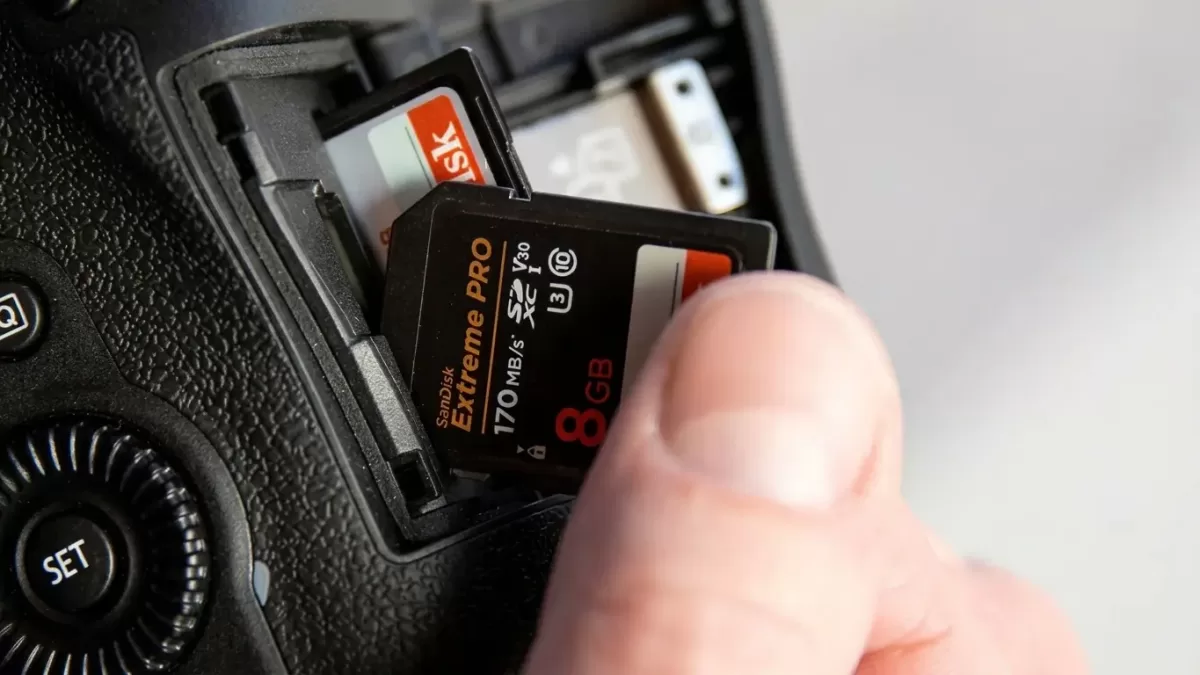
You just slid a fresh 8GB SD card into your camera, and the same nagging question pops up: Will this card actually last the whole shoot? Whether you’re heading out for a wedding, a weekend hike, or a quick product shoot, knowing exactly how many pictures an 8GB card holds saves you from those panic moments when the screen flashes “Card Full.”
The short, clear answer: an 8GB memory card holds roughly 2,288 JPEG photos from a 10-megapixel camera and around 222 RAW photos at the same resolution. However, the real number depends on your camera’s megapixels, file format, compression, and even the complexity of the scene you shoot.
This guide breaks down the numbers, charts, and practical factors so you can plan your next shoot with total confidence — and avoid the dreaded “out of space” alert at the worst possible moment.
Capture more keepers in every shot with our professional photo retouching service — perfect for polishing every frame after you fill up that 8GB card.
- How Many Pictures Can an 8GB Card Hold? The Quick Answer
- Why an 8GB Card Doesn’t Actually Give You 8GB
- How Many Pictures Does an 8GB Card Hold by Megapixel? (JPEG Chart)
- How Many RAW Photos Can an 8GB Card Hold?
- 5 Key Factors That Affect How Many Photos Fit on an 8GB Card
- How Many Photos Can an 8GB Card Hold Across Different Devices?
- How Much Video Can an 8GB SD Card Hold?
- How to Check Available Space on Your 8GB Card
- How to Calculate Photo Capacity Manually
- 10 Pro Tips to Maximize Your 8GB Card’s Capacity
- SD Card Speed Classes: Does It Affect How Many Photos Fit?
- Is an 8GB Card Still Worth Buying in 2026?
- Real-World 8GB Card Examples by Camera Model
- Common Mistakes That Waste Your 8GB Card Space
- How Long Does an 8GB SD Card Last?
- Frequently Asked Questions (FAQ)
- Final Verdict: How Many Pictures Can an 8GB Card Hold?
How Many Pictures Can an 8GB Card Hold? The Quick Answer
Here’s the snapshot every photographer wants up front:
- JPEG photos (10MP camera): approximately 2,288 images
- RAW photos (10MP camera): approximately 222 images
- Smartphone photos (8–12MP): around 2,500–2,700 images
- GoPro photos (~4MB each): around 1,800–1,900 images
- 1080p HD video: roughly 80–90 minutes at high quality
- 4K video: roughly 10–15 minutes
These numbers come from official capacity estimates published by SanDisk and align with most camera manufacturer specs.
Why an 8GB Card Doesn’t Actually Give You 8GB
The Hidden Storage Math
Here’s a truth that surprises many beginners: an 8GB card never gives you a full 8 gigabytes of usable space. When you format the card, the file system reserves a slice for indexing, partitioning, and metadata. Manufacturers also calculate storage in decimal (1GB = 1,000,000,000 bytes), while your computer reads it in binary (1GB = 1,073,741,824 bytes).
In practical terms:
- An advertised 8GB card actually offers around 7.45 GB of real usable space
- Format overhead trims another 50–100 MB
- The card you bought really delivers roughly 7.3–7.4 GB for your photos
That difference matters. If you base your shoot count on a perfect 8GB, you’ll fall short by 50–80 JPEGs on a typical 10MP camera.
How Many Pictures Does an 8GB Card Hold by Megapixel? (JPEG Chart)
JPEG is the format most photographers use day-to-day because it compresses files smartly without sacrificing too much visible quality. The chart below estimates how many JPEG photos an 8GB card holds across common megapixel counts.
| Megapixels | Average JPEG Size | Photos on 8GB |
|---|---|---|
| 4 MP | 1.2 MB | ~5,720 |
| 6 MP | 1.8 MB | ~3,810 |
| 8 MP | 2.4 MB | ~2,860 |
| 10 MP | 3.0 MB | ~2,288 |
| 12 MP | 3.6 MB | ~1,900 |
| 14 MP | 4.2 MB | ~1,630 |
| 16 MP | 4.8 MB | ~1,430 |
| 20 MP | 6.0 MB | ~1,150 |
| 22 MP | 6.6 MB | ~1,040 |
| 24 MP | 7.2 MB | ~950 |
Want a side-by-side comparison with a larger card? Check this in-depth breakdown on how many photos a 32GB card holds to see how quickly capacity scales.
How Many RAW Photos Can an 8GB Card Hold?
RAW Files Eat Storage Fast
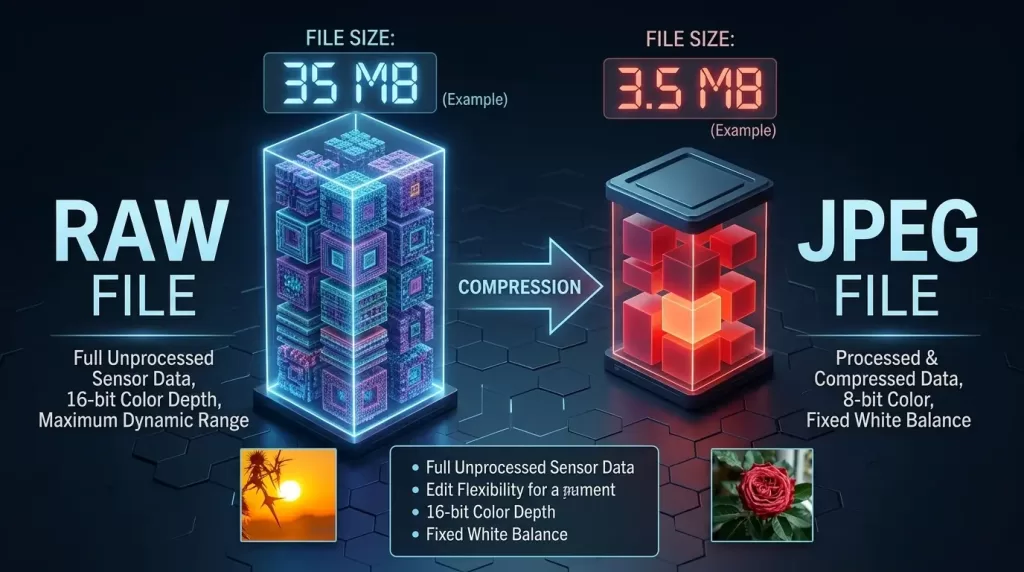
Shooting in RAW preserves every pixel of detail your sensor captures — that’s why pros love it. The downside? RAW files run 2 to 6 times larger than JPEGs of the same image. An 8GB card fills up in a hurry.
| Megapixels | Average RAW Size | Photos on 8GB |
|---|---|---|
| 4 MP | 12 MB | ~572 |
| 6 MP | 18 MB | ~381 |
| 8 MP | 24 MB | ~286 |
| 10 MP | 30 MB | ~228 |
| 12 MP | 36 MB | ~190 |
| 14 MP | 42 MB | ~163 |
| 16 MP | 48 MB | ~143 |
| 20 MP | 60 MB | ~115 |
| 22 MP | 66 MB | ~104 |
| 24 MP | 72 MB | ~95 |
For Adobe’s official notes on RAW workflow, read the Adobe RAW file overview — it confirms why RAW eats so much storage.
Filled your 8GB card with stunning RAW shots? Let our team handle the heavy lifting with expert background removal services to make every product photo pop.
5 Key Factors That Affect How Many Photos Fit on an 8GB Card
Even with the same card, two photographers can end up with very different photo counts. These five variables drive the difference:
1. Image Resolution (Megapixels)
Higher-megapixel sensors capture more detail per shot, which directly increases file size. A 24MP camera generates files almost three times larger than an 8MP camera at the same compression.
2. File Format
- JPEG compresses aggressively for the smallest files
- RAW keeps every pixel of sensor data uncompressed
- HEIF/HEIC (iPhones) cuts JPEG size by 30–50%
- TIFF produces the largest, lossless files
3. Compression Level
Most cameras let you choose Fine, Normal, or Basic compression. Switching from Fine to Normal shrinks files by 30–40% with very little visible quality loss.
4. Scene Complexity
Complex scenes with intricate textures (foliage, crowds, beach pebbles) compress less efficiently than simple scenes (a clean studio backdrop or a clear blue sky). The same JPEG setting can produce a 4MB file for one shot and a 7MB file for the next.
5. ISO and Noise
Higher ISO introduces digital noise. Noise patterns are random, so compression algorithms struggle to shrink them. A shot at ISO 6400 can be 20–30% larger than the same scene at ISO 100.
How Many Photos Can an 8GB Card Hold Across Different Devices?
DSLR and Mirrorless Cameras
Most modern DSLRs and mirrorless cameras sit in the 20–24MP range. On an 8GB card, expect:
- Fine JPEG: 900–1,200 photos
- Compressed RAW: 250–350 photos
- Uncompressed RAW: 95–130 photos
Smartphones
iPhones and Android flagships typically save 12MP HEIC files at around 2–3MB each:
- iPhone (12MP HEIC): ~2,700–3,200 photos
- Android (12MP JPEG): ~2,200–2,800 photos
- iPhone Live Photos: ~2,200 photos
GoPro and Action Cameras
GoPros shoot in WideRAW or JPEG. A typical 12MP file runs around 4–5MB:
- GoPro JPEG photos: ~1,800–2,000 photos
- GoPro RAW (GPR): ~480–550 photos
Drones (DJI Mavic, Air, Mini)
Drone cameras shoot 12–20MP files with rich dynamic range:
- DJI Mavic JPEG: ~1,600 photos
- DJI Mavic RAW (DNG): ~280 photos
Compact Point-and-Shoots
Cameras like the Canon PowerShot or Sony RX series usually hit 16–20MP:
- JPEG: ~1,300–1,600 photos
- RAW (where supported): ~150–200 photos
Shooting fashion or e-commerce? Our ghost mannequin service transforms apparel photos into clean, conversion-ready visuals — straight from your 8GB card.
How Much Video Can an 8GB SD Card Hold?
Video gobbles storage far faster than photos. Here’s a realistic breakdown:
| Video Quality | Bitrate | Approx. Recording Time on 8GB |
|---|---|---|
| 4K UHD @ 60fps | ~100 Mbps | ~10 minutes |
| 4K UHD @ 30fps | ~60 Mbps | ~15–17 minutes |
| 1080p @ 60fps | ~28 Mbps | ~35–40 minutes |
| 1080p @ 30fps | ~12 Mbps | ~80–90 minutes |
| 720p HD | ~8 Mbps | ~120 minutes |
| 480p SD | ~3 Mbps | ~300+ minutes |
If you plan to record 4K, an 8GB card simply won’t be enough for serious work. Consider stepping up to 64GB or 128GB for video-heavy projects.
How to Check Available Space on Your 8GB Card
You don’t need to guess. Every modern camera and phone gives you a real-time photo counter.
On Your Camera
- Insert the formatted 8GB card
- Set your desired resolution and file format
- Look at the top-right (or bottom) of the display
- The counter shows how many shots remain
On Your Computer
- Insert the card via a USB card reader
- Open File Explorer (Windows) or Finder (Mac)
- Right-click the card → Properties / Get Info
- Read the “Free space” value
On Your Smartphone
- iPhone: Settings → General → iPhone Storage
- Android: Settings → Storage → SD Card
How to Calculate Photo Capacity Manually
Use this simple two-step formula whenever you’re unsure:
- Multiply your card size by 1,000 to get megabytes: 8GB × 1,000 = 8,000 MB
- Divide by your average file size: 8,000 ÷ file size in MB = total photos
Example: Your camera produces 6MB JPEGs.
8,000 ÷ 6 = 1,333 photos
For a more accurate range, calculate both the smallest and largest file sizes your camera generates and use both numbers as your minimum and maximum.
10 Pro Tips to Maximize Your 8GB Card’s Capacity
You’d be amazed how much you can stretch a small card with the right habits:
- Shoot JPEG Fine instead of RAW when you don’t plan to heavily edit
- Lower the resolution if you only need web or social media-ready images
- Switch compression from “Superfine” to “Fine” to gain 20–30% extra space
- Delete blurry or duplicate shots in-camera between sessions
- Use HEIF format if your camera supports it (cuts file size in half)
- Avoid burst mode unless you need the sequence — bursts pile up fast
- Turn off in-camera HDR (it doubles file count by saving multiple exposures)
- Disable JPEG + RAW dual recording if storage is tight
- Format the card before each shoot rather than just deleting files
- Carry a backup card — 8GB cards are cheap insurance against missing shots
Want every product photo to look gallery-perfect? Our pixel-precise clipping path service delivers crisp cutouts that elevate your entire portfolio.
SD Card Speed Classes: Does It Affect How Many Photos Fit?
Speed class doesn’t change capacity, but it dramatically changes the shooting experience. A faster card writes images quicker, freeing the buffer for the next shot.
| Speed Class | Minimum Write Speed | Best For |
|---|---|---|
| Class 4 | 4 MB/s | Casual JPEG shooting |
| Class 10 | 10 MB/s | Full HD video, JPEG burst |
| UHS-I (U1) | 10 MB/s | HD video |
| UHS-I (U3) | 30 MB/s | 4K video, RAW burst |
| V30 | 30 MB/s | 4K UHD video |
| V60 / V90 | 60–90 MB/s | 8K, cinema, high-fps RAW |
For complete official specs, the SD Association maintains the most authoritative reference.
Is an 8GB Card Still Worth Buying in 2026?
Honest answer: it depends on your workflow.
An 8GB card still makes sense if you:
- Shoot casual JPEGs from a phone or compact camera
- Use it as a quick backup or transfer card
- Run an older DSLR with sub-12MP resolution
- Need cheap, dedicated cards for client handoffs
You’ll outgrow 8GB fast if you:
- Shoot RAW from a 20MP+ mirrorless or DSLR
- Record any 4K video
- Cover weddings, sports, or wildlife
- Edit and keep originals long-term
For most photographers in 2026, a 64GB or 128GB card offers a far better price-per-photo ratio. 8GB cards still hold value as emergency backups in your kit bag.
Real-World 8GB Card Examples by Camera Model
| Camera | MP | RAW Photos | JPEG Photos |
|---|---|---|---|
| Canon PowerShot ELPH 110 | 16 | ~140 | ~1,400 |
| Nikon D3500 | 24 | ~95 | ~950 |
| Sony A6000 | 24 | ~100 | ~1,000 |
| Canon EOS Rebel T7 | 24 | ~95 | ~950 |
| Nikon Z30 | 21 | ~110 | ~1,100 |
| Fujifilm X-T30 II | 26 | ~85 | ~900 |
| Sony A7 III | 24 | ~95 | ~950 |
These figures use compressed RAW and Fine JPEG settings — your real-world results may vary by ±10%.
Common Mistakes That Waste Your 8GB Card Space
People burn through their card space without realizing it. Avoid these pitfalls:
- Saving RAW + JPEG simultaneously when only one is needed
- Leaving bracketing on outside of HDR shoots
- Forgetting to delete duds between shoots
- Skipping format between sessions (fragments slow the card)
- Using the wrong file system (FAT32 vs exFAT affects compatibility and large file support)
Want deeper specs? Kingston’s storage capacity chart provides an excellent cross-format comparison from JPEG to 8K video.
How Long Does an 8GB SD Card Last?
Beyond capacity, durability matters. A quality 8GB SD card from SanDisk, Kingston, or Lexar typically delivers:
- Read/write cycles: 10,000+ before reliable failure
- Data retention: 10 years when properly stored
- Daily shooting lifespan: 5–10 years for hobbyists
- Professional use: 2–4 years before recommended replacement
To extend lifespan, always eject safely, avoid temperature extremes, and reformat in-camera (never on a computer) at least once a month.
Ready to turn every shot into a portfolio masterpiece? Explore our full suite of professional image editing services and let your photos speak louder than your storage card ever could.
Frequently Asked Questions (FAQ)
1. How many pictures can an 8GB card hold from an iPhone?
An 8GB card (used via adapter or older iPhone) holds roughly 2,700–3,200 HEIC photos from a 12MP iPhone camera. JPEG-only shooting drops the number to around 2,200–2,500 photos.
2. Can an 8GB SD card hold 1,000 photos?
Yes, easily. At 10MP JPEG, an 8GB card holds about 2,288 photos — well over 1,000. Even at 24MP RAW, you’ll fit roughly 95 photos, so 1,000 is comfortable for most JPEG users.
3. How many 12MP photos can an 8GB card hold?
Expect roughly 1,900 JPEG photos or 190 RAW photos at 12MP. Smartphone HEIC images at 12MP push the count above 2,500 photos.
4. Is an 8GB card enough for a weekend trip?
For casual JPEG shooters, yes — 2,000+ photos cover most weekends. RAW shooters and 4K videographers should pack at least one 32GB or 64GB card instead.
5. Why does my 8GB card say only 7.4GB available?
The difference comes from how manufacturers measure storage (1GB = 1 billion bytes) versus how your computer calculates it (1GB = 1.073 billion bytes), plus file system overhead. 7.4GB of usable space is normal.
6. Can I use an 8GB card for 4K video?
Technically yes, but practically no. You’ll only get 10–15 minutes of 4K footage before the card fills. Choose a 64GB+ card with V30 or higher speed rating for serious 4K work.
7. Does formatting an 8GB card free up more space?
Formatting clears all files and resets the file system, recovering any fragmented space. It won’t expand the card beyond its physical capacity (~7.4GB usable), but it keeps the card running efficiently.
8. Should I buy two 8GB cards or one 16GB card?
Two 8GB cards offer redundancy — if one fails mid-shoot, the other still has your safe files. A single 16GB card is simpler to manage. For critical work (weddings, events), the dual-card approach wins.
Final Verdict: How Many Pictures Can an 8GB Card Hold?
To wrap it up clearly: an 8GB memory card holds anywhere from 95 to 5,720 photos, depending on your camera resolution and format. For the average photographer using a 12–16MP camera shooting JPEG Fine, expect around 1,400–1,900 photos per card. RAW shooters at 24MP should plan on roughly 95 shots per card — barely enough for a single portrait session.
The real lesson? Know your camera’s average file size before you head out, carry backups, and consider sizing up to 32GB or 64GB if you shoot RAW or video. An 8GB card has its place in 2026 — as a backup, casual carry, or budget option — but it’s no longer the workhorse it once was.
Whatever card you choose, the magic happens after the shutter clicks. Make every photo on that card count with professional editing that turns good shots into unforgettable ones.
From product cutouts to fine retouching, our expert team at Clipping Expert Asia transforms your captures into stunning finished work — no matter what size card you shoot on.