

LinkedIn Image Sizes 2026: Banner, Post, Profile & Ad Dimensions (Updated)
October 17, 2026
Monochrome vs Black and White Photography: Zone System, Film & Conversion
October 21, 2026
- TL;DR: The Short Answer
- The 2026 X (Twitter) Image Size Cheat Sheet
- Header / Banner / Cover Photo: 1500 × 500
- Profile Photo: 400 × 400, Circle Crop
- Single Tweet Image: Why 3:4 Beats 16:9 in 2026
- Multi-Image Tweets: How X Crops 2, 3, and 4 Photos
- Link Cards and og:image: 1200 × 627
- Video on X: Sizes and Length
- X Ads: Image and Carousel Specs
- Export Settings for Sharp X Graphics
- 5 Common Twitter Image Mistakes
- Frequently Asked Questions
- Final Verdict
TL;DR: The Short Answer
Here is the one thing most 2024-era guides get wrong: X (Twitter) now prioritizes portrait 3:4 images in the feed — they display taller and take more space than the old 16:9 landscape. If you still post 16:9 by default, you are giving up screen real estate. Beyond that, the core sizes are stable: header/banner/cover photo 1500 × 500 pixels (3:1), profile photo 400 × 400 (circle crop), single tweet images accept any ratio from 2:1 to 3:4 — use 1200×1600 (3:4) for maximum space, 1600×900 (16:9) for landscape, or 1080×1080 (1:1) square, link/og:image cards 1200×627 (1.91:1), and ads support 1.91:1, 1:1, 4:5, 2:3, 16:9, and 9:16.
Export as sRGB JPG under 5 MB (8 MB for Premium). Keep all header text in the center band — roughly 60 px crops off the top and bottom, and your circular profile photo covers the lower-left. This guide covers every surface — header, profile, single and multi-image tweets, link cards, video, and ads — with crop maps and safe zones. The official X Help Center profile guide and Adobe’s X/Twitter image sizes guide confirm these numbers.
The 2026 X (Twitter) Image Size Cheat Sheet
| Surface | Recommended size | Aspect ratio | Max file | Notes |
|---|---|---|---|---|
| Header / banner / cover | 1500 × 500 px | 3:1 | 5 MB | ~60 px crops top & bottom |
| Profile photo | 400 × 400 px (upload larger) | 1:1 | 2 MB | Circle crop ~200 px display |
| Tweet image — portrait | 1200 × 1600 px | 3:4 | 5 MB (8 MB Premium) | Most feed space in 2026 |
| Tweet image — landscape | 1600 × 900 px | 16:9 | 5 MB | Classic, displays smaller now |
| Tweet image — square | 1080 × 1080 px | 1:1 | 5 MB | Safe, works everywhere |
| Tweet image — wide | 1200 × 600 px | 2:1 | 5 MB | Widest accepted without crop |
| Link card / og:image | 1200 × 627 px | 1.91:1 | — | Auto-pulled from shared links |
| Multi-image (2, 3, 4) | 1080 × 1080 each | varies | 5 MB each | Cropped into grid tiles |
| Single-image ad | 1200 × 627 or 1080 × 1080 | 1.91:1 / 1:1 | 5 MB | Also 4:5, 2:3, 16:9, 9:16 |
| Carousel ad | 800 × 800 px (1:1) or 800 × 418 (1.91:1) | 1:1 / 1.91:1 | — | 2–6 cards |
| Video | 1280 × 720 min, 1920 × 1080 recommended | 16:9 / 1:1 / 9:16 | 512 MB | 140 s standard, up to 3 h Premium |
Header / Banner / Cover Photo: 1500 × 500
Your Twitter header (also called banner or cover photo) is the single most-missized element on the platform. The official X Help Center recommends 1500 × 500 pixels, a 3:1 aspect ratio. Upload JPG, PNG, or GIF — but animated GIFs do not work on headers or profile photos; they render as a static first frame.
Two crops ruin headers. First, X trims roughly 60 px off the top and 60 px off the bottom on some displays and browsers, so the visible band is closer to 1500 × 380. Second, your circular profile photo overlaps the lower-left corner, covering anything you put there. Design for a center safe zone: keep all text, logos, and faces within the middle ~70% horizontally and the middle ~75% vertically, and never put anything important in the lower-left. Solid brand colors, subtle gradients, and simple patterns always survive cropping; busy photos with faces in the corners do not. Hootsuite’s social media image sizes guide and Influencer Marketing Hub’s X image sizes 2026 both flag this crop trap.

Profile Photo: 400 × 400, Circle Crop
Upload your profile photo at 400 × 400 minimum (800 × 800 is better for sharpness). It displays as a circle around 200 px on your profile and much smaller (40–48 px) in the feed. Keep your face centered and away from the edges — anything in the corners gets cut off by the circle. Use a real headshot with a clean background; if you need to remove a distracting backdrop, our background removal methods or ecommerce product photo editing team handle it cleanly. Max file size is 2 MB, and animated GIFs are not supported.
Single Tweet Image: Why 3:4 Beats 16:9 in 2026
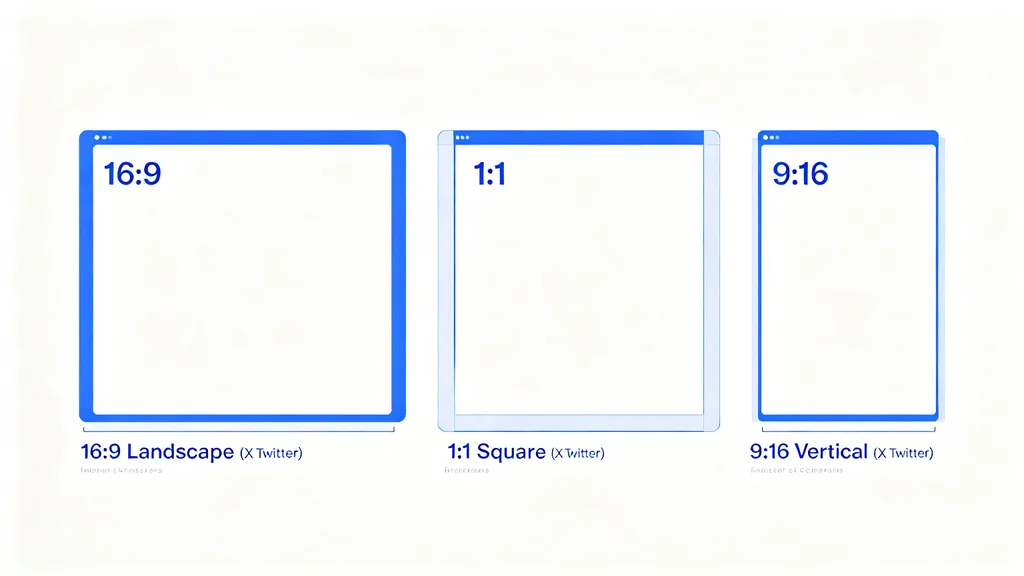
This is the biggest change in recent years. X displays any single image with an aspect ratio between 2:1 (wide) and 3:4 (tall) in full, without cropping. Within that range, taller images take more vertical space in the feed — and more space means more attention. So:
- 3:4 portrait (1200 × 1600): the tallest allowed, the most feed space. Best for portraits, quotes, infographics, and anything you want to stop the scroll.
- 1:1 square (1080 × 1080): safe middle ground, looks identical on desktop and mobile, never crops.
- 16:9 landscape (1600 × 900 or 1200 × 675): classic for screenshots and wide scenes, but displays noticeably smaller than 3:4 now.
- 2:1 wide (1200 × 600): the widest accepted without crop. Anything wider gets cropped to 2:1.
Minimum resolution X accepts is low, but anything under 1200 px wide looks soft on retina displays. Max file is 5 MB for free accounts, 8 MB for X Premium. After resizing to your target pixel dimensions, a light sharpening pass keeps text and edges crisp through X’s compression. For a consistent brand look across posts, our how photographers lose clients because of inconsistent editing post explains why uniform templates matter.
Ready to transform your raw photos into professional assets?
Get a custom, no-obligation quote tailored to your specific volume and needs. Explore Clipping Expert Asia
Multi-Image Tweets: How X Crops 2, 3, and 4 Photos
When you attach more than one photo, X arranges them in a grid and crops each tile — so composition matters.
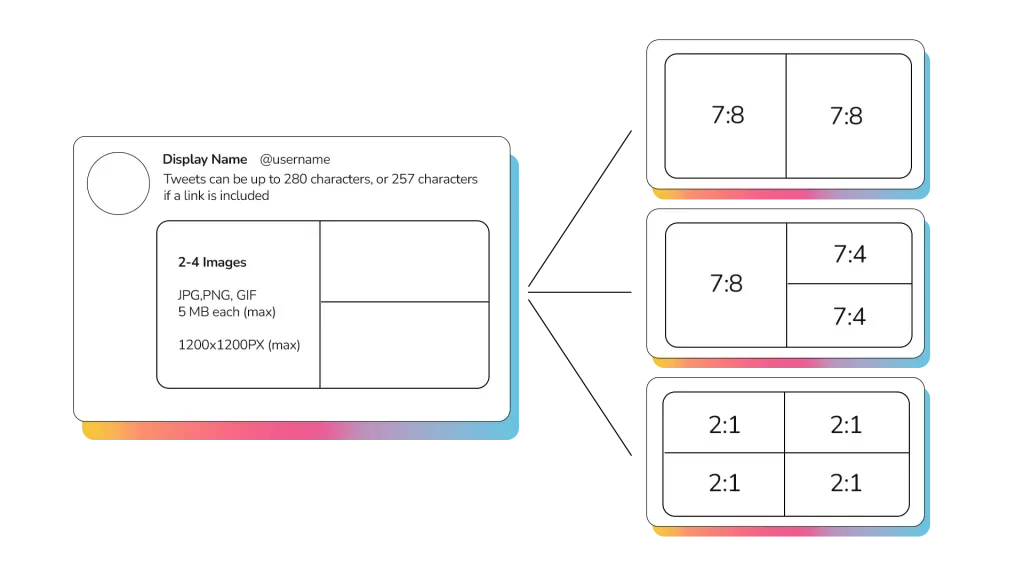
- 2 images: side by side, each roughly 7:8 (slightly portrait). Keep subjects centered; left/right edges get trimmed.
- 3 images: one large image on the left (roughly 7:8) plus two stacked images on the right (each roughly square). The first image you attach is the large one.
- 4 images: 2 × 2 grid, each tile roughly 1:1 or 7:8.
Because every tile is cropped toward a near-square, upload square (1080 × 1080) or near-square images for multi-photo tweets — wide 16:9 shots get butchered in the grid. Put the most important photo first, since it gets the largest tile in a 3-photo post and the top-left position in a 4-photo grid.
Link Cards and og:image: 1200 × 627
When you paste a link into a tweet, X pulls the og:image from the page and shows it as a link card — a 1.91:1 rectangle below your text. Design your website’s og:image at 1200 × 627 pixels (or 1600 × 840, same ratio). If your og:image is missing or too small, X shows a plain text link, which gets far fewer clicks. Put the article title or a strong visual on the image — link cards are clickable, and a compelling thumbnail doubles click-through. Buffer’s social media image sizes guide covers og:image specs across all networks.
Video on X: Sizes and Length
- Resolution: minimum 1280 × 720 (720p); recommended 1920 × 1080 (1080p). Max accepted is higher, but 1080p is the sweet spot.
- Aspect ratios: 16:9 (landscape), 1:1 (square), or 9:16 (vertical). Vertical 9:16 (1080 × 1920) takes the most mobile feed space, matching the 3:4 still-image logic.
- Length: up to 140 seconds (2:20) for standard accounts; X Premium subscribers can upload up to ~3 hours.
- File size: up to 512 MB. MP4 or MOV. Add captions — most viewers watch with sound off.
X Ads: Image and Carousel Specs
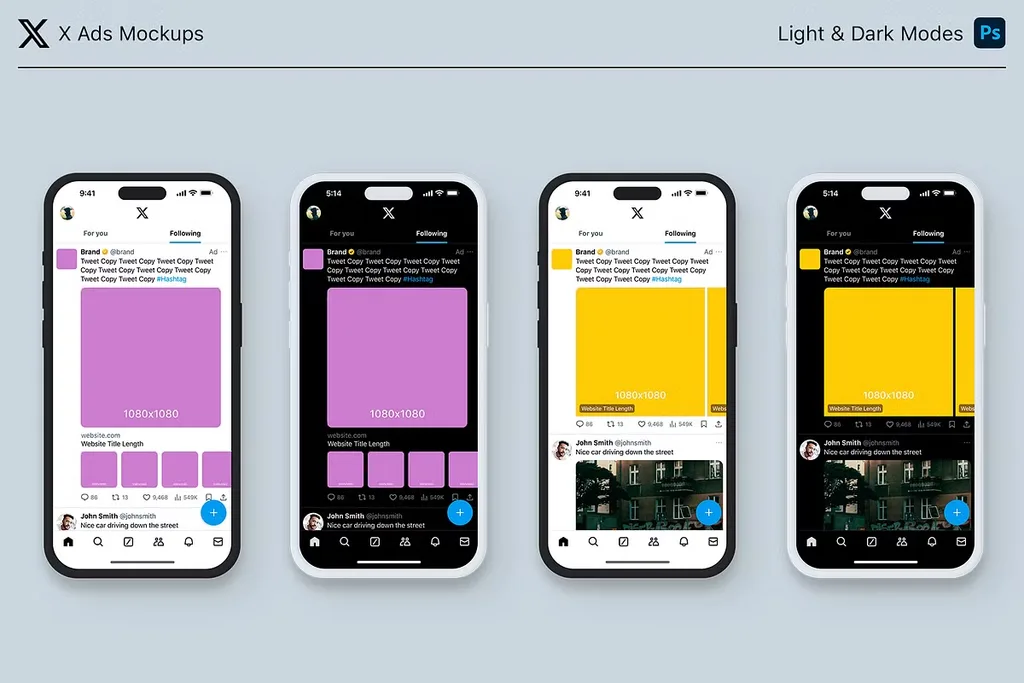
Paid posts support more ratios than organic.
- Single image ad: 1.91:1 (1200 × 627), 1:1 (1080 × 1080), 4:5 (1440 × 1800), 2:3 (1080 × 1620), 16:9, or 9:16. Max 5 MB, JPG/PNG. The 4:5 and 2:3 portrait formats take the most feed space.
- Carousel ad: 2–6 cards, each 800 × 800 (1:1) or 800 × 418 (1.91:1). Headline up to 70 characters per card.
- Video ad: MP4 or MOV, 6-second looping GIF or standard video, 16:9 recommended (1280 × 720), up to 512 MB.
The official X Business ad specs page lists every format in detail.
Export Settings for Sharp X Graphics
- Color space: sRGB. Adobe RGB and ProPhoto shift dull on X.
- Format: JPG quality 80–90% for photos; PNG for text-heavy graphics, logos, and flat colors.
- File size: under 5 MB (free) / 8 MB (Premium). Aim for 200–500 KB for feed images.
- Pixel dimensions: export at exactly the target size. Never upscale — it blurs.
- Sharpen after resize: light unsharp mask (Amount 80–120%, Radius 0.5–1 px) compensates for X’s compression. Our photo editing guide covers the full export workflow.
- Text: keep it large and high-contrast. In a 1500×500 header, text under 24 px is unreadable.
Ready to elevate your brand’s visual presence?
Partner with Clipping Expert Asia for fast, secure, and premium image editing starting at just 25¢. Explore all our services
5 Common Twitter Image Mistakes
- Posting 16:9 by default. In 2026, 3:4 portrait takes far more feed space. Switch your default template to 1200 × 1600.
- Putting text in the header corners. 60 px crops off top and bottom, and the profile photo covers the lower-left. Keep everything centered.
- Uploading wide 16:9 images in multi-photo tweets. They get cropped to near-square tiles. Use square for multi-image posts.
- Forgetting og:image on your website. Shared links without a 1200 × 627 og:image show as plain text and get ignored.
- Oversized files. A 10 MB photo compresses harder and looks worse than a properly exported 400 KB one.
Frequently Asked Questions
1500 × 500 pixels (3:1 aspect ratio), per X’s official Help Center. About 60 px crops off the top and bottom on some displays, and your profile photo covers the lower-left — keep important content centered.
What size is a Twitter profile picture?
Upload at 400 × 400 pixels minimum (800 × 800 recommended). It displays as a circle around 200 px on your profile and much smaller in the feed. Max file size is 2 MB.
What is the best Twitter tweet image size?
In 2026, 3:4 portrait (1200 × 1600) takes the most vertical space in the feed. X accepts any single image from 2:1 wide to 3:4 tall without cropping. Square 1080 × 1080 and landscape 1600 × 900 also work but display smaller.
What size is a Twitter link card / og:image?
1200 × 627 pixels (1.91:1). When you share a link, X pulls the og:image from the page. A missing or too-small og:image shows as plain text.
How many photos can you attach to one tweet?
Up to 4. Two images show side by side (7:8 each); three show one large left + two stacked right; four show a 2×2 grid. Upload square or near-square images — wide 16:9 crops badly.
What is the Twitter cover photo size?
Same as the header/banner: 1500 × 500 pixels. “Cover photo,” “header,” and “banner” are the same thing on X.
What file size and format should I upload to Twitter?
JPG (quality 80–90%) for photos, PNG for text/logos, sRGB color space, under 5 MB for free accounts (8 MB for Premium). Export at the exact pixel dimensions, then lightly sharpen. Animated GIFs do not work on headers or profile photos.
What are Twitter ad image sizes?
Single-image ads accept 1.91:1 (1200 × 627), 1:1 (1080 × 1080), 4:5 (1440 × 1800), 2:3 (1080 × 1620), 16:9, and 9:16, max 5 MB. Carousel ads use 2–6 cards at 800 × 800 (1:1) or 800 × 418 (1.91:1).
Final Verdict
Twitter’s sizes are stable except for one important shift: the feed now rewards tall 3:4 images, so retire the old 16:9 default. Keep your header at 1500 × 500 with everything centered, profile photo at 400 × 400, single tweets at 1200 × 1600 (or 1080 × 1080 for multi-photo), link cards at 1200 × 627, and export in sRGB under 5 MB. Design for the two header crops — top/bottom trim and the profile-photo overlap — and your graphics will look sharp on every device.