

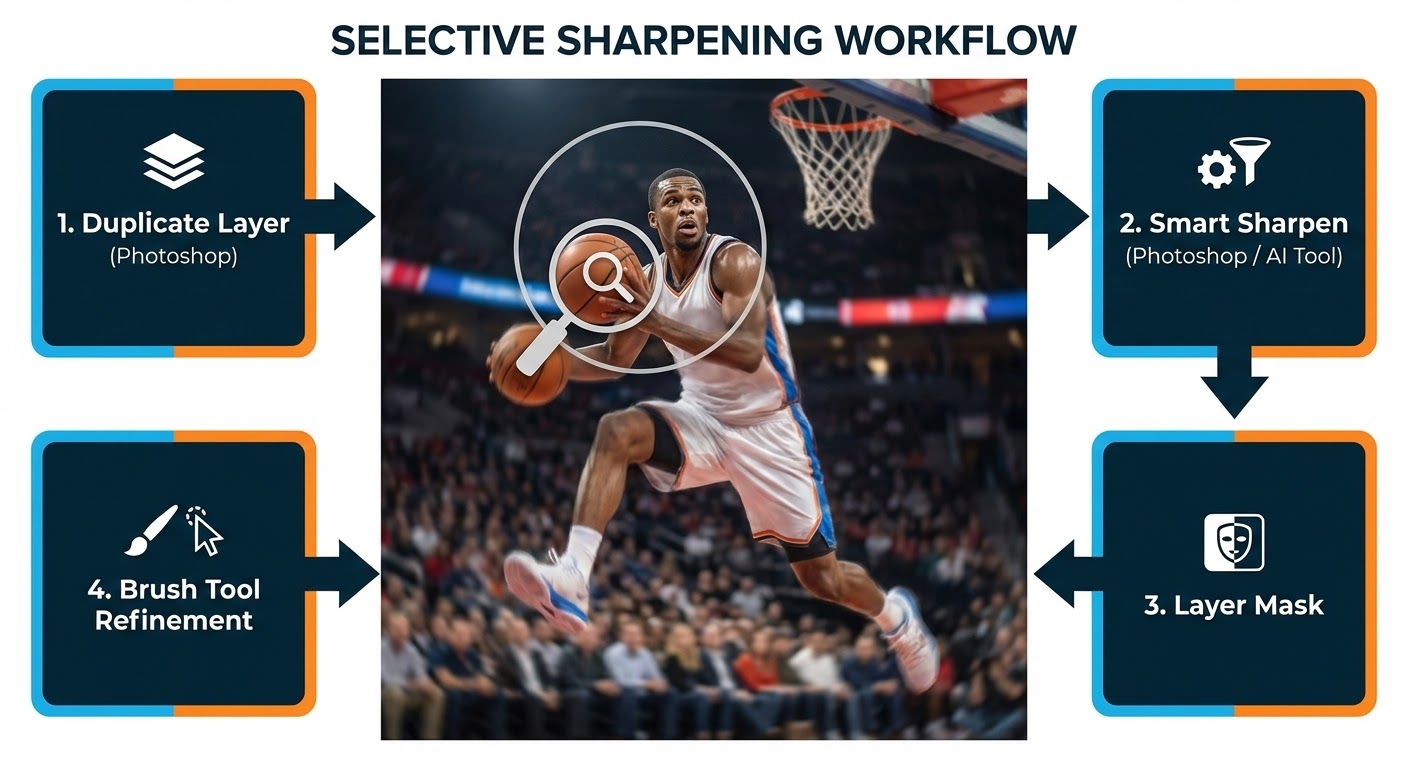
Fix Blurry Sports Photos: Step-by-Step Guide
October 20, 2025
Outsource Image Editing Services: Save Time & Boost Visual Quality
October 27, 2025
- Image Editing Explained in Detail: From Basic Edits to Advanced Effects
- What is Photo Editing?
- Types of Photo Editing
- What is Pixel Editing?
- Examples of Photo Editing
- Product and E-commerce Photography
- Sports Photography
- Headshot and Portrait Photography
- What is the best app to use for photo editing?
- What is the purpose of a photo editor?
Image Editing Explained in Detail: From Basic Edits to Advanced Effects
Learning what photo editing is helps you understand how simple changes can improve product photos. First of all, a clean, bright, and clear image can catch a customer’s eye and make the product more attractive. Furthermore, good editing not only enhances the look but also helps turn views into real sales.
Photo editing means enhancing or changing an image to boost its quality, style, or impact. The process involves adjusting elements such as brightness, contrast, colors, and sharpness to make photos look more polished and professional. Also, beyond basic corrections, photo editing can include background removal, retouching imperfections, adding effects, or combining multiple images. This technique is widely used in photography, advertising, e-commerce, and social media to create visually appealing content. Finally, editing transforms raw images into eye-catching visuals that communicate a clearer message and leave a lasting impression on viewers.
What is Photo Editing?
Photo editing is the process of refining and transforming images to make them more visually appealing, professional, and effective. To begin, it includes a wide variety of techniques, from simple adjustments like cropping, brightness, and color correction to more advanced tasks such as background removal, retouching, and adding creative effects. In today’s digital era, photo editing is essential for businesses, brands, and individuals who want to create eye-catching visuals that stand out. Furthermore, for e-commerce, well-edited product photos can build trust, highlight important features, and encourage buyers to make a purchase. Another reason people edit photos is for personal use, as it helps preserve memories in the best possible way. Ultimately, photo editing is not just about altering an image—it’s about enhancing its story, capturing attention, and delivering a strong visual impact that resonates with viewers.
Types of Photo Editing
First of all, photo editing encompasses a range of techniques to enhance images. Key types include background removal, color correction, and retouching. Furthermore, editors use cropping to improve composition and adjust exposure for better lighting. They can also add filters for creative effects. Another aspect involves advanced edits, such as object removal, image restoration, or complex manipulation. Finally, each type helps improve image quality, making photos visually appealing and professional for personal use, branding, or e-commerce.
1. Basic Editing
These essential adjustments improve image quality and make photos look polished. For instance, editors use cropping and resizing to adjust a photo’s composition or dimensions. They also correct underexposed or overexposed areas through exposure and brightness adjustments. Furthermore, contrast and saturation can enhance colors and add depth. Finally, white balance and color correction ensure that colors look natural and accurate.
2. Retouching
Retouching focuses on enhancing specific details, and professionals often use it in portrait or fashion photography. For example, skin retouching removes blemishes, wrinkles, or uneven skin tones. Also, eye and teeth enhancement techniques whiten teeth, brighten eyes, or remove red-eye. In addition, hair and body adjustments can smooth hair, remove stray strands, or subtly reshape features.
3. Advanced Editing / Manipulation
These edits involve more complex adjustments or creative changes. First, background removal and replacement isolate subjects or change backgrounds for commercial or artistic purposes. Another advanced technique is photo compositing, which combines multiple images into one seamless picture. Additionally, editors apply special effects and filters to add artistic elements like blur, vignettes, or HDR effects.
4. Color Grading & Enhancement
Editors use color grading to give photos a specific mood, style, or aesthetic. For example, they can apply tones reminiscent of old film to create a vintage or retro look. They might also create a cinematic or dramatic feel with deep shadows and specific color tones. Furthermore, converting an image to black and white emphasizes contrast and texture without the distraction of color.
5. Restoration & Preservation
People use restoration techniques to fix old or damaged photographs. This process includes removing scratches and dust to clean up scanned old photos. Editors can also repair faded colors to bring back the original vibrancy. Moreover, they use cloning or inpainting tools to fix tears or missing parts of an image.
6. Commercial / Product Editing
This type of editing is essential for e-commerce, marketing, and professional presentations. First, clipping paths or masking can isolate products for catalogs or websites. Also, creating shadows and reflections makes products look more realistic and appealing. Finally, resizing and optimizing images ensures they load quickly while maintaining high quality for web use.
7. Creative / Artistic Editing
Creative editing focuses on artistic expression rather than pure realism. For example, an editor can turn photos into digital art like paintings, sketches, or cartoons. They can also make surreal edits by adding imaginative elements, fantasy environments, or double exposures. Another creative approach is making collages and montages, which combine various images into a new artistic composition.
What is Pixel Editing?
Pixel editing is a process where you change an image at its smallest unit, the pixel. Each one carries specific color and detail information. Therefore, adjusting them directly gives you fine-tuned control over an image’s final appearance. In the past, editors performed this manually with software, a task which required significant time and patience. Today, however, AI simplifies pixel editing by automatically fixing noise, sharpening blurry areas, and improving resolution. This blend of creativity and technology helps you create clearer, sharper, and more professional images with minimal effort.
Examples of Photo Editing
Improving or transforming an image can make it look more appealing, professional, or creative. To start, this can be as simple as adjusting brightness and contrast or cropping a photo to focus on the main subject. Also, editors often remove unwanted objects or fix imperfections to create a cleaner look. In portraits, for example, editing helps smooth skin, enhance eyes, or balance lighting for a natural yet polished result. Furthermore, for product photography, editors highlight important details, correct colors, and sometimes remove mannequins to display clothes in a more realistic way. Finally, more advanced edits include creating artistic effects, blending multiple photos, or changing entire backgrounds. Overall, photo editing turns raw images into compelling visuals that tell a clearer story and attract more attention.
Product and E-commerce Photography
Product and e-commerce photography plays a vital role in attracting customers and driving sales. To start, high-quality product images help buyers trust what they see and make quicker purchasing decisions. Traditionally, creating flawless product photos required professional setups, expert editing skills, and a lot of time. Today, AI has transformed this process by automating background removal, color correction, and lighting adjustments. Furthermore, AI-powered tools can generate realistic shadows, enhance image resolution, and create multiple variations of a product photo instantly. This makes e-commerce photography faster, more affordable, and highly effective. Ultimately, with AI, businesses can present polished, professional product images that boost conversions and improve online shopping experiences.
Brightness and Exposure
Brightness and exposure control how light appears in a photo. Proper adjustments make images clearer, more balanced, and visually appealing, which improves overall quality and detail.
Background Removal
Background removal is the process of separating a subject from its background. It helps you create clean, professional images, perfect for e-commerce, marketing, and product photography, ensuring focus stays on the main subject.
Color Correction
Color correction is the process of adjusting and balancing colors in an image to make it look natural and appealing. It helps fix issues like poor lighting, dull tones, or color shifts. By enhancing brightness, contrast, and saturation, color correction ensures your photos reflect true-to-life visuals. This technique is widely used in photography, e-commerce, and digital media to create professional-quality images that grab attention and convey the right mood.
Color Change
Color change in photo editing allows you to replace or modify specific colors within an image. Editors often use it to adjust clothing shades, product colors, or background tones. This technique enhances creativity, maintains brand consistency, and gives businesses the flexibility to showcase different variations of the same product without needing multiple photoshoots.
Sports Photography
Sports photography is all about freezing moments of action, energy, and passion in athletics. From a footballer’s winning goal to a runner’s final sprint, it captures emotions that words cannot describe. Photographers rely on fast shutter speeds, sharp focus, and creativity to tell powerful stories through their images. These photos inspire fans, highlight achievements, and preserve unforgettable sporting memories.
Headshot and Portrait Photography
Headshot and portrait photography focus on capturing a person’s character, personality, and expression in a powerful way. A headshot usually highlights the face and is often used for professional profiles, business branding, or acting portfolios. Portrait photography, on the other hand, goes beyond the face to showcase mood, style, and individuality, often including body language and environment. Both forms require careful attention to lighting, background, and composition to create natural yet impactful images. Whether for personal use or professional needs, headshot and portrait photography help people present their best selves with confidence and authenticity.
What is the best app to use for photo editing?
The “best” photo editing app really depends on what you want to achieve. If you’re a professional photographer, Adobe Lightroom is often the top choice because it gives you powerful editing tools, RAW file support, and precise adjustments. For creatives who want Photoshop-level features without a monthly subscription, Affinity Photo is a great one-time purchase alternative.
If you prefer editing on your phone, Snapseed is completely free and surprisingly powerful. Meanwhile, VSCO is perfect if you want filters that give your images a stylish, cinematic look. For those who enjoy AI-powered edits—like quick background removal or selfie enhancements—apps like YouCam Perfect or Lensa are easy, fast, and social-media friendly.
In short:
- Lightroom = best for professionals.
- Snapseed = best free option.
- Affinity Photo = best one-time purchase.
- VSCO/Lensa = best for creative filters & AI.
What is the purpose of a photo editor?
The main purpose of a photo editor is to improve, adjust, and transform images so they look more polished and professional. First of all, an editor can fix issues like poor lighting, uneven colors, or distracting backgrounds. It also allows for creative changes, such as adding effects, enhancing details, or resizing photos. Finally, whether for personal use, business, or e-commerce, a photo editor helps make images more appealing, engaging, and ready to grab attention.