

More Than a Photo: The Complete Guide to Photo Retouching for Business Growth
October 20, 2025
How to Make a Clipping Path in InDesign: A Simple Guide
October 20, 2025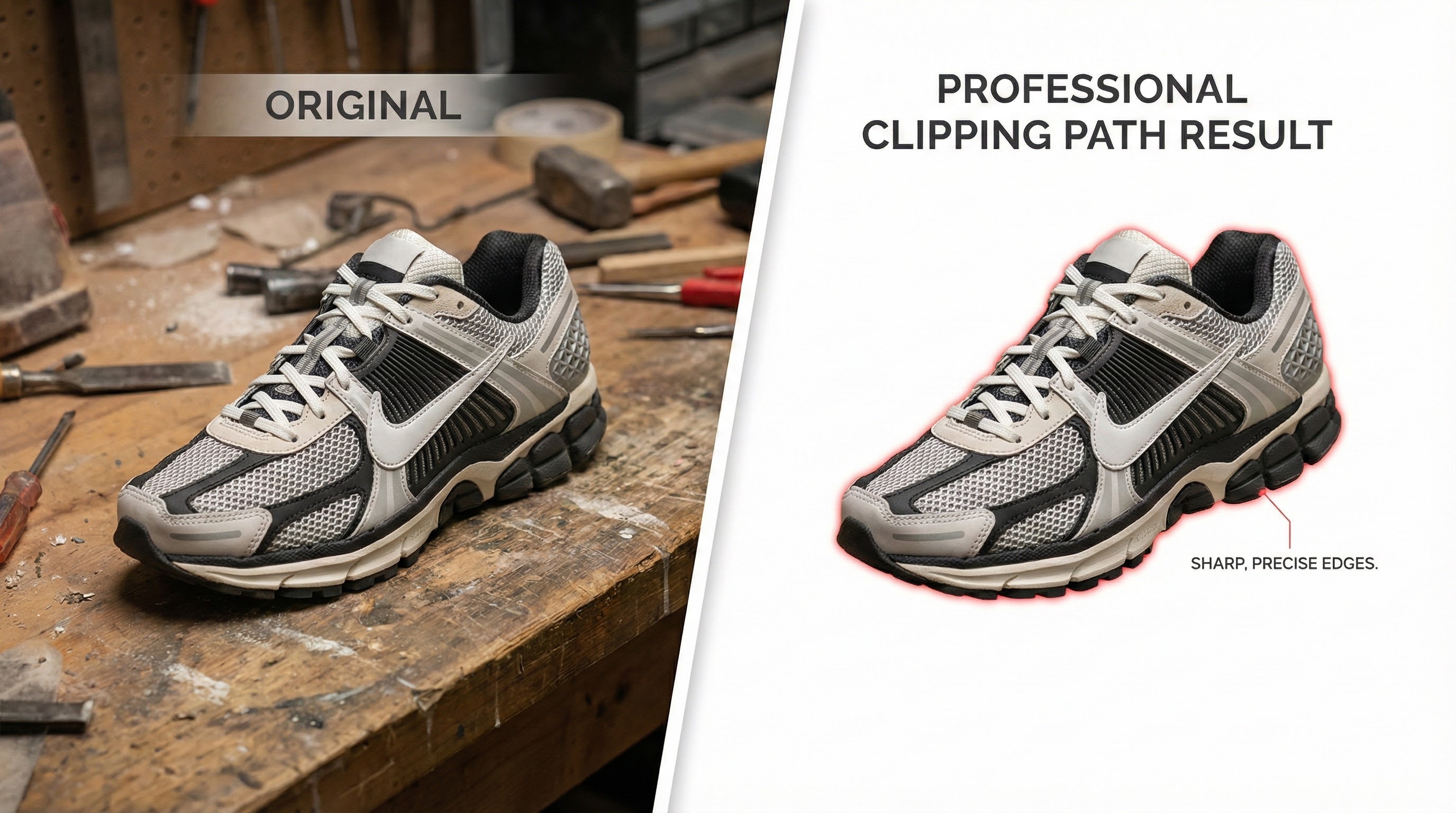
- Clipping Path vs. Background Removal Explained: Complete 2026 Guide
- Understanding the Basics: What is a Background Removal Service?
- The Gold Standard of Precision: A Deep Dive into Clipping Path Service
- When is a Clipping Path the Best Choice?
- When Edges Get Complicated: The Role of Image Masking
- The Rise of AI: Automated vs. Manual Background Removal
- Making the Right Choice: A Practical Guide for Your Images
- Conclusion: It's Not a Competition, It's a Toolkit
- Frequently Asked Questions (FAQ)
Clipping Path vs. Background Removal Explained: Complete 2026 Guide
In the hyper-competitive digital marketplace, your product images are not just pictures; they are your virtual storefront, your silent salesperson, and a critical factor in a customer’s decision to click “add to cart.” High-quality, clean, and professional visuals are non-negotiable. This is where the magic of post-production comes in, but it also brings a common point of confusion: the terms clipping path and background removal.
Are they the same thing? Is one better than the other? If you’re an e-commerce entrepreneur, a professional photographer, or a marketing manager, choosing the wrong service can lead to wasted time, budget overruns, and images that fail to convert.
This definitive guide will demystify these essential photo editing services. We will explore the nuances of each technique, explain when to use them, and empower you to make the right choice for your images, ensuring your products always look their absolute best.
Understanding the Basics: What is a Background Removal Service?
First, let’s establish a clear foundation. A background removal service is the broad, umbrella term for any process that isolates the main subject of an image from its surrounding environment. The ultimate goal is to eliminate distracting backgrounds and place the product on a new background—most commonly a
white background or a transparent background.
Think of it as the what—the objective you want to achieve.
This is crucial for e-commerce photo editing, as major online marketplaces like Amazon and Shopify have strict guidelines requiring products to be displayed on a pure white background to ensure a consistent and professional shopping experience. A professional background removal process achieves several key business objectives:
- Focuses Customer Attention: It removes visual clutter, making the product the undeniable hero of the image.
- Ensures Brand Consistency: It allows you to place all your products on a uniform background, creating a cohesive and professional online catalog.
- Increases Versatility: An isolated product image can be repurposed for marketing materials, social media posts, banners, and advertisements without clashing backgrounds.
The how of background removal involves several distinct techniques, each suited for different types of images. The most common methods are clipping path, image masking service, and automated AI tools. Understanding the difference between these methods is the key to ordering the right service.
The Gold Standard of Precision: A Deep Dive into Clipping Path Service
When precision, sharpness, and flawless edges are paramount, the clipping path service is the industry’s gold standard. This is not an automated process; it is a meticulous, manual technique performed by skilled digital artists.
A clipping path, sometimes referred to as deep etching, is a closed vector path created around an object using the Photoshop Pen Tool. This path acts like a perfect stencil, precisely separating the subject from its background. Because it’s a vector, not a pixel-based selection, the resulting cutout is incredibly sharp, scalable, and clean.
When is a Clipping Path the Best Choice?
The hand-drawn clipping path technique excels with subjects that have hard, sharp, or well-defined edges. It is the go-to solution for a vast range of e-commerce products, including:
- Apparel & Accessories: T-shirts, shoes, handbags, watches, and simple garments.
- Electronics: Smartphones, laptops, cameras, and other gadgets.
- Furniture & Homewares: Chairs, tables, lamps, and kitchen appliances.
- Simple Jewelry: Rings, pendants, and earrings with solid shapes.
The primary benefit of a professional clipping path service is its unparalleled accuracy. The human eye, guided by an expert hand, can discern edges and curves in a way that automated software often cannot, ensuring no part of your product is awkwardly cropped and no stray background pixels remain. This precision is what separates amateur-looking product photos from high-converting, professional ones.
(To see examples of our precise work, visit our Clipping Path Service page.)
When Edges Get Complicated: The Role of Image Masking
So, what happens when your subject doesn’t have sharp, clean edges? Think of a model with flyaway hair, a fuzzy woolen sweater, or a pet portrait. Using a clipping path on these subjects would result in an unnatural, “helmet-like” cutout that looks jarring and unprofessional.
This is where an image masking service becomes essential.
Image masking is a more advanced and intricate technique used for subjects with soft, fuzzy, or semi-transparent edges. Instead of creating a hard vector line,
Photoshop masking uses soft brushes and pixel-level adjustments to isolate the subject while preserving fine details. Techniques like layer masking and channel masking allow editors to separate even the most complex images from their backgrounds realistically.
Image Masking is Ideal For:
- Human Models: Especially for isolating fine hair details (hair masking).
- Furry or Fuzzy Products: Items like fur coats, soft blankets, or stuffed animals.
- Translucent Objects: Products like glassware, liquids, or sheer fabrics.
- Intricate Jewelry: Fine chains or detailed filigree work.
While a clipping path cuts, image masking blends. It’s a more nuanced process that retains the natural look and feel of soft edges, ensuring the final image is believable and high-quality. For many complex projects, a combination of both techniques is used—a clipping path for the hard-edged parts of an object and masking for the softer details.
(Learn more about how we handle intricate details on our Image Masking Service page.)
The Rise of AI: Automated vs. Manual Background Removal
In recent years, a new player has entered the field: the AI background remover. These tools promise instant results with a single click, and for very simple, high-contrast images, they can be surprisingly effective.
The Pros of AI Tools:
- Speed: They can process images in seconds.
- Cost: Many are free or low-cost for basic use.
The Cons of AI Tools:
- Lack of Precision: AI often struggles with low-contrast edges, complex shapes, and fine details, leaving behind jagged artifacts or cropping into the product itself.
- Inconsistency: The quality can vary wildly from one image to the next.
- No Nuance: AI cannot understand the subtle context of an image the way a human can.
While an AI background remover might be suitable for quick mockups or internal use, it rarely meets the quality standards required for professional e-commerce. A professional photo editor performing a manual hand-drawn clipping path delivers a level of quality and consistency that builds brand trust and drives sales. Automated tools are a convenient shortcut, but professional results require professional craftsmanship.
Making the Right Choice: A Practical Guide for Your Images
Now that you understand the different methods, how do you choose the right one for your project? The decision depends on three factors: your subject, your quality standards, and your end-use.
Here is a simple guide to help you decide:
| If Your Subject Is… | And Your Goal Is… | The Best Service Is… |
| Hard-edged products (shoes, electronics, furniture) | A clean, professional look for an e-commerce store (e.g., Amazon, Shopify). | Clipping Path Service |
| A model with hair, furry items, or soft fabrics | A realistic cutout that preserves fine details for fashion catalogs or advertisements. | Image Masking Service |
| A complex object with both hard and soft edges | A perfect, high-end result for a hero image or print ad. | A combination of Clipping Path and Image Masking |
| A simple, high-contrast object for a quick draft | A fast, low-cost solution for internal review. | AI Background Remover |
| An intricate product with multiple parts needing separate color adjustments | To isolate different components within a single image for advanced editing. | Multi-Clipping Path Service |
Ultimately, finding the best clipping path company means finding a partner who understands these nuances and can guide you toward the right solution. A good provider won’t just take your order; they will consult with you to ensure the chosen technique aligns with your goals.
Conclusion: It’s Not a Competition, It’s a Toolkit
So, clipping path vs. background removal—which is better? The answer is that it’s the wrong question. It’s not a competition. Background removal is the objective, and clipping path is one of the most precise and reliable tools to achieve it.
Understanding the difference empowers you to communicate your needs clearly to your professional photo editor and ensures you get the exact results your brand deserves. For hard-edged products, a hand-drawn clipping path offers unmatched precision. For subjects with soft or intricate details, image masking is the key to a realistic finish.
By investing in the right photo editing services, you are not just cleaning up pictures; you are elevating your brand, building customer trust, and creating a powerful visual experience that converts browsers into buyers.
Ready to transform your product photos? Contact us today for a free quote and let our experts help you choose the perfect editing solution for your images.
Frequently Asked Questions (FAQ)
1. What is the main difference between a clipping path and background removal? Background removal is the overall goal of isolating a subject from its background. A clipping path is a specific, high-precision manual technique using the Photoshop Pen Tool to achieve that goal, best suited for hard-edged objects. Other background removal methods include image masking (for soft edges) and automated AI tools.
2. Is a clipping path necessary for all e-commerce photos? For most e-commerce platforms like Amazon, a clean, white background is required. A clipping path is the most reliable way to achieve this for products with sharp edges (like electronics, boxes, or shoes), ensuring a professional and compliant result. For items with soft edges like fur or hair, image masking would be the necessary technique.
3. How much does a professional clipping path service cost? Pricing typically depends on the complexity of the image. Simple images with smooth curves can start as low as $0.29-$0.39 per image. More complex images with many curves, corners, or internal holes will cost more. Many providers offer discounts for bulk orders.
4. Can I just use an app or AI tool to remove the background? You can, and for simple, high-contrast images, AI tools can be very fast. However, they often lack the precision of a hand-drawn clipping path, which can result in jagged edges, missed spots, or parts of the product being cut off. For professional e-commerce use where quality and brand perception matter, a manual service is highly recommended.
5. What file format is best for an image with a transparent background? The PNG (Portable Network Graphics) format is the best choice for saving an image with a transparent background. Unlike JPEGs, which will fill the background with white, PNG files support transparency, allowing you to place your isolated product on any background you choose online.