


Mastering Content-Aware Fill for Seamless Photo Editing
April 8, 2026
From Blurry to Brilliant: How To Make Your Camera Quality Better
April 13, 2026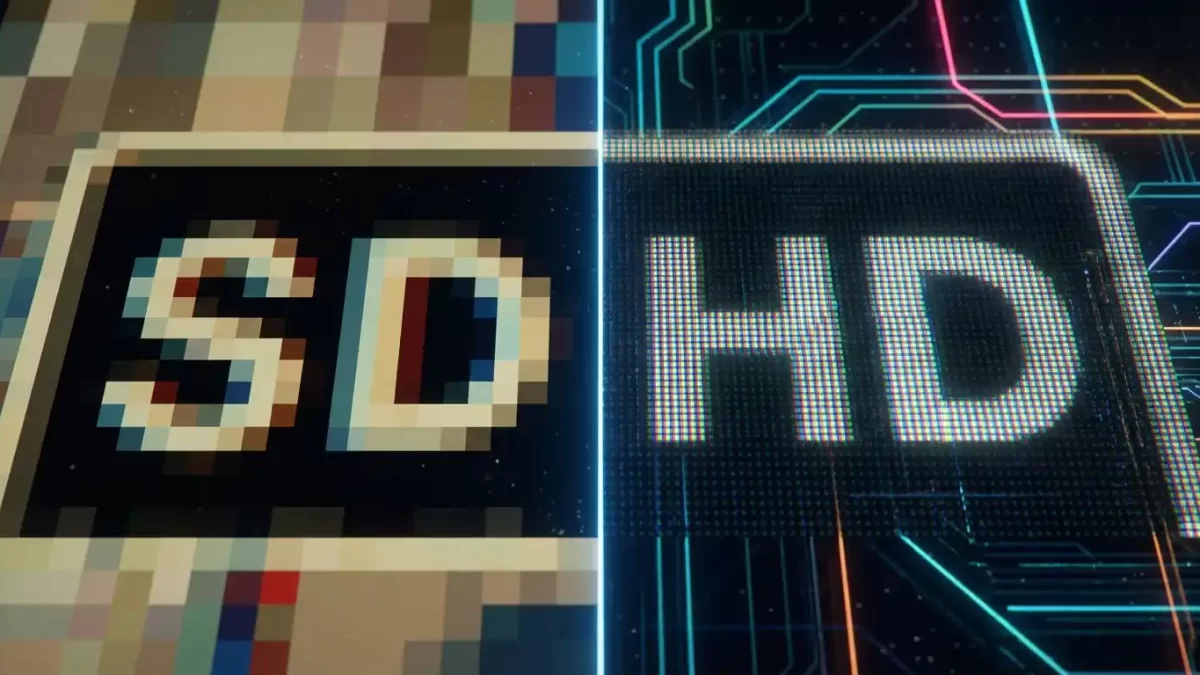
The shift from watching grainy reruns on a boxy CRT television to streaming a crisp nature documentary in 4K on an OLED screen shows just how far video resolution has come. But before you get to 4K or 8K, you have to pass through the two most fundamental tiers of video quality: Standard Definition (SD) and High Definition (HD).
Understanding the difference between SD and HD isn’t just about impressing your friends with tech knowledge; it’s about practical decisions. Should you upload that family video in 1080p? Will your security camera capture a license plate in SD? Why does your streaming service buffer when you switch to HD? This guide breaks down everything you need to know about SD vs. HD resolution, from pixel counts and bandwidth usage to real-world applications and upscaling technology.
Resolution matters for photos too. Get a free clipping path test to see true HD clarity in your product images
- What is Standard Definition (SD)?
- What is High Definition (HD)?
- Understanding Aspect Ratios: 4:3 vs. 16:9
- The Side-by-Side Comparison: SD vs. HD
- Why Resolution Affects Your Bandwidth and Storage
- Use Cases: When to Choose SD vs. HD
- Beyond HD: What About 4K, 8K, and the Future?
- Can You Convert SD to HD? (The Upscaling Question)
- Common Myths About SD and HD Resolution
- Which One Should You Choose? A Practical Guide
- Final Verdict
- Frequently Asked Questions (FAQ)
What is Standard Definition (SD)?
Standard Definition, or SD, refers to any video resolution with a vertical pixel count of 480 (in NTSC regions like North America) or 576 (in PAL regions like Europe). For decades, this was the global standard for television broadcasting, VHS tapes, and DVDs. To understand the technical origins of these standards, you can refer to this detailed breakdown of NTSC vs PAL differences on Lifewire.
The Pixel Reality of SD
SD resolution typically comes in a few variations:
- 480p (640 x 480): The classic 4:3 aspect ratio resolution. It contains roughly 307,200 total pixels.
- 480p Widescreen (720 x 480): Anamorphic widescreen used for many DVDs, totaling 345,600 pixels.
- 576p (720 x 576): The PAL standard used in many other parts of the world, containing 414,720 pixels.
Key Characteristics of SD
- Aspect Ratio: Most classic SD content uses a 4:3 aspect ratio, which looks almost square compared to modern screens.
- Image Quality: The lower pixel density often leads to softer images, visible pixelation on large screens, and a lack of fine detail.
- Usage Today: While largely phased out for premium content, SD remains widely used for bonus features on DVDs, archival footage, older video game consoles, and as a low-bandwidth option on streaming platforms like YouTube and Netflix.
- Audio Limitations: Standard Definition formats typically pair with stereo or Dolby Pro Logic audio, lacking the immersive surround sound found in HD broadcasts.
What is High Definition (HD)?
High Definition (HD) refers to video or display quality with at least 720 vertical pixels and a widescreen 16:9 aspect ratio. It delivers sharper images, clearer details, and richer colors, creating a far better viewing experience than standard definition. HD is widely used in TVs, monitors, cameras, and online video because it improves visual clarity and audience engagement. For businesses and creators, HD content helps present products, films, and media more professionally, making visuals look modern, polished, and highly appealing across digital and broadcast platforms.
The Main Flavors of HD
- 720p (1280 x 720): Often called “HD Ready,” this is the entry-level HD standard. It contains approximately 921,600 pixels—about three times the detail of standard 480p SD.
- 1080p (1920 x 1080): Known as “Full HD,” this is the most common HD format today. It packs roughly 2.1 million pixels, offering exceptional clarity and detail.
Key Characteristics of HD
- Sharpness and Detail: HD resolution allows you to see individual strands of hair, read small text on a screen, and enjoy textures that SD simply cannot reproduce.
- Color Depth: HD formats generally support higher color bit depths, resulting in smoother gradients and more vibrant colors.
- Viewing Experience: HD maintains its quality on large screens. A 1080p video looks fantastic on a 50-inch television, whereas an SD video would appear blurry and pixelated on the same display.
- Enhanced Audio Support: High Definition standards often accompany Dolby Digital Plus or DTS audio, delivering a true surround sound experience.
Understanding Aspect Ratios: 4:3 vs. 16:9
One of the most visible differences between SD and HD content is the shape of the picture itself. Older SD televisions used a nearly square 4:3 aspect ratio. Modern HD screens use a rectangular 16:9 aspect ratio, which matches the natural field of view of human eyes.
- 4:3 (Standard Definition): Measures four units wide for every three units tall. When you watch a 4:3 SD show on a widescreen HD TV, you typically see black bars on the left and right sides (pillarboxing).
- 16:9 (High Definition): Measures sixteen units wide for every nine units tall. This widescreen format allows you to watch movies without black bars at the top and bottom (letterboxing), and it provides a more cinematic experience.
Why does this matter for your viewing choices? Many streaming services offer old TV shows in their original 4:3 SD format. Cropping them to 16:9 cuts off important parts of the image. Therefore, watching them in SD with pillarboxing preserves the director’s original framing.
The Side-by-Side Comparison: SD vs. HD
To visualize the core differences, look at the table below:
| Feature | Standard Definition (SD) | High Definition (HD) |
|---|---|---|
| Common Resolutions | 640×480 (4:3), 720×480 (16:9), 720×576 (PAL) | 1280×720 (720p), 1920×1080 (1080p) |
| Pixel Count | ~300,000 to ~400,000 pixels | ~921,600 to ~2,073,600 pixels |
| Aspect Ratio | Mostly 4:3 (boxy), some 16:9 | Standard 16:9 (widescreen) |
| Image Quality | Soft, noticeable pixelation on large displays | Sharp, detailed, smooth edges |
| File Size | Small (e.g., 250-500 MB for a movie) | Large (e.g., 1.5-4 GB for a movie) |
| Bandwidth Needed | Low (approx. 1.5 – 3 Mbps) | Medium-High (approx. 5 – 15 Mbps) |
| Best Use Case | Slow internet, mobile data saving, archives | Home theaters, modern gaming, professional video |
Why Resolution Affects Your Bandwidth and Storage
The jump in quality from SD to HD comes with a hidden cost: data. More pixels mean exponentially more information, which translates directly into larger file sizes and higher bandwidth requirements.
The Data Divide
- SD is Efficient: Streaming a 480p video on YouTube uses approximately 0.3 to 0.5 GB of data per hour. A 720p HD stream jumps to roughly 0.9 to 1.5 GB per hour, while 1080p can consume 2 to 3 GB per hour. SD video files also take up significantly less space on your hard drive or cloud storage.
- HD is Demanding: Streaming platforms like Netflix recommend a steady internet connection of at least 5 Mbps for 1080p HD content. For a buffer-free 4K experience, you’ll need upwards of 25 Mbps. You can check Netflix’s official internet speed recommendations to see exactly what they require for each resolution. This higher bitrate requirement is why your video might automatically drop from “HD” to “SD” when your Wi-Fi signal weakens.
Just like HD needs more bandwidth, high‑resolution product photos need expert editing. See our photo retouching pricing for bulk images
Real-World Examples of Data Consumption
Let’s put these numbers into everyday context:
- One hour of SD video (480p): Roughly the same data as loading 150 web pages.
- One hour of HD video (1080p): Roughly the same data as downloading a full video game demo (2-3 GB).
- Monthly data cap (e.g., 100 GB): You could stream about 200 hours of SD video or only 40 hours of 1080p HD video before hitting your limit.
These differences become critical for users with satellite internet, mobile hotspots, or capped home broadband plans.
Use Cases: When to Choose SD vs. HD
Choosing the right resolution depends entirely on your specific scenario.
When SD Makes Perfect Sense
Despite being older technology, SD still has a vital role to play in the modern digital ecosystem.
- Slow or Metered Internet Connections: If you have a limited data plan or your internet speed consistently drops below 5 Mbps, SD is your best friend. It allows for smooth, uninterrupted playback without buffering.
- Archival Footage: Old family videos, classic TV shows, or historical footage shot on SD cameras don’t benefit from HD. Upscaling won’t add detail that wasn’t originally captured. Keeping this footage in SD preserves its original character and saves storage space.
- Budget Security Systems: For a security camera monitoring a wide area like a parking lot, SD might suffice. However, if you need to identify a person’s face or read a license plate from a distance, you will need HD.
- Simple Digital Signage: For small displays in elevators, waiting rooms, or fast-food menus, SD resolution is often perfectly adequate and much cheaper to distribute and store.
- Remote Learning or Webinars: When screen sharing a presentation or slideshow, SD resolution often works well enough for text and basic graphics, preserving bandwidth for other participants.
When HD is a Must-Have
For most modern applications, especially those involving professional content creation or personal entertainment, HD is now the baseline expectation.
- Content Creation for Social Media: Platforms like YouTube, TikTok, and Instagram favor and promote HD content in their algorithms. Uploading in 1080p or higher ensures your videos look professional and engaging. For creators, YouTube’s recommended upload bitrates clearly show that HD is the minimum for monetized channels.
- Modern Gaming: Video games rely on HD resolution to render detailed environments and fast-moving action. Playing on a standard definition screen would make text unreadable and reduce the immersive experience.
- Professional Videography: For corporate videos, weddings, or any client work, HD is the minimum standard. It provides the crispness needed for professional editing, color grading, and delivery.
- Large Screen Viewing: On any modern television larger than 32 inches, the difference between SD and HD is night and day. HD content looks sharp and immersive, while SD appears soft and dated.
- Medical or Technical Imaging: X-rays, MRI scans, or engineering blueprints demand HD resolution to reveal fine details that could be critical for diagnosis or design.
Beyond HD: What About 4K, 8K, and the Future?
While this article focuses on SD vs. HD, the resolution race continues upward. You’ve likely heard of 4K (Ultra HD) and 8K.
- 4K (3840 x 2160): This resolution contains approximately 8.3 million pixels—four times the detail of 1080p. It’s rapidly becoming the new standard for high-end home theaters and professional cinema cameras.
- 8K (7680 x 4320): With over 33 million pixels, 8K offers staggering detail. However, the content is scarce, and the bandwidth requirements are immense, making it a niche format for the foreseeable future.
For now, HD represents the sweet spot between quality, file size, and accessibility. However, if you have old SD footage you want to bring into the modern era, new technology offers a solution.
Can You Convert SD to HD? (The Upscaling Question)
You cannot add detail to an image that wasn’t captured by the camera, but you can “upscale” it. Upscaling is the process of increasing a video’s resolution to fit a higher-resolution screen. There are two main methods:
- Standard Upscaling (Interpolation): Most modern TVs and video players perform basic upscaling automatically. The software guesses what the missing pixels should be based on the surrounding ones. This prevents the video from appearing as a tiny box on your screen, but it often results in a soft, blurry look.
- AI-Powered Upscaling: This is the game-changer. Software like Topaz Video AI or AVCLabs Video Enhancer AI uses deep learning models trained on millions of video frames. Instead of just guessing, these AI models actually reconstruct details, reduce noise, and sharpen edges. You can take grainy, pixelated SD footage from the 1990s and convert it into a convincing 1080p or even 4K video. For a real-world example, visit the Topaz Video AI product page to see before-and-after demonstrations. While not a perfect replacement for native HD, the results are often stunning.
Important Limitations of Upscaling
Even with AI, you cannot perform miracles. If the original SD footage suffers from heavy compression artifacts, motion blur, or out-of-focus shots, upscaling will sometimes make these flaws more obvious. Always keep the original SD master file as a backup.
Common Myths About SD and HD Resolution
Let’s debunk a few persistent myths that confuse many viewers:
- Myth 1: “HD is always better than SD.”
Truth: For slow internet connections or tiny screens, SD provides a smoother experience without noticeable quality loss. - Myth 2: “Upscaling SD to HD creates true HD quality.”
Truth: Upscaling guesses missing pixels, but it never recovers detail that the camera never recorded. It only makes SD look better on an HD screen, not identical to native HD. - Myth 3: “You need a 4K TV to enjoy HD.”
Truth: A standard 1080p HD TV displays 1080p content perfectly. 4K TVs actually have to upscale HD content, which can sometimes introduce minor artifacts. - Myth 4: “All HD content uses the same amount of data.”
Truth: A 1080p video on YouTube often uses a lower bitrate (2-4 Mbps) than a Blu-ray disc (20-30 Mbps). Bitrate matters as much as resolution.
Which One Should You Choose? A Practical Guide
Making the final choice between SD and HD comes down to evaluating your specific needs. Here is a quick decision matrix:
- Ask yourself: What is my primary goal?
- If maximizing audience engagement: Choose HD (1080p). Viewers expect crisp visuals, and platforms reward high-quality content.
- If minimizing data usage and ensuring playback: Choose SD (480p). Perfect for users with limited data plans or unstable internet connections.
- Ask yourself: Where will people watch this?
- On a smartphone or small window: SD often looks perfectly fine on a 5-6 inch screen, saving your viewers’ data.
- On a 40-inch TV or monitor: HD is non-negotiable. SD will look visibly poor and unprofessional.
- Ask yourself: What are my technical limits?
- Limited storage or slow upload speed: SD files are significantly smaller, making them easier to upload, store, and share.
- Professional project or high-speed fiber connection: HD is the way to go.
Final Verdict
The debate between SD and HD resolution isn’t about one being “good” and the other “bad.” It is about fitness for purpose. High Definition (HD) delivers a superior, immersive viewing experience with sharp detail and vibrant colors, making it the gold standard for modern entertainment, gaming, and professional content. However, this quality comes at the cost of higher bandwidth and larger storage requirements.
Standard Definition (SD) remains a highly practical and efficient option. It is the unsung hero for users with slow internet connections, limited data plans, or older devices. It ensures smooth playback without buffering and keeps file sizes small.
When you watch your next video, check the resolution settings. By understanding the trade-offs between pixels, performance, and practicality, you can take full control of your viewing experience and never suffer through a blurry movie or a buffering screen again. Whether you choose the nostalgic charm of SD or the crystal clarity of HD, the right resolution is the one that fits your screen, your connection, and your content.
Ready to upgrade your product photos from SD to HD quality? Get a free quote for professional photo editing – from clipping path to retouching
Frequently Asked Questions (FAQ)
1. Can the human eye actually tell the difference between SD and HD?
Yes, absolutely. On any screen larger than a smartphone, the difference is immediately noticeable. HD provides sharper edges, clearer text, and significantly more detail, especially in fast-moving scenes.
2. Why does my HD video sometimes look blurry?
Blurry HD video usually results from a low bitrate. Bitrate controls how much data is used to display each second of video. A 1080p video with a very low bitrate (common on some free streaming sites) will look pixelated or blocky, while a 720p video with a high bitrate can look nearly flawless.
3. Does using HD resolution drain my phone battery faster?
Yes. Streaming or playing an HD video requires your phone’s processor and display to work harder to render all those extra pixels. This consumes more battery power than playing an SD video.
4. Is SD good enough for a security camera?
It depends on the goal. For general activity monitoring (motion detection), SD is often sufficient. However, for forensic evidence (identifying a face or license plate), HD (1080p or higher) is highly recommended.
5. What is the difference between “interlaced” (i) and “progressive” (p) scan?
The “p” in 480p or 1080p stands for progressive scan, which draws every line of the image in sequence, creating a smooth, clean picture. The “i” (e.g., 1080i) stands for interlaced, which draws alternating lines. Progressive scan is always superior for modern displays, especially for fast-moving content like sports or gaming.
6. Will watching SD content on an HD TV damage the screen?
Not at all. It will not damage your TV. The television will automatically upscale the image to fit its screen. It simply won’t look as sharp as native HD content.
7. What internet speed do I need for HD streaming?
Most services recommend a minimum download speed of 5-10 Mbps for consistent 1080p streaming. For 720p, 3-5 Mbps is often sufficient. For a stable 4K stream, you generally need at least 25 Mbps.
8. Why does my DVD (480p) look better than a low bitrate 1080p YouTube video?
Resolution isn’t everything. A high-bitrate, professionally mastered SD DVD can sometimes appear cleaner and more stable than a heavily compressed, low-bitrate HD stream that suffers from compression artifacts like blocking or smearing.