

How to Become a Commercial Photographer: 2026 Pro Guide
May 5, 2026
The Best Mirrorless Cameras in 2026: A Photographer’s Honest Buying Guide
May 5, 2026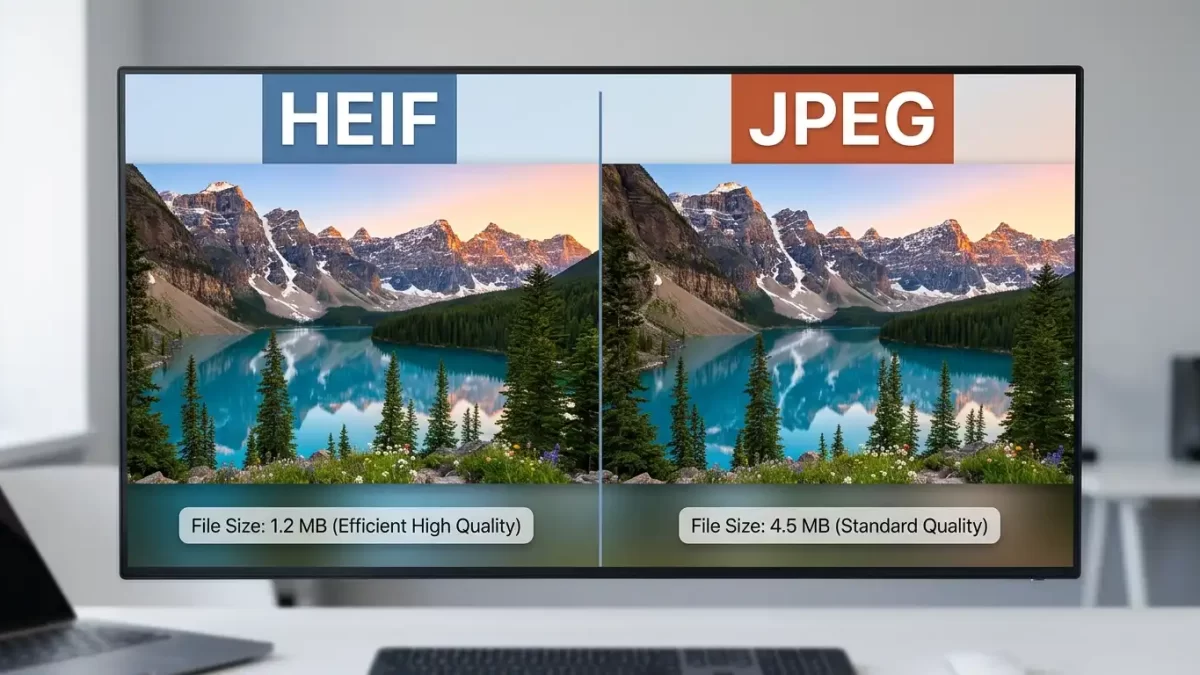
- A Practical Guide for Photographers Weighing Modern Image Formats Against the Universal Standard
- What HEIF Really Is and Why It Exists
- The Concrete Advantages HEIF Brings to the Table
- Which Cameras Actually Support HEIF Today
- The Real-World Friction That Keeps Photographers on JPEG
- When HEIF Makes Genuine Sense Right Now
- When JPEG Remains the Smarter Choice
- A Practical Migration Plan for Curious Photographers
- The Verdict: Not Quite Yet for Most, but Soon
- Frequently Asked Questions
A Practical Guide for Photographers Weighing Modern Image Formats Against the Universal Standard
Tucked away inside your camera’s settings menu, often hidden under layers most photographers never explore, sits a quiet little toggle that could change how you capture, store, and share your images. That toggle lets you switch from the familiar JPEG to a newer format called HEIF. Canon, Sony, Nikon, and Fujifilm have all quietly rolled out support across their mirrorless lineups over the past few years, yet most shooters still ignore the option entirely.
The reason is simple. JPEG has been the universal language of digital photography for more than three decades. It opens on every device, uploads to every platform, and prints at every lab. Switching to anything else feels like learning Esperanto in a world that already speaks English fluently.
But HEIF is not a fringe experiment. Apple adopted it as the iPhone’s default capture format back in 2017, which means billions of photos get saved in this format every single day. The format also brings real, measurable advantages over JPEG, including better color depth, dramatically smaller files, and richer feature support. So the honest question becomes this: does flipping that switch on your camera actually improve your workflow in 2026, or does it create more headaches than it cures?
Let’s break it down properly.
Need clean, professional images for your storefront, portfolio, or marketing campaign? Our expert clipping path specialists deliver pixel-perfect cutouts on any image format, including HEIF and JPEG.
What HEIF Really Is and Why It Exists
The Origin Story Behind High Efficiency Image Format
HEIF stands for High Efficiency Image Format, and the Moving Picture Experts Group (MPEG) developed it. That same standards body gave the world MP3, MP4, and H.264, which power most of the media you stream every day. Engineers finalized the specification in 2015, but mainstream awareness came two years later, when Apple switched iPhones to HEIF capture by default.
At its core, HEIF acts as a container rather than a single-image format. One HEIF file can hold:
- Multiple images in a single wrapper, ideal for burst sequences and Live Photos
- Depth maps that power portrait-mode background blur
- Alpha channels for transparency, something JPEG simply cannot offer
- Audio clips attached to image data
- Rich metadata with significantly more flexibility than legacy formats
Under the hood, HEIF typically relies on HEVC (H.265) compression, the very same codec that drives 4K video streaming. That advanced compression pipeline is why HEIF squeezes so much more quality into so much less space.
How JPEG Compares on Paper
JPEG, on the other hand, dates back to 1992. That’s not a misprint. The format powering most of the photos you see online today launched when “high resolution” meant 640 by 480 pixels and decoding an image required real engineering effort. JPEG solved the problems of its time brilliantly. Those problems, however, are not the problems photographers face today.
The Concrete Advantages HEIF Brings to the Table
10-Bit Color Depth Changes Everything
This benefit headlines every HEIF discussion, and rightly so. JPEG caps out at 8-bit color, which delivers 256 tonal values per channel and roughly 16.7 million total colors. HEIF jumps to 10-bit color, expanding that figure to 1,024 tonal values per channel and over a billion possible colors.
In practical shooting terms, that means:
- Smoother gradients in skies, sunsets, and shadow transitions
- More natural skin tones with fewer abrupt color shifts
- Less banding when you push exposure or contrast in post
- More editing headroom before artifacts begin to show
If you’ve ever pushed a JPEG sky and watched it break into visible bands of slightly different blues, you’ve hit that 8-bit ceiling firsthand. HEIF gives you breathing room without forcing you into raw territory.
Smaller Files Without Sacrificing Quality
HEIF files run about 40 to 50 percent smaller than equivalent JPEGs at the same visual quality. That’s not a marginal tweak. It effectively doubles the capacity of your memory cards and slashes long-term storage costs.
This savings matters most for:
- Event and wedding photographers burning through cards in a single day
- Sports shooters firing thousands of frames during one match
- Travel photographers working with limited onboard storage on the road
- Studios archiving hundreds of thousands of files for long-term retention
Bonus Capabilities JPEG Cannot Match
HEIF supports transparency through alpha channels, a feature JPEG never offered and that previously demanded the much heavier PNG format. It also offers an optional lossless mode, meaning you can preserve every bit of image data when the situation calls for archival precision. The container structure additionally allows sequences and supplementary data to ride along inside a single file.
Selling products online? Boost conversions with our professional ghost mannequin service that creates clean, hollow-man effects clients love.
Which Cameras Actually Support HEIF Today
Major Manufacturer Rollouts
HEIF availability has expanded considerably across modern mirrorless lineups, though coverage remains uneven for older bodies.
Canon offers HEIF on most RF-mount cameras, including the EOS R5, R5 Mark II, R6 Mark II, R6 Mark III, R1, R7, R8, and R3. Canon labels its files with the HIF extension and pairs the format with 10-bit HDR PQ output, designed for HDR-capable monitors and televisions.
Sony introduced HEIF in 2020 with the Sony Alpha 7S III and now includes it on the a7 IV, a7R V, a7C II, a7 V, a9 III, and a1. Sony’s implementation also captures full 10-bit color.
Nikon rolled HEIF into Z-mount bodies including the Z8, Z9, Zf, Z6 III, and Z5 II, sticking with the standard HEIF label in menus.
Fujifilm has joined the party as well, with HEIF available on the X-H2, X-H2S, X-T5, and several GFX medium-format bodies.
The common thread across brands is straightforward: most current mirrorless cameras now support HEIF, but older or entry-level models may not. Always check your specific body’s manual before assuming it’s there.
The Real-World Friction That Keeps Photographers on JPEG
Compatibility Still Trips People Up
This issue tops every working photographer’s list of concerns. Despite years of progress, HEIF still hits walls in places JPEG never struggles:
- Many web browsers still don’t render HEIF natively without conversion
- Several client gallery platforms reject HEIF uploads or convert them silently
- Print labs almost universally demand JPEG or TIFF files
- Social media platforms handle HEIF inconsistently across uploads
- Older email clients sometimes strip or fail to preview HEIF attachments
If your workflow ends with you handing files to another human or uploading to a third-party platform, you live or die by what that platform supports. As of 2026, the answer remains overwhelmingly JPEG. JPEG’s three decades of universal adoption built an ecosystem so entrenched that displacing it requires every downstream service to update simultaneously, which has not happened yet.
Editing Software Support Stays Uneven
Adobe Lightroom and Photoshop handle HEIF without fuss. Capture One supports it. ON1 and DxO have both added compatibility. But step outside the major players and predictability drops fast. Some plug-ins crash on HEIF files. Older versions of otherwise capable tools choke on the codec. Batch processors and digital asset management systems built around JPEG and TIFF often skip HEIF files silently, which is the worst kind of failure because you don’t notice until it’s too late.
Windows Has Historically Lagged Apple
Apple’s ecosystem has supported HEIF natively since 2017, which makes sense given Apple drove the format’s mainstream adoption. Windows arrived later. Microsoft added HEIF support to Windows 10 but required a separate codec download from the Microsoft Store. Windows 11 improved matters considerably, yet edge cases and bugs still surface, especially in mixed-platform studios. For deeper guidance on opening HEIF files across systems, PhotoFixal’s image format resources cover the practical workarounds in detail.
Decoding Speed Adds Up at Scale
HEVC compression is more computationally demanding than JPEG’s lighter encoding. Modern hardware with hardware-accelerated HEVC handles this gracefully. But on older machines or during bulk imports of thousands of frames, the cumulative slowdown becomes noticeable. Import times stretch. Preview generation drags. Library scrolling feels slightly less snappy. For someone editing thirty images, this is invisible. For someone importing three thousand event photos, it’s a real consideration.
Working with complex catalog images that need precise edge work? Our multi-clipping path service handles intricate selections that automated tools simply cannot match.
When HEIF Makes Genuine Sense Right Now
Photographers Who Should Make the Switch
Not every photographer needs to wait. Specific workflows benefit from HEIF today with minimal compromise.
- Apple-ecosystem photographers. If you capture on Apple devices, edit in Lightroom or Pixelmator Pro, and deliver digitally to platforms that already accept HEIF, the format slots in cleanly with mature, reliable native support throughout the chain.
- High-volume shooters where raw feels excessive. Event photographers, corporate documentarians, and real estate shooters churning through thousands of frames will appreciate HEIF’s middle ground. You get better quality than JPEG and dramatically smaller files than raw, all while keeping turnaround speeds tight.
- Hybrid stills-and-video creators. When you pull stills from video workflows or document behind-the-scenes work alongside your primary shoot, HEIF offers a far more capable quick-capture format without raw’s overhead.
- HDR-focused shooters. If your output targets HDR-capable displays and televisions, HEIF’s 10-bit container preserves the wider tonal range native HDR workflows demand.
- Personal archive builders. For family photographers backing up decades of memories, HEIF’s storage savings translate into real money saved on drives and cloud subscriptions over time.
When JPEG Remains the Smarter Choice
Workflows Where Switching Hurts More Than It Helps
For many photographers, the honest answer in 2026 is that JPEG still wins on practicality. Not because it performs better (it doesn’t) but because it works everywhere without question.
- Client delivery workflows. If you hand files to clients, agencies, magazines, or print labs, JPEG is what they expect. Delivering HEIF to someone who can’t open it isn’t a technical victory; it’s a customer service breakdown.
- Collaborative production environments. When files pass through multiple hands, software platforms, and operating systems, JPEG’s universal compatibility removes an entire category of friction. Every conversion step adds a potential failure point.
- Raw shooters using JPEG sidecars. If you’re already shooting raw with JPEG as a quick-share preview, swapping that sidecar to HEIF gains you almost nothing. The raw file is your source of truth, and the sidecar format barely matters.
- Cameras with HEIF write delay. Some camera bodies introduce slightly longer write times when encoding HEVC, which can trim into your buffer during fast action sequences. Test this before committing if you shoot sports or wildlife.
- Print-heavy businesses. If physical prints are your primary deliverable, JPEG and TIFF remain the print lab standards. The ecosystem there moves slowly.
Need flawless skin, products, or backgrounds for high-end campaigns? Our photo retouching specialists deliver editorial-grade results that elevate every shot.
A Practical Migration Plan for Curious Photographers
How to Test HEIF Without Breaking Your Workflow
Rather than flipping the switch and hoping for the best, follow a structured trial that exposes weak links before they cost you a paying job.
- Enable HEIF on your camera for a single low-stakes shoot, ideally a personal project or test session.
- Import the files using your standard ingestion software and watch for missing thumbnails, error messages, or skipped files.
- Edit a representative sample through your usual color-grading and retouching pipeline to confirm full compatibility.
- Export to your delivery format and check that the chain produces clean, predictable output.
- Upload to your client gallery or storage platform of choice and verify the files survive the trip.
- Send a sample to a client or trusted reviewer on both Mac and Windows to confirm cross-platform display works as expected.
If any step fails, you know exactly where the chain breaks and can make an informed decision about whether the trade-off is worth it for your specific situation. For additional technical context on color spaces and bit depth, Adobe’s color depth primer explains the underlying math beautifully.
Launching products on a transparent or custom background? Our precision image masking service handles hair, fur, and intricate edges that clipping paths cannot.
The Verdict: Not Quite Yet for Most, but Soon
HEIF’s technical advantages are real and meaningful. The 10-bit color depth alone gives you genuinely more editing latitude than JPEG. The file size savings genuinely reduce storage costs over time. The container flexibility genuinely opens creative workflows that JPEG cannot accommodate.
But photography is a chain of tools, services, and human collaborators. A format wins when every link supports it. Today, the camera-side and editing-side links are ready. The delivery-side and client-side links are still catching up.
If you shoot raw, the entire HEIF-versus-JPEG debate is mostly academic. Your raw file is your source of truth, and whether your preview sidecar saves as JPEG or HEIF barely affects your final deliverable.
If you shoot JPEG-only for high-volume work, HEIF is a meaningful upgrade. The richer color and smaller files will improve your daily workflow, provided you test the entire chain before committing fully.
If you’re a hybrid shooter or content creator working primarily within Apple’s ecosystem, switching today makes sense and the friction will be minimal.
For everyone else, the smart move is to keep an eye on the format, test it occasionally, and prepare to migrate when the downstream ecosystem catches up. That moment is coming, probably within the next two or three years. JPEG has earned its three decades of dominance, but no format rules forever.
Want products that pop with realistic depth and dimension? Our shadow creation specialists add natural drop, reflection, and floating shadows that lift any image.
Frequently Asked Questions
Will HEIF replace JPEG entirely?
Not anytime soon. JPEG’s universal compatibility runs so deep across browsers, devices, print labs, and legacy systems that complete replacement remains years away. HEIF will likely coexist with JPEG for the foreseeable future, gradually taking share as the surrounding ecosystem catches up.
Can I convert HEIF to JPEG easily?
Yes. macOS, Windows 11, and most editing software convert HEIF to JPEG with a few clicks. Online converters and free tools handle batch conversion well, though each conversion step risks tiny quality losses, which is why shooting in the right format from the start saves time.
Does HEIF work on Android phones?
Most modern Android devices read HEIF without issue, and several flagship phones now capture in the format natively. Older Android versions, however, may need a third-party viewer or codec to display HEIF files properly.
Is HEIF better than raw for editing?
No. Raw files preserve far more data and editing latitude than HEIF. HEIF sits comfortably between JPEG and raw, offering more flexibility than JPEG without the file size or processing overhead of raw. Use raw for maximum editing power, HEIF for efficient quality, and JPEG for universal compatibility.
Will my old printer or print lab accept HEIF files?
Probably not. Most print labs and consumer printers still require JPEG or TIFF. Always confirm with your lab before sending HEIF files, and convert to JPEG when in doubt to avoid delays and reprints.
Does HEIF affect my camera’s burst speed or buffer?
In some camera implementations, HEIF encoding adds a slight delay due to HEVC’s heavier compression demands. The difference is small but real, especially during extended bursts. If you shoot fast action, run a buffer test before committing to the format full-time.
Most major platforms convert HEIF to JPEG behind the scenes during upload, which means your image displays fine but loses HEIF’s quality advantages. A few smaller platforms still reject HEIF outright, so check before uploading critical work.
Is HEIF safe for long-term archival storage?
HEIF is safe for archival storage today, especially for personal libraries. For mission-critical professional archives, however, JPEG and TIFF still offer better long-term reading guarantees because of their decades of proven compatibility across every imaginable system.