

How to Restore Old Photos: Step-by-Step Guide to Clear, Repaired Pictures 2026
October 10, 2026
Every Facebook Image Size: Cover, Post, Profile & Ads 2026
October 12, 2026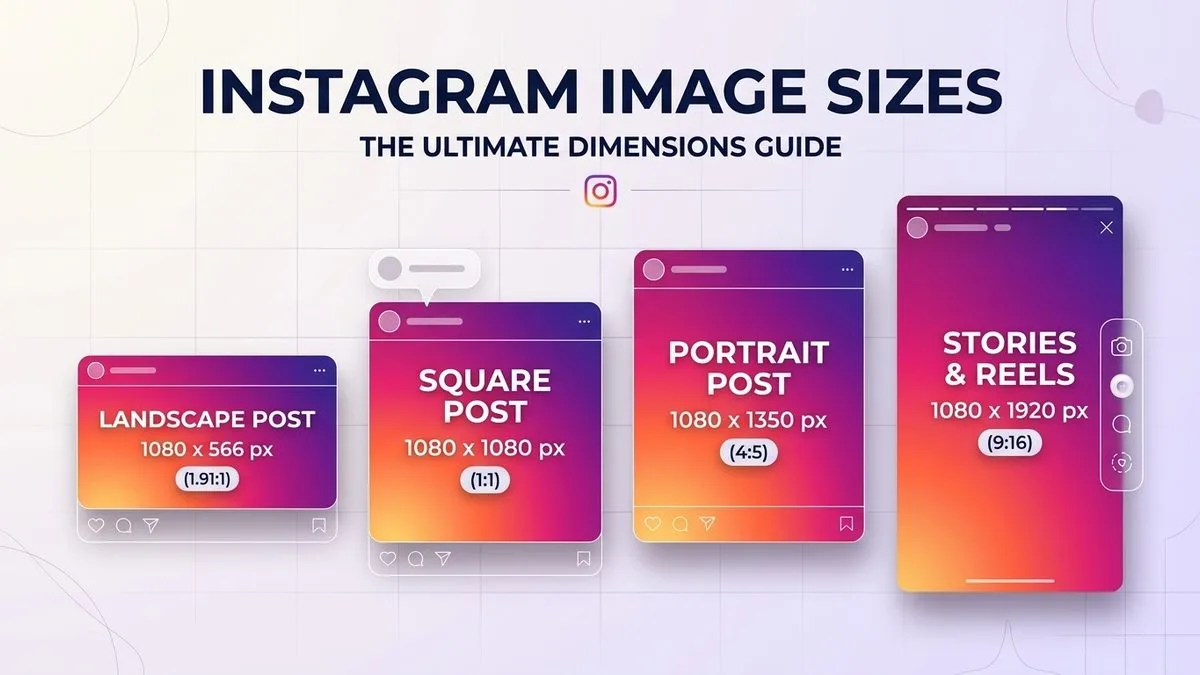
- TL;DR: The Short Answer
- Quick Reference: Every Instagram Size in 2026
- What Aspect Ratio Is Instagram, Exactly?
- Feed Posts: Which Size Should You Use?
- Instagram Story Size and Safe Zones
- Reels Size and Cover Image
- Profile Picture Size
- Carousel Posts: The First Slide Sets the Ratio
- How to Resize a Photo for Instagram Without Cropping
- Export Settings: Keep Instagram From Ruining Your Quality
- 5 Common Instagram Size Mistakes
- Frequently Asked Questions
- Final Verdict
TL;DR: The Short Answer
Instagram post size — the format that gets the most space in the feed — is 1080×1350 pixels at a 4:5 aspect ratio (portrait). As of May 2025, Instagram also natively supports a taller 3:4 format at 1080×1440 pixels, which displays uncropped in both the feed and your profile grid — that is the biggest change in years. Square posts are 1080×1080 (1:1) and landscape posts are 1080×566 (1.91:1). Instagram Stories and Reels are both 1080×1920 pixels (9:16), with a safe zone of roughly 1080×1610 — keep text and logos out of the top and bottom ~250 pixels where Instagram’s UI overlays sit. Profile pictures display at 110×110 but upload at 320×320 (or 1080×1080 for crispness). All feed formats share a 1080-pixel width; only the height changes. This guide covers every dimension, which ratio to choose, the safe zones, and how to resize photos without cropping. FixPhotoLab’s Instagram image sizes guide covers the same core dimensions.
Quick Reference: Every Instagram Size in 2026
| Format | Aspect ratio | Recommended size | Notes |
|---|---|---|---|
| Portrait feed post | 4:5 | 1080 × 1350 px | Most feed real estate; recommended default |
| Tall feed post (new) | 3:4 | 1080 × 1440 px | Uncropped in feed AND grid (added May 2025) |
| Square feed post | 1:1 | 1080 × 1080 px | Classic; safe for every layout |
| Landscape feed post | 1.91:1 | 1080 × 566 px | Widest accepted; least vertical space |
| Stories | 9:16 | 1080 × 1920 px | Full screen; keep text in safe zone |
| Reels | 9:16 | 1080 × 1920 px | Same as Stories; cover 1080×1920 |
| Reels grid cover | 3:4 | 1080 × 1440 px | What shows on your profile grid |
| Profile picture | 1:1 | 320 × 320 px (upload 1080×1080) | Displays 110×110, circular crop |
| Carousel | 4:5 or 3:4 | 1080×1350 or 1080×1440 | First slide sets the ratio for all slides |
| Feed ads | 1:1, 4:5, 1.91:1 | Same as organic | Max file ~30 MB |
| Stories/Reels ads | 9:16 | 1080 × 1920 px | Same safe zones as organic |
What Aspect Ratio Is Instagram, Exactly?
Instagram accepts aspect ratios between 1.91:1 (widest landscape) and 4:5 (tallest portrait) for feed posts, plus the newer 3:4 tall format. Anything outside that range gets cropped automatically — which is why a tall 9:16 photo uploaded as a post will have its top and bottom chopped off. For Stories and Reels, the only ratio is 9:16 (full vertical screen). The universal width for all feed images is 1080 pixels — Instagram downscales anything wider, and upscales anything narrower (which makes it soft). So always export at 1080 pixels wide to avoid compression artifacts.
The official Instagram Help Center confirms these supported ratios, and Hootsuite’s social media image sizes guide updates them every quarter.
Feed Posts: Which Size Should You Use?
Portrait 4:5 — 1080×1350 (the recommended default)
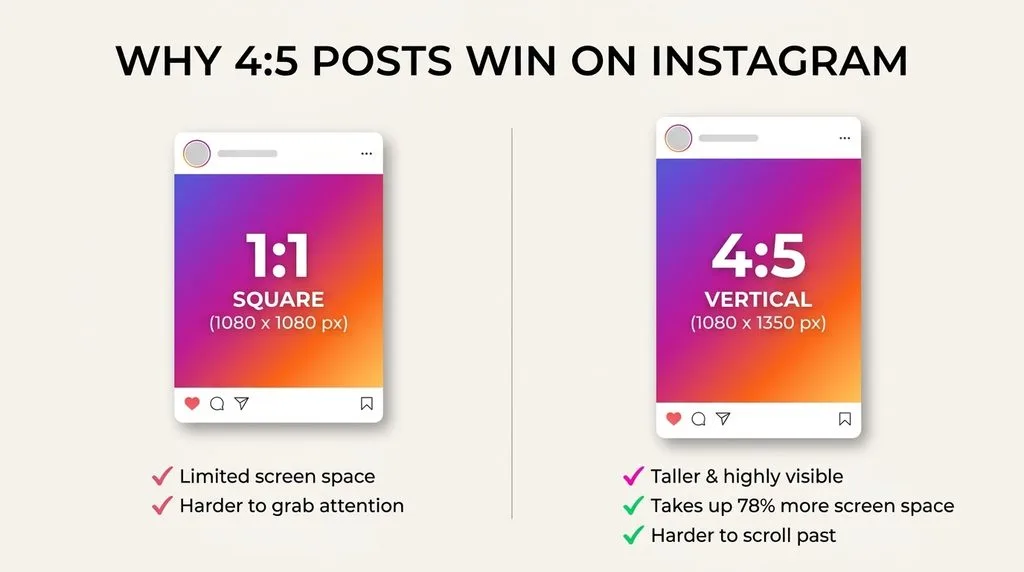
A 4:5 portrait post takes up roughly 30% more vertical screen space than a square, which means it grabs more attention as users scroll. It is Instagram’s recommended format and the safest default for most posts. The catch: on your profile grid, it gets cropped to a square center crop, so keep the subject near the middle. For product shots, our ecommerce product photo editing workflow pairs well with this ratio — products centered with clean negative space look great in 4:5.
New Tall 3:4 — 1080×1440 (the 2026 game-changer)
In May 2025, Instagram added native 3:4 support. A 1080×1440 post shows uncropped in both the feed and the profile grid — no more square crop on your grid. It is the tallest format you can post without cropping, and it is rapidly becoming the new standard for photographers and brands. Third-party scheduling tools are still catching up, so if you auto-post, check that your scheduler supports it — otherwise post natively.
Square 1:1 — 1080×1080 (the classic)
Square was Instagram’s original format and still works perfectly. It takes the least vertical space in the feed but looks clean and consistent on a grid. Use it for symmetrical compositions, logos, and when you want a uniform grid.
Landscape 1.91:1 — 1080×566 (the widest)
Landscape is best for panoramic travel shots, group photos, and wide scenes. It takes the least vertical space in the feed, and on your grid only the middle ~40% shows — so keep the subject and any text dead center. 1.91:1 is the widest ratio Instagram accepts; anything wider gets cropped.
Instagram Story Size and Safe Zones
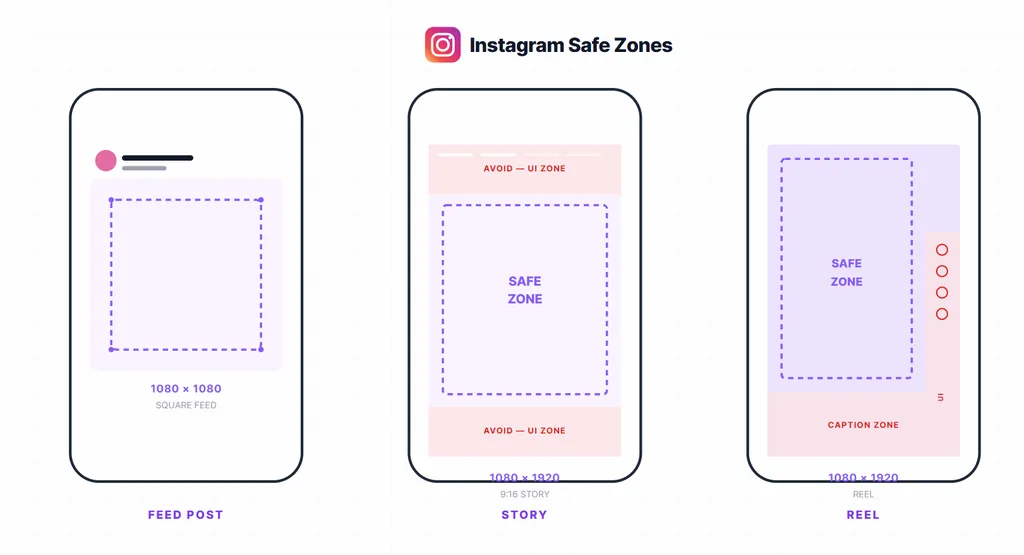
Instagram Stories are 1080×1920 pixels at a 9:16 aspect ratio — full vertical screen. Upload at exactly that size and your story fills the screen with no borders, no letterboxing, and no cropping. If you upload a shorter photo, Instagram letterboxes it with a blurred or gradient background.
The critical detail is the safe zone. Instagram overlays its own UI on top of your story:
- Top ~250 pixels — your username, the progress bar, the close button, and timestamp.
- Bottom ~250 pixels — the reply bar, message input, reaction emojis, and any sticker or link buttons. On ads, add another ~90 pixels for the CTA button.
So the actual safe area for text, logos, and important visuals is roughly 1080×1610 pixels in the center. Put your hook text just below the 250px top line, your main value proposition dead center, and your call-to-action just above the 250px bottom line. Anything in those top and bottom bands will be partially or fully covered — a common and costly mistake. Adobe’s Instagram sizes guide and Canva’s Instagram sizes templates both bake these safe zones in.
Reels Size and Cover Image
Reels are 1080×1920 pixels (9:16), same as Stories. For video, shoot or export at 1080×1920, 30fps (or 60fps for slow-mo), under 4 GB. The cover image you choose displays at 1080×1920 in the Reels feed, but on your profile grid it crops to 3:4 (1080×1440) — so design your cover with the subject in the center 3:4 area, or the top and bottom will be chopped on your grid. Keep captions and text in the same safe zone as Stories (avoid top/bottom 250px), because Reels show the same UI overlays plus a caption block.
Profile Picture Size
Your Instagram profile picture displays at 110×110 pixels as a circle, but Instagram stores it at 320×320. Upload at 1080×1080 (square) for maximum crispness — it will be downscaled cleanly. Because it crops to a circle, keep your face or logo in the center and avoid important details near the corners. A busy background gets lost at 110px; use a solid color or simple backdrop.
Carousel Posts: The First Slide Sets the Ratio
For carousel posts (multi-image slides), the first slide determines the aspect ratio for every slide. If slide one is 4:5, all slides must be 4:5 — a square slide two will get cropped or letterboxed. So design all carousel slides at the same size from the start: either 1080×1350 (4:5) or the newer 1080×1440 (3:4). Text-heavy carousels work best in 4:5 because they give you room for headlines and body copy without crowding.
How to Resize a Photo for Instagram Without Cropping
You do not have to chop off heads to fit a ratio. These three methods keep your whole photo in the frame.
Method 1 — Canvas Size (Photoshop, full control):
- Open your photo. Go to Image > Canvas Size.
- Enter the target dimensions (e.g., 1080×1350 for 4:5).
- Choose an anchor point (usually center) and pick a canvas extension color — white, black, a color sampled from the photo, or a blurred copy of the image itself.
- The photo stays whole; empty space fills with your chosen color. A blurred copy of the image as the background looks the most professional.
Method 2 — Canva / Adobe Express (fast, no install):
Create a new design using the built-in Instagram Post or Instagram Story template, upload your photo, and scale it to fit inside the frame. The free tier handles all resizing; the empty space fills with your chosen background color or pattern.
Method 3 — Generative Expand (Photoshop beta, 2026):
Select the Crop tool, set the ratio to 4:5 or 9:16, drag the crop handles outward beyond the image, and click Generative Expand. Photoshop’s AI fills the new canvas with plausible content — more sky, more floor, more background. It is remarkably good for landscapes and simple scenes. Check the result carefully, though — AI can invent weird details.
After resizing, always sharpen lightly (Unsharp Mask or Smart Sharpen) because resizing softens edges. Our how to sharpen an image guide covers the exact Amount/Radius/Threshold settings for web output.
Export Settings: Keep Instagram From Ruining Your Quality
Instagram compresses every upload. To minimize damage:
- Export as JPG at 80–90% quality (Quality 10 in Lightroom’s Export dialog).
- Convert to sRGB color space — Instagram ignores other profiles and colors will shift.
- Resize to exactly 1080px wide (feed) or 1080×1920 (Stories/Reels) before upload. If you upload a huge file, Instagram’s own downscale is harsher than yours.
- Sharpen after resizing, lightly — Amount 80–120%, Radius 0.5–1px.
- Keep file size under 30 MB (hard limit for images; 4 GB for video).
- For a full editing workflow, our photo editing guide and best photo editing software 2026 roundup cover export presets in detail.
5 Common Instagram Size Mistakes
- Uploading 9:16 as a feed post. Instagram crops the top and bottom to 4:5 — you lose heads and captions. Crop to 4:5 or 3:4 first.
- Text in the story danger zones. Usernames and reply bars cover the top/bottom 250px. Keep text in the center 1080×1610.
- Mixed carousel ratios. Slide one sets the ratio; a mismatched slide two gets cropped. Design all slides at one size.
- Uploading low-resolution images. Anything under 1080px wide gets upscaled and looks soft. Always export at 1080px.
- Forgetting the grid crop. A 4:5 or landscape post crops to a square on your profile grid. Keep the subject centered so it still looks good there — or use the new 3:4 format, which shows uncropped.
Frequently Asked Questions
What is the best Instagram post size in 2026?
1080×1350 pixels (4:5 portrait) is still the recommended default — it takes the most vertical feed space. The newer 1080×1440 (3:4) is even taller and shows uncropped in both feed and grid, but check that your scheduling tool supports it.
What size is an Instagram Story?
1080×1920 pixels at a 9:16 aspect ratio. Keep important text and logos in the center safe zone (roughly 1080×1610), away from the top and bottom ~250 pixels where Instagram’s UI overlays sit.
What aspect ratio is Instagram?
Feed posts accept 1.91:1 (landscape) up to 4:5 (portrait), plus the new 3:4 tall format. Stories and Reels are always 9:16. All feed images should be 1080 pixels wide.
What size is an Instagram profile picture?
It displays at 110×110 pixels as a circle, but upload at 320×320 or 1080×1080 (square) for crispness. Keep your face or logo centered — corners are cropped into a circle.
What is the new 3:4 Instagram size?
Added in May 2025, the 3:4 format (1080×1440 pixels) is the tallest feed format and displays uncropped in both the feed and the profile grid. It is becoming the new standard for photographers and brands.
How do I make a picture fit Instagram without cropping?
Use Photoshop’s Canvas Size to add background space, use Canva’s Instagram templates and scale your photo inside the frame, or use Photoshop’s Generative Expand to AI-fill the extra canvas. Always export at 1080px wide in sRGB.
What size should Reels be?
1080×1920 pixels (9:16), same as Stories. The cover image crops to 3:4 (1080×1440) on your profile grid, so design the cover with the subject centered.
Does Instagram reduce image quality?
Yes — Instagram compresses every upload. Export at exactly 1080px wide, JPG 80–90% quality, sRGB color space, and sharpen lightly after resizing to minimize compression damage.
Final Verdict
The right Instagram size is the one that fills the most screen without getting cropped. For feed posts, default to 4:5 (1080×1350) and switch to the new 3:4 (1080×1440) when you want maximum height and an uncropped grid. For Stories and Reels, always use 1080×1920 (9:16) and keep text out of the top and bottom 250 pixels. Export at exactly 1080px wide in sRGB, sharpen lightly, and you will beat Instagram’s compression every time. Get those three things right — ratio, safe zone, and export — and your photos will look crisp on every device.