


Instagram Image Sizes 2026: Every Post, Story, Reel & Profile Dimension
October 12, 2026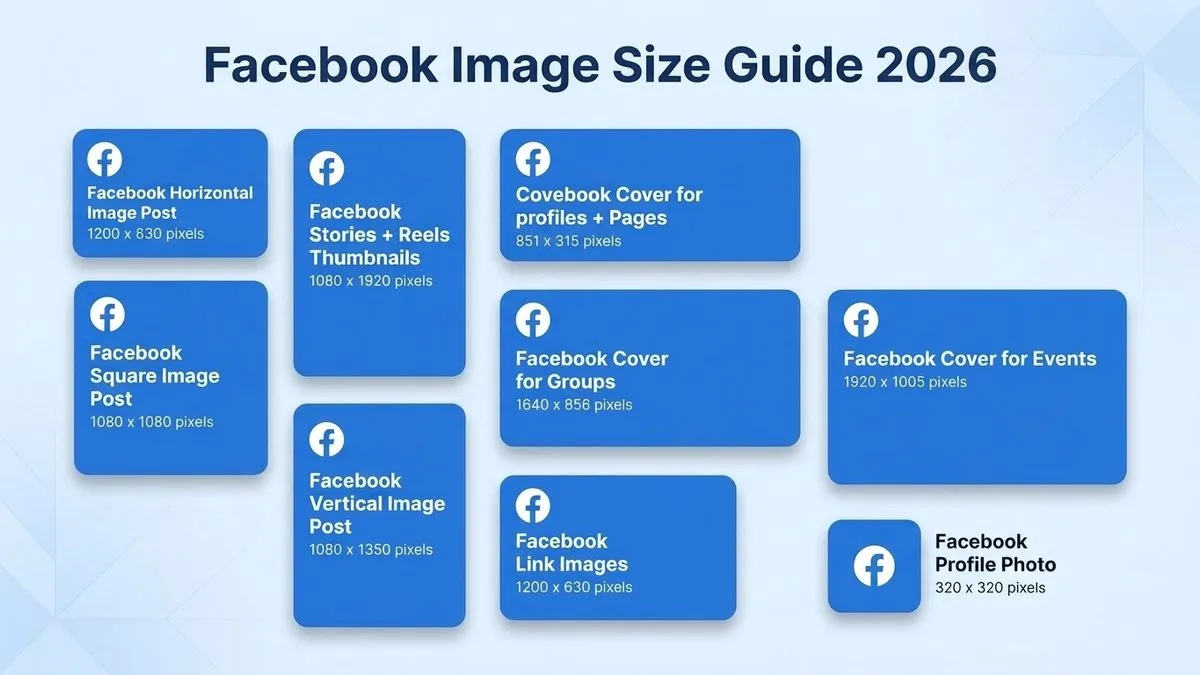
- TL;DR: The Short Answer
- Quick Reference: Every Facebook Size in 2026
- The #1 Mistake: Your Cover Photo Looks Perfect on Desktop — and Broken on Mobile
- Cover Photo Size: Exact Specs
- Profile Picture Size
- Feed Post Sizes: Which One to Use
- Stories and Reels: 1080×1920 with a Safe Zone
- Event and Group Covers
- Carousels and Ads
- Export Settings: Beat Facebook's Compression
- How to Resize a Photo for Facebook Without Cropping
- 5 Common Facebook Size Mistakes
- Frequently Asked Questions
- Final Verdict
TL;DR: The Short Answer
The Facebook cover photo is the trickiest size on the platform, because Facebook crops it differently on every device. Upload at 851×315 pixels (or 820×360 for a universal canvas). It displays at 820×312 on desktop but only 640×360 on mobile — so your logo, text, and faces must live inside the central 640×312 safe zone, or mobile users will see them chopped off. The profile picture uploads at 320×320 (square) and displays as a circle (176×176 desktop, 196×196 mobile). Feed posts look best at 1080×1350 (4:5 portrait) for maximum screen space, with 1080×1080 square as the safe cross-platform default and 1200×630 (1.91:1) for link previews. Stories and Reels are 1080×1920 (9:16). Event covers are 1920×1005, group covers 1640×856. This guide covers every placement, the mobile-vs-desktop cover trap that ruins most pages, and the export settings that beat Facebook’s compression. FixPhotoLab’s Facebook image sizes guide covers the same core dimensions.
Quick Reference: Every Facebook Size in 2026
| Placement | Recommended upload | Aspect ratio | Displays at | Notes |
|---|---|---|---|---|
| Cover photo (page/profile) | 851×315 px | ~2.7:1 | 820×312 desktop / 640×360 mobile | Safe zone: 640×312 center |
| Profile picture | 320×320 px (upload 720+) | 1:1 | 176×176 desktop / 196×196 mobile | Circular crop |
| Feed post — portrait | 1080×1350 px | 4:5 | Full width, tallest | Most feed space |
| Feed post — square | 1080×1080 px | 1:1 | Full width | Safe cross-platform |
| Feed post — landscape / link | 1200×630 px | 1.91:1 | Full width | og:image for link shares |
| Stories & Reels | 1080×1920 px | 9:16 | Full screen | Safe zone ~1080×1610 |
| Event cover | 1920×1005 px | 1.91:1 | Crops in feed | Put date/title center |
| Group cover | 1640×856 px | 1.91:1 | Crops on mobile | Text in center |
| Carousel cards | 1080×1080 px | 1:1 (or 4:5) | All same ratio | First card sets ratio |
| Feed ads | 1080×1080 or 1080×1350 | 1:1 or 4:5 | Min 600×600 | Max 30 MB |
| Stories ads | 1080×1920 px | 9:16 | Full screen | CTA button at bottom |
The #1 Mistake: Your Cover Photo Looks Perfect on Desktop — and Broken on Mobile
This is the mistake that ruins most Facebook pages. You design a beautiful cover, upload it, check it on your laptop — it looks perfect. Then you open your phone and half your logo is gone. Here is why, and how to fix it.
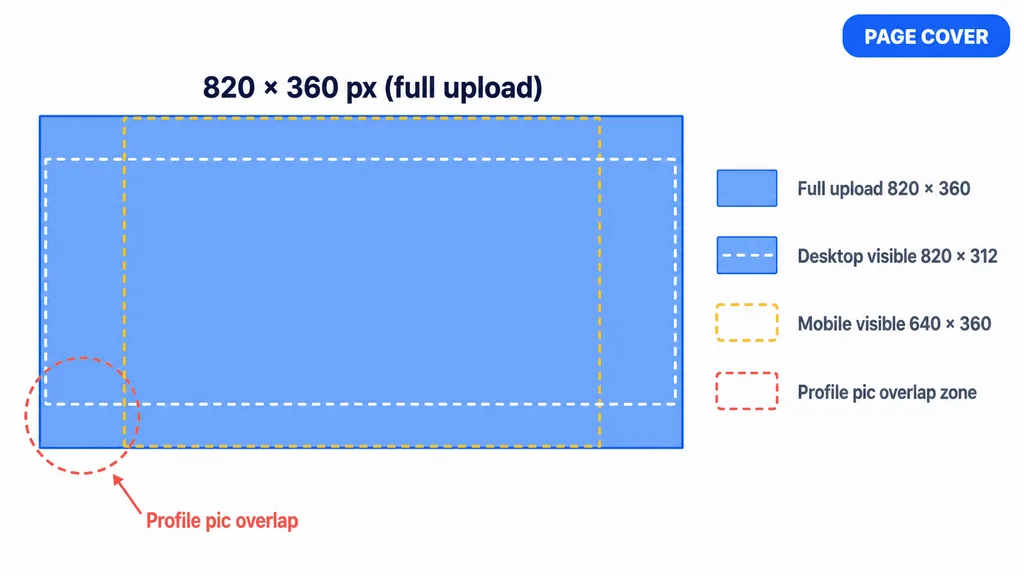
Facebook renders the same uploaded cover photo at two different shapes:
- Desktop: 820 pixels wide × 312 pixels tall (wide and short)
- Mobile: 640 pixels wide × 360 pixels tall (narrower and taller)
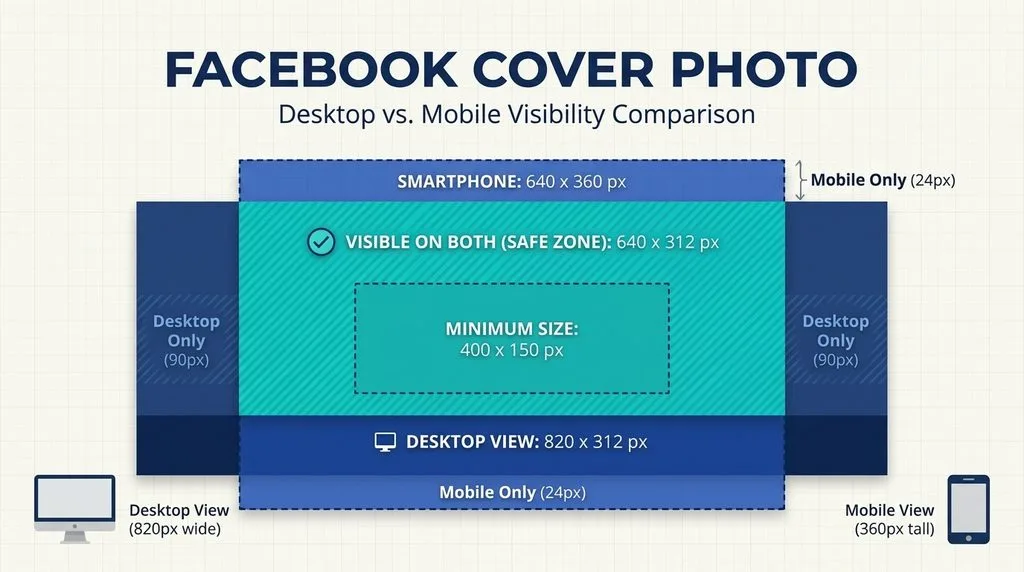
So mobile cuts roughly 90 pixels off each side of the desktop view, while desktop cuts roughly 24 pixels off the top and bottom of the mobile view. The only area guaranteed visible on every device is the central 640×312 pixel safe zone. Anything outside that box — logos, text, faces, calls-to-action — will be cropped on either desktop or mobile.
Additionally, on desktop your profile picture overlaps the bottom-left corner of the cover. So never put important content in that bottom-left area.
The fix: Design your cover on an 820×360 (or 851×315) canvas, place all text, logos, and faces dead center in a 640×312 box, and use the outer edges only for decorative background that can afford to be cropped. Adobe’s Facebook sizes guide and Canva’s Facebook sizes templates both mark this safe zone for you. Hootsuite’s social media image sizes guide updates these numbers every quarter.
Cover Photo Size: Exact Specs
- Upload size: 851×315 pixels (classic) or 820×360 pixels (universal canvas that covers both crops). For retina sharpness, upload at 2× — 1640×624 or 1702×630.
- Minimum upload: 400×150 pixels (anything smaller gets stretched and blurry).
- File size: Under 100 KB if possible — Facebook compresses heavily, and a small JPG loads fast and degrades less. For text-heavy or logo covers, use PNG to avoid JPEG artifacts around letter edges.
- Color space: sRGB. Any other profile gets stripped and colors shift.
- Content rule: Put your tagline, logo, and faces in the center 640×312. Use the left and right 90px strips and top/bottom 24px strips for background only. Avoid the bottom-left corner entirely — the profile picture sits there.
Profile Picture Size
Your Facebook profile picture (personal or page) displays as a circle. Upload a square image at 320×320 pixels minimum — 720×720 or 1080×1080 for crispness. It displays at 176×176 on desktop and 196×196 on mobile, and at 36×36 in comment threads. Because of the circular crop, keep your face or logo centered and away from the corners. A busy background disappears at 36px; use a solid color or simple backdrop. For pages, your profile pic and cover photo should be designed as a pair — the cover’s bottom-left is covered by the profile pic, so coordinate the two.
Feed Post Sizes: Which One to Use
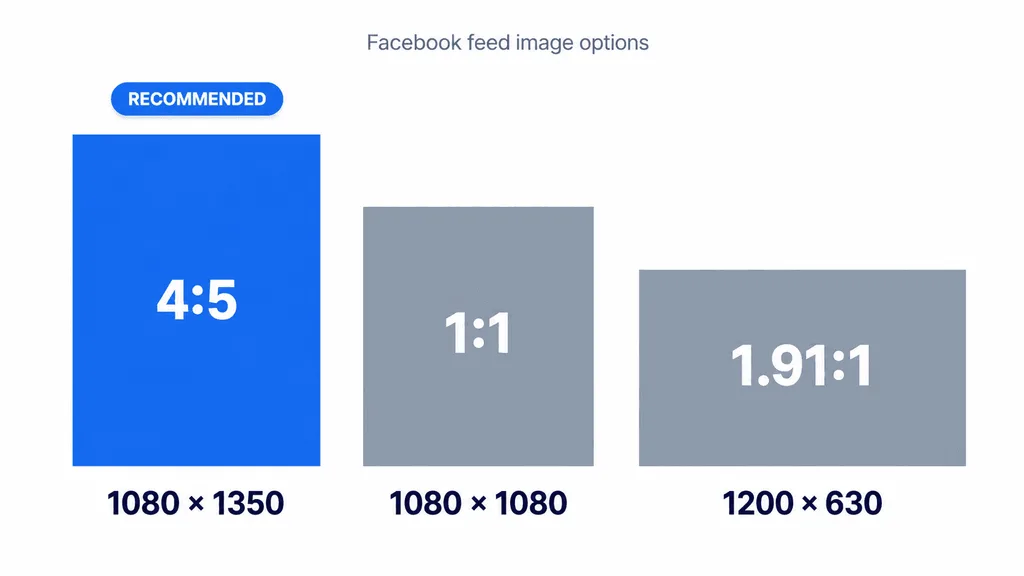
Facebook accepts feed images from 1.91:1 (landscape) up to 4:5 (portrait), with a minimum width of 500 pixels. Three sizes cover every case.
Portrait 4:5 — 1080×1350 (recommended default). A 4:5 post takes up the most vertical screen real estate in the feed, which means it grabs more attention as users scroll. It is Facebook’s best-performing organic format for photos. The catch: it crops to a square or landscape in some placements, so keep the subject centered.
Square 1:1 — 1080×1080 (the safe default). Square looks consistent everywhere — feed, shared links, cross-posts to Instagram, and third-party previews. If one image has to work across networks, use square. For product photos destined for Marketplace or shops, our ecommerce product photo editing workflow pairs well with a clean square crop.
Landscape 1.91:1 — 1200×630 (link previews). When you share a link, Facebook pulls the og:image from your page, which should be 1200×630 pixels. Design it with a readable headline and a simple visual — it displays small, so tiny text becomes unreadable. This is also the right size for landscape photos and video thumbnails.
Stories and Reels: 1080×1920 with a Safe Zone
Facebook Stories and Reels both use the full vertical 1080×1920 (9:16) canvas, same as Instagram. Keep text, stickers, and calls-to-action out of the top and bottom ~250 pixels — Facebook overlays the account name, progress bar, reply box, and reaction buttons there. The usable safe zone is roughly 1080×1610 in the center. For Reels, captions and subtitles sit at the bottom, so keep your main subject in the upper two-thirds of the frame.
Event and Group Covers
- Event cover photo: Upload at 1920×1005 pixels (1.91:1). Facebook crops it differently in the event page, feed preview, and search results, so put the event name, date, and location dead center. Anything near the edges gets trimmed in at least one placement.
- Group cover photo: Upload at 1640×856 pixels (1.91:1) (some tools use 1920×1080 16:9 — both work, but 1640×856 matches Facebook’s crop). Same rule: group name and key visuals centered.
Carousels and Ads
- Carousel cards: Use 1080×1080 (1:1) or 1080×1350 (4:5). Every card in a carousel must use the same ratio — the first card sets it. Mix ratios and Facebook crops the mismatched ones.
- Feed ads: 1:1 (1080×1080) or 4:5 (1080×1350), minimum 600×600, max file 30 MB. 4:5 takes more space, but 1:1 leaves room for text below the image.
- Stories/Reels ads: 1080×1920 (9:16). The CTA button (Learn More, Shop Now) eats the bottom ~90px, so keep your offer text above it.
- Marketplace listings: Square 1:1, minimum 1080×1080, up to 10 photos per listing.
Export Settings: Beat Facebook’s Compression
Facebook compresses every image, and a bad export comes out soft, muddy, or banded. Do this instead:
- Cover photos: JPG at 70–85% quality, target under 100 KB, sRGB. For text-heavy covers, use PNG-24.
- Feed posts: JPG at 80–90% quality, sRGB, exactly 1080px wide (or 1200px for landscape). If you upload a 4000px wide photo, Facebook’s downscale is harsher than yours.
- Sharpen after resizing. Any resize softens edges — a light Unsharp Mask (Amount 80–120%, Radius 0.5–1px) brings crispness back. Our how to sharpen an image guide covers the exact sliders.
- PNG for logos and text, JPG for photos. PNG preserves hard edges; JPG smears them.
- Never upscale. If your source is smaller than 1080px wide, find a higher-resolution original. Upscaling a 500px photo to 1080px just makes blur bigger.
For a full editing and export workflow, our photo editing guide walks through resize, sharpen, and color-space steps in order.
How to Resize a Photo for Facebook Without Cropping
You do not have to chop off heads to fit a ratio. In Photoshop, go to Image > Canvas Size, enter the target dimensions (e.g., 1200×630 for a link image), and fill the extra canvas with a solid color, a blurred copy of the image, or use Generative Expand to AI-fill the space. In Canva or Adobe Express, pick the Facebook template, drop your photo in, and scale it to fit inside the frame — empty space fills with your chosen background. Always export at the exact recommended pixel size, not larger.
5 Common Facebook Size Mistakes
- Designing the cover for desktop only. Mobile crops 90px off each side. Put everything important in the central 640×312.
- Putting text in the cover’s bottom-left. The profile picture covers it on desktop.
- Uploading a huge photo and letting Facebook resize. Their compression is harsh. Resize to exactly 1080/1200px wide yourself.
- Mixing carousel ratios. The first card sets the ratio; mismatched cards get cropped.
- Using JPG for text-heavy covers. JPEG artifacts blur letter edges. Use PNG for logos and text.
Frequently Asked Questions
What is the Facebook cover photo size in 2026?
Upload at 851×315 pixels (or 820×360 universal). It displays at 820×312 on desktop and 640×360 on mobile. Keep all text, logos, and faces inside the central 640×312 safe zone so nothing gets cropped on either device.
What size is a Facebook profile picture?
Upload a square image at 320×320 pixels minimum (720×720 or 1080×1080 for sharpness). It displays at 176×176 on desktop and 196×196 on mobile, cropped into a circle. Keep your face or logo centered.
What is the best Facebook post image size?
1080×1350 pixels (4:5 portrait) takes the most vertical feed space and performs best organically. 1080×1080 (square) is the safe cross-platform default. Link previews use 1200×630 (1.91:1).
Why does my Facebook cover photo look cropped on mobile?
Because mobile displays the cover at 640×360 while desktop displays it at 820×312 — two different shapes. Mobile cuts about 90 pixels from each side. Design for the central 640×312 safe zone and it looks right on every device.
What size is a Facebook event cover photo?
1920×1005 pixels (1.91:1). Put the event name, date, and location dead center — Facebook crops the edges in feed previews and search results.
What size is a Facebook group cover photo?
1640×856 pixels (1.91:1). Same center-content rule applies: group name and key visuals in the middle, edges used for decorative background only.
What size are Facebook Stories and Reels?
1080×1920 pixels (9:16), full vertical screen. Keep text and CTAs out of the top and bottom ~250 pixels where Facebook’s UI overlays sit.
How do I keep my Facebook photos from looking blurry?
Export at exactly the recommended pixel width (1080 or 1200), in sRGB color space, JPG at 80–90% quality (PNG for text), sharpen lightly after resizing, and never upscale a small source image.
Final Verdict
Facebook sizes look simple until you hit the cover photo — that is the one place where desktop and mobile disagree, and it ruins more pages than any other size. Upload your cover at 851×315 or 820×360, keep everything important in the central 640×312, and avoid the bottom-left where the profile pic sits. For everything else: posts at 1080×1350 (4:5) or 1080×1080 (square), link previews at 1200×630, Stories and Reels at 1080×1920, events at 1920×1005, groups at 1640×856. Export in sRGB, sharpen after resize, and you will beat Facebook’s compression every time.