

Ghost Mannequin Photography: A Step-by-Step Guide to Creating Realistic 3D Clothing Images
August 14, 2026
Clipping Path vs Image Masking: When to Use Which
August 15, 2026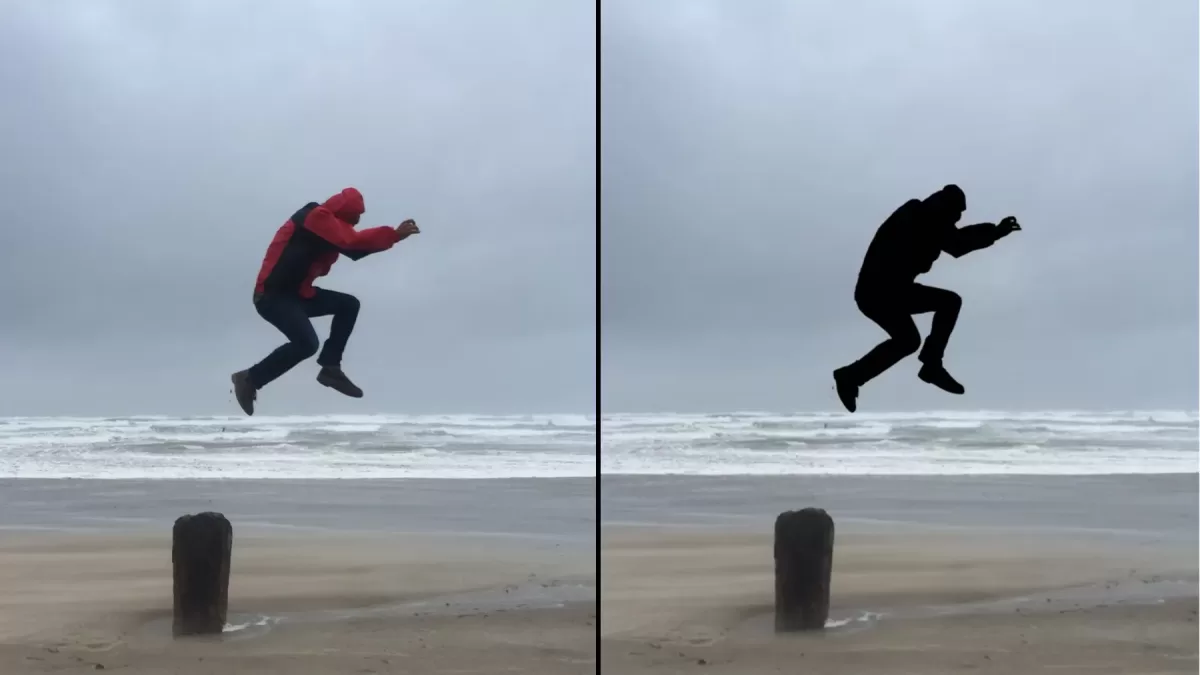
- TL;DR — The 30-Second Answer
- Quotable Definitions
- Why This Terminology Confuses Everyone
- Side-by-Side Comparison Table
- Clipping Path: The Formal Definition
- Deep Etch: The Same Technique, an Older Name
- Silhouetting: The Term That Means Two Things
- Knockout: The Fourth Cousin in the Family
- Vector Path vs Raster Mask — A Key Technical Distinction
- The Historical Timeline (Where Each Term Came From)
- The Full Vocabulary Map (Every Related Term in One Place)
- When to Use Each Technique (Practical Decision Guide)
- How Clients Actually Use These Terms (Original Insight)
- Real-World Scenarios
- Common Misconceptions (And the Truth)
- FAQ — People Also Ask
- Final Thoughts
TL;DR — The 30-Second Answer
- Clipping path and deep etch describe the same technique: a closed vector outline used to cut a subject out of its background. Wikipedia explicitly lists “deep etch” as a synonym for clipping path.
- Silhouetting carries two very different meanings. In prepress and e-commerce, “silhouette” (often shortened to “silo”) refers to the finished cut-out image. In photography, “silhouette” is an artistic effect — a backlit subject rendered as a dark shape against a bright background.
- Knockout, cutout, extract, silo — all four are adjacent terms that overlap with these three but carry subtle regional and technical differences.
- In one line: Clipping path = deep etch (technique). Silo = the finished result. Photographic silhouette = an entirely separate lighting effect.
Quotable Definitions
- Clipping path — a closed vector outline drawn with the Pen Tool in Photoshop or Illustrator to isolate a subject from its background.
- Deep etch — the traditional print-industry term for a clipping path; identical technique under an older name.
- Silhouetting (prepress / silo) — a product image on white or transparent background after its original scene has been removed.
- Silhouette (photography) — a backlit subject captured as a solid dark shape against a brighter background.
- Knockout — a prepress technique that removes one color or region so another can print underneath; overlaps with silhouetting on halftone workflows.
- Cutout — a generic, informal term used for any subject separated from its background.
Why This Terminology Confuses Everyone
Three forces created the mess:
- Two industries adopted overlapping vocabulary. Magazine prepress used “deep etch” long before Photoshop existed. Digital designers later coined “clipping path” for the same task. Photographers used “silhouette” for a completely different backlit effect.
- Regional preferences persist. Australian, British, and older print studios still say “deep etch.” American e-commerce studios say “clipping path.” Fashion catalog teams say “silo.”
- Modern tools rebrand the same action. Photoshop, Photoroom, Remove.bg, Canva, and Adobe Firefly each name their cutout feature differently — “extract,” “cut-out,” “background removal,” “erase background,” “isolate subject.”
By the end of this guide, you will know exactly which term applies in each context.
Side-by-Side Comparison Table
| Feature | Clipping Path | Deep Etch | Silo (Prepress) | Silhouette (Photography) |
|---|---|---|---|---|
| What is it? | Technique (vector outline) | Same technique, older name | The output image | Backlit photo effect |
| Where does it live? | Paths panel in Photoshop | Paths panel in Photoshop | Exported PNG / TIFF / PSD | RAW / JPEG from camera |
| Industry origin | Digital design, e-commerce | Print prepress, lithography | Prepress + fashion catalogs | Fine-art photography |
| Editable after? | Yes — path stays live | Yes — identical to clipping path | No — flat file output | Rarely — kept as captured |
| Common users | E-commerce, agencies | UK/AU print, older studios | Amazon and catalog teams | Landscape, portrait, editorial photographers |
| Typical output | Subject on transparent background | Subject on transparent background | Product on pure white | Dark subject on bright background |
Clipping Path: The Formal Definition
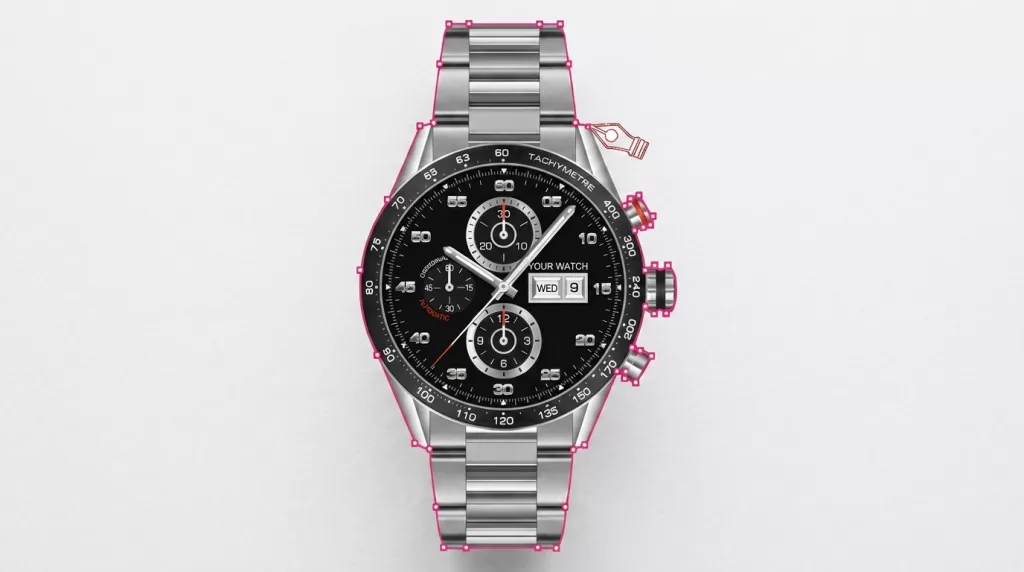
A clipping path is a closed vector path — drawn with the Pen Tool in software such as Adobe Photoshop or Illustrator — used to cut a 2D subject out of its background. Anything inside the path is preserved; anything outside disappears from the output.
Wikipedia defines a clipping path as “a closed vector path, or shape, used to cut out a 2D image in image editing software” and explicitly lists the industry synonym “deep etch.”
Three technical traits set a clipping path apart from any raster selection:
- It is vector, not pixel. The path is stored as mathematical Bézier curves, so it scales infinitely without pixelation.
- It is non-destructive. The original pixels remain intact. The path only hides what falls outside its shape.
- It travels inside the file. A saved clipping path in a PSD, TIFF, or EPS carries into InDesign or QuarkXPress and applies automatically on import.
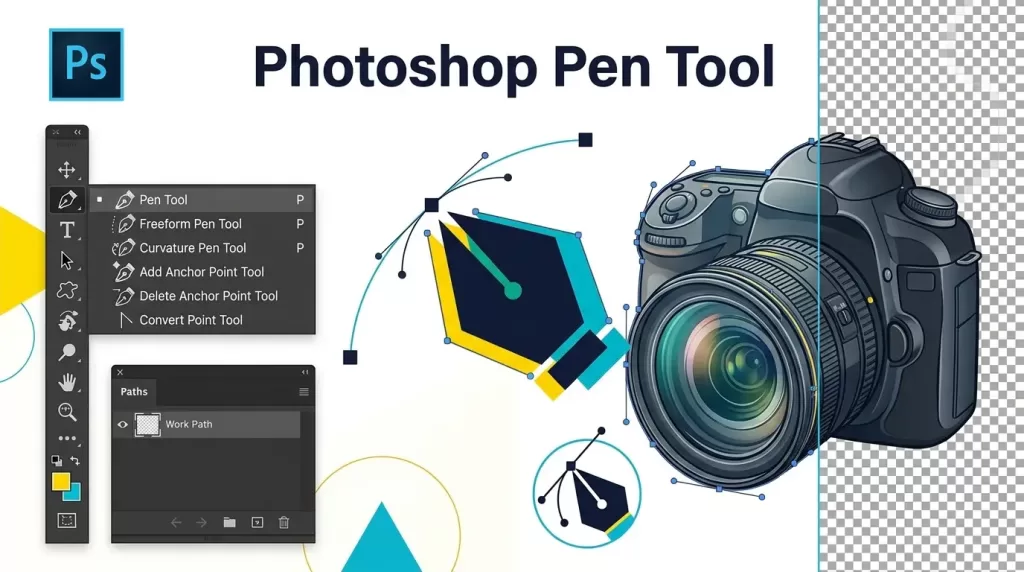
How to create a clipping path in Photoshop (accurate 5-step method)
- Open the image and press P to activate the Pen Tool.
- Trace the subject with anchor points spaced 8–12 pixels apart; drag the handles to control curvature.
- In the Paths panel, double-click Work Path and rename it (for example, “Product”).
- From the Paths panel menu, choose Clipping Path, select the saved path by name, and leave flatness blank (or set 0.5–3 for high-resolution photographic subjects).
- Save the file as PSD, TIFF, or EPS so the path travels with it.
This pen-tool workflow sits at the heart of every professional clipping path service, because it produces pixel-perfect, resolution-independent edges no automated tool can match on complex products.
Struggling with inconsistent cutouts from automated software?
Switch to 100% manual, expert Clipping Path for guaranteed perfection.
Deep Etch: The Same Technique, an Older Name
“Deep etch” is the traditional print-industry name for a clipping path. The term traces to mid-20th-century photolithographic and offset workflows, where “etching” originally described chemically or mechanically removing unwanted areas of a printing plate.
When those workflows moved to Photoshop in the early 1990s — specifically after Photoshop 2.0 in June 1991 added paths and the CMYK color model — magazine and catalog studios kept the older vocabulary. A designer in Sydney or London would request a “deep-etched” product photo; a designer in New York would request one with a “clipping path.” Both received the same file: a subject cleanly cut out, ready to drop onto any background.
Key facts that settle the debate:
- Wikipedia officially lists “deep etch” as a synonym for clipping path, citing Gordon Woolf’s 2004 magazine-production reference book.
- Adobe Community threads, prepress veterans, and every major photo-editing glossary confirm the two terms describe identical output.
- Regional split is real: “deep etch” dominates Australia, the UK, and legacy publishing shops; “clipping path” dominates outsourcing studios and US e-commerce.
Where “deep etch” still gets used
- Australian and British catalog studios where prepress terminology persists.
- Older InDesign and QuarkXPress workflows that reference deep-etched TIFFs.
- Photography schools and print houses training students on legacy prepress.
- Retouching studios that market both terms to reach global audiences.
If a client sends a brief that says “please deep-etch these 200 shots,” they want the exact same thing a modern e-commerce team calls “clipping path work” — an outlined, background-free subject on a transparent or white canvas.
Silhouetting: The Term That Means Two Things
Silhouetting is where the confusion multiplies, because the same word describes two entirely different concepts.
Meaning 1 — Prepress “Silo” (the finished cut-out)
In e-commerce, retouching, and catalog work, silhouette — often abbreviated “silo” — refers to the finished cut-out image: a product photographed on white or transparent background, ready for any layout. Industry glossaries confirm silhouetting, etching, cutting-out, and creating a silo all describe the same output workflow.
In this meaning:
- A silhouette is the result, not the process.
- To produce a silo, editors first draw a clipping path (or deep etch) around the subject.
- The image retains full color, detail, and texture — only the background is removed.
Meaning 2 — Photographic Silhouette (the artistic backlit effect)
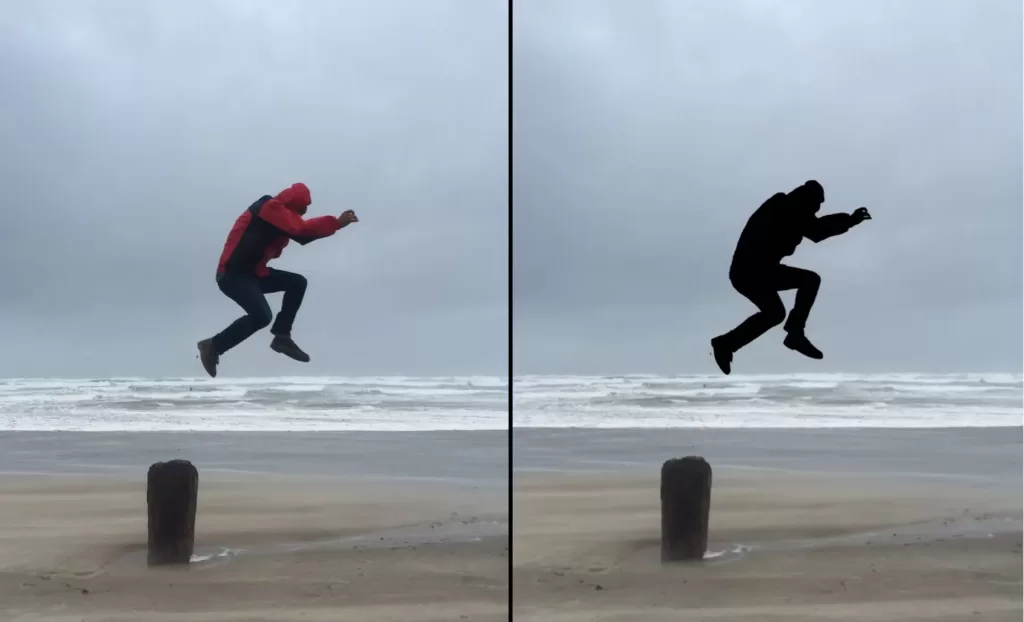
In creative photography, silhouette photography describes a completely different technique. Adobe defines a silhouette as “a solid, dark image of a subject against a brighter background.”
In this meaning:
- The silhouette is created in camera by placing the subject in front of a bright light source.
- The result is a featureless dark outline — no product detail, no surface texture.
- Photographers use it for storytelling, drama, and negative-space composition — not e-commerce cutouts.
Standard camera settings for a photographic silhouette:
- Spot metering on the bright background (not the subject).
- Exposure compensation of −1 to −2 EV to intentionally underexpose the subject.
- Subject positioned in shadow with the light source behind it.
- Lighting ratio of roughly 16:1 or greater between background and subject.
Which meaning applies to you?
- Selling products online? “Silhouette” almost certainly means the cut-out (Meaning 1).
- Shooting portraits, landscapes, or editorial? It means the backlit dark-shape effect (Meaning 2).
- Editing wedding, travel, or lifestyle photos? You will hear both in the same week.
The dual meaning is why so many people search “clipping path vs silhouetting” — they encounter one word used two ways and assume they are missing something.
Knockout: The Fourth Cousin in the Family
“Knockout” is a prepress term that overlaps with silhouetting and deserves its own place in this vocabulary map.
The Graphic Solutions Group print glossary defines a knockout as “a halftone in which the background has been removed or replaced to isolate or silhouette the main image — also called knockout halftone and silhouette halftone.”
Key differences between knockout and the other three:
- Knockout emphasizes the negative-space technique — one color or region is removed so another can print underneath or read through.
- In offset printing, “knockout” also describes intentionally leaving one ink area blank so another color prints cleanly in that spot.
- In modern usage, “knockout” and “silhouette halftone” are near-synonyms for the deep-etched, background-free image ready for print.
You will hear “knockout” most often from packaging designers, print production managers, and prepress operators. E-commerce studios rarely use it. When you see it in a brief, treat it as another word for “give me the product cleanly separated from its background.”
Vector Path vs Raster Mask — A Key Technical Distinction
A common misconception: clipping paths and layer masks do the same thing. Technically, they do not.
- A vector clipping path is a mathematical shape stored in the Paths panel. It stays sharp at any resolution and travels through prepress software.
- A raster layer mask is a grayscale pixel image attached to a layer. It supports soft edges, gradients, and feathering that vector paths cannot deliver.
- A vector mask is a hybrid: a vector shape used as a mask on a layer, sharper than a raster mask but pinned to that layer.
Simple rule of thumb:
- Hard-edged products (boxes, shoes, phones) → clipping path (vector).
- Soft-edged subjects (hair, fur, veils, smoke, glass) → layer mask (raster) or hybrid workflow.
- Repeatable design elements (banners, buttons) → vector mask.
The Historical Timeline (Where Each Term Came From)
Understanding the sequence explains why the vocabulary feels scrambled today.
- 1759 — Étienne de Silhouette becomes France’s Controller-General of Finances under Louis XV. His austerity measures during the Seven Years’ War made his name synonymous with anything cheap — including outline portraits that would soon be called silhouettes.
- 1796 — Alois Senefelder invents lithography in Germany, laying the groundwork for later photo-mechanical printing.
- Mid-20th century — “Etching” and later “deep etching” become standard prepress vocabulary in offset print shops for the process of cutting a subject out of a background for magazine and catalog layouts.
- February 19, 1990 — Adobe Photoshop 1.0 ships for Macintosh, opening the door to digital retouching.
- June 1991 — Photoshop 2.0 introduces paths and CMYK color, formalizing the digital vocabulary of “clipping path.”
- Late 1990s and 2000s — Fashion and catalog studios shorten “silhouette” to “silo” for stripped-background product shots.
- 2020s — AI tools rebrand the same output as “background removal,” “cut-out,” “extract,” “erase,” or “isolate subject.”
Each term describes essentially the same output: a subject cleanly separated from its background. The vocabulary depends on who trained the person using it.
The Full Vocabulary Map (Every Related Term in One Place)
- Clipping path — vector outline; the digital-era name.
- Deep etch — same vector outline; the print-era name.
- Silhouette / silo — the finished cut-out (prepress and e-commerce).
- Silhouette (photography) — a backlit dark-shape image.
- Knockout — prepress term for removing a color or region so another can show through; overlaps with silhouette halftone.
- Cutout — informal, everyday term for any subject separated from its background.
- Extract — a Photoshop-specific term dating to the old Extract Filter from Photoshop CS through CS4, now replaced by Select and Mask.
- Background removal — the modern umbrella covering all of the above.
- Isolate / cut out / erase background — casual synonyms popularized by AI tools.
When a client uses any of these words, they almost always want the same output: a clean, background-free subject ready to place anywhere.
When to Use Each Technique (Practical Decision Guide)
Use a clipping path (a.k.a. deep etch) when the subject has:
- Hard, well-defined edges — boxes, phones, shoes, watches, appliances.
- Straight or geometric outlines vector curves can trace precisely.
- Reflective or metallic surfaces where AI often misreads highlights as background.
- Product families that need identical edge quality across an entire catalog.
Use image masking instead when the subject has:
- Hair, fur, or feathers with wispy edges.
- Glass, smoke, water, or semi-transparent materials.
- Complex negative space where a rigid outline would look artificial.
- Wedding veils, tulle, lace, or translucent fabric.
For those cases, editors pair a hand-drawn path with a specialized image masking workflow that preserves fine detail vector alone cannot capture.
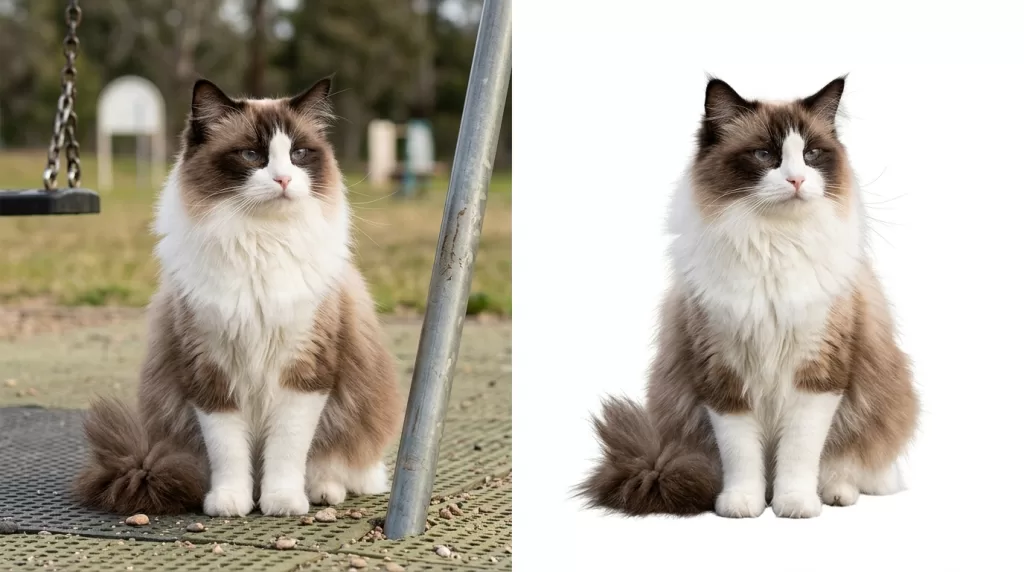
Struggling with complex hair or fur edges?
Let our experts deliver flawless, natural cutouts with our advanced Image Masking Service
Use “silhouetting” (silo output) when you need to:
- Deliver marketplace-ready images for Amazon, Shopify, Etsy, or Walmart.
- Build a consistent catalog where every SKU shares identical framing and background.
- Create packshots that can drop into brochures, banners, or ads on demand.
Use artistic silhouette photography when you want:
- Dramatic mood, storytelling, or negative-space composition.
- Editorial images for magazines, book covers, or brand campaigns.
- Portrait or landscape work where shape carries more meaning than surface detail.
Composition frameworks such as the rule of thirds work especially well with silhouette photography because reducing subjects to outlines emphasizes placement over detail.
How Clients Actually Use These Terms (Original Insight)
After processing hundreds of thousands of edited images, professional studios notice consistent patterns in how briefs arrive:
- US e-commerce brand → “clipping path” or “background removal” — the two most common briefs in America.
- UK / Australian fashion catalog → “deep etch” — still the default among older studios, art directors, and prepress teams.
- Fashion producer or catalog manager → “silos” or “silo shots” — the workflow output, plural.
- Packaging or print designer → “knockout” — usually paired with instructions about which color to strip.
- Amateur seller or first-time client → “cutout” or “just remove the background” — generic and safe.
- Photographer briefing a compositor → “extract the subject” — carryover from the Extract Filter days.
If you outsource editing, use whichever term feels natural. Every reputable editing studio understands all of them.
Real-World Scenarios
Scenario A — Amazon seller, 500 sneakers to list.
Ask for clipping paths or deep etch — same result. Delivery format: PNG on transparent or JPEG on pure white. This workflow underpins every compliant Amazon listing image that fills the required 85% of the frame on a #FFFFFF background.
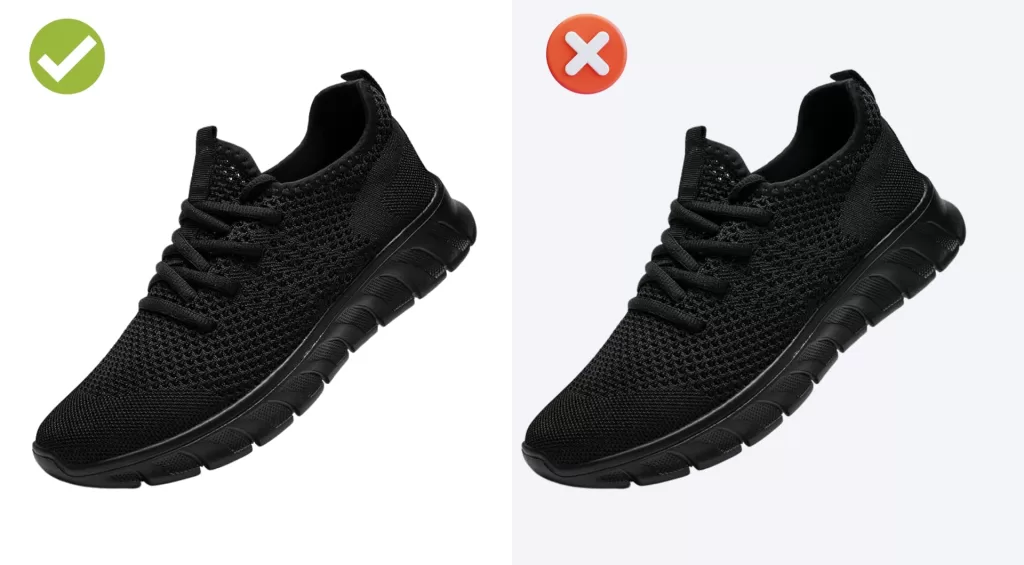
Want to replace messy backgrounds with pure white or custom colors?
Our expert Background Removal Service makes it quick and effortless.
Scenario B — UK fashion catalog studio.
The brief says, “please deep-etch these 300 garments.” Same job as clipping paths — vector outlines around each SKU, saved inside layered TIFFs for InDesign import.
Scenario C — Wedding photographer editing a portfolio.
“Silhouette” here means the backlit dark-shape composition — a bride against a sunset window. No clipping path involved. This is a shooting technique, not an editing service.
Scenario D — Furniture brand launching a Shopify store.
The team says, “we need silos of every sofa.” That means final cut-out images on white. Pipeline: shoot → clipping path (deep etch) → export as silo PNG or JPG → upload.
Scenario E — Packaging designer briefing a print shop.
“Knockout the logo from the base layer” means leave the logo area blank so a different ink color prints through — a prepress instruction, not an image edit.
Scenario F — Photographer using an older Photoshop plugin.
“Extract the model from the studio background” refers to the legacy Extract Filter (Photoshop CS to CS4). Modern equivalent: Select and Mask, or a manually drawn clipping path.
Common Misconceptions (And the Truth)
Misconception 1 — “Deep etch is a more advanced clipping path.”
False. They describe the same vector outline. The difference is regional vocabulary, not technical capability.
Misconception 2 — “Silhouette always means an artistic backlit photo.”
Only in fine-art contexts. In e-commerce, silhouette or silo almost always means the finished cut-out product image.
Misconception 3 — “Clipping path and background removal are identical.”
Not quite. A clipping path is one method of removing a background — the vector-based one. Background removal is the broader umbrella that also includes masking, AI cutouts, the eraser tool, and the magic wand tool.
Misconception 4 — “AI has replaced clipping paths.”
Not yet. AI wins on speed for simple cutouts. Manual clipping paths still win on hair, glass, jewelry, and complex negative space. Most professional studios in 2026 run a hybrid workflow — AI for volume, manual paths for hero images.
Misconception 5 — “Clipping paths and layer masks are the same.”
No. A clipping path is a vector shape stored in the Paths panel. A layer mask is a raster grayscale image attached to a layer. Both hide pixels, but they behave differently in InDesign, on print output, and when scaled.
Misconception 6 — “PNG saves clipping paths.”
False. PNG does not preserve clipping paths — it converts them into transparent pixels. If you need to keep the path editable, save PSD, TIFF, or EPS.
FAQ — People Also Ask
Are clipping path and deep etch the same thing?
Yes. Both describe a closed vector outline drawn to cut a subject out of its background. “Deep etch” is the older, print-industry name; “clipping path” is the digital-era term Adobe popularized after Photoshop 2.0 introduced paths in June 1991. The output is identical.
What is the difference between a clipping path and a silhouette?
A clipping path is the technique used to isolate a subject. A silhouette — often called a “silo” in prepress and e-commerce — is the resulting image after that technique is applied. In artistic photography, a silhouette is a separate backlighting effect unrelated to clipping paths.
Is silhouetting a photo-editing technique or a photography style?
Both, depending on context. In prepress and e-commerce, silhouetting is an editing process that produces cut-out product images called silos. In fine-art photography, silhouetting is a shooting technique that uses backlighting to render subjects as dark, featureless shapes.
What does “knockout” mean in this vocabulary?
Knockout is a prepress term for removing a color or region so another can print underneath. In photo-cutout workflows it overlaps with silhouetting — the same background-removed halftone image can be called a knockout halftone or a silhouette halftone. Packaging and print designers use it most often.
Which term should I use when hiring an editor?
Any of them. Professional editing studios understand all industry vocabulary. Globally, “clipping path” is the most recognized term. UK, Australian, and older print teams respond faster to “deep etch.” Fashion catalog managers use “silos.” First-time clients use “cutout.”
Do modern AI tools produce clipping paths?
Not in the classic vector sense. Tools such as Photoroom, Remove.bg, and Photoshop’s Generative Fill create raster masks based on machine-learning models. A traditional clipping path is a hand-drawn Bézier curve stored in the Paths panel — mathematically precise and infinitely scalable.
Can I convert a clipping path into a layer mask?
Yes. In Photoshop, right-click your saved path, choose Make Selection, then click the layer-mask icon at the bottom of the Layers panel. The vector outline becomes a raster mask. Once converted, the mask loses its vector precision and cannot be scaled without softening.
Which file formats preserve a clipping path?
PSD, TIFF, EPS, and PDF preserve embedded clipping paths and carry them into InDesign, QuarkXPress, or Illustrator. JPEG technically supports paths but often strips them on re-save. PNG does not preserve clipping paths — it converts them into transparent pixels.
Final Thoughts
The three terms sound like a technical puzzle, but the reality is simple:
- Clipping path and deep etch describe one technique — one vector outline, two industry names.
- Silhouetting has two lives — the prepress “silo” output on one side, the artistic backlit photograph on the other.
- Knockout, cutout, extract, and background removal all orbit the same idea from different professional angles.
- The right label depends on who you are talking to — an e-commerce studio, a British print shop, or a landscape photographer will each reach for different vocabulary.
Once you know which world your audience lives in, the terminology stops being confusing and becomes a signal about which workflow, tool, and file format someone actually needs.
Ready to transform your raw photos into professional assets?
Get a custom, no-obligation quote tailored to your specific volume and needs. Explore Clipping Expert Asia