


Complete Guide to Photo Sizes: 4×6 to 16×20
March 27, 2026
4:3 Aspect Ratio Guide: History & Modern Uses
April 2, 2026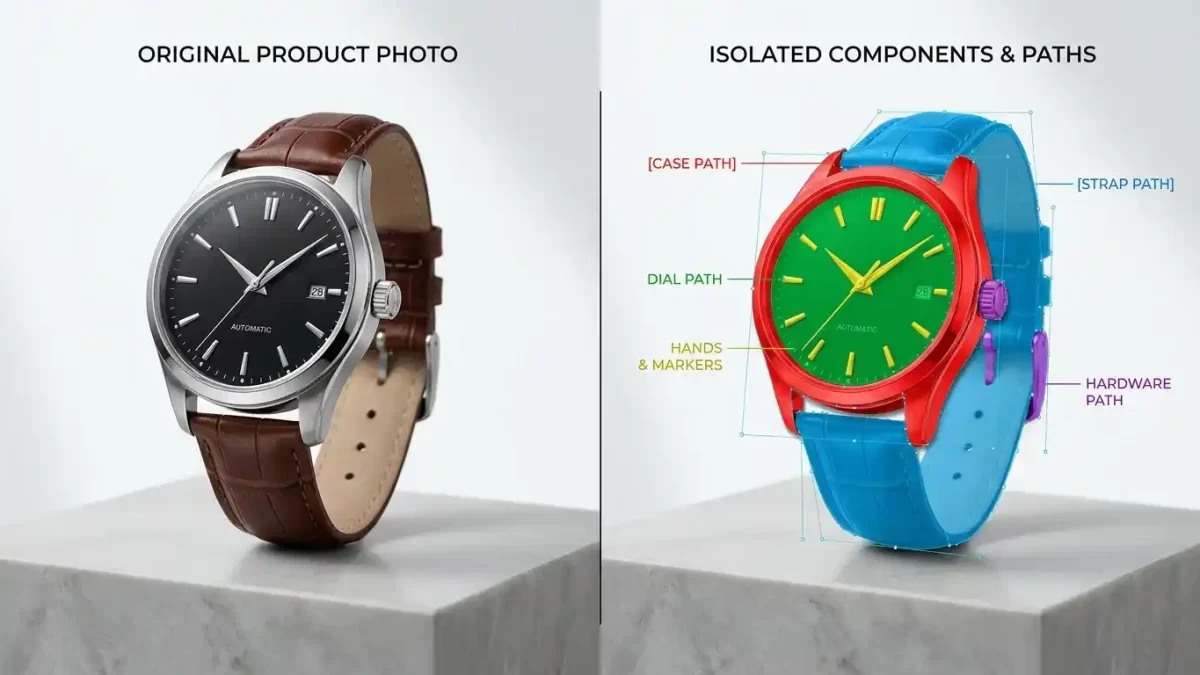
You invest considerable time arranging the ideal product photograph. You carefully adjust the lighting, position each element with precision, and capture an image that authentically represents your brand. However, the editing phase often introduces unexpected complexities.
A basic background removal proves insufficient when your product consists of multiple components, various color options, or intricate details that require individual attention. You need a technique that treats each part of the image independently, providing complete creative control.
Professionals refer to this advanced technique as a multiple clipping path.
Consider it comparable to working with a layered cake rather than a single slice. Each layer remains fully independent, enabling you to modify, recolor, or enhance specific areas without affecting the rest of the image. Whether you manage an e-commerce store, work as a product photographer, or oversee a creative agency, mastering this service can significantly elevate the quality of your visual presentations.
I will guide you through the precise nature of multiple clipping paths, the scenarios in which they provide genuine value to your business, and how to determine whether outsourcing this work represents the optimal decision.
Wondering if multi‑path is worth it? Let us prove it. Try our multi‑clipping path service free on 2 images
- What Exactly Is a Multiple Clipping Path?
- How the Process Works in Photoshop
- When Does a Multiple Clipping Path Become Worth It?
- Real-World Applications Across Industries
- In-House vs. Outsourcing: Which Path Makes Sense?
- Understanding Pricing for Multiple Clipping Paths
- How to Choose a Multiple Clipping Path Provider
- Final Thoughts
- Frequently Asked Questions
What Exactly Is a Multiple Clipping Path?
A multiple clipping path is an advanced Photoshop technique in which skilled editors create several independent vector outlines within a single image file. Each outline isolates a distinct element, such as a watch strap, necklace chain, shirt collar, or even a custom shadow.
These separate outlines grant you full control over individual edits. You can change the color of one product variant without reshooting the entire scene. You’re able to refine the shadow beneath a single item while leaving surrounding elements untouched. You can replace the background while preserving razor-sharp edges around challenging areas such as flowing hair or soft fur.
Here is a clear way to understand the difference:
- A single clipping path creates one outline around the entire object. You obtain one selection, one layer, and limited editing options.
- A multiple clipping path creates several independent outlines around distinct objects or sections. You obtain separate selections, separate layers, and unlimited editing possibilities.
This technique allows you to generate multiple versions of the same photograph from a single master file. It saves substantial time for product catalogs, lookbooks, and advertising campaigns.
How the Process Works in Photoshop
Experienced editors rely on the industry-standard Pen Tool to create multiple clipping paths with exceptional accuracy. The workflow follows a systematic and precise sequence.
Image analysis occurs first. The editor thoroughly reviews the photograph and identifies every element that requires its own path, including the main product, internal details, shadows, reflections, or multiple products captured in one shot.
Path creation follows. The editor zooms to at least 300 percent and draws clean vector outlines around each identified element using the Pen Tool, ensuring every curve, corner, and fine detail is captured accurately.
Layer organization maintains clarity. Each path is saved as a separate alpha channel or layer within the PSD file. Editors apply clear, descriptive names such as “watch case,” “watch strap,” or “watch dial” to simplify future modifications.
Independent editing delivers targeted results. With each element isolated, the editor applies specific adjustments, including color changes, shadow enhancements, background replacements, or detailed retouching, without influencing other areas.
File delivery completes the process. You receive a fully layered PSD file or high-resolution PNGs with transparent backgrounds. The organized structure enables you or your team to reopen the file and make future changes efficiently.
This manual approach produces superior results that automated tools cannot match. AI background removers frequently struggle with hair, fur, transparent objects, and complex edges. In contrast, hand-drawn paths ensure every edge remains crisp and natural.
When Does a Multiple Clipping Path Become Worth It?
Not every image requires this level of detail. A simple product shot against a plain background may need only a single path. However, in several key scenarios, investing in multiple clipping paths delivers significant returns and streamlines your workflow.
You Need Multiple Color Variants
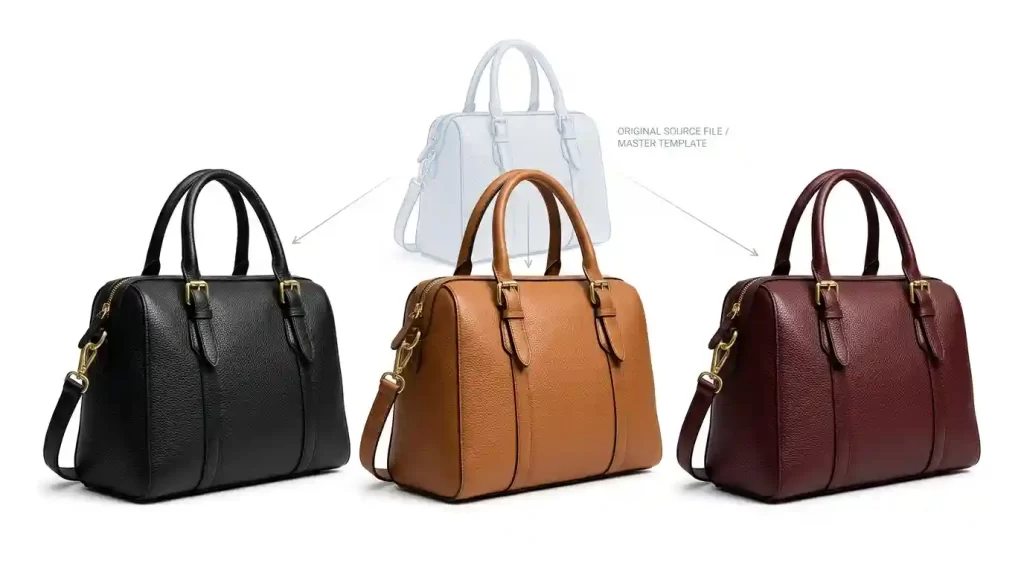
Consider a handbag available in black, tan, and burgundy. Reshooting the same item in multiple colors consumes valuable time, money, and studio resources. A multiple clipping path addresses this challenge by isolating the bag body, handles, and metal hardware on separate paths.
You can then:
- Change the body color to any shade instantly.
- Maintain consistent hardware colors across all variants.
- Generate unlimited color options from one original image.
This method substantially reduces photoshoot costs and accelerates time to market. Fashion brands, accessory sellers, and home decor businesses particularly benefit from the flexibility and efficiency it provides.
Your Product Has Complex Components
A wristwatch consists of multiple distinct parts, including the case, strap, dial, hands, crown, and crystal. Each component often requires different treatment.
The metal case benefits from enhanced reflections.
The leather strap requires accurate color correction.
The glass crystal demands glare reduction.
Separate paths allow precise adjustments for every element. You avoid the compromise of applying uniform edits that fail to suit each individual part.
You Want Realistic Shadows and Reflections
Shadows behave differently across complex objects. A product with multiple parts produces shadows that vary in opacity, softness, and direction.
When you isolate each component with its own path, you can:
- Create custom drop shadows tailored to each element.
- Add natural shadows that follow the object’s true contours.
- Adjust reflection intensity on specific surfaces only.
The final image appears significantly more realistic and professional than one treated with a generic shadow applied to the entire product.
From precise cutouts to realistic shadows – we do it all. Request a free quote for drop shadow services
Your Images Will Appear on Different Backgrounds
Your product photographs must perform effectively across multiple platforms, including Amazon, your website, social media channels, and printed catalogs. This requirement often demands several background treatments from the same original shot.
A multiple clipping path enables you to:
- Use a pure white background for Amazon listings.
- Create engaging lifestyle backgrounds for your website.
- Provide transparent backgrounds for catalog layouts.
- Apply gradient backgrounds for advertising creatives.
All variations are generated from one well-organized master file, ensuring consistent brand presentation across every channel.
You Sell Through Marketplaces with Strict Requirements
Major e-commerce platforms such as Amazon and eBay enforce specific image guidelines. For instance, Amazon requires pure white backgrounds for main product images, while secondary images may showcase context or lifestyle settings.
Multiple clipping paths allow you to:
- Generate the required white-background version for the primary image.
- Create supplementary images that display the product in use.
- Maintain perfect edges that fully comply with marketplace standards.
Not every image needs multi‑path – complex edges need masking. Try our image masking service free on 2 images
Real-World Applications Across Industries
Businesses across various sectors utilize multiple clipping paths to address specific visual challenges. The technique adapts effectively to different needs.
Fashion and Apparel Brands
Clothing items often feature multiple color zones, patterns, and textures. Multiple paths enable editors to:
- Isolate shirts, pants, and accessories within model photographs.
- Change specific colors without affecting adjacent areas.
- Remove wrinkles selectively while preserving the fabric’s natural texture.
- Create ghost mannequin effects that display garments on invisible forms.
Jewelry Retailers
Jewelry demands exceptional precision due to its fine details. Tiny elements such as prongs, chain links, and gemstone facets require individual attention. Multiple clipping paths help:
- Enhance metal reflections without overexposing stones.
- Remove dust and lint from specific areas.
- Isolate each gem for accurate color correction.
- Achieve consistent lighting across complex pieces.
Furniture and Home Decor Sellers
Furniture photographs frequently need to appear in different room settings. With multiple paths, you can:
- Place the same sofa in various room backgrounds.
- Change upholstery colors instantly.
- Remove distracting elements such as lamps or pillows for clean catalog shots.
- Add realistic shadows that ground the piece naturally in its environment.
Electronics and Gadget Brands
Technology products include screens, buttons, ports, and glossy surfaces that reflect light differently. Multiple paths enable you to:
- Replace screens with dynamic content.
- Reduce glare on specific surfaces.
- Apply consistent color treatment across product families.
- Create detailed zoom views that highlight key features.
In-House vs. Outsourcing: Which Path Makes Sense?
You have two primary options for obtaining multiple clipping paths: develop an in-house team or outsource to a specialized provider. Each approach offers distinct advantages and considerations.
Doing It In-House
Pros:
- You maintain direct communication with the editing team.
- You receive immediate feedback and rapid revisions.
- You retain full control over file organization and naming conventions.
Cons:
- Costs for software licenses, high-performance hardware, and skilled salaries accumulate quickly.
- Scaling during peak seasons presents significant challenges.
- Training editors to achieve professional speed requires considerable time.
- Your creative team spends valuable hours on repetitive technical tasks instead of focusing on strategic initiatives.
Outsourcing to a Professional Service
Pros:
- You benefit from predictable per-image pricing.
- You gain access to experienced editors who handle complex paths on a daily basis.
- You enjoy rapid turnaround times, often within 24 to 48 hours.
- You can scale effortlessly from small batches to thousands of images.
- You eliminate expenses related to software and infrastructure.
Cons:
- A brief learning curve exists when establishing file transfer workflows.
- You must clearly communicate quality expectations at the outset.
For most e-commerce businesses and photographers, outsourcing delivers greater overall value. You convert a fixed operational cost into a variable expense that scales according to your requirements. Your internal team remains focused on high-value activities such as creative direction, marketing, and client relationship management.
Understanding Pricing for Multiple Clipping Paths
Pricing depends on image complexity, the number of paths required, and the level of detail within each path. Professional services typically organize work into clearly defined tiers.
| Complexity Level | Typical Price Range | What It Includes |
|---|---|---|
| Basic | $1–2 per image | 2–3 smooth-edged paths; simple objects like boxes or solid garments |
| Simple | $2–4 per image | 3–5 paths with moderate curves; small product groupings or accessories |
| Medium | $5–8 per image | 5–10 paths with intricate edges; complete outfits or detailed products |
| Complex | $9–15 per image | 10+ paths with fine details; jewelry, fur, transparent objects, or multi-product scenes |
Volume discounts are often available for large batches. Many providers also offer subscription plans or free trial images to allow you to assess quality before making a commitment.
How to Choose a Multiple Clipping Path Provider
Quality levels vary significantly among service providers. When selecting a partner, focus on the following essential criteria:
- Hand-drawn paths are critical. Avoid services that rely primarily on automated tools, as manual creation delivers cleaner edges and greater flexibility.
- Layered PSD delivery ensures you receive well-organized files with clearly named layers for seamless future editing.
- Fast turnaround is important. Seek providers that offer standard 24–48 hour delivery along with rush options for urgent projects.
- A free trial confirms reliability. Reputable services willingly process sample images before requiring payment.
- Scalability guarantees that the provider can handle your peak volumes without compromising quality.
Final Thoughts
Your product images represent your brand. When they appear polished, professional, and versatile, customers take notice. A multiple clipping path provides the technical foundation required to create outstanding visuals without repeated photoshoots or time-consuming manual edits.
The technique proves particularly effective when you need flexibility for color variants, complex product details, realistic shadows, or multi-platform usage. While developing in-house capabilities remains an option, outsourcing to experienced professionals often delivers superior quality at a more favorable cost.
If you are ready to experience the difference, begin with a small batch of images from a reliable service. Compare the results with your current process. You will likely discover that the precision, speed, and scalability make it a worthwhile investment.
Complex images need more than paths – they need masking and retouching. Contact us for a custom quote on a full editing package
Frequently Asked Questions
What’s the Difference Between a Single and Multiple Clipping Path?
A single clipping path creates one outline around the entire image, enabling basic background removal and uniform edits. In contrast, a multiple clipping path creates several independent outlines within one image. This allows you to edit each element separately, changing colors, adding shadows, or retouching specific areas without affecting the rest.
Can I Use Multiple Clipping Paths for Ghost Mannequin Effects?
Yes. Ghost mannequin photography relies on multiple clipping paths to isolate a garment’s interior and exterior separately. This technique creates the illusion of an invisible mannequin, revealing the clothing’s true shape and structure without any visible props.
How Long Does It Take to Complete a Batch of Images with Multiple Clipping Paths?
Turnaround time depends on image complexity and batch size. Most professional services deliver standard orders within 24 to 48 hours. For urgent projects, rush options can return your images in as little as 6 hours.
What File Formats Should I Expect from a Multiple Clipping Path Service?
You should receive fully layered PSD files that preserve all paths for future editing. Many services also deliver PNG files with transparent backgrounds for immediate use. Some providers offer JPEG or TIFF formats upon request.
Is a Multiple Clipping Path Worth It for Simple Products?
For simple products with no internal details or color variations, a single clipping path usually suffices. However, multiple clipping paths become valuable when you need flexibility—such as creating multiple color options, applying different background treatments, or performing targeted editing on isolated elements.
Can I Edit the Layered Files Myself Later?
Absolutely. The layered PSD files give you full control. You can open them in Photoshop and modify any layer independently—change a color, adjust a shadow, or replace a background—without redoing the original path work.
How Do I Know If an Image Needs Multiple Clipping Path?
Ask yourself these key questions:
- Will this image appear on different backgrounds?
- Do I need multiple color versions?
- Does the product have distinct components that require separate edits?
If you answer yes to any of these, a multiple clipping path will save you time and significantly improve your results.
Are Multiple Clipping Paths Only for Photoshop?
While Photoshop remains the industry standard, the principle applies across other editing software. Any program that supports layers and vector masks can work with multi-path files. However, most professional providers deliver files in PSD format for maximum compatibility and ease of use.